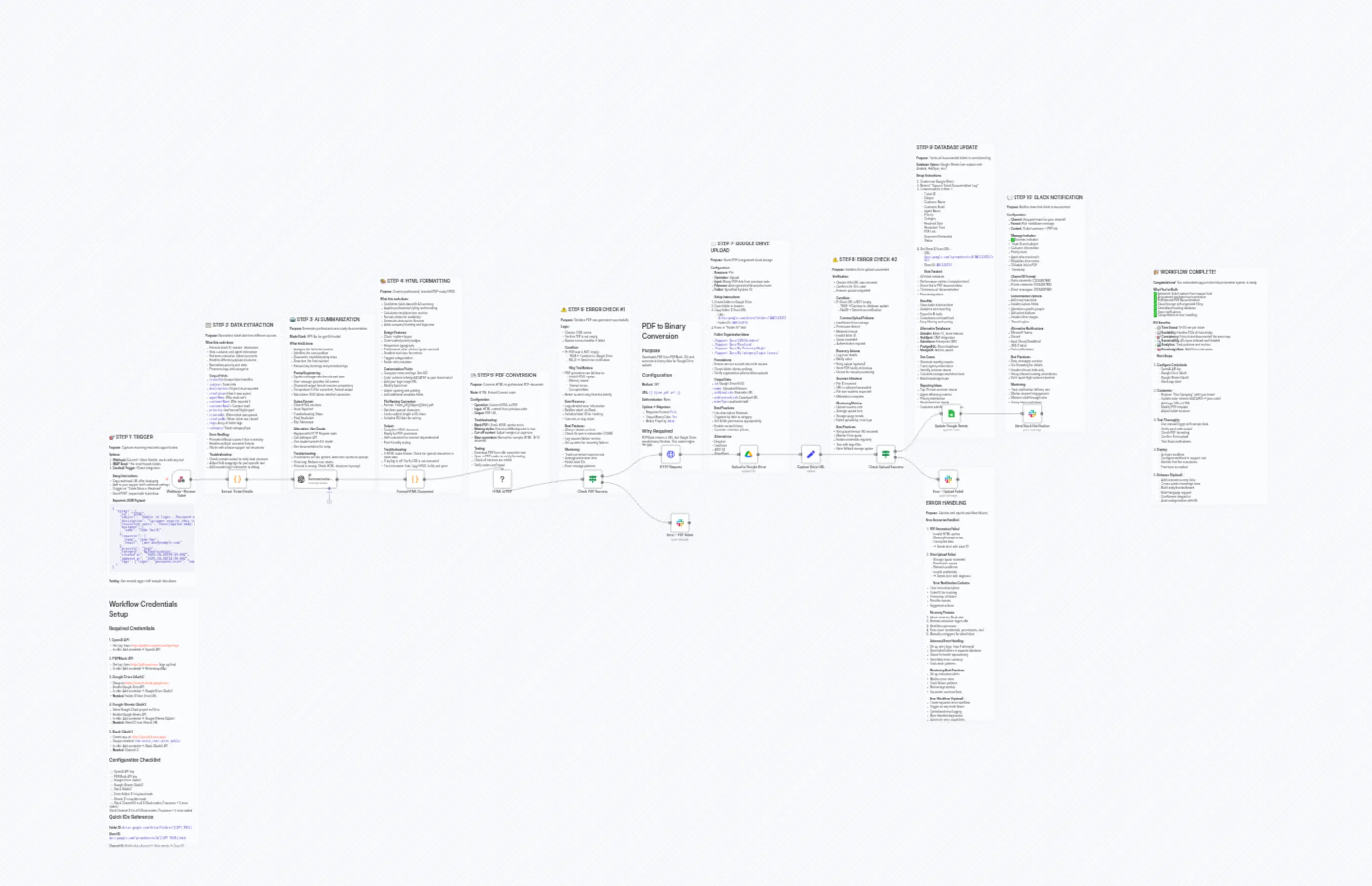
Customer Support Ticket Workflow Automation
描述
分类
🤖 AI & Machine Learning
使用的节点
n8n-nodes-base.ifn8n-nodes-base.ifn8n-nodes-base.setn8n-nodes-base.coden8n-nodes-base.coden8n-nodes-base.slackn8n-nodes-base.slackn8n-nodes-base.slackn8n-nodes-base.webhookn8n-nodes-base.stickyNote
价格免费
浏览量0
最后更新11/28/2025
workflow.json
{
"id": "support-ticket-documentation",
"meta": {
"templateCredsSetupCompleted": true
},
"name": "Customer Support Ticket Workflow Automation",
"tags": [],
"nodes": [
{
"id": "61dc2aa7-ac6c-4397-bcbc-ad6014d1b117",
"name": "Webhook - Receive Ticket",
"type": "n8n-nodes-base.webhook",
"position": [
-2352,
240
],
"webhookId": "",
"parameters": {
"path": "support-ticket-resolved",
"options": {},
"httpMethod": "POST",
"responseMode": "responseNode"
},
"typeVersion": 1
},
{
"id": "3a08bb55-109b-4bce-ae0c-1a8bd6bd8233",
"name": "📝 Sticky Note - Trigger Setup",
"type": "n8n-nodes-base.stickyNote",
"position": [
-2688,
48
],
"parameters": {
"color": 7,
"width": 468,
"height": 804,
"content": "## 🎯 STEP 1: TRIGGER\n\n**Purpose:** Captures incoming resolved support tickets\n\n**Options:**\n1. **Webhook** (Current) - Most flexible, works with any tool\n2. **IMAP Email** - For email-based tickets\n3. **Zendesk Trigger** - Direct integration\n\n**Setup Instructions:**\n- Copy webhook URL after deploying\n- Add to your support tool's webhook settings\n- Trigger on \"Ticket Status = Resolved\"\n- Send POST request with ticket data\n\n**Expected JSON Payload:**\n```json\n{\n \"ticket\": {\n \"id\": \"12345\",\n \"subject\": \"Unable to login - Password reset not working\",\n \"description\": \"Customer reports they tried to reset their password but are not receiving the reset email. They have checked spam folder.\",\n \"resolution_notes\": \"Investigated email delivery logs. Found email was being blocked by customer's corporate firewall. Whitelisted our domain with their IT team. Sent password reset again and customer successfully received it. Customer confirmed they can now login.\",\n \"assignee\": {\n \"name\": \"John Smith\"\n },\n \"requester\": {\n \"name\": \"Jane Doe\",\n \"email\": \"[email protected]\"\n },\n \"priority\": \"high\",\n \"category\": \"Authentication\",\n \"created_at\": \"2025-10-03T09:15:00Z\",\n \"updated_at\": \"2025-10-04T14:30:00Z\",\n \"tags\": [\"login\", \"password-reset\", \"email-delivery\"]\n }\n}\n```\n\n**Testing:** Use manual trigger with sample data above"
},
"typeVersion": 1
},
{
"id": "01277a43-c6fa-4a85-bb95-5e6fa1b096ff",
"name": "Extract Ticket Details",
"type": "n8n-nodes-base.code",
"position": [
-2064,
240
],
"parameters": {
"jsCode": "// Extract and normalize ticket data from webhook payload\nconst ticketData = $input.item.json.body || $input.item.json;\n\n// Handle different payload structures (Zendesk, Freshdesk, custom)\nconst ticket = ticketData.ticket || ticketData;\n\n// Extract ticket ID (handle various formats)\nconst extractTicketId = (ticket) => {\n return ticket.id || ticket.ticket_id || ticket.number || 'UNKNOWN';\n};\n\n// Extract agent name with fallback\nconst extractAgentName = (ticket) => {\n if (ticket.assignee?.name) return ticket.assignee.name;\n if (ticket.agent?.name) return ticket.agent.name;\n if (ticket.assigned_to) return ticket.assigned_to;\n return 'Support Team';\n};\n\n// Extract customer info\nconst extractCustomerInfo = (ticket) => {\n return {\n name: ticket.requester?.name || ticket.customer?.name || 'Customer',\n email: ticket.requester?.email || ticket.customer?.email || 'N/A'\n };\n};\n\n// Extract resolution notes\nconst extractResolution = (ticket) => {\n if (ticket.resolution_notes) return ticket.resolution_notes;\n if (ticket.latest_comment?.body) return ticket.latest_comment.body;\n if (ticket.internal_notes) return ticket.internal_notes;\n if (Array.isArray(ticket.comments) && ticket.comments.length > 0) {\n return ticket.comments[ticket.comments.length - 1].body;\n }\n return 'Resolution details not available';\n};\n\nconst customer = extractCustomerInfo(ticket);\n\n// Return normalized data structure\nreturn {\n json: {\n ticketId: extractTicketId(ticket),\n subject: ticket.subject || 'No Subject Provided',\n description: ticket.description || ticket.body || '',\n resolution: extractResolution(ticket),\n agentName: extractAgentName(ticket),\n customerName: customer.name,\n customerEmail: customer.email,\n priority: (ticket.priority || 'normal').toLowerCase(),\n createdAt: ticket.created_at || new Date().toISOString(),\n resolvedAt: ticket.updated_at || ticket.resolved_at || new Date().toISOString(),\n tags: ticket.tags || [],\n category: ticket.category || ticket.type || 'General Support',\n rawTicket: ticket // Keep original for reference\n }\n};"
},
"typeVersion": 2
},
{
"id": "8e5339a1-47ac-466a-a5ab-ae753c10864a",
"name": "📝 Sticky Note - Data Extraction",
"type": "n8n-nodes-base.stickyNote",
"position": [
-2192,
-528
],
"parameters": {
"color": 7,
"width": 404,
"height": 904,
"content": "## 📋 STEP 2: DATA EXTRACTION\n\n**Purpose:** Normalizes ticket data from different sources\n\n**What this node does:**\n- Extracts ticket ID, subject, description\n- Gets customer and agent information\n- Retrieves resolution notes/comments\n- Handles different payload structures\n- Normalizes priority and dates\n- Preserves tags and categories\n\n**Output Fields:**\n- `ticketId`: Unique ticket identifier\n- `subject`: Ticket title\n- `description`: Original issue reported\n- `resolution`: How it was solved\n- `agentName`: Who resolved it\n- `customerName`: Who reported it\n- `customerEmail`: Contact email\n- `priority`: low/normal/high/urgent\n- `createdAt`: When ticket was opened\n- `resolvedAt`: When ticket was closed\n- `tags`: Array of ticket tags\n- `category`: Ticket category/type\n\n**Error Handling:**\n- Provides fallback values if data is missing\n- Handles multiple comment formats\n- Works with various support tool structures\n\n**Troubleshooting:**\n- Check console output to verify data structure\n- Adjust field mappings for your specific tool\n- Add console.log() statements to debug"
},
"typeVersion": 1
},
{
"id": "708ee78b-72c0-4a45-b334-8cdd845f9af8",
"name": "AI Summarization (OpenAI)",
"type": "@n8n/n8n-nodes-langchain.openAi",
"position": [
-1728,
240
],
"parameters": {
"modelId": {
"__rl": true,
"mode": "list",
"value": "gpt-4",
"cachedResultName": "GPT-4"
},
"options": {
"maxTokens": 1500,
"temperature": 0.3
},
"messages": {
"values": [
{
"content": "=You are a technical support documentation specialist. Your task is to analyze support tickets and create clear, professional case study summaries.\n\nCreate summaries that are:\n- Clear and professional\n- Structured with proper HTML formatting\n- Actionable and informative\n- Suitable for knowledge base articles\n- Include key takeaways and prevention tips"
},
{
"content": "=Please analyze this support ticket and provide a comprehensive, structured summary:\n\n**TICKET INFORMATION**\n- Ticket ID: {{ $json.ticketId }}\n- Subject: {{ $json.subject }}\n- Customer: {{ $json.customerName }} ({{ $json.customerEmail }})\n- Priority: {{ $json.priority }}\n- Category: {{ $json.category }}\n- Tags: {{ $json.tags.join(', ') }}\n\n**ORIGINAL ISSUE REPORTED:**\n{{ $json.description }}\n\n**RESOLUTION PROVIDED:**\n{{ $json.resolution }}\n\n**RESOLVED BY:** {{ $json.agentName }}\n\n---\n\nPlease structure your response using the following HTML format:\n\n<h2>🔍 Issue Reported</h2>\n<div class=\"section\">\n<p>[Provide a clear, concise description of the problem the customer experienced. Include symptoms, error messages, and impact on the customer.]</p>\n</div>\n\n<h2>🛠️ Troubleshooting Steps</h2>\n<div class=\"section\">\n<ul>\n<li>[Step 1: What was checked or attempted first]</li>\n<li>[Step 2: Next diagnostic action taken]</li>\n<li>[Step 3: Additional troubleshooting performed]</li>\n</ul>\n</div>\n\n<h2>✅ Final Resolution</h2>\n<div class=\"section\">\n<p>[Describe the exact solution that resolved the issue. Be specific about what was done and why it worked.]</p>\n</div>\n\n<h2>💡 Key Takeaways</h2>\n<div class=\"section\">\n<ul>\n<li>[Important lesson or insight from this case]</li>\n<li>[Prevention tip or best practice]</li>\n<li>[Related knowledge or documentation reference]</li>\n</ul>\n</div>\n\nIMPORTANT: \n- Use only the HTML tags and structure shown above\n- Be specific and technical but keep language clear\n- Focus on actionable information\n- If information is missing, make reasonable inferences based on context\n- Keep the summary concise but comprehensive (aim for 200-400 words total)"
}
]
}
},
"credentials": {
"openAiApi": {
"id": "1",
"name": "OpenAI Account"
}
},
"typeVersion": 1
},
{
"id": "aa238d8e-b227-4bf1-b3c7-218457f58e4c",
"name": "📝 Sticky Note - AI Summarization",
"type": "n8n-nodes-base.stickyNote",
"position": [
-1760,
-560
],
"parameters": {
"color": 7,
"width": 452,
"height": 916,
"content": "## 🤖 STEP 3: AI SUMMARIZATION\n\n**Purpose:** Generates professional case study documentation\n\n**Model Used:** GPT-4o (or gpt-3.5-turbo)\n\n**What the AI does:**\n- Analyzes the full ticket context\n- Identifies the core problem\n- Documents troubleshooting steps\n- Describes the final solution\n- Extracts key learnings and prevention tips\n\n**Prompt Engineering:**\n- System message sets the role and tone\n- User message provides full context\n- Structured output format ensures consistency\n- Temperature 0.3 for consistent, factual output\n- Max tokens 1500 allows detailed summaries\n\n**Output Format:**\n- Clean HTML sections\n- Issue Reported\n- Troubleshooting Steps\n- Final Resolution\n- Key Takeaways\n\n**Alternative: Use Claude**\n- Replace with HTTP Request node\n- Call Anthropic API\n- Use claude-sonnet-4-5 model\n- See documentation for setup\n\n**Troubleshooting:**\n- If summaries are too generic: Add more context to prompt\n- If too long: Reduce max tokens\n- If format is wrong: Check HTML structure in prompt"
},
"typeVersion": 1
},
{
"id": "6ce3cdf9-7619-4f8a-973a-a0021a22e13d",
"name": "Format HTML Document",
"type": "n8n-nodes-base.code",
"position": [
-1152,
240
],
"parameters": {
"jsCode": "// Combine ticket data with AI summary and create professional HTML document\nconst ticket = $('Extract Ticket Details').item.json;\nconst aiResponse = $input.item.json;\n\n// Extract AI summary (handle different response formats)\nlet aiSummary = '';\nif (aiResponse.message?.content) {\n aiSummary = aiResponse.message.content;\n} else if (aiResponse.choices?.[0]?.message?.content) {\n aiSummary = aiResponse.choices[0].message.content;\n} else if (typeof aiResponse === 'string') {\n aiSummary = aiResponse;\n} else {\n aiSummary = JSON.stringify(aiResponse);\n}\n\n// Format dates nicely\nconst formatDate = (dateString) => {\n const date = new Date(dateString);\n return date.toLocaleDateString('en-US', { \n year: 'numeric', \n month: 'long', \n day: 'numeric',\n hour: '2-digit',\n minute: '2-digit'\n });\n};\n\n// Calculate resolution time\nconst calculateResolutionTime = (created, resolved) => {\n const diff = new Date(resolved) - new Date(created);\n const hours = Math.floor(diff / (1000 * 60 * 60));\n const days = Math.floor(hours / 24);\n \n if (days > 0) return `${days} day${days > 1 ? 's' : ''}`;\n if (hours > 0) return `${hours} hour${hours > 1 ? 's' : ''}`;\n return 'Less than 1 hour';\n};\n\nconst resolutionTime = calculateResolutionTime(ticket.createdAt, ticket.resolvedAt);\nconst currentDate = new Date().toLocaleDateString('en-US', { \n year: 'numeric', \n month: 'long', \n day: 'numeric' \n});\n\n// Create comprehensive HTML document\nconst html = `\n<!DOCTYPE html>\n<html lang=\"en\">\n<head>\n <meta charset=\"UTF-8\">\n <meta name=\"viewport\" content=\"width=device-width, initial-scale=1.0\">\n <title>Support Ticket ${ticket.ticketId} - Case Documentation</title>\n <style>\n * {\n margin: 0;\n padding: 0;\n box-sizing: border-box;\n }\n body {\n font-family: 'Segoe UI', Tahoma, Geneva, Verdana, sans-serif;\n line-height: 1.6;\n color: #333;\n background-color: #f5f7fa;\n padding: 0;\n }\n .page {\n background-color: white;\n max-width: 800px;\n margin: 0 auto;\n padding: 40px;\n min-height: 100vh;\n }\n .header {\n border-bottom: 4px solid #4CAF50;\n padding-bottom: 25px;\n margin-bottom: 35px;\n }\n .logo {\n color: #4CAF50;\n font-size: 28px;\n font-weight: bold;\n margin-bottom: 5px;\n display: flex;\n align-items: center;\n gap: 10px;\n }\n .company-tagline {\n color: #666;\n font-size: 14px;\n font-style: italic;\n margin-bottom: 20px;\n }\n h1 {\n color: #2c3e50;\n margin: 10px 0;\n font-size: 32px;\n font-weight: 700;\n }\n .badges {\n margin-top: 15px;\n }\n .badge {\n display: inline-block;\n padding: 6px 14px;\n border-radius: 20px;\n font-size: 11px;\n font-weight: bold;\n text-transform: uppercase;\n letter-spacing: 0.5px;\n margin-right: 8px;\n }\n .badge-resolved {\n background-color: #4CAF50;\n color: white;\n }\n .badge-priority-high {\n background-color: #f44336;\n color: white;\n }\n .badge-priority-urgent {\n background-color: #d32f2f;\n color: white;\n }\n .badge-priority-normal {\n background-color: #ff9800;\n color: white;\n }\n .badge-priority-low {\n background-color: #2196F3;\n color: white;\n }\n .meta-info {\n display: grid;\n grid-template-columns: repeat(2, 1fr);\n gap: 20px;\n background: linear-gradient(135deg, #f8f9fa 0%, #e9ecef 100%);\n padding: 25px;\n border-radius: 8px;\n margin-bottom: 35px;\n border: 1px solid #dee2e6;\n }\n .meta-item {\n font-size: 14px;\n }\n .meta-label {\n font-weight: 700;\n color: #495057;\n display: block;\n margin-bottom: 5px;\n text-transform: uppercase;\n font-size: 11px;\n letter-spacing: 0.5px;\n }\n .meta-value {\n color: #212529;\n font-size: 15px;\n font-weight: 500;\n }\n h2 {\n color: #4CAF50;\n border-left: 5px solid #4CAF50;\n padding-left: 15px;\n margin-top: 35px;\n margin-bottom: 20px;\n font-size: 22px;\n display: flex;\n align-items: center;\n gap: 10px;\n }\n .section {\n margin-bottom: 30px;\n padding: 20px;\n background-color: #fafbfc;\n border-radius: 6px;\n border-left: 3px solid #e9ecef;\n }\n .section p {\n margin-bottom: 12px;\n line-height: 1.8;\n }\n .section ul {\n margin: 15px 0;\n padding-left: 25px;\n }\n .section li {\n margin-bottom: 10px;\n line-height: 1.8;\n padding-left: 5px;\n }\n .tags {\n margin-top: 20px;\n padding-top: 20px;\n border-top: 1px solid #e9ecef;\n }\n .tag {\n display: inline-block;\n background-color: #e9ecef;\n color: #495057;\n padding: 5px 12px;\n border-radius: 12px;\n font-size: 12px;\n margin-right: 8px;\n margin-bottom: 8px;\n }\n .footer {\n margin-top: 50px;\n padding-top: 25px;\n border-top: 2px solid #e9ecef;\n text-align: center;\n font-size: 12px;\n color: #6c757d;\n }\n .footer-row {\n margin-bottom: 8px;\n }\n .stats-box {\n background: linear-gradient(135deg, #667eea 0%, #764ba2 100%);\n color: white;\n padding: 20px;\n border-radius: 8px;\n margin-bottom: 30px;\n text-align: center;\n }\n .stats-box .stat-label {\n font-size: 12px;\n text-transform: uppercase;\n letter-spacing: 1px;\n opacity: 0.9;\n margin-bottom: 5px;\n }\n .stats-box .stat-value {\n font-size: 24px;\n font-weight: bold;\n }\n </style>\n</head>\n<body>\n <div class=\"page\">\n <div class=\"header\">\n <div class=\"logo\">\n 🎯 Your Company Support\n </div>\n <div class=\"company-tagline\">Excellence in Customer Service</div>\n <h1>Support Case Documentation</h1>\n <div class=\"badges\">\n <span class=\"badge badge-resolved\">✓ RESOLVED</span>\n <span class=\"badge badge-priority-${ticket.priority}\">${ticket.priority.toUpperCase()} PRIORITY</span>\n </div>\n </div>\n\n <div class=\"stats-box\">\n <div class=\"stat-label\">Resolution Time</div>\n <div class=\"stat-value\">⚡ ${resolutionTime}</div>\n </div>\n\n <div class=\"meta-info\">\n <div class=\"meta-item\">\n <span class=\"meta-label\">Ticket ID</span>\n <div class=\"meta-value\">#${ticket.ticketId}</div>\n </div>\n <div class=\"meta-item\">\n <span class=\"meta-label\">Category</span>\n <div class=\"meta-value\">${ticket.category}</div>\n </div>\n <div class=\"meta-item\">\n <span class=\"meta-label\">Customer</span>\n <div class=\"meta-value\">${ticket.customerName}</div>\n </div>\n <div class=\"meta-item\">\n <span class=\"meta-label\">Customer Email</span>\n <div class=\"meta-value\">${ticket.customerEmail}</div>\n </div>\n <div class=\"meta-item\">\n <span class=\"meta-label\">Resolved By</span>\n <div class=\"meta-value\">${ticket.agentName}</div>\n </div>\n <div class=\"meta-item\">\n <span class=\"meta-label\">Resolution Date</span>\n <div class=\"meta-value\">${formatDate(ticket.resolvedAt)}</div>\n </div>\n </div>\n\n <h2>📋 Subject</h2>\n <div class=\"section\">\n <p><strong>${ticket.subject}</strong></p>\n </div>\n\n ${aiSummary}\n\n ${ticket.tags && ticket.tags.length > 0 ? `\n <div class=\"tags\">\n <strong>Tags:</strong><br>\n ${ticket.tags.map(tag => `<span class=\"tag\">#${tag}</span>`).join('')}\n </div>\n ` : ''}\n\n <div class=\"footer\">\n <div class=\"footer-row\">\n <strong>Document Generated:</strong> ${currentDate}\n </div>\n <div class=\"footer-row\">\n Case #${ticket.ticketId} | Ticket opened: ${formatDate(ticket.createdAt)}\n </div>\n <div class=\"footer-row\" style=\"margin-top: 15px;\">\n © ${new Date().getFullYear()} Your Company - Support Documentation System\n </div>\n <div class=\"footer-row\" style=\"margin-top: 10px; font-style: italic;\">\n This document was automatically generated by our AI-powered support documentation workflow\n </div>\n </div>\n </div>\n</body>\n</html>\n`;\n\n// Generate filename with timestamp\nconst timestamp = new Date().toISOString().split('T')[0];\nconst sanitizedSubject = ticket.subject\n .replace(/[^a-z0-9]/gi, '_')\n .substring(0, 50);\nconst fileName = `Ticket_${ticket.ticketId}_${sanitizedSubject}_${timestamp}.pdf`;\n\nreturn {\n json: {\n ...ticket,\n aiSummary: aiSummary,\n htmlContent: html,\n fileName: fileName,\n resolutionTime: resolutionTime,\n documentGeneratedAt: new Date().toISOString()\n }\n};"
},
"typeVersion": 2
},
{
"id": "7d4c30c8-8872-44fd-88d4-5f9b160a7799",
"name": "📝 Sticky Note - HTML Formatting",
"type": "n8n-nodes-base.stickyNote",
"position": [
-1296,
-752
],
"parameters": {
"color": 7,
"width": 436,
"height": 1116,
"content": "## 🎨 STEP 4: HTML FORMATTING\n\n**Purpose:** Creates professional, branded PDF-ready HTML\n\n**What this node does:**\n- Combines ticket data with AI summary\n- Applies professional styling and branding\n- Calculates resolution time metrics\n- Formats dates for readability\n- Generates descriptive filename\n- Adds company branding and logo area\n\n**Design Features:**\n- Clean, modern layout\n- Color-coded priority badges\n- Responsive typography\n- Professional color scheme (green accents)\n- Gradient stats box for metrics\n- Tagged categorization\n- Footer with metadata\n\n**Customization Points:**\n- Company name and logo (line 82)\n- Color scheme (change #4CAF50 to your brand color)\n- Add your logo image URL\n- Modify footer text\n- Adjust spacing and padding\n- Add additional metadata fields\n\n**File Naming Convention:**\n- Format: Ticket_[ID]_[Subject]_[Date].pdf\n- Sanitizes special characters\n- Limits subject length to 50 chars\n- Includes ISO date for sorting\n\n**Output:**\n- Complete HTML document\n- Ready for PDF conversion\n- Self-contained (no external dependencies)\n- Print-friendly styling\n\n**Troubleshooting:**\n- If HTML looks broken: Check for special characters in ticket data\n- If styling is off: Verify CSS is not truncated\n- Test in browser first: Copy HTML to file and open"
},
"typeVersion": 1
},
{
"id": "75a14225-69a2-4db7-8dd3-d3e03b172f4a",
"name": "📝 Sticky Note - PDF Conversion",
"type": "n8n-nodes-base.stickyNote",
"position": [
-832,
-272
],
"parameters": {
"color": 7,
"width": 420,
"height": 668,
"content": "## 📄 STEP 5: PDF CONVERSION\n\n**Purpose:** Converts HTML to professional PDF document\n\n**Node:** HTML Extract/Convert node\n\n**Configuration:**\n- **Operation:** Convert HTML to PDF\n- **Input:** HTML content from previous node\n- **Output:** PDF URL\n\n**Troubleshooting:**\n- **Blank PDF:** Check HTML syntax errors\n- **Missing styles:** Ensure printBackground is true\n- **Cut-off content:** Adjust margins or page size\n- **Slow conversion:** Normal for complex HTML (5-10 seconds)\n\n**Testing:**\n- Download PDF from n8n execution view\n- Open in PDF reader to verify formatting\n- Check all sections are visible\n- Verify colors and layout"
},
"typeVersion": 1
},
{
"id": "34506c7f-ea7b-4d6f-9213-940cd56d6d37",
"name": "Check PDF Success",
"type": "n8n-nodes-base.if",
"position": [
-240,
240
],
"parameters": {
"conditions": {
"string": [
{
"value1": "={{ $json.success }}",
"operation": "isNotEmpty"
}
]
}
},
"typeVersion": 1
},
{
"id": "867a398d-8eca-4327-9555-6b153ba01c02",
"name": "📝 Sticky Note - Error Check",
"type": "n8n-nodes-base.stickyNote",
"position": [
-368,
-608
],
"parameters": {
"color": 7,
"width": 372,
"height": 980,
"content": "## ⚠️ STEP 6: ERROR CHECK #1\n\n**Purpose:** Validates PDF was generated successfully\n\n**Logic:**\n- Checks if URL exists\n- Verifies PDF is not empty\n- Routes to error handler if failed\n\n**Condition:**\n- IF: PDF data is NOT empty\n - TRUE → Continue to Google Drive\n - FALSE → Send error notification\n\n**Why This Matters:**\n- PDF generation can fail due to:\n - Invalid HTML syntax\n - Memory issues\n - Timeout errors\n - Corrupted data\n- Better to catch early than fail silently\n\n**Error Recovery:**\n- Logs detailed error information\n- Notifies admin via Slack\n- Includes ticket ID for tracking\n- Can retry or skip ticket\n\n**Best Practices:**\n- Always validate url data\n- Check file size is reasonable (>10KB)\n- Log success/failure metrics\n- Set up alerts for recurring failures\n\n**Monitoring:**\n- Track conversion success rate\n- Average conversion time\n- Failed ticket IDs\n- Error message patterns"
},
"typeVersion": 1
},
{
"id": "726984c8-2e34-4881-9c99-4b07de711263",
"name": "Upload to Google Drive",
"type": "n8n-nodes-base.googleDrive",
"position": [
560,
112
],
"parameters": {
"name": "={{ $('Format HTML Document').item.json.fileName }}",
"driveId": {
"__rl": true,
"mode": "list",
"value": "My Drive"
},
"options": {},
"folderId": {
"__rl": true,
"mode": "list",
"value": "YOUR_FOLDER_ID_HERE"
}
},
"credentials": {
"googleDriveOAuth2Api": {
"id": "3",
"name": "Google Drive account"
}
},
"typeVersion": 3
},
{
"id": "7eb6e69c-c2e4-4f9a-8b4b-e8e3a5cd8258",
"name": "📝 Sticky Note - Drive Upload",
"type": "n8n-nodes-base.stickyNote",
"position": [
400,
-944
],
"parameters": {
"color": 7,
"width": 420,
"height": 1208,
"content": "## ☁️ STEP 7: GOOGLE DRIVE UPLOAD\n\n**Purpose:** Saves PDF to organized cloud storage\n\n**Configuration:**\n- **Resource:** File\n- **Operation:** Upload\n- **Input:** Binary PDF data from previous node\n- **Filename:** Auto-generated descriptive name\n- **Folder:** Specified by folder ID\n\n**Setup Instructions:**\n1. Create folder in Google Drive\n2. Open folder in browser\n3. Copy folder ID from URL:\n - URL: `drive.google.com/drive/folders/1ABC123XYZ`\n - Folder ID: `1ABC123XYZ`\n4. Paste in \"Folder ID\" field\n\n**Folder Organization Ideas:**\n- `/Support Docs/2025/October/`\n- `/Support Docs/Resolved/`\n- `/Support Docs/By Priority/High/`\n- `/Support Docs/By Category/Login Issues/`\n\n**Permissions:**\n- Ensure service account has write access\n- Check folder sharing settings\n- Verify organization policies allow uploads\n\n**Output Data:**\n- `id`: Google Drive file ID\n- `name`: Uploaded filename\n- `webViewLink`: Shareable URL\n- `webContentLink`: Download URL\n- `mimeType`: application/pdf\n\n**Best Practices:**\n- Use descriptive filenames\n- Organize by date or category\n- Set folder permissions appropriately\n- Enable version history\n- Consider retention policies\n\n**Alternatives:**\n- Dropbox\n- OneDrive\n- AWS S3\n- SharePoint"
},
"typeVersion": 1
},
{
"id": "56bcd853-4095-4b0c-9bb0-d24f22dd8ed9",
"name": "Capture Drive URL",
"type": "n8n-nodes-base.set",
"position": [
880,
112
],
"parameters": {
"fields": {
"values": [
{
"name": "driveFileId",
"stringValue": "={{ $json.id }}"
},
{
"name": "driveFileUrl",
"stringValue": "={{ $json.webViewLink }}"
},
{
"name": "driveFileName",
"stringValue": "={{ $json.name }}"
}
]
},
"options": {}
},
"typeVersion": 3
},
{
"id": "ecfdb162-21d7-4126-95fb-939aa0392065",
"name": "Check Upload Success",
"type": "n8n-nodes-base.if",
"position": [
1264,
112
],
"parameters": {
"conditions": {
"string": [
{
"value1": "={{ $json.driveFileUrl }}",
"operation": "isNotEmpty"
}
]
}
},
"typeVersion": 1
},
{
"id": "f6be4bde-7607-46a2-b720-e97dfeea3e77",
"name": "📝 Sticky Note - Upload Check",
"type": "n8n-nodes-base.stickyNote",
"position": [
1024,
-864
],
"parameters": {
"color": 7,
"width": 388,
"height": 1120,
"content": "## ⚠️ STEP 8: ERROR CHECK #2\n\n**Purpose:** Validates Drive upload succeeded\n\n**Verification:**\n- Checks if file URL was returned\n- Confirms file ID is valid\n- Ensures upload completed\n\n**Condition:**\n- IF: Drive URL is NOT empty\n - TRUE → Continue to database update\n - FALSE → Send error notification\n\n**Common Upload Failures:**\n- Insufficient Drive storage\n- Permission denied\n- Network timeout\n- Invalid folder ID\n- Quota exceeded\n- Authentication expired\n\n**Recovery Actions:**\n- Log error details\n- Notify admin\n- Retry upload (optional)\n- Store PDF locally as backup\n- Queue for manual processing\n\n**Success Indicators:**\n- File ID received\n- URL is valid and accessible\n- File size matches expected\n- Metadata is complete\n\n**Monitoring Metrics:**\n- Upload success rate\n- Average upload time\n- Storage usage trends\n- Failed uploads by error type\n\n**Best Practices:**\n- Set upload timeout (60 seconds)\n- Monitor Drive quota\n- Rotate credentials regularly\n- Test with large files\n- Have fallback storage option"
},
"typeVersion": 1
},
{
"id": "d66117e3-612e-4d2e-8630-154076c8d07a",
"name": "Update Google Sheets",
"type": "n8n-nodes-base.googleSheets",
"position": [
1600,
-96
],
"parameters": {
"columns": {
"value": {
"Status": "Documented",
"Subject": "={{ $('Extract Ticket Details').item.json.subject }}",
"Category": "={{ $('Extract Ticket Details').item.json.category }}",
"PDF Link": "={{ $json.driveFileUrl }}",
"Priority": "={{ $('Extract Ticket Details').item.json.priority }}",
"Ticket ID": "={{ $('Extract Ticket Details').item.json.ticketId }}",
"Agent Name": "={{ $('Extract Ticket Details').item.json.agentName }}",
"Customer Name": "={{ $('Extract Ticket Details').item.json.customerName }}",
"Resolved Date": "={{ $('Extract Ticket Details').item.json.resolvedAt }}",
"Customer Email": "={{ $('Extract Ticket Details').item.json.customerEmail }}",
"Resolution Time": "={{ $('Format HTML Document').item.json.resolutionTime }}",
"Document Generated": "={{ $now }}"
},
"schema": [
{
"id": "Ticket ID",
"type": "string",
"display": true,
"required": false,
"displayName": "Ticket ID",
"defaultMatch": false,
"canBeUsedToMatch": true
},
{
"id": "Subject",
"type": "string",
"display": true,
"required": false,
"displayName": "Subject",
"defaultMatch": false,
"canBeUsedToMatch": true
},
{
"id": "Customer Name",
"type": "string",
"display": true,
"required": false,
"displayName": "Customer Name",
"defaultMatch": false,
"canBeUsedToMatch": true
},
{
"id": "Customer Email",
"type": "string",
"display": true,
"required": false,
"displayName": "Customer Email",
"defaultMatch": false,
"canBeUsedToMatch": true
},
{
"id": "Agent Name",
"type": "string",
"display": true,
"required": false,
"displayName": "Agent Name",
"defaultMatch": false,
"canBeUsedToMatch": true
},
{
"id": "Priority",
"type": "string",
"display": true,
"required": false,
"displayName": "Priority",
"defaultMatch": false,
"canBeUsedToMatch": true
},
{
"id": "Category",
"type": "string",
"display": true,
"required": false,
"displayName": "Category",
"defaultMatch": false,
"canBeUsedToMatch": true
},
{
"id": "Resolved Date",
"type": "string",
"display": true,
"required": false,
"displayName": "Resolved Date",
"defaultMatch": false,
"canBeUsedToMatch": true
},
{
"id": "Resolution Time",
"type": "string",
"display": true,
"required": false,
"displayName": "Resolution Time",
"defaultMatch": false,
"canBeUsedToMatch": true
},
{
"id": "PDF Link",
"type": "string",
"display": true,
"required": false,
"displayName": "PDF Link",
"defaultMatch": false,
"canBeUsedToMatch": true
},
{
"id": "Document Generated",
"type": "string",
"display": true,
"required": false,
"displayName": "Document Generated",
"defaultMatch": false,
"canBeUsedToMatch": true
},
{
"id": "Status",
"type": "string",
"display": true,
"required": false,
"displayName": "Status",
"defaultMatch": false,
"canBeUsedToMatch": true
}
],
"mappingMode": "defineBelow",
"matchingColumns": [],
"attemptToConvertTypes": false,
"convertFieldsToString": false
},
"options": {},
"operation": "append",
"sheetName": {
"__rl": true,
"mode": "name",
"value": "Sheet1"
},
"documentId": {
"__rl": true,
"mode": "id",
"value": "YOUR_SHEET_ID_HERE"
}
},
"credentials": {
"googleSheetsOAuth2Api": {
"id": "4",
"name": "Google Sheets account"
}
},
"typeVersion": 4
},
{
"id": "896eb68c-5576-4584-ace7-ad48a2826d28",
"name": "📝 Sticky Note - Database",
"type": "n8n-nodes-base.stickyNote",
"position": [
1456,
-1440
],
"parameters": {
"color": 7,
"width": 420,
"height": 1528,
"content": "## STEP 9: DATABASE UPDATE\n\n**Purpose:** Tracks all documented tickets in centralized log\n\n**Database Option:** Google Sheets (can replace with Airtable, HubSpot, etc.)\n\n**Setup Instructions:**\n1. Create new Google Sheet\n2. Name it \"Support Ticket Documentation Log\"\n3. Create headers in Row 1:\n - Ticket ID\n - Subject\n - Customer Name\n - Customer Email\n - Agent Name\n - Priority\n - Category\n - Resolved Date\n - Resolution Time\n - PDF Link\n - Document Generated\n - Status\n\n4. Get Sheet ID from URL:\n - URL: `docs.google.com/spreadsheets/d/ABC123XYZ/edit`\n - Sheet ID: `ABC123XYZ`\n\n**Data Tracked:**\n- All ticket metadata\n- Performance metrics (resolution time)\n- Direct link to PDF documentation\n- Timestamp of documentation\n- Processing status\n\n**Benefits:**\n- Searchable ticket archive\n- Analytics and reporting\n- Export to BI tools\n- Compliance and audit trail\n- Easy filtering and sorting\n\n**Alternative Databases:**\n- **Airtable:** Better UI, more features\n- **HubSpot:** CRM integration\n- **Salesforce:** Enterprise CRM\n- **PostgreSQL:** Direct database\n- **MongoDB:** NoSQL option\n\n**Use Cases:**\n- Generate monthly reports\n- Track agent performance\n- Identify common issues\n- Calculate average resolution times\n- Build knowledge base\n\n**Reporting Ideas:**\n- Top 10 most common issues\n- Agent efficiency metrics\n- Priority distribution\n- Resolution time trends\n- Customer satisfaction correlation"
},
"typeVersion": 1
},
{
"id": "3fbf74bf-4418-4109-94c2-196a3e760e69",
"name": "Send Slack Notification",
"type": "n8n-nodes-base.slack",
"position": [
2016,
-96
],
"webhookId": "",
"parameters": {
"text": "=✅ *Support Ticket Documented Successfully*\n\n*Ticket Details:*\n• *ID:* #{{ $('Extract Ticket Details').item.json.ticketId }}\n• *Subject:* {{ $('Extract Ticket Details').item.json.subject }}\n• *Customer:* {{ $('Extract Ticket Details').item.json.customerName }}\n• *Priority:* {{ $('Extract Ticket Details').item.json.priority.toUpperCase() }}\n\n*Resolution Info:*\n• *Resolved by:* {{ $('Extract Ticket Details').item.json.agentName }}\n• *Resolution Time:* {{ $('Format HTML Document').item.json.resolutionTime }}\n\n📄 *Documentation:* <{{ $('Capture Drive URL').item.json.driveFileUrl }}|View PDF>\n\n_Automatically generated at {{ $now.format('MM/DD/YYYY h:mm A') }}_",
"select": "channel",
"channelId": {
"__rl": true,
"mode": "id",
"value": "YOUR_CHANNEL_ID_HERE"
},
"otherOptions": {},
"authentication": "oAuth2"
},
"credentials": {
"slackOAuth2Api": {
"id": "5",
"name": "Slack account"
}
},
"typeVersion": 2
},
{
"id": "f92ee144-07fe-474a-b3d8-6047b8fe1db3",
"name": "📝 Sticky Note - Slack",
"type": "n8n-nodes-base.stickyNote",
"position": [
1920,
-1184
],
"parameters": {
"color": 7,
"width": 420,
"height": 1240,
"content": "## 💬 STEP 10: SLACK NOTIFICATION\n\n**Purpose:** Notifies team that ticket is documented\n\n**Configuration:**\n- **Channel:** #support-team (or your channel)\n- **Format:** Rich markdown message\n- **Content:** Ticket summary + PDF link\n\n**Message Includes:**\n- ✅ Success indicator\n- Ticket ID and subject\n- Customer information\n- Priority level\n- Agent who resolved it\n- Resolution time metric\n- Clickable link to PDF\n- Timestamp\n\n**Channel ID Format:**\n- Public channels: C1234567890\n- Private channels: G1234567890\n- Direct messages: D1234567890\n\n**Customization Options:**\n- Add emoji reactions\n- Include custom fields\n- @mention specific people\n- Add action buttons\n- Include inline images\n- Thread replies\n\n**Alternative Notifications:**\n- Microsoft Teams\n- Discord\n- Email (Gmail/SendGrid)\n- SMS (Twilio)\n- Push notifications\n\n**Best Practices:**\n- Keep messages concise\n- Use threading for details\n- Include relevant links only\n- Set up channel naming conventions\n- Don't spam high-volume channels\n\n**Monitoring:**\n- Track notification delivery rate\n- Monitor channel engagement\n- Measure click-through rates\n- Survey team usefulness"
},
"typeVersion": 1
},
{
"id": "1259aa69-0636-4229-a0f9-072f024e068e",
"name": "Error - PDF Failed",
"type": "n8n-nodes-base.slack",
"position": [
208,
464
],
"webhookId": "",
"parameters": {
"text": "=🚨 *Support Documentation Workflow Failed*\n\n*Error:* PDF generation failed for ticket\n*Ticket ID:* #{{ $('Extract Ticket Details').item.json.ticketId }}\n*Subject:* {{ $('Extract Ticket Details').item.json.subject }}\n*Time:* {{ $now.format('MM/DD/YYYY h:mm A') }}\n\n*Action Required:*\nPlease check the n8n workflow execution logs and manually process this ticket.\n\n_Automated Error Alert_",
"select": "channel",
"channelId": {
"__rl": true,
"mode": "id",
"value": "YOUR_CHANNEL_ID_HERE"
},
"otherOptions": {},
"authentication": "oAuth2"
},
"credentials": {
"slackOAuth2Api": {
"id": "5",
"name": "Slack account"
}
},
"typeVersion": 2
},
{
"id": "8ed1117f-2e16-4718-bc33-ea313098dc94",
"name": "Error - Upload Failed",
"type": "n8n-nodes-base.slack",
"position": [
1584,
240
],
"webhookId": "",
"parameters": {
"text": "=🚨 *Support Documentation Workflow Failed*\n\n*Error:* Google Drive upload failed\n*Ticket ID:* #{{ $('Extract Ticket Details').item.json.ticketId }}\n*Subject:* {{ $('Extract Ticket Details').item.json.subject }}\n*Time:* {{ $now.format('MM/DD/YYYY h:mm A') }}\n\n*Possible Causes:*\n• Drive storage quota exceeded\n• Invalid folder permissions\n• Authentication expired\n• Network timeout\n\n*Action Required:*\nCheck Google Drive credentials and storage, then retry this ticket.\n\n_Automated Error Alert_",
"select": "channel",
"channelId": {
"__rl": true,
"mode": "id",
"value": "YOUR_CHANNEL_ID_HERE"
},
"otherOptions": {},
"authentication": "oAuth2"
},
"credentials": {
"slackOAuth2Api": {
"id": "5",
"name": "Slack account"
}
},
"typeVersion": 2
},
{
"id": "bed85817-521b-4b79-9205-549d1a4f348b",
"name": "📝 Sticky Note - Error Handling",
"type": "n8n-nodes-base.stickyNote",
"position": [
1504,
224
],
"parameters": {
"color": 7,
"width": 372,
"height": 1308,
"content": "\n\n\n\n\n\n\n\n\n\n\n\n\n## ERROR HANDLING\n\n**Purpose:** Catches and reports workflow failures\n\n**Error Scenarios Handled:**\n\n1. **PDF Generation Failed**\n - Invalid HTML syntax\n - Memory/timeout errors\n - Corrupted data\n - → Sends alert with ticket ID\n\n2. **Drive Upload Failed**\n - Storage quota exceeded\n - Permission issues\n - Network problems\n - Invalid credentials\n - → Sends alert with diagnosis\n\n**Error Notification Contains:**\n- Clear error description\n- Ticket ID for tracking\n- Timestamp of failure\n- Possible causes\n- Suggested actions\n\n**Recovery Process:**\n1. Admin receives Slack alert\n2. Reviews execution logs in n8n\n3. Identifies root cause\n4. Fixes issue (credentials, permissions, etc.)\n5. Manually retriggers for failed ticket\n\n**Advanced Error Handling:**\n- Set up retry logic (max 3 attempts)\n- Store failed tickets in separate database\n- Queue for batch reprocessing\n- Send daily error summary\n- Track error patterns\n\n**Monitoring Best Practices:**\n- Set up execution alerts\n- Monitor error rates\n- Track failure patterns\n- Review logs weekly\n- Document common fixes\n\n**Error Workflow (Optional):**\n- Create separate error workflow\n- Trigger on any node failure\n- Centralized error logging\n- More detailed diagnostics\n- Automatic retry capabilities"
},
"typeVersion": 1
},
{
"id": "48380fdf-d2e4-4a0a-9f1d-dd7213df7061",
"name": "📝 Sticky Note - Completion Guide",
"type": "n8n-nodes-base.stickyNote",
"position": [
2672,
-800
],
"parameters": {
"color": 7,
"width": 604,
"height": 1228,
"content": "## 🎉 WORKFLOW COMPLETE!\n\n**Congratulations!** Your automated support ticket documentation system is ready.\n\n**What You've Built:**\n✅ Automatic ticket capture from support tool\n✅ AI-powered intelligent summarization\n✅ Professional PDF documentation\n✅ Cloud storage with organized filing\n✅ Centralized tracking database\n✅ Team notifications\n✅ Comprehensive error handling\n\n**ROI Benefits:**\n- ⏱️ **Time Saved:** 15-30 min per ticket\n- 📈 **Scalability:** Handles 100s of tickets/day\n- 🎯 **Consistency:** Every ticket documented the same way\n- 🔍 **Searchability:** All cases indexed and findable\n- 📊 **Analytics:** Track patterns and metrics\n- 🧠 **Knowledge Base:** Build from real cases\n\n**Next Steps:**\n\n1. **Configure Credentials:**\n - OpenAI API key\n - Google Drive OAuth\n - Google Sheets OAuth\n - Slack app token\n\n2. **Customize:**\n - Replace \"Your Company\" with your brand\n - Update color scheme (#4CAF50 → your color)\n - Add logo URL in HTML\n - Modify PDF template\n - Adjust folder structure\n\n3. **Test Thoroughly:**\n - Use manual trigger with sample data\n - Verify each node output\n - Check PDF formatting\n - Confirm Drive upload\n - Test Slack notifications\n\n4. **Deploy:**\n - Activate workflow\n - Configure webhook in support tool\n - Monitor first few executions\n - Fine-tune as needed\n\n5. **Enhance (Optional):**\n - Add customer survey links\n - Create public knowledge base\n - Build analytics dashboard\n - Multi-language support\n - Confluence integration\n - Auto-categorization with ML"
},
"typeVersion": 1
},
{
"id": "df0d9c67-d252-45a0-91c5-ba6b73ec2b83",
"name": "HTML to PDF",
"type": "n8n-nodes-htmlcsstopdf.htmlcsstopdf",
"position": [
-704,
240
],
"parameters": {
"html_content": "={{ $json.htmlContent }}"
},
"credentials": {
"htmlcsstopdfApi": {
"id": "2",
"name": "HtmlcsstopdfApi account"
}
},
"typeVersion": 1
},
{
"id": "3e02523d-6776-466d-9233-2520e25c6647",
"name": "HTTP Request",
"type": "n8n-nodes-base.httpRequest",
"position": [
160,
112
],
"parameters": {
"url": "={{ $json.pdf_url }}",
"options": {
"response": {
"response": {}
}
}
},
"typeVersion": 4.2
},
{
"id": "b8cd13d5-994a-4c59-9c14-55f96cd44af4",
"name": "Sticky Note",
"type": "n8n-nodes-base.stickyNote",
"position": [
-2688,
896
],
"parameters": {
"color": 7,
"width": 480,
"height": 1280,
"content": "# Workflow Credentials Setup\n\n## Required Credentials\n\n### 1. OpenAI API\n- Get key from: https://platform.openai.com/api-keys\n- In n8n: Add credential → OpenAI API\n\n### 2. PDFMunk API\n- Get key from: https://pdfmunk.com (sign up free)\n- In n8n: Add credential → HtmlcsstopdfApi\n\n### 3. Google Drive OAuth2\n- Setup at: https://console.cloud.google.com\n- Enable Google Drive API\n- In n8n: Add credential → Google Drive OAuth2\n- **Needed:** Folder ID from Drive URL\n\n### 4. Google Sheets OAuth2\n- Same Google Cloud project as Drive\n- Enable Google Sheets API\n- In n8n: Add credential → Google Sheets OAuth2\n- **Needed:** Sheet ID from Sheets URL\n\n### 5. Slack OAuth2\n- Create app at: https://api.slack.com/apps\n- Scopes needed: `chat:write`, `chat:write.public`\n- In n8n: Add credential → Slack OAuth2 API\n- **Needed:** Channel ID\n\n## Configuration Checklist\n\n- [ ] OpenAI API key\n- [ ] PDFMunk API key\n- [ ] Google Drive OAuth2\n- [ ] Google Sheets OAuth2\n- [ ] Slack OAuth2\n- [ ] Drive Folder ID in upload node\n- [ ] Sheets ID in update node\n- [ ] Slack Channel ID in all 3 Slack nodes (1 success + 2 error nodes)\n\n## Quick IDs Reference\n\n**Folder ID:** `drive.google.com/drive/folders/[COPY_THIS]`\n\n**Sheet ID:** `docs.google.com/spreadsheets/d/[COPY_THIS]/edit`\n\n**Channel ID:** Right-click channel → View details → Copy ID"
},
"typeVersion": 1
},
{
"id": "1595445b-f5b9-47ce-a36d-9930bbd5083a",
"name": "Sticky Note1",
"type": "n8n-nodes-base.stickyNote",
"position": [
48,
-528
],
"parameters": {
"color": 7,
"width": 320,
"height": 784,
"content": "# PDF to Binary Conversion\n\n## Purpose\nDownloads PDF from PDFMunk URL and converts to binary data for Google Drive upload.\n\n## Configuration\n\n**Method:** GET\n\n**URL:** `{{ $json.pdf_url }}`\n\n**Authentication:** None\n\n**Options → Response:**\n- Response Format: `File`\n- Output Binary Data: `Yes`\n- Binary Property: `data`\n\n## Why Required\nPDFMunk returns a URL, but Google Drive needs binary file data. This node bridges the gap.\n "
},
"typeVersion": 1
}
],
"active": false,
"pinData": {},
"settings": {
"executionOrder": "v1"
},
"connections": {
"HTML to PDF": {
"main": [
[
{
"node": "Check PDF Success",
"type": "main",
"index": 0
}
]
]
},
"HTTP Request": {
"main": [
[
{
"node": "Upload to Google Drive",
"type": "main",
"index": 0
}
]
]
},
"Capture Drive URL": {
"main": [
[
{
"node": "Check Upload Success",
"type": "main",
"index": 0
}
]
]
},
"Check PDF Success": {
"main": [
[
{
"node": "HTTP Request",
"type": "main",
"index": 0
}
],
[
{
"node": "Error - PDF Failed",
"type": "main",
"index": 0
}
]
]
},
"Check Upload Success": {
"main": [
[
{
"node": "Update Google Sheets",
"type": "main",
"index": 0
}
],
[
{
"node": "Error - Upload Failed",
"type": "main",
"index": 0
}
]
]
},
"Format HTML Document": {
"main": [
[
{
"node": "HTML to PDF",
"type": "main",
"index": 0
}
]
]
},
"Update Google Sheets": {
"main": [
[
{
"node": "Send Slack Notification",
"type": "main",
"index": 0
}
]
]
},
"Extract Ticket Details": {
"main": [
[
{
"node": "AI Summarization (OpenAI)",
"type": "main",
"index": 0
}
]
]
},
"Upload to Google Drive": {
"main": [
[
{
"node": "Capture Drive URL",
"type": "main",
"index": 0
}
]
]
},
"Webhook - Receive Ticket": {
"main": [
[
{
"node": "Extract Ticket Details",
"type": "main",
"index": 0
}
]
]
},
"AI Summarization (OpenAI)": {
"main": [
[
{
"node": "Format HTML Document",
"type": "main",
"index": 0
}
]
]
}
}
}