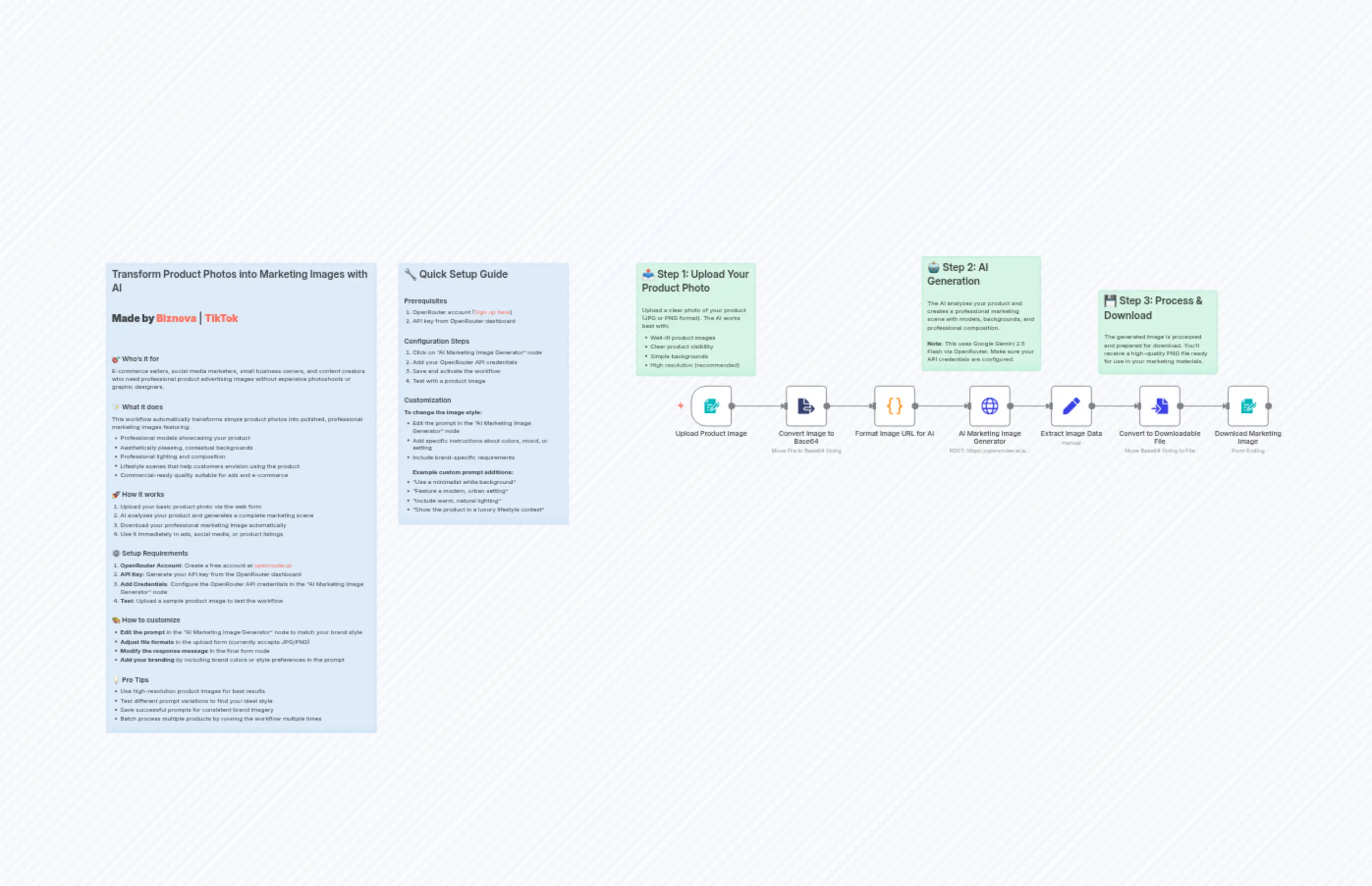
Transform Product Photos into Marketing Images with AI
描述
分类
🤖 AI & Machine Learning
使用的节点
n8n-nodes-base.setn8n-nodes-base.coden8n-nodes-base.formn8n-nodes-base.stickyNoten8n-nodes-base.stickyNoten8n-nodes-base.stickyNoten8n-nodes-base.stickyNoten8n-nodes-base.stickyNoten8n-nodes-base.formTriggern8n-nodes-base.httpRequest
价格免费
浏览量0
最后更新11/28/2025
workflow.json
{
  "id": "LXRZnDfPCKjD6FT8",
  "meta": {
    "instanceId": "8e5c0196cd9c25c3b614ccc37109266dd4ae7fef2aa858eab9011bdc62218bf1",
    "templateCredsSetupCompleted": true
  },
  "name": "Transform Product Photos into Marketing Images with AI",
  "tags": [
    {
      "id": "sBLDO4c3ubWvhiSj",
      "name": "n8n creator",
      "createdAt": "2025-09-30T20:55:34.201Z",
      "updatedAt": "2025-09-30T20:55:34.201Z"
    }
  ],
  "nodes": [
    {
      "id": "becdfdad-82d2-4294-a282-adcb434c7c45",
      "name": "Extract Image Data",
      "type": "n8n-nodes-base.set",
      "position": [
        2720,
        784
      ],
      "parameters": {
        "options": {},
        "assignments": {
          "assignments": [
            {
              "id": "d83a18ad-f0dd-4088-b4d4-4109882c17c6",
              "name": "data",
              "type": "string",
              "value": "={{ $json.choices[0].message.images[0].image_url.url }}"
            },
            {
              "id": "16aac0e1-9be2-4f1a-85f7-751bf370fb5c",
              "name": "base",
              "type": "string",
              "value": "={{ $json.choices[0].message.images[0].image_url.url.split(\",\")[1] }}"
            },
            {
              "id": "eed882fe-7e1a-4914-82c2-5acb0139f71a",
              "name": "content",
              "type": "string",
              "value": "={{ $json.choices[0].message.content }}"
            },
            {
              "id": "1c01e6fb-4bc5-429d-bca1-71fa08a3dd08",
              "name": "mime",
              "type": "string",
              "value": "={{ $json.choices[0].message.images[0].image_url.url.split(\",\")[0].split(':')[1]}}"
            },
            {
              "id": "0c206e48-63ca-4018-8515-230dda633beb",
              "name": "fileNme",
              "type": "string",
              "value": ".png"
            }
          ]
        }
      },
      "typeVersion": 3.4
    },
    {
      "id": "acd06b17-48d1-4813-b7c5-492b2018ae48",
      "name": "Convert to Downloadable File",
      "type": "n8n-nodes-base.convertToFile",
      "position": [
        2928,
        784
      ],
      "parameters": {
        "options": {},
        "operation": "toBinary",
        "sourceProperty": "base"
      },
      "typeVersion": 1.1
    },
    {
      "id": "3059e6a8-4370-4383-a3ac-59c2bb942fee",
      "name": "Download Marketing Image",
      "type": "n8n-nodes-base.form",
      "position": [
        3136,
        784
      ],
      "webhookId": "5bf16605-997b-4b9e-a812-9853fd88edb1",
      "parameters": {
        "options": {},
        "operation": "completion",
        "respondWith": "returnBinary",
        "completionTitle": "Your Marketing Image is Ready!",
        "completionMessage": "Your AI-generated marketing image will automatically download to your device. Use it in your ads, social media, or product listings!"
      },
      "typeVersion": 1
    },
    {
      "id": "028dd4ee-c286-4c9b-8976-5462609e1bbd",
      "name": "Upload Instructions",
      "type": "n8n-nodes-base.stickyNote",
      "position": [
        1744,
        496
      ],
      "parameters": {
        "color": 4,
        "width": 280,
        "height": 265,
        "content": "## 📤 Step 1: Upload Your Product Photo\n\nUpload a clear photo of your product (JPG or PNG format). The AI works best with:\n- Well-lit product images\n- Clear product visibility\n- Simple backgrounds\n- High resolution (recommended)"
      },
      "typeVersion": 1
    },
    {
      "id": "1f8fa60f-9bbf-45b2-a871-0fa4891b1e5b",
      "name": "AI Marketing Image Generator",
      "type": "n8n-nodes-base.httpRequest",
      "position": [
        2528,
        784
      ],
      "parameters": {
        "url": "https://openrouter.ai/api/v1/chat/completions",
        "method": "POST",
        "options": {},
        "jsonBody": "={\n  \"model\": \"google/gemini-2.5-flash-image-preview\",\n  \"messages\": [\n    {\n      \"role\": \"user\",\n      \"content\": [\n        {\n          \"type\": \"text\",\n          \"text\": \"Transform this product image into a professional marketing photograph. Create a scene that includes: 1) A professional model naturally showcasing or using the product, 2) An aesthetically pleasing background that complements the product's style and target market, 3) Professional lighting and composition, 4) Strategic placement highlighting the product's key features, 5) A lifestyle context that helps potential customers envision using the product. The final image should look like a high-end advertisement suitable for e-commerce, social media, or print campaigns.\"\n        },\n        {\n          \"type\": \"image_url\",\n          \"image_url\": {\n            \"url\": \"{{ $json.url }}\"\n          }\n        }\n      ]\n    }\n  ]\n}",
        "sendBody": true,
        "specifyBody": "json",
        "authentication": "predefinedCredentialType",
        "nodeCredentialType": "openRouterApi"
      },
      "credentials": {
        "openRouterApi": {
          "id": "zFZq5RDpNbZ0ghSe",
          "name": "new_key"
        }
      },
      "typeVersion": 4.2
    },
    {
      "id": "4fef9c13-dd77-45d9-bbe7-c520c7bd0645",
      "name": "Workflow Documentation",
      "type": "n8n-nodes-base.stickyNote",
      "position": [
        496,
        496
      ],
      "parameters": {
        "color": 5,
        "width": 636,
        "height": 1106,
        "content": "## Transform Product Photos into Marketing Images with AI\n\n**Made by [Biznova](https://www.biznova.tech/en)** | **[TikTok](https://www.tiktok.com/@biznova_tech)**\n\n---\n\n### 🎯 Who's it for\nE-commerce sellers, social media marketers, small business owners, and content creators who need professional product advertising images without expensive photoshoots or graphic designers.\n\n### ✨ What it does\nThis workflow automatically transforms simple product photos into polished, professional marketing images featuring:\n- Professional models showcasing your product\n- Aesthetically pleasing, contextual backgrounds\n- Professional lighting and composition\n- Lifestyle scenes that help customers envision using the product\n- Commercial-ready quality suitable for ads and e-commerce\n\n### 🚀 How it works\n1. Upload your basic product photo via the web form\n2. AI analyzes your product and generates a complete marketing scene\n3. Download your professional marketing image automatically\n4. Use it immediately in ads, social media, or product listings\n\n### ⚙️ Setup Requirements\n1. **OpenRouter Account**: Create a free account at [openrouter.ai](https://openrouter.ai)\n2. **API Key**: Generate your API key from the OpenRouter dashboard\n3. **Add Credentials**: Configure the OpenRouter API credentials in the \"AI Marketing Image Generator\" node\n4. **Test**: Upload a sample product image to test the workflow\n\n### 🎨 How to customize\n- **Edit the prompt** in the \"AI Marketing Image Generator\" node to match your brand style\n- **Adjust file formats** in the upload form (currently accepts JPG/PNG)\n- **Modify the response message** in the final form node\n- **Add your branding** by including brand colors or style preferences in the prompt\n\n### 💡 Pro Tips\n- Use high-resolution product images for best results\n- Test different prompt variations to find your ideal style\n- Save successful prompts for consistent brand imagery\n- Batch process multiple products by running the workflow multiple times"
      },
      "typeVersion": 1
    },
    {
      "id": "b02395b9-960a-404e-b680-d44366f39e05",
      "name": "Upload Product Image",
      "type": "n8n-nodes-base.formTrigger",
      "position": [
        1872,
        784
      ],
      "webhookId": "79ece969-c2c6-41a7-b1a9-90fb5d96a4be",
      "parameters": {
        "options": {},
        "formTitle": "Product Photo to Marketing Image",
        "formFields": {
          "values": [
            {
              "fieldType": "file",
              "fieldLabel": "Product Image",
              "multipleFiles": false,
              "requiredField": true,
              "acceptFileTypes": "jpg,png"
            }
          ]
        },
        "formDescription": "Upload your product photo and get a professional marketing image in seconds!"
      },
      "typeVersion": 2.2
    },
    {
      "id": "d3aa7fa1-4a98-47c2-8b4e-32b57e858590",
      "name": "Convert Image to Base64",
      "type": "n8n-nodes-base.extractFromFile",
      "position": [
        2096,
        784
      ],
      "parameters": {
        "options": {},
        "operation": "binaryToPropery",
        "binaryPropertyName": "Image"
      },
      "typeVersion": 1
    },
    {
      "id": "5a8b957c-768a-4a35-a9b1-58fc62ac80d0",
      "name": "Format Image URL for AI",
      "type": "n8n-nodes-base.code",
      "position": [
        2304,
        784
      ],
      "parameters": {
        "jsCode": "const items = $input.all();\nconst updatedItems = items.map((item) => {\n  const base64Url = item?.json?.data;\n  const url = `data:image/png;base64,${base64Url}`;\n  return { url };\n});\nreturn updatedItems;"
      },
      "typeVersion": 2
    },
    {
      "id": "493b0000-6d23-42c9-b3c2-df6ca73f21e1",
      "name": "AI Generation Info",
      "type": "n8n-nodes-base.stickyNote",
      "position": [
        2416,
        480
      ],
      "parameters": {
        "color": 4,
        "width": 280,
        "height": 269,
        "content": "## 🤖 Step 2: AI Generation\n\nThe AI analyzes your product and creates a professional marketing scene with models, backgrounds, and professional composition.\n\n**Note**: This uses Google Gemini 2.5 Flash via OpenRouter. Make sure your API credentials are configured."
      },
      "typeVersion": 1
    },
    {
      "id": "6bd383f9-3f47-461b-b49e-3320c8e5cdb1",
      "name": "Download Info",
      "type": "n8n-nodes-base.stickyNote",
      "position": [
        2832,
        560
      ],
      "parameters": {
        "color": 4,
        "width": 280,
        "height": 197,
        "content": "## 💾 Step 3: Process & Download\n\nThe generated image is processed and prepared for download. You'll receive a high-quality PNG file ready for use in your marketing materials."
      },
      "typeVersion": 1
    },
    {
      "id": "c0b3b857-bd0e-49e0-a5c5-eee13a4e4dce",
      "name": "Setup Guide",
      "type": "n8n-nodes-base.stickyNote",
      "position": [
        1184,
        496
      ],
      "parameters": {
        "color": 5,
        "width": 400,
        "height": 615,
        "content": "## 🔧 Quick Setup Guide\n\n### Prerequisites\n1. OpenRouter account ([Sign up here](https://openrouter.ai))\n2. API key from OpenRouter dashboard\n\n### Configuration Steps\n1. Click on \"AI Marketing Image Generator\" node\n2. Add your OpenRouter API credentials\n3. Save and activate the workflow\n4. Test with a product image\n\n### Customization\n**To change the image style:**\n- Edit the prompt in the \"AI Marketing Image Generator\" node\n- Add specific instructions about colors, mood, or setting\n- Include brand-specific requirements\n\n**Example custom prompt additions:**\n- \"Use a minimalist white background\"\n- \"Feature a modern, urban setting\"\n- \"Include warm, natural lighting\"\n- \"Show the product in a luxury lifestyle context\""
      },
      "typeVersion": 1
    }
  ],
  "active": false,
  "pinData": {},
  "settings": {
    "executionOrder": "v1"
  },
  "versionId": "0ad0ebec-1df3-4337-bfde-a92b49278b62",
  "connections": {
    "Extract Image Data": {
      "main": [
        [
          {
            "node": "Convert to Downloadable File",
            "type": "main",
            "index": 0
          }
        ]
      ]
    },
    "Upload Product Image": {
      "main": [
        [
          {
            "node": "Convert Image to Base64",
            "type": "main",
            "index": 0
          }
        ]
      ]
    },
    "Convert Image to Base64": {
      "main": [
        [
          {
            "node": "Format Image URL for AI",
            "type": "main",
            "index": 0
          }
        ]
      ]
    },
    "Format Image URL for AI": {
      "main": [
        [
          {
            "node": "AI Marketing Image Generator",
            "type": "main",
            "index": 0
          }
        ]
      ]
    },
    "AI Marketing Image Generator": {
      "main": [
        [
          {
            "node": "Extract Image Data",
            "type": "main",
            "index": 0
          }
        ]
      ]
    },
    "Convert to Downloadable File": {
      "main": [
        [
          {
            "node": "Download Marketing Image",
            "type": "main",
            "index": 0
          }
        ]
      ]
    }
  }
}