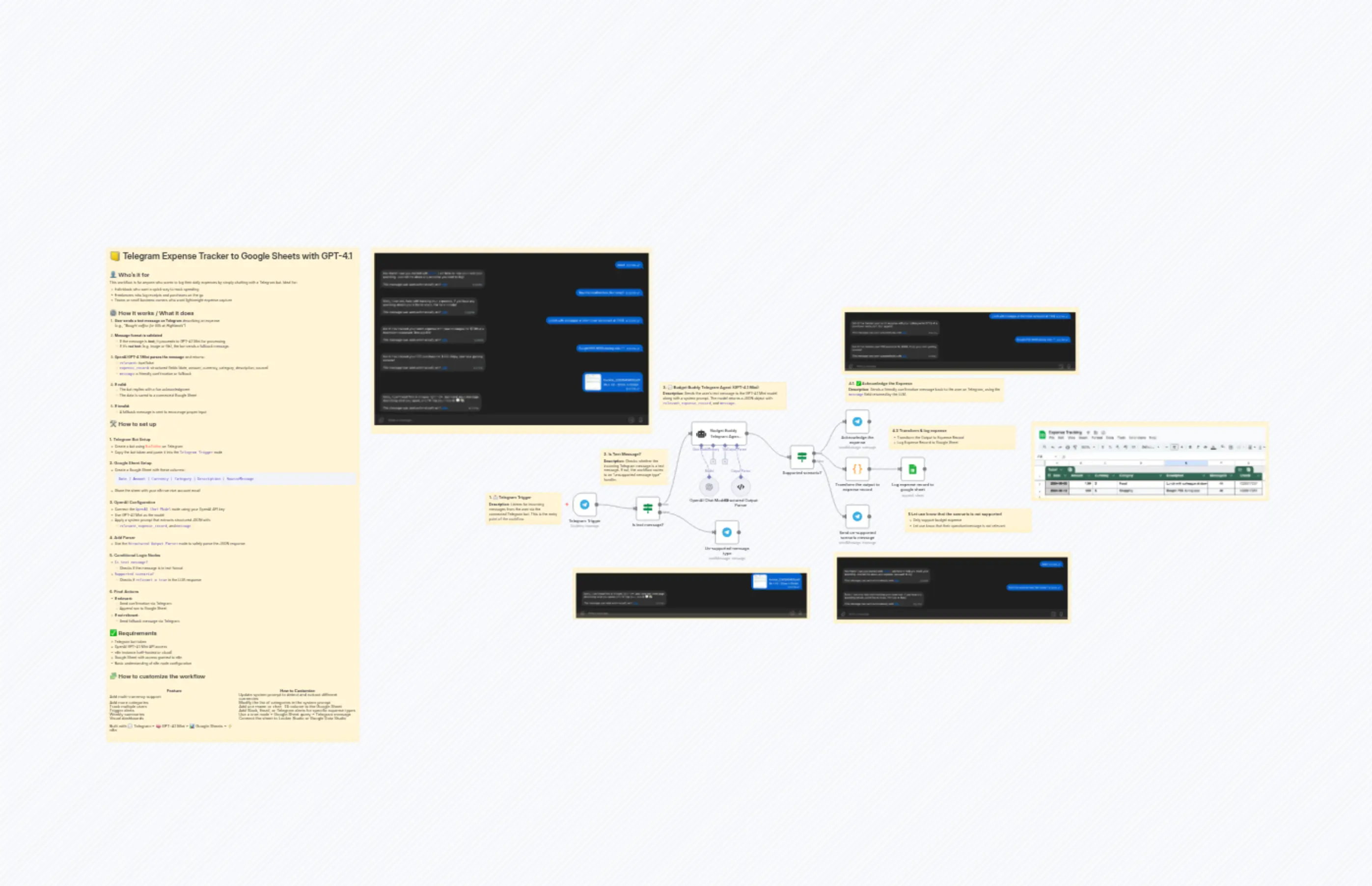
Telegram Expense Tracker to Google Sheets with GPT-4.1
描述
分类
📊 Productivity🤖 AI & Machine Learning
使用的节点
n8n-nodes-base.ifn8n-nodes-base.ifn8n-nodes-base.coden8n-nodes-base.telegramn8n-nodes-base.telegramn8n-nodes-base.telegramn8n-nodes-base.stickyNoten8n-nodes-base.stickyNoten8n-nodes-base.stickyNoten8n-nodes-base.stickyNote
价格免费
浏览量0
最后更新11/28/2025
workflow.json
{
"id": "RYrAtaZopeMoGvwC",
"meta": {
"instanceId": "4a2e6764ba7a6bc9890d9225f4b21d570ce88fc9bd57549c89057fcee58fed0f",
"templateId": "2465",
"templateCredsSetupCompleted": true
},
"name": "Telegram Expense Tracker to Google Sheets with GPT-4.1",
"tags": [
{
"id": "5HqPDYxcmr92h5gG",
"name": "Finance Workflow",
"createdAt": "2025-08-02T13:47:30.790Z",
"updatedAt": "2025-08-02T13:47:30.790Z"
}
],
"nodes": [
{
"id": "528b33c9-b3d7-4fc2-ad0c-8112b09377b2",
"name": "Telegram Trigger",
"type": "n8n-nodes-base.telegramTrigger",
"position": [
864,
2512
],
"webhookId": "4fa0d5df-5d63-4197-a5ba-add4fb4205ba",
"parameters": {
"updates": [
"message"
],
"additionalFields": {
"download": true
}
},
"credentials": {
"telegramApi": {
"id": "paNoPvnV5Wzt4Lhv",
"name": "Telegram account"
}
},
"typeVersion": 1.2
},
{
"id": "73e405fd-1906-4970-9bfd-034663753371",
"name": "OpenAI Chat Model2",
"type": "@n8n/n8n-nodes-langchain.lmChatOpenAi",
"position": [
1376,
2436
],
"parameters": {
"model": {
"__rl": true,
"mode": "list",
"value": "gpt-4.1-mini",
"cachedResultName": "gpt-4.1-mini"
},
"options": {}
},
"credentials": {
"openAiApi": {
"id": "PPSwAKeLQYgAPobT",
"name": "OpenAi account"
}
},
"typeVersion": 1.2
},
{
"id": "0923ce77-3410-4f8d-b8ca-19f1912bdb43",
"name": "Structured Output Parser",
"type": "@n8n/n8n-nodes-langchain.outputParserStructured",
"position": [
1504,
2436
],
"parameters": {
"jsonSchemaExample": "{\n \"relevant\": true,\n \"expense_record\": {\n \"date\": \"2025-08-04\",\n \"amount\": 120000,\n \"currency\": \"VND\",\n \"category\": \"Food\",\n \"description\": \"Lunch at Phở Hòa with Linh\"\n },\n \"message\": \"\"\n}"
},
"typeVersion": 1.3
},
{
"id": "e61ee81e-b66a-4df9-a2d1-ad6b181fa009",
"name": "Supported scenario?",
"type": "n8n-nodes-base.if",
"position": [
1744,
2316
],
"parameters": {
"options": {},
"conditions": {
"options": {
"version": 2,
"leftValue": "",
"caseSensitive": true,
"typeValidation": "strict"
},
"combinator": "and",
"conditions": [
{
"id": "430e6d22-2ff8-42bf-8f0e-940c0378ad30",
"operator": {
"type": "boolean",
"operation": "true",
"singleValue": true
},
"leftValue": "={{ $json.output.relevant }}",
"rightValue": ""
}
]
}
},
"typeVersion": 2.2
},
{
"id": "bcf6f9b4-23aa-4ddb-8b80-c7bbf54bf681",
"name": "Acknowledge the expense",
"type": "n8n-nodes-base.telegram",
"position": [
1968,
2176
],
"webhookId": "da2178e4-f6e4-4c45-b8de-b810d65f580a",
"parameters": {
"text": "={{ $json.output.message }}",
"chatId": "={{ $('Telegram Trigger').item.json.message.chat.id }}",
"additionalFields": {}
},
"credentials": {
"telegramApi": {
"id": "paNoPvnV5Wzt4Lhv",
"name": "Telegram account"
}
},
"typeVersion": 1.2
},
{
"id": "5a98d5eb-c402-4473-bd1c-5d1c4a9406be",
"name": "Send un-supported scenario message",
"type": "n8n-nodes-base.telegram",
"position": [
1968,
2560
],
"webhookId": "4e8e4674-5b05-458b-818a-f46a0254d344",
"parameters": {
"text": "={{ $json.output.message }}",
"chatId": "={{ $('Telegram Trigger').item.json.message.chat.id }}",
"additionalFields": {}
},
"credentials": {
"telegramApi": {
"id": "paNoPvnV5Wzt4Lhv",
"name": "Telegram account"
}
},
"typeVersion": 1.2
},
{
"id": "b0377606-2f20-4329-9a11-7e710eea221e",
"name": "Transform the output to expense record",
"type": "n8n-nodes-base.code",
"position": [
1968,
2368
],
"parameters": {
"jsCode": "const record = $input.first().json.output.expense_record;\n\nreturn {\n Date: record.date.toString(),\n Amount: record.amount,\n Currency: record.currency,\n Category: record.category,\n Description: record.description,\n MessageID: $('Telegram Trigger').first().json.message.message_id,\n ChatID: $('Telegram Trigger').first().json.message.chat.id\n};"
},
"typeVersion": 2
},
{
"id": "f5f1845c-02b3-4f9c-8e8f-5e98dda19dda",
"name": "Log expense record to google sheet",
"type": "n8n-nodes-base.googleSheets",
"position": [
2192,
2368
],
"parameters": {
"columns": {
"value": {},
"schema": [
{
"id": "Date",
"type": "string",
"display": true,
"required": false,
"displayName": "Date",
"defaultMatch": false,
"canBeUsedToMatch": true
},
{
"id": "Amount",
"type": "string",
"display": true,
"required": false,
"displayName": "Amount",
"defaultMatch": false,
"canBeUsedToMatch": true
},
{
"id": "Currency",
"type": "string",
"display": true,
"required": false,
"displayName": "Currency",
"defaultMatch": false,
"canBeUsedToMatch": true
},
{
"id": "Category",
"type": "string",
"display": true,
"required": false,
"displayName": "Category",
"defaultMatch": false,
"canBeUsedToMatch": true
},
{
"id": "Description",
"type": "string",
"display": true,
"required": false,
"displayName": "Description",
"defaultMatch": false,
"canBeUsedToMatch": true
},
{
"id": "Source",
"type": "string",
"display": true,
"required": false,
"displayName": "Source",
"defaultMatch": false,
"canBeUsedToMatch": true
},
{
"id": "File ID",
"type": "string",
"display": true,
"required": false,
"displayName": "File ID",
"defaultMatch": false,
"canBeUsedToMatch": true
}
],
"mappingMode": "autoMapInputData",
"matchingColumns": [],
"attemptToConvertTypes": false,
"convertFieldsToString": false
},
"options": {},
"operation": "append",
"sheetName": {
"__rl": true,
"mode": "list",
"value": "gid=0",
"cachedResultUrl": "https://docs.google.com/spreadsheets/d/1CDLvqjsCPlNvHqZo-TyqVJ3yjkcL-WJyj1OdVw90YOs/edit#gid=0",
"cachedResultName": "Sheet1"
},
"documentId": {
"__rl": true,
"mode": "list",
"value": "1CDLvqjsCPlNvHqZo-TyqVJ3yjkcL-WJyj1OdVw90YOs",
"cachedResultUrl": "https://docs.google.com/spreadsheets/d/1CDLvqjsCPlNvHqZo-TyqVJ3yjkcL-WJyj1OdVw90YOs/edit?usp=drivesdk",
"cachedResultName": "Expense Tracking"
}
},
"credentials": {
"googleSheetsOAuth2Api": {
"id": "L670Nly6gZGo71br",
"name": "Google Sheets account 2"
}
},
"typeVersion": 4.6
},
{
"id": "2fb66558-eae4-4a25-ad99-86c7e02e3a77",
"name": "Budget Buddy Telegram Agent Text",
"type": "@n8n/n8n-nodes-langchain.agent",
"position": [
1344,
2212
],
"parameters": {
"text": "={{ $json.message.text }}",
"options": {
"systemMessage": "You are Budget Buddy, a helpful and funny personal finance assistant that helps users track their spending via Telegram chat.\nThe input you receive is a plain text message sent by the user in chat. It may describe a recent expense such as a purchase, bill payment, or money transfer. Your job is to analyze this message and determine whether it contains a valid personal expense.\nIf the content clearly describes a financial transaction (such as a purchase, payment, or transfer), extract the structured details:\n- date: The date of the transaction (use today’s date if not mentioned)\n- amount: The total amount paid\n- currency: The currency used (default to “VND” unless another is clearly shown)\n- category: Choose the most appropriate category\n- description: A short summary of what the expense was for\nOnly return an expense if key information like amount and description is present. Do not assume details that are not clearly found in the input.\nYou must always respond with a single valid JSON object in the following format:\n- \"relevant\": true if the user chat contains a valid expense, false otherwise\n- \"expense_record\": An object with the extracted expense details (only include if relevant is true, otherwise leave empty for all fields)\n- \"message\": A friendly, human-like response that confirms the tracked expense (if relevant), or a polite fallback message if not\n\nYour tone should be casual, friendly, and supportive. If the content is not clearly an expense (e.g., unclear message , unrelated info), respond with message sorry and politely as user to tell user that you only able to suport expense tracking\n\nWhen classifying the expense, choose one appropriate category from the list below:\n\nFood, Transportation, Utilities, Shopping, Entertainment, Health, Education, Housing, Travel, Groceries, Subscriptions, Gifts, Insurance, Investment, Phone & Internet, Bank Fees, Charity, Childcare, Pets, Other\n\nIf no category fits, use \"Other\".\n\nOnly return the final JSON object. Do not include explanations or extra text."
},
"promptType": "define",
"hasOutputParser": true
},
"typeVersion": 2.1
},
{
"id": "ea33d919-65ea-4337-b386-a37a0999d006",
"name": "Is text message?",
"type": "n8n-nodes-base.if",
"position": [
1120,
2516
],
"parameters": {
"options": {},
"conditions": {
"options": {
"version": 2,
"leftValue": "",
"caseSensitive": true,
"typeValidation": "strict"
},
"combinator": "and",
"conditions": [
{
"id": "069b1c3b-d683-46f2-b7d6-9dbcdde41445",
"operator": {
"type": "string",
"operation": "contains"
},
"leftValue": "={{ $json.message.toJsonString() }}",
"rightValue": "text"
}
]
}
},
"typeVersion": 2.2
},
{
"id": "8227ca3e-9e42-4be6-942e-7febe923d4d8",
"name": "Un-supported message type",
"type": "n8n-nodes-base.telegram",
"position": [
1432,
2612
],
"webhookId": "4e8e4674-5b05-458b-818a-f46a0254d344",
"parameters": {
"text": "=Sorry, I can’t read files or images right now. Just send me a message describing what you spent, and I’ll help you track it! 💬💸",
"chatId": "={{ $('Telegram Trigger').item.json.message.chat.id }}",
"additionalFields": {}
},
"credentials": {
"telegramApi": {
"id": "paNoPvnV5Wzt4Lhv",
"name": "Telegram account"
}
},
"typeVersion": 1.2
},
{
"id": "8672c0fe-ff15-4dd2-a7fc-40f70539ad51",
"name": "Sticky Note",
"type": "n8n-nodes-base.stickyNote",
"position": [
-1024,
1520
],
"parameters": {
"width": 1024,
"height": 2000,
"content": "# 📒 Telegram Expense Tracker to Google Sheets with GPT-4.1\n\n## 👤 Who’s it for\nThis workflow is for anyone who wants to log their daily expenses by simply chatting with a Telegram bot. Ideal for:\n- Individuals who want a quick way to track spending\n- Freelancers who log receipts and purchases on the go\n- Teams or small business owners who want lightweight expense capture\n\n## ⚙️ How it works / What it does\n1. **User sends a text message on Telegram** describing an expense \n _(e.g., “Bought coffee for 50k at Highlands”)_\n\n2. **Message format is validated**\n - If the message is **text**, it proceeds to GPT-4.1 Mini for processing.\n - If it's **not text** (e.g. image or file), the bot sends a fallback message.\n\n3. **OpenAI GPT-4.1 Mini parses the message** and returns:\n - `relevant`: true/false\n - `expense_record`: structured fields (date, amount, currency, category, description, source)\n - `message`: a friendly confirmation or fallback\n\n4. **If valid**:\n - The bot replies with a fun acknowledgment\n - The data is saved to a connected Google Sheet\n\n5. **If invalid**:\n - A fallback message is sent to encourage proper input\n\n## 🛠️ How to set up\n\n### 1. Telegram Bot Setup\n- Create a bot using [BotFather](https://t.me/botfather) on Telegram\n- Copy the bot token and paste it into the `Telegram Trigger` node\n\n### 2. Google Sheet Setup\n- Create a Google Sheet with these columns:\n ```\n Date | Amount | Currency | Category | Description | SourceMessage\n ```\n- Share the sheet with your n8n service account email\n\n### 3. OpenAI Configuration\n- Connect the `OpenAI Chat Model` node using your OpenAI API key\n- Use GPT-4.1 Mini as the model\n- Apply a system prompt that extracts structured JSON with:\n - `relevant`, `expense_record`, and `message`\n\n### 4. Add Parser\n- Use the `Structured Output Parser` node to safely parse the JSON response\n\n### 5. Conditional Logic Nodes\n- `Is text message?` \n - Checks if the message is in text format \n- `Supported scenario?` \n - Checks if `relevant = true` in the LLM response\n\n### 6. Final Actions\n- **If relevant**: \n - Send confirmation via Telegram \n - Append row to Google Sheet \n- **If not relevant**: \n - Send fallback message via Telegram\n\n## ✅ Requirements\n- Telegram bot token\n- OpenAI GPT-4.1 Mini API access\n- n8n instance (self-hosted or cloud)\n- Google Sheet with access granted to n8n\n- Basic understanding of n8n node configuration\n\n## 🧩 How to customize the workflow\n\n| Feature | How to Customize |\n|----------------------------------|-------------------------------------------------------------------|\n| Add multi-currency support | Update system prompt to detect and extract different currencies |\n| Add more categories | Modify the list of categories in the system prompt |\n| Track multiple users | Add `username` or `chat ID` column to the Google Sheet |\n| Trigger alerts | Add Slack, Email, or Telegram alerts for specific expense types |\n| Weekly summaries | Use a cron node + Google Sheet query + Telegram message |\n| Visual dashboards | Connect the sheet to Looker Studio or Google Data Studio |\n\nBuilt with 💬 Telegram + 🧠 GPT-4.1 Mini + 📊 Google Sheets + ⚡ n8n"
},
"typeVersion": 1
},
{
"id": "6dd2be31-9532-4cc9-b42a-6c7e55db816f",
"name": "Sticky Note1",
"type": "n8n-nodes-base.stickyNote",
"position": [
2720,
2224
],
"parameters": {
"width": 960,
"height": 320,
"content": ""
},
"typeVersion": 1
},
{
"id": "1b56c157-8f4d-4b8b-8b54-6a1993c20b25",
"name": "Sticky Note2",
"type": "n8n-nodes-base.stickyNote",
"position": [
1952,
1760
],
"parameters": {
"width": 960,
"height": 272,
"content": ""
},
"typeVersion": 1
},
{
"id": "6496a7e8-4c4d-4264-8e72-371a7457e415",
"name": "Sticky Note3",
"type": "n8n-nodes-base.stickyNote",
"position": [
1920,
2752
],
"parameters": {
"width": 960,
"height": 288,
"content": ""
},
"typeVersion": 1
},
{
"id": "083253a0-bc79-4acc-816b-bc3d0a5e8f4c",
"name": "Sticky Note4",
"type": "n8n-nodes-base.stickyNote",
"position": [
864,
2816
],
"parameters": {
"width": 960,
"height": 208,
"content": ""
},
"typeVersion": 1
},
{
"id": "a3959a72-29f4-4947-b20a-d088781674dc",
"name": "Sticky Note5",
"type": "n8n-nodes-base.stickyNote",
"position": [
512,
2512
],
"parameters": {
"width": 304,
"height": 128,
"content": "### 1. 📩 Telegram Trigger \n**Description**: Listens for incoming messages from the user via the connected Telegram bot. This is the entry point of the workflow."
},
"typeVersion": 1
},
{
"id": "5cd98929-68d9-42fe-bf55-354efebe8dbc",
"name": "Sticky Note6",
"type": "n8n-nodes-base.stickyNote",
"position": [
976,
2336
],
"parameters": {
"width": 272,
"height": 144,
"content": "### 2. Is Text Message? \n**Description**: Checks whether the incoming Telegram message is a text message. If not, the workflow routes to an \"unsupported message type\" handler."
},
"typeVersion": 1
},
{
"id": "93216e1c-1d56-4b52-b81f-0cc10186549c",
"name": "Sticky Note7",
"type": "n8n-nodes-base.stickyNote",
"position": [
1216,
2064
],
"parameters": {
"width": 512,
"height": 112,
"content": "### 3. 💬 Budget Buddy Telegram Agent (GPT-4.1 Mini) \n**Description**: Sends the user’s text message to the GPT-4.1 Mini model along with a system prompt. The model returns a JSON object with `relevant`, `expense_record`, and `message`.\n"
},
"typeVersion": 1
},
{
"id": "81c17aea-3f22-4c29-b220-17bc14f6512e",
"name": "Sticky Note8",
"type": "n8n-nodes-base.stickyNote",
"position": [
1968,
2048
],
"parameters": {
"width": 640,
"height": 96,
"content": "### 4.1. ✅ Acknowledge the Expense \n**Description**: Sends a friendly confirmation message back to the user on Telegram, using the `message` field returned by the LLM.\n"
},
"typeVersion": 1
},
{
"id": "147c9089-8fed-44a7-86a5-350d9a5e56f5",
"name": "Sticky Note9",
"type": "n8n-nodes-base.stickyNote",
"position": [
2144,
2240
],
"parameters": {
"width": 512,
"height": 96,
"content": "### 4.2 Transform & log expense\n- Transform the Output to Expense Record \n- Log Expense Record to Google Sheet \n\n"
},
"typeVersion": 1
},
{
"id": "f453b718-dc12-41e5-8d6c-90323d546744",
"name": "Sticky Note10",
"type": "n8n-nodes-base.stickyNote",
"position": [
2208,
2576
],
"parameters": {
"width": 512,
"height": 96,
"content": "### 5 Let use know that the scenario is not supported\n- Only support budget expense\n- Let use know that their question/message is not relevant"
},
"typeVersion": 1
},
{
"id": "42f1955f-ba2e-466f-b3ed-ab2226b353a6",
"name": "Sticky Note11",
"type": "n8n-nodes-base.stickyNote",
"position": [
48,
1520
],
"parameters": {
"width": 1136,
"height": 752,
"content": ""
},
"typeVersion": 1
}
],
"active": false,
"pinData": {},
"settings": {
"executionOrder": "v1"
},
"versionId": "34a0a999-731f-4321-a74f-75412e341b7b",
"connections": {
"Is text message?": {
"main": [
[
{
"node": "Budget Buddy Telegram Agent Text",
"type": "main",
"index": 0
}
],
[
{
"node": "Un-supported message type",
"type": "main",
"index": 0
}
]
]
},
"Telegram Trigger": {
"main": [
[
{
"node": "Is text message?",
"type": "main",
"index": 0
}
]
]
},
"OpenAI Chat Model2": {
"ai_languageModel": [
[
{
"node": "Budget Buddy Telegram Agent Text",
"type": "ai_languageModel",
"index": 0
}
]
]
},
"Supported scenario?": {
"main": [
[
{
"node": "Acknowledge the expense",
"type": "main",
"index": 0
},
{
"node": "Transform the output to expense record",
"type": "main",
"index": 0
}
],
[
{
"node": "Send un-supported scenario message",
"type": "main",
"index": 0
}
]
]
},
"Structured Output Parser": {
"ai_outputParser": [
[
{
"node": "Budget Buddy Telegram Agent Text",
"type": "ai_outputParser",
"index": 0
}
]
]
},
"Budget Buddy Telegram Agent Text": {
"main": [
[
{
"node": "Supported scenario?",
"type": "main",
"index": 0
}
]
]
},
"Transform the output to expense record": {
"main": [
[
{
"node": "Log expense record to google sheet",
"type": "main",
"index": 0
}
]
]
}
}
}