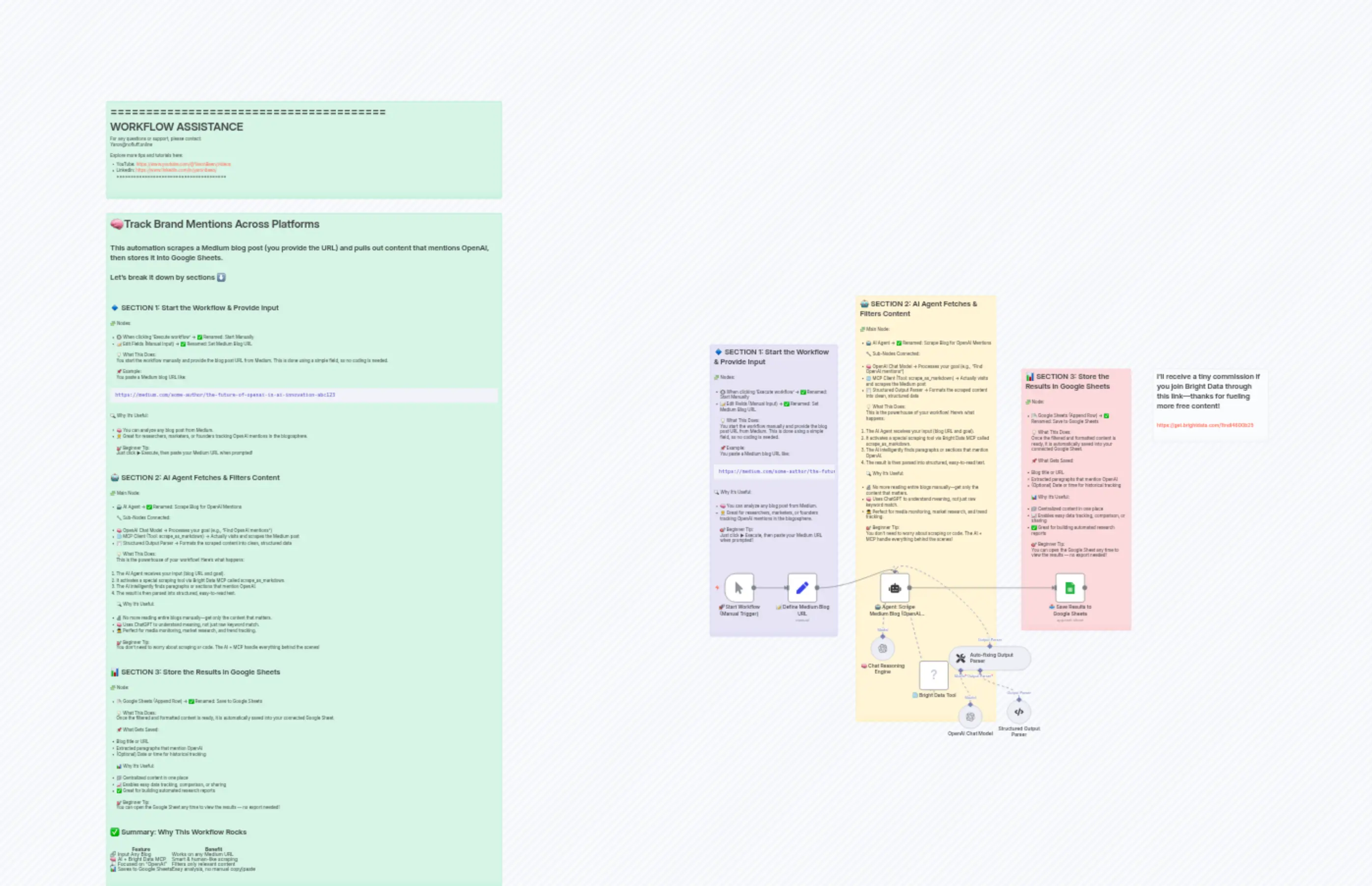
8 Track Brand Mentions Across Platforms
描述
分类
📢 Marketing🤖 AI & Machine Learning
使用的节点
n8n-nodes-base.setn8n-nodes-base.stickyNoten8n-nodes-base.stickyNoten8n-nodes-base.stickyNoten8n-nodes-base.stickyNoten8n-nodes-base.stickyNoten8n-nodes-base.stickyNoten8n-nodes-base.googleSheetsn8n-nodes-mcp.mcpClientTooln8n-nodes-base.manualTrigger
价格免费
浏览量0
最后更新11/28/2025
workflow.json
{
"id": "Kw6CPl5oArWJBG0E",
"meta": {
"instanceId": "c38e3b8a7e4240e6cdca062743f016c1029f385bf40345b6291939dfd83bfd77",
"templateCredsSetupCompleted": true
},
"name": "8 Track Brand Mentions Across Platforms",
"tags": [],
"nodes": [
{
"id": "6f0fed2a-cd9b-472e-b541-321c4e43f12b",
"name": "🚀 Start Workflow (Manual Trigger)",
"type": "n8n-nodes-base.manualTrigger",
"position": [
-340,
-80
],
"parameters": {},
"typeVersion": 1
},
{
"id": "c9195c44-551e-440e-a191-80801c17cbbb",
"name": "📝 Define Medium Blog URL",
"type": "n8n-nodes-base.set",
"position": [
-120,
-80
],
"parameters": {
"options": {},
"assignments": {
"assignments": [
{
"id": "5ce0f046-dd35-47d3-96a1-845a179f7949",
"name": "blogURL",
"type": "string",
"value": "https://medium.com/gitconnected/why-openai-suddenly-erased-jony-ive-from-their-website-5d6f431e5297"
}
]
}
},
"typeVersion": 3.4
},
{
"id": "00f42b47-ced0-4d28-919b-6b1f9b05e210",
"name": "🤖 Agent: Scrape Medium Blog (OpenAI Mentions)",
"type": "@n8n/n8n-nodes-langchain.agent",
"position": [
180,
-80
],
"parameters": {
"text": "=scrape the below medium blog URL and do setimant analysis:\n{{ $json.blogURL }}",
"options": {},
"promptType": "define",
"hasOutputParser": true
},
"typeVersion": 2
},
{
"id": "c15a7aa3-4ec6-442b-859d-db32655ec08e",
"name": "🧠 Chat Reasoning Engine",
"type": "@n8n/n8n-nodes-langchain.lmChatOpenAi",
"position": [
140,
140
],
"parameters": {
"model": {
"__rl": true,
"mode": "list",
"value": "gpt-4.1-mini"
},
"options": {}
},
"credentials": {
"openAiApi": {
"id": "kmqnyfHdWfA8k1KC",
"name": "OpenAi account 3"
}
},
"typeVersion": 1.2
},
{
"id": "2948ad8b-b41b-4405-98e8-7af70cf4cbde",
"name": "🌐 Bright Data Tool",
"type": "n8n-nodes-mcp.mcpClientTool",
"position": [
300,
220
],
"parameters": {
"toolName": "scrape_as_markdown",
"operation": "executeTool",
"toolParameters": "={{ /*n8n-auto-generated-fromAI-override*/ $fromAI('Tool_Parameters', ``, 'json') }}"
},
"credentials": {
"mcpClientApi": {
"id": "dGu6Ys11ijXSTxcV",
"name": "MCP Client (STDIO) account"
}
},
"typeVersion": 1
},
{
"id": "0dec0fe8-a2db-4862-b3f5-243d059066c5",
"name": "📥 Save Results to Google Sheets",
"type": "n8n-nodes-base.googleSheets",
"position": [
760,
-80
],
"parameters": {
"columns": {
"value": {
"URL": "={{ $('📝 Define Medium Blog URL').item.json.blogURL }}",
"Title": "={{ $json.output.title }}",
"Author": "={{ $json.output.author }}",
"Platform": "={{ $json.output.platform }}",
"Sentiment": "={{ $json.output.sentiment }}",
"Content Summary": "={{ $json.output['content summary'] }}"
},
"schema": [
{
"id": "URL",
"type": "string",
"display": true,
"required": false,
"displayName": "URL",
"defaultMatch": false,
"canBeUsedToMatch": true
},
{
"id": "Platform",
"type": "string",
"display": true,
"required": false,
"displayName": "Platform",
"defaultMatch": false,
"canBeUsedToMatch": true
},
{
"id": "Author",
"type": "string",
"display": true,
"required": false,
"displayName": "Author",
"defaultMatch": false,
"canBeUsedToMatch": true
},
{
"id": "Title",
"type": "string",
"display": true,
"required": false,
"displayName": "Title",
"defaultMatch": false,
"canBeUsedToMatch": true
},
{
"id": "Content Summary",
"type": "string",
"display": true,
"required": false,
"displayName": "Content Summary",
"defaultMatch": false,
"canBeUsedToMatch": true
},
{
"id": "Sentiment",
"type": "string",
"display": true,
"required": false,
"displayName": "Sentiment",
"defaultMatch": false,
"canBeUsedToMatch": true
}
],
"mappingMode": "defineBelow",
"matchingColumns": [],
"attemptToConvertTypes": false,
"convertFieldsToString": false
},
"options": {},
"operation": "append",
"sheetName": {
"__rl": true,
"mode": "list",
"value": "gid=0",
"cachedResultUrl": "https://docs.google.com/spreadsheets/d/1XxLjaMa4vLqSV6bf0Fq1vreOJX6Os_uUCW0PrUK3UWE/edit#gid=0",
"cachedResultName": "Sheet1"
},
"documentId": {
"__rl": true,
"mode": "list",
"value": "1XxLjaMa4vLqSV6bf0Fq1vreOJX6Os_uUCW0PrUK3UWE",
"cachedResultUrl": "https://docs.google.com/spreadsheets/d/1XxLjaMa4vLqSV6bf0Fq1vreOJX6Os_uUCW0PrUK3UWE/edit?usp=drivesdk",
"cachedResultName": "brand sentiment analysis"
}
},
"credentials": {
"googleSheetsOAuth2Api": {
"id": "i899RBJ6SKiYYWwx",
"name": "Google Sheets account"
}
},
"typeVersion": 4.6
},
{
"id": "ccc265dd-b894-4f2c-87d9-13e704ede0f8",
"name": "Sticky Note",
"type": "n8n-nodes-base.stickyNote",
"position": [
-380,
-820
],
"parameters": {
"color": 6,
"width": 420,
"height": 960,
"content": "## 🔹 SECTION 1: Start the Workflow & Provide Input\n\n🧩 Nodes:\n\n* 🔘 When clicking 'Execute workflow' → ✅ Renamed: Start Manually\n* 📝 Edit Fields (Manual Input) → ✅ Renamed: Set Medium Blog URL\n\n💡 What This Does:\nYou start the workflow manually and provide the blog post URL from Medium. This is done using a simple field, so no coding is needed.\n\n📌 Example:\nYou paste a Medium blog URL like:\n\n```\nhttps://medium.com/some-author/the-future-of-openai-in-ai-innovation-abc123\n```\n\n🔍 Why It’s Useful:\n\n* 🧠 You can analyze any blog post from Medium.\n* 🧑💼 Great for researchers, marketers, or founders tracking OpenAI mentions in the blogosphere.\n\n🎯 Beginner Tip:\nJust click ▶ Execute, then paste your Medium URL when prompted!\n\n"
},
"typeVersion": 1
},
{
"id": "77163aaf-9a40-42b5-86ce-81933f8de5aa",
"name": "Sticky Note1",
"type": "n8n-nodes-base.stickyNote",
"position": [
100,
-980
],
"parameters": {
"width": 460,
"height": 1400,
"content": "## 🤖 SECTION 2: AI Agent Fetches & Filters Content\n\n🧩 Main Node:\n\n* 🤖 AI Agent → ✅ Renamed: Scrape Blog for OpenAI Mentions\n\n🔧 Sub-Nodes Connected:\n\n* 🧠 OpenAI Chat Model → Processes your goal (e.g., “Find OpenAI mentions”)\n* 🌐 MCP Client (Tool: scrape\\_as\\_markdown) → Actually visits and scrapes the Medium post\n* 🧾 Structured Output Parser → Formats the scraped content into clean, structured data\n\n💡 What This Does:\nThis is the powerhouse of your workflow! Here's what happens:\n\n1. The AI Agent receives your input (blog URL and goal).\n2. It activates a special scraping tool via Bright Data MCP called scrape\\_as\\_markdown.\n3. The AI intelligently finds paragraphs or sections that mention OpenAI.\n4. The result is then parsed into structured, easy-to-read text.\n\n🔍 Why It’s Useful:\n\n* 🔬 No more reading entire blogs manually—get only the content that matters.\n* 🧠 Uses ChatGPT to understand meaning, not just raw keyword match.\n* 🕵️ Perfect for media monitoring, market research, and trend tracking.\n\n🎯 Beginner Tip:\nYou don’t need to worry about scraping or code. The AI + MCP handle everything behind the scenes!\n"
},
"typeVersion": 1
},
{
"id": "a291820d-69b5-450a-a588-d4ef3a75090d",
"name": "Sticky Note3",
"type": "n8n-nodes-base.stickyNote",
"position": [
640,
-740
],
"parameters": {
"color": 3,
"width": 360,
"height": 860,
"content": "## 📊 SECTION 3: Store the Results in Google Sheets\n\n🧩 Node:\n\n* 📄 Google Sheets (Append Row) → ✅ Renamed: Save to Google Sheets\n\n💡 What This Does:\nOnce the filtered and formatted content is ready, it is automatically saved into your connected Google Sheet.\n\n📌 What Gets Saved:\n\n* Blog title or URL\n* Extracted paragraphs that mention OpenAI\n* (Optional) Date or time for historical tracking\n\n📊 Why It’s Useful:\n\n* 📁 Centralized content in one place\n* 📈 Enables easy data tracking, comparison, or sharing\n* ✅ Great for building automated research reports\n\n🎯 Beginner Tip:\nYou can open the Google Sheet any time to view the results — no export needed!\n\n\n"
},
"typeVersion": 1
},
{
"id": "46d528b4-e68e-4f42-92cc-ec75d582348f",
"name": "Sticky Note2",
"type": "n8n-nodes-base.stickyNote",
"position": [
-2360,
-1260
],
"parameters": {
"color": 4,
"width": 1300,
"height": 2220,
"content": "# 🧠Track Brand Mentions Across Platforms\n\nThis automation scrapes a Medium blog post (you provide the URL) and pulls out content that mentions OpenAI, then stores it into Google Sheets.\n\nLet’s break it down by sections ⬇️\n\n---\n\n## 🔹 SECTION 1: Start the Workflow & Provide Input\n\n🧩 Nodes:\n\n* 🔘 When clicking 'Execute workflow' → ✅ Renamed: Start Manually\n* 📝 Edit Fields (Manual Input) → ✅ Renamed: Set Medium Blog URL\n\n💡 What This Does:\nYou start the workflow manually and provide the blog post URL from Medium. This is done using a simple field, so no coding is needed.\n\n📌 Example:\nYou paste a Medium blog URL like:\n\n```\nhttps://medium.com/some-author/the-future-of-openai-in-ai-innovation-abc123\n```\n\n🔍 Why It’s Useful:\n\n* 🧠 You can analyze any blog post from Medium.\n* 🧑💼 Great for researchers, marketers, or founders tracking OpenAI mentions in the blogosphere.\n\n🎯 Beginner Tip:\nJust click ▶ Execute, then paste your Medium URL when prompted!\n\n---\n\n## 🤖 SECTION 2: AI Agent Fetches & Filters Content\n\n🧩 Main Node:\n\n* 🤖 AI Agent → ✅ Renamed: Scrape Blog for OpenAI Mentions\n\n🔧 Sub-Nodes Connected:\n\n* 🧠 OpenAI Chat Model → Processes your goal (e.g., “Find OpenAI mentions”)\n* 🌐 MCP Client (Tool: scrape\\_as\\_markdown) → Actually visits and scrapes the Medium post\n* 🧾 Structured Output Parser → Formats the scraped content into clean, structured data\n\n💡 What This Does:\nThis is the powerhouse of your workflow! Here's what happens:\n\n1. The AI Agent receives your input (blog URL and goal).\n2. It activates a special scraping tool via Bright Data MCP called scrape\\_as\\_markdown.\n3. The AI intelligently finds paragraphs or sections that mention OpenAI.\n4. The result is then parsed into structured, easy-to-read text.\n\n🔍 Why It’s Useful:\n\n* 🔬 No more reading entire blogs manually—get only the content that matters.\n* 🧠 Uses ChatGPT to understand meaning, not just raw keyword match.\n* 🕵️ Perfect for media monitoring, market research, and trend tracking.\n\n🎯 Beginner Tip:\nYou don’t need to worry about scraping or code. The AI + MCP handle everything behind the scenes!\n\n---\n\n## 📊 SECTION 3: Store the Results in Google Sheets\n\n🧩 Node:\n\n* 📄 Google Sheets (Append Row) → ✅ Renamed: Save to Google Sheets\n\n💡 What This Does:\nOnce the filtered and formatted content is ready, it is automatically saved into your connected Google Sheet.\n\n📌 What Gets Saved:\n\n* Blog title or URL\n* Extracted paragraphs that mention OpenAI\n* (Optional) Date or time for historical tracking\n\n📊 Why It’s Useful:\n\n* 📁 Centralized content in one place\n* 📈 Enables easy data tracking, comparison, or sharing\n* ✅ Great for building automated research reports\n\n🎯 Beginner Tip:\nYou can open the Google Sheet any time to view the results — no export needed!\n\n---\n\n## ✅ Summary: Why This Workflow Rocks\n\n| Feature | Benefit |\n| ------------------------- | ----------------------------------- |\n| 🔗 Input Any Blog | Works on any Medium URL |\n| 🧠 AI + Bright Data MCP | Smart & human-like scraping |\n| 🔎 Focused on “OpenAI” | Filters only relevant content |\n| 📊 Saves to Google Sheets | Easy analysis, no manual copy/paste |\n\n\n"
},
"typeVersion": 1
},
{
"id": "ec93ef06-2418-4677-bb49-332d308b7506",
"name": "Sticky Note9",
"type": "n8n-nodes-base.stickyNote",
"position": [
-2360,
-1620
],
"parameters": {
"color": 4,
"width": 1300,
"height": 320,
"content": "=======================================\n WORKFLOW ASSISTANCE\n=======================================\nFor any questions or support, please contact:\n [email protected]\n\nExplore more tips and tutorials here:\n - YouTube: https://www.youtube.com/@YaronBeen/videos\n - LinkedIn: https://www.linkedin.com/in/yaronbeen/\n=======================================\n"
},
"typeVersion": 1
},
{
"id": "d33d3c54-def3-4bc7-869d-85707bdb4106",
"name": "Sticky Note5",
"type": "n8n-nodes-base.stickyNote",
"position": [
1080,
-740
],
"parameters": {
"color": 7,
"width": 380,
"height": 240,
"content": "## I’ll receive a tiny commission if you join Bright Data through this link—thanks for fueling more free content!\n\n### https://get.brightdata.com/1tndi4600b25"
},
"typeVersion": 1
},
{
"id": "01b7e9dd-992f-463f-819a-7c9e36a219d4",
"name": "Auto-fixing Output Parser",
"type": "@n8n/n8n-nodes-langchain.outputParserAutofixing",
"position": [
400,
160
],
"parameters": {
"options": {
"prompt": "Instructions:\n--------------\n{instructions}\n--------------\nCompletion:\n--------------\n{completion}\n--------------\n\nAbove, the Completion did not satisfy the constraints given in the Instructions.\nError:\n--------------\n{error}\n--------------\n\nPlease try again. Please only respond with an answer that satisfies the constraints laid out in the Instructions:"
}
},
"typeVersion": 1
},
{
"id": "7a9c56b5-5d2a-478d-b3fc-61e5e4f7526e",
"name": "OpenAI Chat Model",
"type": "@n8n/n8n-nodes-langchain.lmChatOpenAi",
"position": [
440,
360
],
"parameters": {
"model": {
"__rl": true,
"mode": "list",
"value": "gpt-4.1-mini"
},
"options": {}
},
"credentials": {
"openAiApi": {
"id": "kmqnyfHdWfA8k1KC",
"name": "OpenAi account 3"
}
},
"typeVersion": 1.2
},
{
"id": "e193f7ea-5ff7-4b9a-816d-3e9a58043ce3",
"name": "Structured Output Parser",
"type": "@n8n/n8n-nodes-langchain.outputParserStructured",
"position": [
600,
340
],
"parameters": {
"jsonSchemaExample": "{\n \"platform\": \"Blog\",\n \"author\": \"Sam Enfield\",\n \"title\": \"Why OpenAI Suddenly Erased Jony Ive from their Website\",\n \"content summary\": \"The article discusses a vanished partnership between OpenAI and Jony Ive, Apple's legendary designer behind iconic products like the iMac, iPod, iPhone, iPad, and Apple Watch. The collaboration aimed to create a sleek, intuitive AI consumer device dubbed the \\\"iPhone of artificial intelligence,\\\" backed by billions in funding and design philosophy from Apple. However, all traces of this collaboration suddenly disappeared online—blog posts, announcement videos, promotional pages, and introductions were deleted or wiped clean. The article reveals that this abrupt removal is linked to a trademark lawsuit that emerged, reshaping the future of AI.\",\n \"sentiment\": \"Negative\"\n}\n"
},
"typeVersion": 1.3
}
],
"active": false,
"pinData": {},
"settings": {
"executionOrder": "v1"
},
"versionId": "05587a39-880b-47c6-ba10-78aa1462d36c",
"connections": {
"OpenAI Chat Model": {
"ai_languageModel": [
[
{
"node": "Auto-fixing Output Parser",
"type": "ai_languageModel",
"index": 0
}
]
]
},
"🌐 Bright Data Tool": {
"ai_tool": [
[
{
"node": "🤖 Agent: Scrape Medium Blog (OpenAI Mentions)",
"type": "ai_tool",
"index": 0
}
]
]
},
"Structured Output Parser": {
"ai_outputParser": [
[
{
"node": "Auto-fixing Output Parser",
"type": "ai_outputParser",
"index": 0
}
]
]
},
"Auto-fixing Output Parser": {
"ai_outputParser": [
[
{
"node": "🤖 Agent: Scrape Medium Blog (OpenAI Mentions)",
"type": "ai_outputParser",
"index": 0
}
]
]
},
"🧠 Chat Reasoning Engine": {
"ai_languageModel": [
[
{
"node": "🤖 Agent: Scrape Medium Blog (OpenAI Mentions)",
"type": "ai_languageModel",
"index": 0
}
]
]
},
"📝 Define Medium Blog URL": {
"main": [
[
{
"node": "🤖 Agent: Scrape Medium Blog (OpenAI Mentions)",
"type": "main",
"index": 0
}
]
]
},
"🚀 Start Workflow (Manual Trigger)": {
"main": [
[
{
"node": "📝 Define Medium Blog URL",
"type": "main",
"index": 0
}
]
]
},
"🤖 Agent: Scrape Medium Blog (OpenAI Mentions)": {
"main": [
[
{
"node": "📥 Save Results to Google Sheets",
"type": "main",
"index": 0
}
]
]
}
}
}