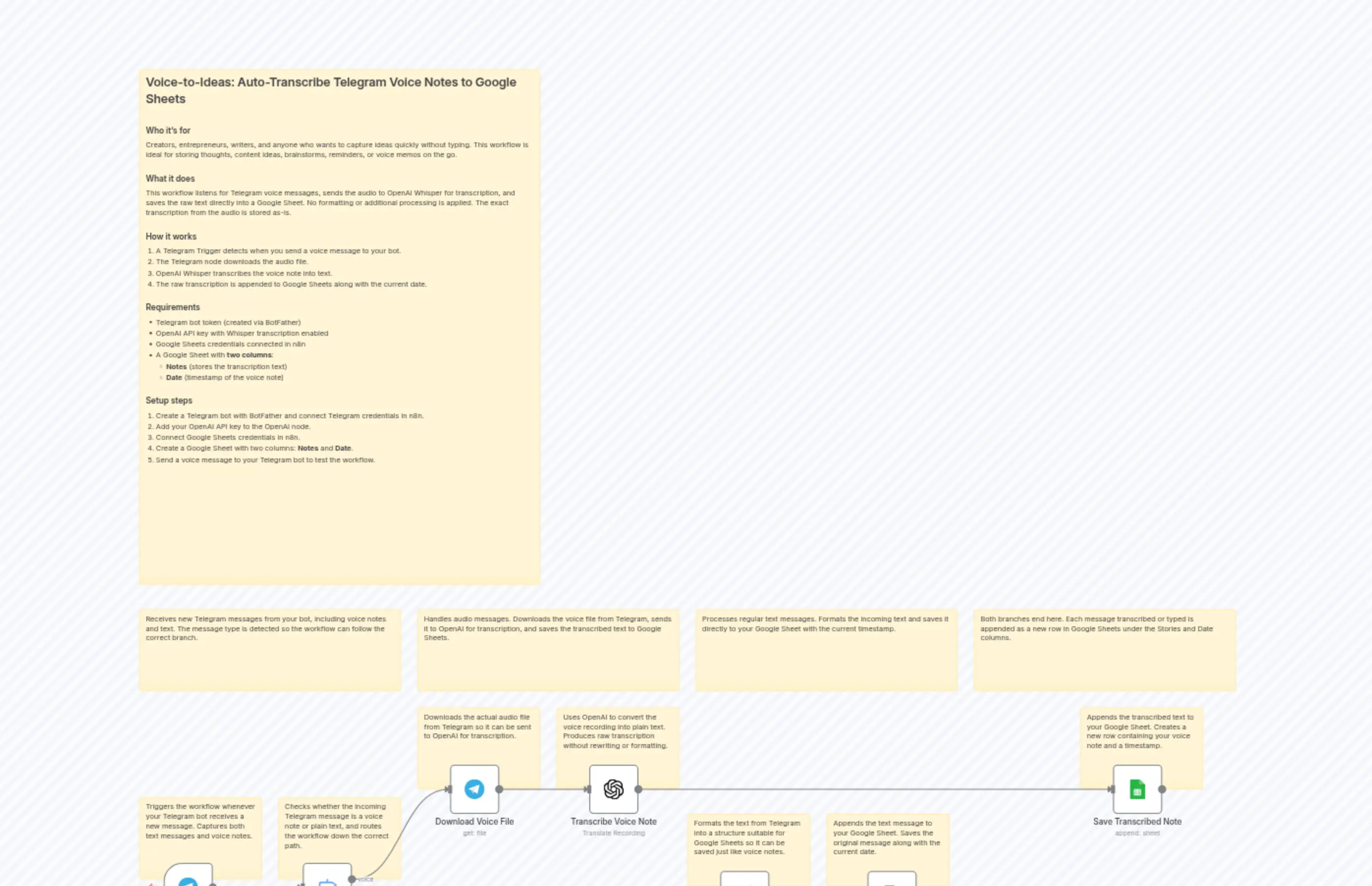
Voice-to-Ideas: Transcribe Telegram Voice Notes with OpenAI Whisper to Google Sheets
描述
分类
📊 Productivity🤖 AI & Machine Learning
使用的节点
n8n-nodes-base.setn8n-nodes-base.switchn8n-nodes-base.telegramn8n-nodes-base.stickyNoten8n-nodes-base.stickyNoten8n-nodes-base.stickyNoten8n-nodes-base.stickyNoten8n-nodes-base.stickyNoten8n-nodes-base.stickyNoten8n-nodes-base.stickyNote
价格免费
浏览量0
最后更新11/28/2025
workflow.json
{
  "meta": {
    "instanceId": "ae9efe3d6a9faa90a81c19972fbef10737cd7f845b5c9f101288ac2d2e7a54d8"
  },
  "nodes": [
    {
      "id": "d8a53cf6-7dae-4b28-bad8-f14244b55bf9",
      "name": "Sticky Note",
      "type": "n8n-nodes-base.stickyNote",
      "position": [
        -608,
        -1360
      ],
      "parameters": {
        "width": 784,
        "height": 1008,
        "content": "## Voice-to-Ideas: Auto-Transcribe Telegram Voice Notes to Google Sheets\n\n### Who it's for\nCreators, entrepreneurs, writers, and anyone who wants to capture ideas quickly without typing. This workflow is ideal for storing thoughts, content ideas, brainstorms, reminders, or voice memos on the go.\n\n### What it does\nThis workflow listens for Telegram voice messages, sends the audio to OpenAI Whisper for transcription, and saves the raw text directly into a Google Sheet. No formatting or additional processing is applied. The exact transcription from the audio is stored as-is.\n\n### How it works\n1. A Telegram Trigger detects when you send a voice message to your bot.  \n2. The Telegram node downloads the audio file.  \n3. OpenAI Whisper transcribes the voice note into text.  \n4. The raw transcription is appended to Google Sheets along with the current date.\n\n### Requirements\n- Telegram bot token (created via BotFather)  \n- OpenAI API key with Whisper transcription enabled  \n- Google Sheets credentials connected in n8n  \n- A Google Sheet with **two columns**:\n  - **Notes** (stores the transcription text)  \n  - **Date** (timestamp of the voice note)\n\n### Setup steps\n1. Create a Telegram bot with BotFather and connect Telegram credentials in n8n.  \n2. Add your OpenAI API key to the OpenAI node.  \n3. Connect Google Sheets credentials in n8n.  \n4. Create a Google Sheet with two columns: **Notes** and **Date**.  \n5. Send a voice message to your Telegram bot to test the workflow."
      },
      "typeVersion": 1
    },
    {
      "id": "abc48b7d-6ea4-4560-862c-a3cbae6ebb91",
      "name": "Receive Telegram Message",
      "type": "n8n-nodes-base.telegramTrigger",
      "position": [
        -560,
        192
      ],
      "webhookId": "3153bc6e-659e-42e5-8b1f-e78ae57bc3e7",
      "parameters": {
        "updates": [
          "message"
        ],
        "additionalFields": {}
      },
      "credentials": {
        "telegramApi": {
          "id": "b9UepjsOkSQIT24G",
          "name": "CaptureStoriesBot"
        }
      },
      "typeVersion": 1.2
    },
    {
      "id": "9dc58ac5-1ef1-46ab-a441-b1ed05223e2d",
      "name": "Detect Message Type",
      "type": "n8n-nodes-base.switch",
      "position": [
        -288,
        192
      ],
      "parameters": {
        "rules": {
          "values": [
            {
              "outputKey": "voice",
              "conditions": {
                "options": {
                  "version": 2,
                  "leftValue": "",
                  "caseSensitive": true,
                  "typeValidation": "strict"
                },
                "combinator": "and",
                "conditions": [
                  {
                    "id": "d110549b-ae2b-4548-824c-ecc1738ac998",
                    "operator": {
                      "type": "object",
                      "operation": "exists",
                      "singleValue": true
                    },
                    "leftValue": "={{ $json.message.voice }}",
                    "rightValue": ""
                  }
                ]
              },
              "renameOutput": true
            },
            {
              "outputKey": "text",
              "conditions": {
                "options": {
                  "version": 2,
                  "leftValue": "",
                  "caseSensitive": true,
                  "typeValidation": "strict"
                },
                "combinator": "and",
                "conditions": [
                  {
                    "id": "880af267-8506-4815-93f1-73f73f00ec83",
                    "operator": {
                      "type": "string",
                      "operation": "exists",
                      "singleValue": true
                    },
                    "leftValue": "={{ $json.message.text }}",
                    "rightValue": ""
                  }
                ]
              },
              "renameOutput": true
            }
          ]
        },
        "options": {}
      },
      "typeVersion": 3.3
    },
    {
      "id": "86e37a6f-0c69-46d3-8bb5-0e2fce3b7791",
      "name": "Download Voice File",
      "type": "n8n-nodes-base.telegram",
      "position": [
        0,
        0
      ],
      "webhookId": "a4e80485-7ed0-4a15-a3fe-3df090764f3a",
      "parameters": {
        "fileId": "={{ $json.message.voice.file_id }}",
        "resource": "file",
        "additionalFields": {}
      },
      "credentials": {
        "telegramApi": {
          "id": "b9UepjsOkSQIT24G",
          "name": "CaptureStoriesBot"
        }
      },
      "typeVersion": 1.2
    },
    {
      "id": "2f5cb3c5-e462-453f-845d-08dc0f825a5e",
      "name": "Transcribe Voice Note",
      "type": "@n8n/n8n-nodes-langchain.openAi",
      "position": [
        272,
        0
      ],
      "parameters": {
        "options": {},
        "resource": "audio",
        "operation": "translate"
      },
      "credentials": {
        "openAiApi": {
          "id": "L654GEjFyakbkxvK",
          "name": "n8n host"
        }
      },
      "typeVersion": 1.8
    },
    {
      "id": "787d972e-686f-43a2-bd2e-7117ca99e778",
      "name": "Save Transcribed Note",
      "type": "n8n-nodes-base.googleSheets",
      "position": [
        1296,
        0
      ],
      "parameters": {
        "operation": "append",
        "sheetName": {
          "__rl": true,
          "mode": "id",
          "value": ""
        },
        "documentId": {
          "__rl": true,
          "mode": "id",
          "value": ""
        }
      },
      "credentials": {
        "googleSheetsOAuth2Api": {
          "id": "ZCKZljchKhMwGOLQ",
          "name": "cjj"
        }
      },
      "typeVersion": 4.7
    },
    {
      "id": "e1485f36-629a-470f-bc6e-ea8219255b44",
      "name": "Prepare Text Message",
      "type": "n8n-nodes-base.set",
      "position": [
        528,
        208
      ],
      "parameters": {
        "options": {},
        "assignments": {
          "assignments": [
            {
              "id": "fc092550-cb98-429e-a667-9cb490911402",
              "name": "message",
              "type": "string",
              "value": "={{ $json.message.text }}"
            }
          ]
        }
      },
      "typeVersion": 3.4
    },
    {
      "id": "bd4ef634-e52f-4b17-84b4-cc7f319d803f",
      "name": "Save Text Message",
      "type": "n8n-nodes-base.googleSheets",
      "position": [
        816,
        208
      ],
      "parameters": {
        "operation": "append",
        "sheetName": {
          "__rl": true,
          "mode": "id",
          "value": ""
        },
        "documentId": {
          "__rl": true,
          "mode": "id",
          "value": ""
        }
      },
      "credentials": {
        "googleSheetsOAuth2Api": {
          "id": "ZCKZljchKhMwGOLQ",
          "name": "cjj"
        }
      },
      "typeVersion": 4.7
    },
    {
      "id": "e244e3ed-773d-4ef5-9c61-402baab4e5a1",
      "name": "Sticky Note1",
      "type": "n8n-nodes-base.stickyNote",
      "position": [
        -608,
        64
      ],
      "parameters": {
        "content": "Triggers the workflow whenever your Telegram bot receives a new message. Captures both text messages and voice notes."
      },
      "typeVersion": 1
    },
    {
      "id": "6c94a1b6-9a06-4a36-85bf-70fb5b3ab007",
      "name": "Sticky Note2",
      "type": "n8n-nodes-base.stickyNote",
      "position": [
        -336,
        64
      ],
      "parameters": {
        "content": "Checks whether the incoming Telegram message is a voice note or plain text, and routes the workflow down the correct path."
      },
      "typeVersion": 1
    },
    {
      "id": "b08c1243-e5db-4ca5-b2e6-0a7e81dc1c12",
      "name": "Sticky Note3",
      "type": "n8n-nodes-base.stickyNote",
      "position": [
        -64,
        -112
      ],
      "parameters": {
        "content": "Downloads the actual audio file from Telegram so it can be sent to OpenAI for transcription."
      },
      "typeVersion": 1
    },
    {
      "id": "0506aa00-0164-4280-89bc-7efa8e785e1c",
      "name": "Sticky Note4",
      "type": "n8n-nodes-base.stickyNote",
      "position": [
        208,
        -112
      ],
      "parameters": {
        "content": "Uses OpenAI to convert the voice recording into plain text. Produces raw transcription without rewriting or formatting."
      },
      "typeVersion": 1
    },
    {
      "id": "f881f9da-497e-41ba-a998-6ee04a4631fd",
      "name": "Sticky Note5",
      "type": "n8n-nodes-base.stickyNote",
      "position": [
        1232,
        -112
      ],
      "parameters": {
        "content": "Appends the transcribed text to your Google Sheet. Creates a new row containing your voice note and a timestamp."
      },
      "typeVersion": 1
    },
    {
      "id": "961647f3-1eae-453a-b0ef-566bc6fdf3b9",
      "name": "Sticky Note6",
      "type": "n8n-nodes-base.stickyNote",
      "position": [
        464,
        96
      ],
      "parameters": {
        "content": "Formats the text from Telegram into a structure suitable for Google Sheets so it can be saved just like voice notes."
      },
      "typeVersion": 1
    },
    {
      "id": "c415448f-4191-420c-846b-82a22feb760f",
      "name": "Sticky Note7",
      "type": "n8n-nodes-base.stickyNote",
      "position": [
        736,
        96
      ],
      "parameters": {
        "content": "Appends the text message to your Google Sheet. Saves the original message along with the current date."
      },
      "typeVersion": 1
    },
    {
      "id": "54ebfc49-fe29-4b56-a71f-30874b9b987c",
      "name": "Sticky Note8",
      "type": "n8n-nodes-base.stickyNote",
      "position": [
        -608,
        -304
      ],
      "parameters": {
        "width": 512,
        "content": "Receives new Telegram messages from your bot, including voice notes and text. The message type is detected so the workflow can follow the correct branch."
      },
      "typeVersion": 1
    },
    {
      "id": "228c7367-3511-42ca-b2e3-6e37b780ca1a",
      "name": "Sticky Note9",
      "type": "n8n-nodes-base.stickyNote",
      "position": [
        -64,
        -304
      ],
      "parameters": {
        "width": 512,
        "content": "Handles audio messages. Downloads the voice file from Telegram, sends it to OpenAI for transcription, and saves the transcribed text to Google Sheets."
      },
      "typeVersion": 1
    },
    {
      "id": "0d199ac7-006a-4b07-b468-224b29e7f3fa",
      "name": "Sticky Note10",
      "type": "n8n-nodes-base.stickyNote",
      "position": [
        480,
        -304
      ],
      "parameters": {
        "width": 512,
        "content": "Processes regular text messages. Formats the incoming text and saves it directly to your Google Sheet with the current timestamp."
      },
      "typeVersion": 1
    },
    {
      "id": "3186c7fd-21d7-4fdc-8b0d-f8c807417b18",
      "name": "Sticky Note11",
      "type": "n8n-nodes-base.stickyNote",
      "position": [
        1024,
        -304
      ],
      "parameters": {
        "width": 512,
        "content": "Both branches end here. Each message transcribed or typed is appended as a new row in Google Sheets under the Stories and Date columns."
      },
      "typeVersion": 1
    }
  ],
  "pinData": {},
  "connections": {
    "Detect Message Type": {
      "main": [
        [
          {
            "node": "Download Voice File",
            "type": "main",
            "index": 0
          }
        ],
        [
          {
            "node": "Prepare Text Message",
            "type": "main",
            "index": 0
          }
        ]
      ]
    },
    "Download Voice File": {
      "main": [
        [
          {
            "node": "Transcribe Voice Note",
            "type": "main",
            "index": 0
          }
        ]
      ]
    },
    "Prepare Text Message": {
      "main": [
        [
          {
            "node": "Save Text Message",
            "type": "main",
            "index": 0
          }
        ]
      ]
    },
    "Transcribe Voice Note": {
      "main": [
        [
          {
            "node": "Save Transcribed Note",
            "type": "main",
            "index": 0
          }
        ]
      ]
    },
    "Receive Telegram Message": {
      "main": [
        [
          {
            "node": "Detect Message Type",
            "type": "main",
            "index": 0
          }
        ]
      ]
    }
  }
}