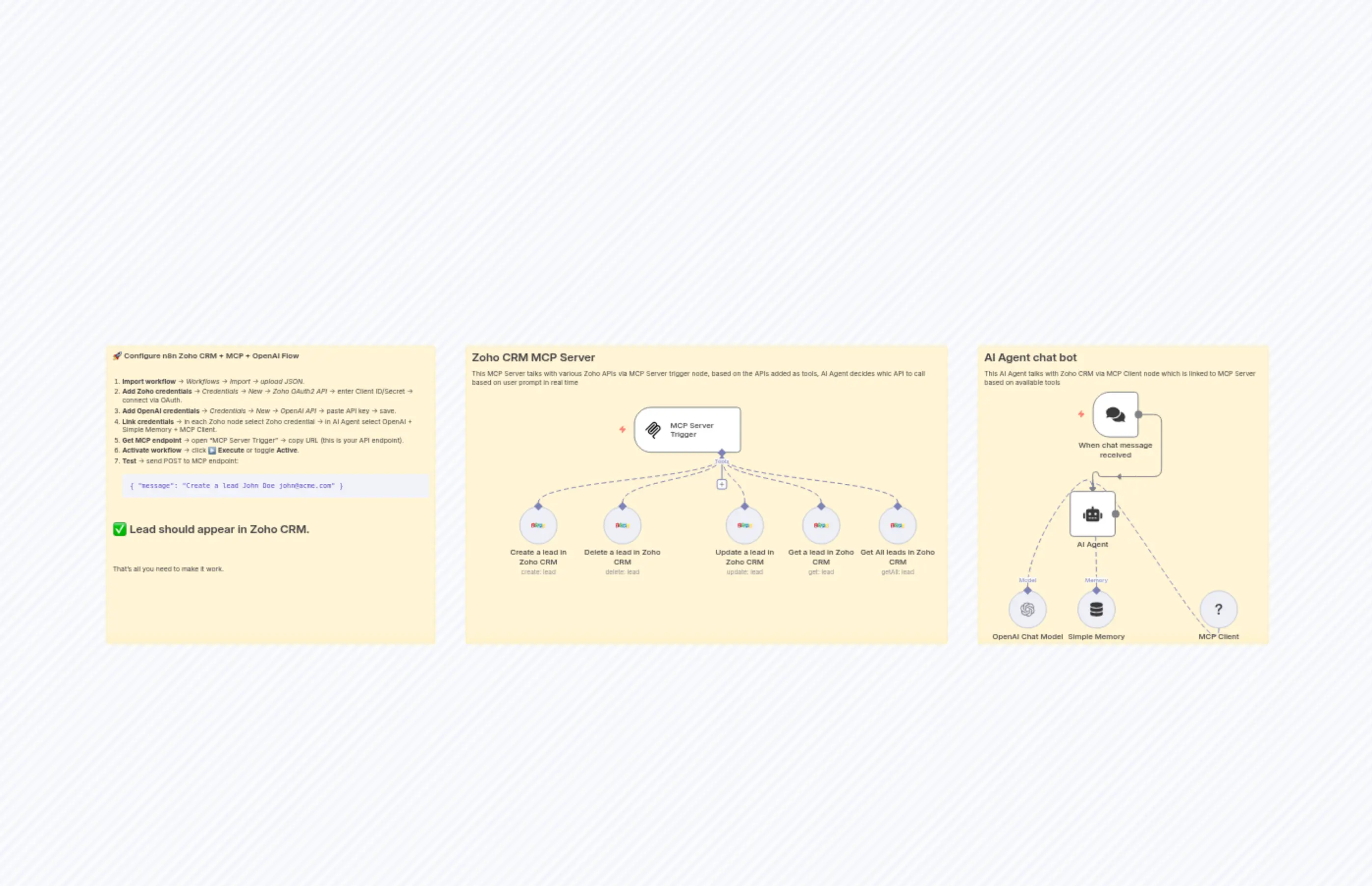
ZohoMCP
説明
Categories
⚙️ Automation
Nodes Used
n8n-nodes-base.stickyNoten8n-nodes-base.stickyNoten8n-nodes-base.stickyNoten8n-nodes-base.zohoCrmTooln8n-nodes-base.zohoCrmTooln8n-nodes-base.zohoCrmTooln8n-nodes-base.zohoCrmTooln8n-nodes-base.zohoCrmTool@n8n/n8n-nodes-langchain.agent@n8n/n8n-nodes-langchain.mcpTrigger
Price無料
Views1
最終更新2/21/2026
workflow.json
{
  "id": "vjGbKloQsG8ffOZd",
  "meta": {
    "instanceId": "949a401c83597c2ef6ff4654dc4eadf958e058e8d68f04fa5deb21cb217cf620",
    "templateCredsSetupCompleted": true
  },
  "name": "ZohoMCP",
  "tags": [],
  "nodes": [
    {
      "id": "9b3a9170-e9e5-41bf-92eb-b044d0f9a84a",
      "name": "MCP Server Trigger",
      "type": "@n8n/n8n-nodes-langchain.mcpTrigger",
      "position": [
        -448,
        -336
      ],
      "webhookId": "ff22d66b-7cc7-4f8f-a47e-f6beae65b2a0",
      "parameters": {
        "path": "ff22d66b-7cc7-4f8f-a47e-f6beae65b2a0"
      },
      "typeVersion": 2
    },
    {
      "id": "0c592c54-b21e-40fe-b1bc-e49088be7730",
      "name": "Create a lead in Zoho CRM",
      "type": "n8n-nodes-base.zohoCrmTool",
      "position": [
        -688,
        -128
      ],
      "parameters": {
        "Company": "={{ /*n8n-auto-generated-fromAI-override*/ $fromAI('Company', ``, 'string') }}",
        "lastName": "={{ /*n8n-auto-generated-fromAI-override*/ $fromAI('Last_Name', ``, 'string') }}",
        "resource": "lead",
        "additionalFields": {
          "Email": "={{ /*n8n-auto-generated-fromAI-override*/ $fromAI('Email', ``, 'string') }}",
          "Mobile": "={{ /*n8n-auto-generated-fromAI-override*/ $fromAI('Mobile', ``, 'string') }}",
          "Website": "={{ /*n8n-auto-generated-fromAI-override*/ $fromAI('Website', ``, 'string') }}",
          "First_Name": "={{ /*n8n-auto-generated-fromAI-override*/ $fromAI('First_Name', ``, 'string') }}",
          "Lead_Source": "={{ /*n8n-auto-generated-fromAI-override*/ $fromAI('Lead_Source', ``, 'string') }}",
          "Lead_Status": "={{ /*n8n-auto-generated-fromAI-override*/ $fromAI('Lead_Status', ``, 'string') }}"
        }
      },
      "credentials": {
        "zohoOAuth2Api": {
          "id": "RjbVlvhPIOsCXhde",
          "name": "Zoho account"
        }
      },
      "typeVersion": 1
    },
    {
      "id": "b63e3d6a-743a-4b40-a39c-03e51ad7c84e",
      "name": "Delete a lead in Zoho CRM",
      "type": "n8n-nodes-base.zohoCrmTool",
      "position": [
        -512,
        -128
      ],
      "parameters": {
        "leadId": "={{ /*n8n-auto-generated-fromAI-override*/ $fromAI('Lead_ID', ``, 'string') }}",
        "resource": "lead",
        "operation": "delete"
      },
      "credentials": {
        "zohoOAuth2Api": {
          "id": "RjbVlvhPIOsCXhde",
          "name": "Zoho account"
        }
      },
      "typeVersion": 1
    },
    {
      "id": "43531271-45db-4a2d-93b0-96095ac8f98f",
      "name": "Get a lead in Zoho CRM",
      "type": "n8n-nodes-base.zohoCrmTool",
      "position": [
        -96,
        -128
      ],
      "parameters": {
        "leadId": "={{ /*n8n-auto-generated-fromAI-override*/ $fromAI('Lead_ID', ``, 'string') }}",
        "resource": "lead",
        "operation": "get"
      },
      "credentials": {
        "zohoOAuth2Api": {
          "id": "RjbVlvhPIOsCXhde",
          "name": "Zoho account"
        }
      },
      "typeVersion": 1
    },
    {
      "id": "712a8aa5-97db-4620-8036-5d611d5807fb",
      "name": "Get All leads in Zoho CRM",
      "type": "n8n-nodes-base.zohoCrmTool",
      "position": [
        64,
        -128
      ],
      "parameters": {
        "options": {},
        "resource": "lead",
        "operation": "getAll",
        "returnAll": true
      },
      "credentials": {
        "zohoOAuth2Api": {
          "id": "RjbVlvhPIOsCXhde",
          "name": "Zoho account"
        }
      },
      "typeVersion": 1
    },
    {
      "id": "7efe805e-4cb2-4f79-be08-64646a32b00c",
      "name": "Update a lead in Zoho CRM",
      "type": "n8n-nodes-base.zohoCrmTool",
      "position": [
        -256,
        -128
      ],
      "parameters": {
        "leadId": "={{ /*n8n-auto-generated-fromAI-override*/ $fromAI('Lead_ID', ``, 'string') }}",
        "resource": "lead",
        "operation": "update",
        "updateFields": {
          "Company": "={{ /*n8n-auto-generated-fromAI-override*/ $fromAI('Company', ``, 'string') }}",
          "Last_Name": "={{ /*n8n-auto-generated-fromAI-override*/ $fromAI('Last_Name', ``, 'string') }}",
          "First_Name": "={{ /*n8n-auto-generated-fromAI-override*/ $fromAI('First_Name', ``, 'string') }}",
          "Description": "={{ /*n8n-auto-generated-fromAI-override*/ $fromAI('Description', ``, 'string') }}",
          "Lead_Source": "={{ /*n8n-auto-generated-fromAI-override*/ $fromAI('Lead_Source', ``, 'string') }}",
          "Lead_Status": "={{ /*n8n-auto-generated-fromAI-override*/ $fromAI('Lead_Status', ``, 'string') }}"
        }
      },
      "credentials": {
        "zohoOAuth2Api": {
          "id": "RjbVlvhPIOsCXhde",
          "name": "Zoho account"
        }
      },
      "typeVersion": 1
    },
    {
      "id": "e67008c6-776a-4f33-bf5a-c54471dc3c85",
      "name": "When chat message received",
      "type": "@n8n/n8n-nodes-langchain.chatTrigger",
      "position": [
        512,
        -368
      ],
      "webhookId": "762e231f-98a8-4e03-b1c0-7425b1cedd1a",
      "parameters": {
        "options": {}
      },
      "typeVersion": 1.3
    },
    {
      "id": "cf3071d3-5189-4a97-91db-7939077b894c",
      "name": "AI Agent",
      "type": "@n8n/n8n-nodes-langchain.agent",
      "position": [
        464,
        -160
      ],
      "parameters": {
        "options": {
          "systemMessage": "You are an AI assistant that helps manage leads in Zoho CRM.\nWhen the user asks to create, update, or delete a lead, use the appropriate tool.\nProvide confirmations in natural language."
        }
      },
      "typeVersion": 2.2
    },
    {
      "id": "e2d2b1c1-dbb4-4c94-9500-e252e0510c79",
      "name": "OpenAI Chat Model",
      "type": "@n8n/n8n-nodes-langchain.lmChatOpenAi",
      "position": [
        336,
        48
      ],
      "parameters": {
        "model": {
          "__rl": true,
          "mode": "list",
          "value": "gpt-5-mini",
          "cachedResultName": "gpt-5-mini"
        },
        "options": {}
      },
      "credentials": {
        "openAiApi": {
          "id": "DKf6I4HwiNPw9TWL",
          "name": "OpenAi account"
        }
      },
      "typeVersion": 1.2
    },
    {
      "id": "2ad8529a-1e84-4522-9ee5-632dff0958d1",
      "name": "Simple Memory",
      "type": "@n8n/n8n-nodes-langchain.memoryBufferWindow",
      "position": [
        480,
        48
      ],
      "parameters": {},
      "typeVersion": 1.3
    },
    {
      "id": "8279e190-dff3-45aa-87ed-77ec46250d4c",
      "name": "MCP Client",
      "type": "@n8n/n8n-nodes-langchain.mcpClientTool",
      "position": [
        736,
        48
      ],
      "parameters": {
        "options": {},
        "endpointUrl": "http://localhost:5678/mcp/ff22d66b-7cc7-4f8f-a47e-f6beae65b2a0"
      },
      "typeVersion": 1.2
    },
    {
      "id": "b9da96be-06b3-42c5-b73f-99e7acd6314d",
      "name": "Sticky Note",
      "type": "n8n-nodes-base.stickyNote",
      "position": [
        -1552,
        -464
      ],
      "parameters": {
        "width": 688,
        "height": 624,
        "content": "### 🚀 Configure n8n Zoho CRM + MCP + OpenAI Flow\n\n1. **Import workflow** → *Workflows → Import → upload JSON*.\n2. **Add Zoho credentials** → *Credentials → New → Zoho OAuth2 API* → enter Client ID/Secret → connect via OAuth.\n3. **Add OpenAI credentials** → *Credentials → New → OpenAI API* → paste API key → save.\n4. **Link credentials** → in each Zoho node select Zoho credential → in AI Agent select OpenAI + Simple Memory + MCP Client.\n5. **Get MCP endpoint** → open “MCP Server Trigger” → copy URL (this is your API endpoint).\n6. **Activate workflow** → click **▶️ Execute** or toggle **Active**.\n7. **Test** → send POST to MCP endpoint:\n\n   ```json\n   { \"message\": \"Create a lead John Doe [email protected]\" }\n   ```\n\n   ✅ Lead should appear in Zoho CRM.\n\n---\n\nThat’s all you need to make it work.\n"
      },
      "typeVersion": 1
    },
    {
      "id": "8aeecab8-d866-47ee-8bf0-fa6a916e8012",
      "name": "Sticky Note1",
      "type": "n8n-nodes-base.stickyNote",
      "position": [
        -800,
        -464
      ],
      "parameters": {
        "width": 1008,
        "height": 624,
        "content": "## Zoho CRM MCP Server\nThis MCP Server talks with various Zoho APIs via MCP Server trigger node, based on the APIs added as tools, AI Agent decides whic API to call based on user prompt in real time"
      },
      "typeVersion": 1
    },
    {
      "id": "e62154ed-9a85-4521-8d87-46dd97083410",
      "name": "Sticky Note2",
      "type": "n8n-nodes-base.stickyNote",
      "position": [
        272,
        -464
      ],
      "parameters": {
        "width": 608,
        "height": 624,
        "content": "## AI Agent chat bot\nThis AI Agent talks with Zoho CRM via MCP Client node which is linked to MCP Server based on available tools"
      },
      "typeVersion": 1
    }
  ],
  "active": true,
  "pinData": {},
  "settings": {
    "executionOrder": "v1"
  },
  "versionId": "582b01a8-5393-4e1b-98a5-b3deefd179ed",
  "connections": {
    "MCP Client": {
      "ai_tool": [
        [
          {
            "node": "AI Agent",
            "type": "ai_tool",
            "index": 0
          }
        ]
      ]
    },
    "Simple Memory": {
      "ai_memory": [
        [
          {
            "node": "AI Agent",
            "type": "ai_memory",
            "index": 0
          }
        ]
      ]
    },
    "OpenAI Chat Model": {
      "ai_languageModel": [
        [
          {
            "node": "AI Agent",
            "type": "ai_languageModel",
            "index": 0
          }
        ]
      ]
    },
    "Get a lead in Zoho CRM": {
      "ai_tool": [
        [
          {
            "node": "MCP Server Trigger",
            "type": "ai_tool",
            "index": 0
          }
        ]
      ]
    },
    "Create a lead in Zoho CRM": {
      "ai_tool": [
        [
          {
            "node": "MCP Server Trigger",
            "type": "ai_tool",
            "index": 0
          }
        ]
      ]
    },
    "Delete a lead in Zoho CRM": {
      "ai_tool": [
        [
          {
            "node": "MCP Server Trigger",
            "type": "ai_tool",
            "index": 0
          }
        ]
      ]
    },
    "Get All leads in Zoho CRM": {
      "ai_tool": [
        [
          {
            "node": "MCP Server Trigger",
            "type": "ai_tool",
            "index": 0
          }
        ]
      ]
    },
    "Update a lead in Zoho CRM": {
      "ai_tool": [
        [
          {
            "node": "MCP Server Trigger",
            "type": "ai_tool",
            "index": 0
          }
        ]
      ]
    },
    "When chat message received": {
      "main": [
        [
          {
            "node": "AI Agent",
            "type": "main",
            "index": 0
          }
        ]
      ]
    }
  }
}