Calendly Bookings to Easy Redmine CRM with Comment and Sales Activity
説明
Categories
🤖 AI & Machine Learning
Nodes Used
n8n-nodes-base.stickyNoten8n-nodes-base.stickyNoten8n-nodes-base.stickyNoten8n-nodes-base.httpRequestn8n-nodes-base.httpRequestn8n-nodes-base.calendlyTriggern8n-nodes-base.microsoftOutlook@easysoftware/n8n-nodes-easy-redmine.easyRedmine
Price無料
Views0
最終更新11/28/2025
workflow.json
{
  "id": "qb3MpiDEyrUkUd1w",
  "meta": {
    "instanceId": "ccf4e500c5536799e0925f03390f0fd338e2b5a5bc862f6a57b5552acfdf3861",
    "templateCredsSetupCompleted": true
  },
  "name": "Calendly Bookings to Easy Redmine CRM with Comment and Sales Activity",
  "tags": [],
  "nodes": [
    {
      "id": "3cb457b8-b6fe-45af-8979-7a9d4d1336c1",
      "name": "Sticky Note1",
      "type": "n8n-nodes-base.stickyNote",
      "position": [
        -608,
        -32
      ],
      "parameters": {
        "width": 720,
        "height": 2096,
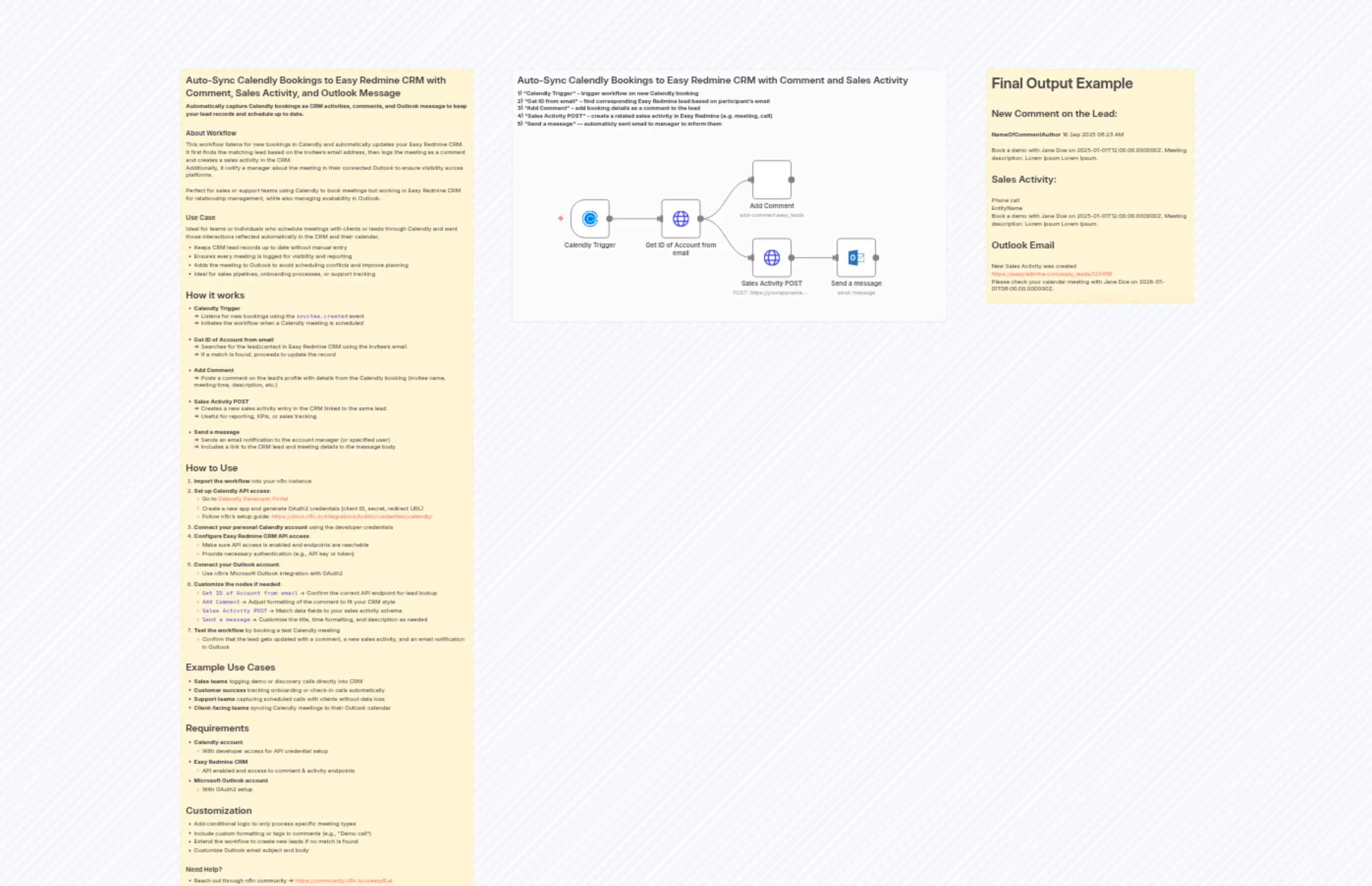
        "content": "## Auto-Sync Calendly Bookings to Easy Redmine CRM with Comment, Sales Activity, and Outlook Message\n  \n**Automatically capture Calendly bookings as CRM activities, comments, and Outlook message to keep your lead records and schedule up to date.**\n\n### About Workflow  \nThis workflow listens for new bookings in Calendly and automatically updates your Easy Redmine CRM. It first finds the matching lead based on the invitee’s email address, then logs the meeting as a comment and creates a sales activity in the CRM.  \nAdditionally, it notify a manager about the meeting in their connected Outlook to ensure visibility across platforms.\n\nPerfect for sales or support teams using Calendly to book meetings but working in Easy Redmine CRM for relationship management, while also managing availability in Outlook.\n\n### Use Case  \nIdeal for teams or individuals who schedule meetings with clients or leads through Calendly and want those interactions reflected automatically in the CRM and their calendar.  \n- Keeps CRM lead records up to date without manual entry  \n- Ensures every meeting is logged for visibility and reporting  \n- Adds the meeting to Outlook to avoid scheduling conflicts and improve planning  \n- Ideal for sales pipelines, onboarding processes, or support tracking  \n\n## How it works  \n- **Calendly Trigger**  \n  => Listens for new bookings using the `invitee.created` event  \n  => Initiates the workflow when a Calendly meeting is scheduled  \n\n- **Get ID of Account from email**  \n  => Searches for the lead/contact in Easy Redmine CRM using the invitee’s email  \n  => If a match is found, proceeds to update the record  \n\n- **Add Comment**  \n  => Posts a comment on the lead’s profile with details from the Calendly booking (invitee name, meeting time, description, etc.)  \n\n- **Sales Activity POST**  \n  => Creates a new sales activity entry in the CRM linked to the same lead  \n  => Useful for reporting, KPIs, or sales tracking  \n\n- **Send a message**  \n  => Sends an email notification to the account manager (or specified user)  \n  => Includes a link to the CRM lead and meeting details in the message body  \n\n## How to Use  \n1. **Import the workflow** into your n8n instance  \n2. **Set up Calendly API access**:  \n   - Go to [Calendly Developer Portal](https://developer.calendly.com/)  \n   - Create a new app and generate OAuth2 credentials (client ID, secret, redirect URL)  \n   - Follow n8n’s setup guide: https://docs.n8n.io/integrations/builtin/credentials/calendly/  \n3. **Connect your personal Calendly account** using the developer credentials  \n4. **Configure Easy Redmine CRM API access**:  \n   - Make sure API access is enabled and endpoints are reachable  \n   - Provide necessary authentication (e.g., API key or token)  \n5. **Connect your Outlook account**:  \n   - Use n8n’s Microsoft Outlook integration with OAuth2  \n6. **Customize the nodes if needed**:  \n   - `Get ID of Account from email` → Confirm the correct API endpoint for lead lookup  \n   - `Add Comment` → Adjust formatting of the comment to fit your CRM style  \n   - `Sales Activity POST` → Match data fields to your sales activity schema  \n   - `Send a message` → Customize the title, time formatting, and description as needed  \n7. **Test the workflow** by booking a test Calendly meeting  \n   - Confirm that the lead gets updated with a comment, a new sales activity, and an email notification in Outlook  \n\n## Example Use Cases  \n- **Sales teams** logging demo or discovery calls directly into CRM  \n- **Customer success** tracking onboarding or check-in calls automatically  \n- **Support teams** capturing scheduled calls with clients without data loss  \n- **Client-facing teams** syncing Calendly meetings to their Outlook calendar  \n\n## Requirements  \n- **Calendly account**  \n  - With developer access for API credential setup  \n- **Easy Redmine CRM**  \n  - API enabled and access to comment & activity endpoints  \n- **Microsoft Outlook account**  \n  - With OAuth2 setup  \n\n## Customization  \n- Add conditional logic to only process specific meeting types  \n- Include custom formatting or tags in comments (e.g., “Demo call”)  \n- Extend the workflow to create new leads if no match is found  \n- Customize Outlook email subject and body  \n\n### Need Help? \n- Reach out through n8n community => https://community.n8n.io/u/easy8.ai\n- Contant our team directly => Easy8.ai\n- Visit our youtube channel => https://www.youtube.com/@easy8ai "
      },
      "typeVersion": 1
    },
    {
      "id": "5e8ceb55-6c17-47c5-877b-5e026d4eee2d",
      "name": "Sticky Note3",
      "type": "n8n-nodes-base.stickyNote",
      "position": [
        208,
        -32
      ],
      "parameters": {
        "color": 7,
        "width": 1072,
        "height": 624,
        "content": "## Auto-Sync Calendly Bookings to Easy Redmine CRM with Comment and Sales Activity  \n**1) \"Calendly Trigger\" – trigger workflow on new Calendly booking**  \n**2) \"Get ID from email\" – find corresponding Easy Redmine lead based on participant’s email**  \n**3) \"Add Comment\" – add booking details as a comment to the lead**  \n**4) \"Sales Activity POST\" – create a related sales activity in Easy Redmine (e.g. meeting, call)**\n**5) \"Send a message\" — automaticly sent email to manager to inform them**  \n\n"
      },
      "typeVersion": 1
    },
    {
      "id": "849c5a4c-b7bf-4920-9f7e-9a1ddaa45a8a",
      "name": "Sticky Note4",
      "type": "n8n-nodes-base.stickyNote",
      "position": [
        1376,
        -32
      ],
      "parameters": {
        "width": 512,
        "height": 576,
        "content": "# Final Output Example \n\n## New Comment on the Lead:\n\n**NameOfCommentAuthor** 16 Sep 2025 08:23 AM\n\nBook a demo with Jane Doe on 2025-01-01T12:00:00.000000Z. Meeting description: Lorem Ipsum Lorem Ipsum.\n\n## Sales Activity:\n\nPhone call\n\t\t      EntityName\nBook a demo with Jane Doe on 2025-01-01T12:00:00.000000Z. Meeting description: Lorem Ipsum Lorem Ipsum.\n\n## Outlook Email  \n\nNew Sales Activity was created https://easyredmine.com/easy_leads/123456\nPlease check your calendar meeting with Jane Doe on 2026-01-01T08:00:00.000000Z."
      },
      "typeVersion": 1
    },
    {
      "id": "5f7a13fd-c48b-4099-866e-fadbad5630cb",
      "name": "Calendly Trigger",
      "type": "n8n-nodes-base.calendlyTrigger",
      "position": [
        352,
        288
      ],
      "webhookId": "a0f9d31b-a633-4b65-878d-3d4e73520968",
      "parameters": {
        "scope": "organization",
        "events": [
          "invitee.created"
        ],
        "authentication": "oAuth2"
      },
      "typeVersion": 1
    },
    {
      "id": "8e6da94c-68f5-4980-b949-603833c315ec",
      "name": "Add Comment",
      "type": "@easysoftware/n8n-nodes-easy-redmine.easyRedmine",
      "position": [
        800,
        192
      ],
      "parameters": {
        "id": "={{ $json.easy_leads[0].id }}",
        "comment": "=Book a demo with {{ $('Calendly Trigger').item.json.payload.name }} on {{ $('Calendly Trigger').item.json.payload.scheduled_event.start_time }}. Meeting description: {{ $('Calendly Trigger').item.json.payload.questions_and_answers[0].answer }}. ",
        "resource": "easy_leads",
        "operation": "add-comment"
      },
      "typeVersion": 1
    },
    {
      "id": "8abe0aec-32da-488c-b7dd-3c5ba6f85dd9",
      "name": "Sales Activity POST",
      "type": "n8n-nodes-base.httpRequest",
      "position": [
        800,
        384
      ],
      "parameters": {
        "url": "=https://yourappname.easyredmine.com/easy_entity_activities.json",
        "method": "POST",
        "options": {},
        "jsonBody": "={\n  \"easy_entity_activity\": {\n    \"entity_type\": \"EasyLead\",\n    \"entity_id\": {{ $json.easy_leads[0].id }},\n    \"name\": \"Book a demo\",\n    \"description\": \"Book a demo with {{ $('Calendly Trigger').item.json.payload.name }} on {{ $('Calendly Trigger').item.json.payload.scheduled_event.start_time }}. Meeting description: {{ $('Calendly Trigger').item.json.payload.questions_and_answers[0].answer }}. \",\n    \"activity_type_id\": 1\n  }\n}\n\n",
        "sendBody": true,
        "specifyBody": "json",
        "authentication": "genericCredentialType",
        "genericAuthType": "httpHeaderAuth"
      },
      "credentials": {
        "httpHeaderAuth": {
          "id": "123abcd456efgh",
          "name": "Jane Doe Account"
        }
      },
      "typeVersion": 4.2
    },
    {
      "id": "f8b83e8b-2ecd-48e2-8bd7-4c9a2fde2ee8",
      "name": "Get ID of Account from email",
      "type": "n8n-nodes-base.httpRequest",
      "position": [
        576,
        288
      ],
      "parameters": {
        "url": "=https://yourappname.easyredmine.com/easy_leads.json?set_filter=1&f[email]={{ $json.payload.email }}",
        "options": {},
        "authentication": "genericCredentialType",
        "genericAuthType": "httpHeaderAuth"
      },
      "credentials": {
        "httpHeaderAuth": {
          "id": "123abcd456efgh",
          "name": "Jane Doe Account"
        }
      },
      "typeVersion": 4.2
    },
    {
      "id": "b05febab-8f93-4ab6-b4e8-931c998d2372",
      "name": "Send a message",
      "type": "n8n-nodes-base.microsoftOutlook",
      "position": [
        1008,
        384
      ],
      "webhookId": "4fb2cfcd-b877-48bd-8657-7c56ebbf9cd7",
      "parameters": {
        "subject": "=Demo meeting with {{ $('Calendly Trigger').item.json.payload.name }}",
        "bodyContent": "=New Sales Activity was created https://easyredmine.com/easy_leads/{{ $json.easy_entity_activity.entity.id }}\nPlease check your calendar meeting with {{ $('Calendly Trigger').item.json.payload.name }} on {{ $('Calendly Trigger').item.json.payload.scheduled_event.start_time }}",
        "toRecipients": "={{ $('Calendly Trigger').item.json.payload.scheduled_event.event_memberships[0].user_email }}",
        "additionalFields": {}
      },
      "typeVersion": 2
    }
  ],
  "active": false,
  "pinData": {},
  "settings": {
    "executionOrder": "v1"
  },
  "versionId": "e6f6f7ca-9803-4e78-ac21-5f13b6194d97",
  "connections": {
    "Calendly Trigger": {
      "main": [
        [
          {
            "node": "Get ID of Account from email",
            "type": "main",
            "index": 0
          }
        ]
      ]
    },
    "Sales Activity POST": {
      "main": [
        [
          {
            "node": "Send a message",
            "type": "main",
            "index": 0
          }
        ]
      ]
    },
    "Get ID of Account from email": {
      "main": [
        [
          {
            "node": "Add Comment",
            "type": "main",
            "index": 0
          },
          {
            "node": "Sales Activity POST",
            "type": "main",
            "index": 0
          }
        ]
      ]
    }
  }
}