Upload to n8n
説明
Categories
🤖 AI & Machine Learning
Nodes Used
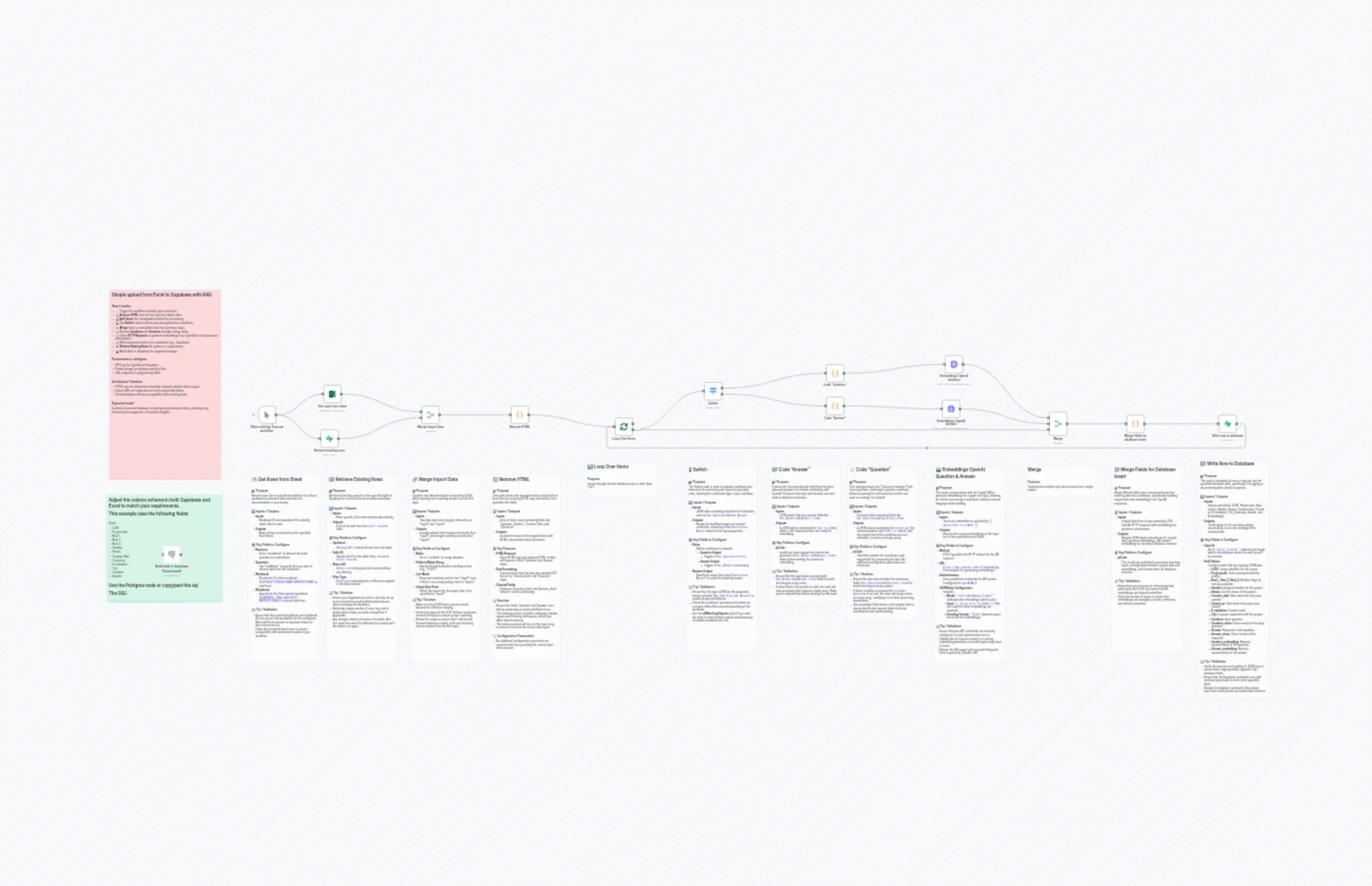
n8n-nodes-base.coden8n-nodes-base.coden8n-nodes-base.coden8n-nodes-base.coden8n-nodes-base.mergen8n-nodes-base.mergen8n-nodes-base.switchn8n-nodes-base.postgresn8n-nodes-base.supabasen8n-nodes-base.supabase
Price無料
Views0
最終更新11/28/2025
workflow.json
{
"id": "N4vmvG8N8J7d1713",
"meta": {
"instanceId": "89249a8a187ba6e01e16112a0d334a3aa01d510ad8f88d223e12cc0a2a8beb6b"
},
"name": "Upload to n8n",
"tags": [],
"nodes": [
{
"id": "1ab6c2f3-8ec9-44f4-aa99-1113bf211dac",
"name": "When clicking ‘Execute workflow’",
"type": "n8n-nodes-base.manualTrigger",
"position": [
1440,
224
],
"parameters": {},
"typeVersion": 1
},
{
"id": "41676fa7-273a-4b53-b2ab-0ef1c84a685c",
"name": "Remove HTML ",
"type": "n8n-nodes-base.code",
"position": [
2800,
224
],
"parameters": {
"jsCode": "// Pass all Excel data through, normalize dates, and clean up text\nconst results = [];\n\n// Excel date formatting (simple)\nfunction fixExcelDate(excelDate) {\n if (!excelDate || isNaN(excelDate)) return null;\n const date = new Date((excelDate - 25569) * 86400 * 1000);\n return date.toISOString().split('T')[0];\n}\n\nfor (const item of $input.all()) {\n const cleanedItem = { ...item.json };\n \n // Fix Excel dates - replace originals to avoid duplicates\n if (cleanedItem['Creation Date']) {\n cleanedItem['Creation Date'] = fixExcelDate(cleanedItem['Creation Date']);\n }\n if (cleanedItem['Closed on']) {\n cleanedItem['Closed on'] = fixExcelDate(cleanedItem['Closed on']);\n }\n \n // Clean Question field\n if (cleanedItem['Question']) {\n cleanedItem['Question_clean'] = cleanedItem['Question']\n .toString()\n .replace(/<[^>]*>/g, '') // remove HTML tags\n .replace(/ /g, ' ') // replace with space\n .replace(/&[^;]+;/g, ' ') // replace other HTML entities\n .replace(/\"\\s\"/g, '') // remove \" \"\n .replace(/\\s+/g, ' ') // collapse multiple spaces\n .trim(); // trim edges\n }\n \n // Clean Answer field - FIXED: was processing Question instead of Answer\n if (cleanedItem['Answer']) {\n cleanedItem['Answer_clean'] = cleanedItem['Answer']\n .toString()\n .replace(/<[^>]*>/g, '') // remove HTML tags\n .replace(/ /g, ' ') // replace with space\n .replace(/&[^;]+;/g, ' ') // replace other HTML entities\n .replace(/\"\\s\"/g, '') // remove \" \"\n .replace(/\\s+/g, ' ') // collapse multiple spaces\n .trim(); // trim edges\n }\n \n // Add flags - FIXED: boolean logic and field names\n cleanedItem['has_Question'] = (cleanedItem['Question_clean'] && cleanedItem['Question_clean'].length > 10);\n cleanedItem['has_Answer'] = (cleanedItem['Answer_clean'] && cleanedItem['Answer_clean'].length > 10);\n \n results.push({\n json: cleanedItem\n });\n}\n\nreturn results;"
},
"typeVersion": 2
},
{
"id": "062375f2-1e05-4f9d-94fb-8a20924f36da",
"name": "Loop Over Items",
"type": "n8n-nodes-base.splitInBatches",
"position": [
3360,
288
],
"parameters": {
"options": {
"reset": false
}
},
"typeVersion": 3
},
{
"id": "59fd4fa7-2911-4170-acd7-fce1b7277b08",
"name": "Switch",
"type": "n8n-nodes-base.switch",
"position": [
3840,
96
],
"parameters": {
"rules": {
"values": [
{
"outputKey": "Question",
"conditions": {
"options": {
"version": 2,
"leftValue": "",
"caseSensitive": true,
"typeValidation": "strict"
},
"combinator": "and",
"conditions": [
{
"id": "679333a5-0792-402a-b3d1-406593bfd7d7",
"operator": {
"type": "boolean",
"operation": "true",
"singleValue": true
},
"leftValue": "={{ $json.has_Question }}",
"rightValue": "=true"
}
]
},
"renameOutput": true
},
{
"outputKey": "Answer",
"conditions": {
"options": {
"version": 2,
"leftValue": "",
"caseSensitive": true,
"typeValidation": "strict"
},
"combinator": "and",
"conditions": [
{
"id": "57db0cab-2abc-4f43-a4bf-b14f2d4034c1",
"operator": {
"type": "boolean",
"operation": "true",
"singleValue": true
},
"leftValue": "={{ $json.has_Answer }}",
"rightValue": ""
}
]
},
"renameOutput": true
}
]
},
"options": {
"allMatchingOutputs": true
}
},
"typeVersion": 3.2
},
{
"id": "59433026-4b9d-41af-8555-11801a87cbeb",
"name": "Merge",
"type": "n8n-nodes-base.merge",
"position": [
5696,
256
],
"parameters": {
"numberInputs": 3
},
"typeVersion": 3.2
},
{
"id": "3ea830bf-4347-4214-9c99-5ac2c996f30c",
"name": "Merge import Data",
"type": "n8n-nodes-base.merge",
"position": [
2320,
224
],
"parameters": {
"mode": "combine",
"options": {},
"joinMode": "keepNonMatches",
"outputDataFrom": "input1",
"fieldsToMatchString": "UUID"
},
"typeVersion": 3.2
},
{
"id": "65279f10-28bc-430f-a259-ceea614f0976",
"name": "Code \"Question\"",
"type": "n8n-nodes-base.code",
"position": [
4496,
0
],
"parameters": {
"jsCode": "// Process only Customer Question field\nconst item = $input.first().json;\n\n// Check whether we need to process Customer Question\nif (!item.has_Question || !item.Question_clean) {\n return [];\n}\n\n// Just send the text to OpenAI – no extra metadata\nreturn [{\n json: {\n record_id: item.id || item.UUID,\n text_to_embed: item.Question_clean,\n original_item: item\n }\n}];"
},
"typeVersion": 2
},
{
"id": "6eee5eea-8559-476b-ab41-b3dba790224d",
"name": "Code \"Answer\"",
"type": "n8n-nodes-base.code",
"position": [
4496,
176
],
"parameters": {
"jsCode": "// Process only Customer Answer field\nconst item = $input.first().json;\n\n// Check whether we need to process Customer Answer\nif (!item.has_Answer || !item.Answer_clean) {\n return [];\n}\n\n// Just send the text to OpenAI – no extra metadata\nreturn [{\n json: {\n text_to_embed: item.Answer_clean\n }\n}];"
},
"typeVersion": 2
},
{
"id": "0c6a7336-ae00-4070-bf4c-be25a0607fcd",
"name": "Embeddings OpenAI Answer",
"type": "n8n-nodes-base.httpRequest",
"position": [
5120,
192
],
"parameters": {
"url": "https://api.openai.com/v1/embeddings",
"method": "POST",
"options": {},
"jsonBody": "={\n \"model\": \"text-embedding-3-small\",\n \"input\": \"{{ $json.text_to_embed }}\",\n \"encoding_format\": \"float\"\n}",
"sendBody": true,
"specifyBody": "json"
},
"typeVersion": 4.2
},
{
"id": "5411a7ea-3792-47a9-8ee3-ae35a4a3eb37",
"name": "Embeddings OpenAI Question",
"type": "n8n-nodes-base.httpRequest",
"position": [
5136,
-48
],
"parameters": {
"url": "https://api.openai.com/v1/embeddings",
"method": "POST",
"options": {},
"jsonBody": "={\n \"model\": \"text-embedding-3-small\",\n \"input\": \"{{ $json.text_to_embed }}\",\n \"encoding_format\": \"float\"\n}",
"sendBody": true,
"specifyBody": "json"
},
"typeVersion": 4.2
},
{
"id": "30eb9104-cde9-4d8f-8dac-4ce62c405093",
"name": "Merge fields for database insert",
"type": "n8n-nodes-base.code",
"position": [
6112,
272
],
"parameters": {
"jsCode": "const inputs = $input.all();\n\nlet originalData = null;\nlet QuestionEmbedding = null;\nlet AnswerEmbedding = null;\n\nfor (const input of inputs) {\n // Original data from Loop Over Items\n if (input.json.UUID && !input.json.data) {\n originalData = input.json;\n }\n // Direct OpenAI HTTP response\n else if (input.json.data && input.json.data[0] && input.json.data[0].embedding) {\n // Here you must distinguish between Question and Answer embeddings\n if (!AnswerEmbedding) {\n QuestionEmbedding = input.json.data[0].embedding;\n } else {\n AnswerEmbedding = input.json.data[0].embedding;\n }\n }\n}\n\nreturn [{\n json: {\n id: originalData.UUID,\n ...originalData,\n Question_embedding: QuestionEmbedding,\n Answer_embedding: AnswerEmbedding\n }\n}];"
},
"typeVersion": 2
},
{
"id": "9f18eea1-2f78-4b07-beca-8cc95577b622",
"name": "Write row to database",
"type": "n8n-nodes-base.supabase",
"position": [
6608,
272
],
"parameters": {
"tableId": "excel_records",
"fieldsUi": {
"fieldValues": [
{
"fieldId": "UUID",
"fieldValue": "={{ $json.UUID }}"
},
{
"fieldId": "Projectcode",
"fieldValue": "={{ $json.Projectcode }}"
},
{
"fieldId": "Bool_1",
"fieldValue": "={{ $json['Bool 1'] }}"
},
{
"fieldId": "Bool_2",
"fieldValue": "={{ $json['Bool 2'] }}"
},
{
"fieldId": "Bool_3",
"fieldValue": "={{ $json['Bool 3'] }}"
},
{
"fieldId": "Handler",
"fieldValue": "={{ $json.Handler }}"
},
{
"fieldId": "Status",
"fieldValue": "={{ $json.Status }}"
},
{
"fieldId": "Creation_date",
"fieldValue": "={{ $json['Creation Date'] }}"
},
{
"fieldId": "Closed_on",
"fieldValue": "={{ $json['Closed on'] }}"
},
{
"fieldId": "E-mailadres",
"fieldValue": "={{ $json['E-mailadres'] }}"
},
{
"fieldId": "City",
"fieldValue": "={{ $json.City }}"
},
{
"fieldId": "Question",
"fieldValue": "={{ $json.Question }}"
},
{
"fieldId": "Question_clean",
"fieldValue": "={{ $json.Question_clean }}"
},
{
"fieldId": "Answer",
"fieldValue": "={{ $json.Answer }}"
},
{
"fieldId": "Answer_clean",
"fieldValue": "={{ $json.Answer_clean }}"
},
{
"fieldId": "Question_embedding",
"fieldValue": "={{ $json.Question_embedding }}"
},
{
"fieldId": "Answer_embedding",
"fieldValue": "={{ $json.Answer_embedding }}"
}
]
}
},
"typeVersion": 1
},
{
"id": "018da39f-630b-4866-b25a-5b58a204dfd8",
"name": "Retrieve existing rows",
"type": "n8n-nodes-base.supabase",
"position": [
1776,
352
],
"parameters": {
"tableId": "excel_records",
"operation": "getAll",
"returnAll": true,
"filterType": "none"
},
"typeVersion": 1
},
{
"id": "8b219fe6-e73c-4c91-bcb2-941147c35f39",
"name": "Build table in Supabase",
"type": "n8n-nodes-base.postgres",
"disabled": true,
"position": [
928,
976
],
"parameters": {
"query": "-- ============================================\n-- Prerequisites (needed for UUID + embeddings)\n-- ============================================\n-- gen_random_uuid() comes from pgcrypto\ncreate extension if not exists pgcrypto;\n-- vector type for embeddings (pgvector)\ncreate extension if not exists vector;\n\n-- ============================================\n-- Recreate table (drop+create)\n-- ============================================\ndrop table if exists public.excel_records cascade;\n\ncreate table public.excel_records (\n -- Primary key + timestamps\n id uuid primary key default gen_random_uuid(),\n created_at timestamptz not null default now(),\n updated_at timestamptz not null default now(),\n\n -- Your original columns (names preserved)\n \"UUID\" text unique,\n \"Projectcode\" text,\n \"Bool_1\" boolean,\n \"Bool_2\" boolean,\n \"Bool_3\" boolean,\n \"Handler\" text,\n \"Status\" text,\n \"Creation_date\" date,\n \"Closed_on\" date,\n \"City\" text,\n\n -- Email with basic validation; keep the quoted name with dash\n \"E-mailadres\" text\n check (\"E-mailadres\" is null\n or \"E-mailadres\" ~* '^[A-Za-z0-9._%+-]+@[A-Za-z0-9.-]+\\.[A-Za-z]{2,}$'),\n\n -- Q/A text (raw + cleaned variants)\n \"Question\" text,\n \"Question_clean\" text,\n \"Answer\" text,\n \"Answer_clean\" text,\n\n -- Embeddings (adjust the dimension if your model differs)\n \"Question_embedding\" vector(1536),\n \"Answer_embedding\" vector(1536),\n\n -- Full-text search (stored columns; we’ll maintain them via triggers)\n \"Question_fts\" tsvector,\n \"Answer_fts\" tsvector\n);\n\n-- ============================================\n-- Auto-maintain updated_at on UPDATE\n-- ============================================\ncreate or replace function public.excel_records_set_updated_at()\nreturns trigger language plpgsql as $$\nbegin\n new.updated_at := now();\n return new;\nend$$;\n\ndrop trigger if exists excel_records_trg_set_updated_at on public.excel_records;\ncreate trigger excel_records_trg_set_updated_at\nbefore update on public.excel_records\nfor each row execute function public.excel_records_set_updated_at();\n\n-- ============================================\n-- Maintain FTS columns on INSERT/UPDATE\n-- (uses 'simple' config; switch to 'dutch' if you prefer)\n-- ============================================\ncreate or replace function public.excel_records_fts_refresh()\nreturns trigger language plpgsql as $$\nbegin\n new.\"Question_fts\" := to_tsvector('simple', coalesce(new.\"Question_clean\", new.\"Question\"));\n new.\"Answer_fts\" := to_tsvector('simple', coalesce(new.\"Answer_clean\", new.\"Answer\"));\n return new;\nend$$;\n\ndrop trigger if exists excel_records_trg_fts_ins on public.excel_records;\ncreate trigger excel_records_trg_fts_ins\nbefore insert on public.excel_records\nfor each row execute function public.excel_records_fts_refresh();\n\ndrop trigger if exists excel_records_trg_fts_upd on public.excel_records;\ncreate trigger excel_records_trg_fts_upd\nbefore update of \"Question\",\"Question_clean\",\"Answer\",\"Answer_clean\" on public.excel_records\nfor each row execute function public.excel_records_fts_refresh();\n\n-- ============================================\n-- Indexes (FTS + embeddings + common filters)\n-- ============================================\n-- Full-text GIN indexes\ncreate index if not exists excel_records_question_fts_gin\n on public.excel_records using gin (\"Question_fts\");\ncreate index if not exists excel_records_answer_fts_gin\n on public.excel_records using gin (\"Answer_fts\");\n\n-- Vector similarity (IVFFLAT with cosine distance)\n-- Tip: performance improves after data is inserted and ANALYZE has run.\ncreate index if not exists excel_records_question_vec_ivfflat\n on public.excel_records using ivfflat (\"Question_embedding\" vector_cosine_ops)\n with (lists = 100);\ncreate index if not exists excel_records_answer_vec_ivfflat\n on public.excel_records using ivfflat (\"Answer_embedding\" vector_cosine_ops)\n with (lists = 100);\n\n-- Helpful general indexes\ncreate index if not exists excel_records_created_at_idx on public.excel_records (created_at);\n\n-- ============================================\n-- Row Level Security (RLS)\n-- Enabled by default; deny-all until policies allow access.\n-- ============================================\nalter table public.excel_records enable row level security;\n\n-- ---------- Default policy: server-side only ----------\n-- This allows only the service role (server key) to read/write.\n-- Use this if the table is NOT accessed directly from the client.\ndrop policy if exists excel_records_service_role_rw on public.excel_records;\ncreate policy excel_records_service_role_rw\non public.excel_records\nusing (auth.role() = 'service_role')\nwith check (auth.role() = 'service_role');\n\n-- ---------- OPTIONAL: per-user ownership ----------\n-- If you want client access where each user sees only their own rows:\n-- 1) Add an owner column:\n-- alter table public.excel_records add column if not exists user_id uuid;\n-- 2) Set it on insert from your app (or default to auth.uid()):\n-- alter table public.excel_records alter column user_id set default auth.uid();\n-- 3) Replace the policy set with:\n-- drop policy if exists excel_records_service_role_rw on public.excel_records;\n-- create policy excel_records_read_own on public.excel_records for select using (user_id = auth.uid());\n-- create policy excel_records_ins_own on public.excel_records for insert with check (user_id = auth.uid());\n-- create policy excel_records_upd_own on public.excel_records for update using (user_id = auth.uid()) with check (user_id = auth.uid());\n-- create policy excel_records_del_own on public.excel_records for delete using (user_id = auth.uid());\n\n-- ============================================\n-- Notes / knobs you can tweak\n-- ============================================\n-- • Embedding size: change vector(1536) if your model uses a different dimension.\n-- • FTS language: change 'simple' to 'dutch' in excel_records_fts_refresh() if preferred.\n-- • After bulk inserts, run ANALYZE for best IVFFLAT performance:\n-- analyze public.excel_records;\n",
"options": {},
"operation": "executeQuery"
},
"typeVersion": 2.6
},
{
"id": "f85dd3f6-851e-46d0-80b8-05db9de5429a",
"name": "Get rows from sheet",
"type": "n8n-nodes-base.microsoftExcel",
"position": [
1792,
112
],
"parameters": {
"options": {},
"resource": "worksheet",
"workbook": {
"__rl": true,
"mode": "list",
"value": "01VJX45VT23GD6IE3HAVD3GBYREFIPIRAO",
"cachedResultUrl": "",
"cachedResultName": ""
},
"operation": "readRows",
"worksheet": {
"__rl": true,
"mode": "list",
"value": "{94B58D19-7964-4A20-BFF2-BBE769717A5B}",
"cachedResultUrl": "",
"cachedResultName": ""
}
},
"typeVersion": 2.1
},
{
"id": "fd45828b-8e0f-43e3-b782-999de869a2b4",
"name": "Sticky Note - Overview",
"type": "n8n-nodes-base.stickyNote",
"position": [
640,
-400
],
"parameters": {
"color": 3,
"width": 600,
"height": 1020,
"content": "## Simple upload from Excel to Supabase with RAG\n\n\n### How it works:\n- 🖱️ Trigger the workflow manually upon execution.\n- 🔍 **Remove HTML** from the text input for cleaner data.\n- 🔄 **Split Items** into manageable batches for processing.\n- 🔀 Use **Switch** nodes to direct processing based on conditions.\n- ➕ **Merge** items to consolidate data from previous steps.\n- 📝 Process **Questions** and **Answers** through coding nodes.\n- 🌐 Utilize **HTTP Requests** to generate embeddings from OpenAI for both questions and answers.\n- 🗂️ Write structured entries into a database (e.g., Supabase).\n- 📥 **Retrieve Existing Rows** for updates or comparisons.\n- 📊 Build tables in Supabase for organized storage.\n\n### Parameters to configure:\n- API keys for OpenAI and Supabase.\n- Paths/settings for database and text files.\n- URL endpoints if using external APIs.\n\n### Limitations / Gotchas:\n- HTML may not always be completely stripped; double-check output.\n- Ensure APIs are responsive to avoid unexpected delays.\n- Check database schema compatibility before writing rows.\n\n### Expected result\nA cleanly structured database containing documentation entries, allowing easy retrieval and management of workflow insights.\n"
},
"typeVersion": 1
},
{
"id": "62b88a14-6095-4d4a-bdf3-6abddf7307e6",
"name": "Sticky Note - Write row to database",
"type": "n8n-nodes-base.stickyNote",
"position": [
6496,
512
],
"parameters": {
"color": 7,
"width": 380,
"height": 1292,
"content": "## 📁 Write Row to Database \n\n### 🎯 Purpose\nThis node is designed to insert a new row into the specified database table, specifically for logging or documenting data related to projects.\n\n### 🔄 Inputs / Outputs\n- **Inputs:** \n - Various data fields (UUID, Projectcode, Bool values, Handler, Status, Creation date, Closed on, E-mailadres, City, Question, Answer, and Embeddings).\n- **Outputs:** \n - Confirmation of the row being added successfully or an error message if the insertion fails.\n\n### ⚙️ Key Fields to Configure\n- **Table ID:** \n - Set to `\"excel_records\"`, indicating the target table in the database where the new row will be inserted.\n- **Field Values:** \n - Configure each field by mapping JSON data:\n - **UUID**: Unique identifier for the record.\n - **Projectcode**: Code associated with the project.\n - **Bool_1, Bool_2, Bool_3**: Boolean flags for various purposes.\n - **Handler**: Assigned handler for the project.\n - **Status**: Current status of the project.\n - **Creation_date**: Date when the entry was created.\n - **Closed_on**: Date when the project was closed.\n - **E-mailadres**: Contact email.\n - **City**: Location associated with the project.\n - **Question**: Input question.\n - **Question_clean**: Clean version of the input question.\n - **Answer**: Response to the question.\n - **Answer_clean**: Clean version of the response.\n - **Question_embedding**: Numeric representation of the question.\n - **Answer_embedding**: Numeric representation of the answer.\n\n### 📝 Tip / Validation\n- Verify the structure and spelling of JSON keys to ensure data is appropriately mapped to the database fields.\n- Ensure that the Supabase credentials are valid and have permission to write to the specified table.\n- Monitor for database constraints (like unique keys) that could prevent successful data insertion."
},
"typeVersion": 1
},
{
"id": "bc3409c2-7359-4b3b-80e1-816486efe036",
"name": "Sticky Note - Merge fields for database insert",
"type": "n8n-nodes-base.stickyNote",
"position": [
6032,
544
],
"parameters": {
"color": 7,
"width": 380,
"height": 1020,
"content": "## 📁 Merge Fields for Database Insert \n\n### 🎯 Purpose\nMerge different fields into a structured format for inserting data into a database, specifically handling original data and embeddings from OpenAI responses.\n\n### 🔄 Inputs / Outputs\n- **Inputs:** \n - Original data from a loop containing UUID.\n - OpenAI HTTP response with embeddings for questions and answers.\n- **Outputs:** \n - Merged JSON object including an ID, original data, question embeddings, and answer embeddings for seamless database insertion.\n\n### ⚙️ Key Fields to Configure\n- **jsCode:**\n - The JavaScript code block processes incoming inputs, distinguishes between original data and embeddings, and formats them for database insertion.\n\n### 📝 Tip / Validation\n- Ensure the correct structure of incoming data, particularly that UUID is present and that embeddings are distinctly identified.\n- Verify the number of inputs to ensure that embeddings are managed correctly; otherwise, one will be overwritten."
},
"typeVersion": 1
},
{
"id": "a03a9c71-c3c2-441a-9703-702472bc5dd1",
"name": "Sticky Note - Merge",
"type": "n8n-nodes-base.stickyNote",
"position": [
5568,
544
],
"parameters": {
"color": 7,
"width": 380,
"height": 188,
"content": "## Merge\n\n### Purpose\nCombine the multiple input data streams into a single output."
},
"typeVersion": 1
},
{
"id": "98e58b46-3447-4b6f-9ebf-164e404d5b4d",
"name": "Sticky Note - Embeddings OpenAI Question",
"type": "n8n-nodes-base.stickyNote",
"position": [
5072,
544
],
"parameters": {
"color": 7,
"width": 380,
"height": 1068,
"content": "## 🤖 Embeddings OpenAI Question & Answer \n\n### 🎯 Purpose\nThis node communicates with the OpenAI API to generate embeddings for a given text input, allowing for further processing in workflows related to natural language understanding.\n\n### 🔄 Inputs / Outputs\n- **Inputs:** \n - Text to be embedded as specified by `{{ $json.text_to_embed }}`.\n- **Outputs:** \n - Returns the numeric embeddings of the input text in the specified format (float).\n\n### ⚙️ Key Fields to Configure\n- **Method:** \n - POST (specifies the HTTP method for the API request).\n- **URL:** \n - `https://api.openai.com/v1/embeddings` (the endpoint for generating embeddings).\n- **Authentication:** \n - Uses predefined credentials for API access (configured as `openAiApi`).\n- **JSON Body Configuration:** \n - Includes:\n - **Model:** `\"text-embedding-3-small\"` (indicates the embedding model to use).\n - **Input:** `{{ $json.text_to_embed }}` (the text input for which embeddings are required).\n - **Encoding Format:** `\"float\"` (desired output format for the embeddings).\n\n### 📝 Tip / Validation\n- Ensure that your API credentials are correctly configured to avoid authentication errors.\n- Validate the text input to ensure it is a string; embedding generation on invalid inputs may result in errors.\n- Monitor the API usage limits to avoid hitting rate limits imposed by OpenAI's API."
},
"typeVersion": 1
},
{
"id": "696c2c7c-c313-4326-b43e-09b6a2725b2c",
"name": "Sticky Note - Code \"Question\"",
"type": "n8n-nodes-base.stickyNote",
"position": [
4608,
544
],
"parameters": {
"color": 7,
"width": 380,
"height": 844,
"content": "## 💡 Code \"Question\" \n\n### 🎯 Purpose\nThis node processes the \"Customer Question\" field from input data, checking for specific conditions before preparing the information for further use, such as sending it to OpenAI.\n\n### 🔄 Inputs / Outputs\n- **Inputs:** \n - Customer data containing fields like `has_Question` and `Question_clean`.\n- **Outputs:** \n - A JSON object comprising the `record_id`, the cleaned question text (`text_to_embed`), and the original item if the conditions are met; otherwise, it returns an empty array.\n\n### ⚙️ Key Fields to Configure\n- **jsCode:** \n - This field contains the JavaScript code responsible for processing the data. No additional configuration parameters are necessary.\n\n### 📝 Tip / Gotchas\n- Ensure the input data includes the necessary fields (`has_Question` and `Question_clean`) to avoid returning an empty output.\n- If either condition to process the `Customer Question` is not met, the node will simply return an empty array, resulting in no further processing downstream.\n- Use meaningful field names in the original data to clearly identify the required fields for better maintenance and understanding."
},
"typeVersion": 1
},
{
"id": "6b48106f-8c97-4ee9-95f6-72dc9424ca95",
"name": "Sticky Note - Code \"Answer\"",
"type": "n8n-nodes-base.stickyNote",
"position": [
4192,
544
],
"parameters": {
"color": 7,
"width": 380,
"height": 748,
"content": "## 📁 Code \"Answer\" \n\n### 🎯 Purpose\nProcess the Customer Answer field from the input data and prepare it for further embedding with OpenAI. It ensures that only valid answers are sent without additional metadata.\n\n### 🔄 Inputs / Outputs\n- **Inputs:** \n - JSON object that may contain fields like `has_Answer` and `Answer_clean`.\n- **Outputs:** \n - A JSON object containing the `text_to_embed`, which is the cleaned answer text ready for embedding.\n\n### ⚙️ Key Fields to Configure\n- **jsCode:** \n - JavaScript code snippet that checks the presence of `has_Answer` and `Answer_clean` fields before sending the answer for embedding.\n\n### 📝 Tip / Validation\n- Ensure that the input object contains both `has_Answer` and `Answer_clean` fields to avoid returning an empty array.\n- If either field is not present or valid, the node will skip processing and output an empty array. Make sure to validate data before feeding it to this node."
},
"typeVersion": 1
},
{
"id": "dd5d2ec1-fbcb-4c2a-95f4-e4196fd662c6",
"name": "Sticky Note - Switch",
"type": "n8n-nodes-base.stickyNote",
"position": [
3744,
544
],
"parameters": {
"color": 7,
"width": 380,
"height": 1020,
"content": "## 🪄 Switch \n\n### 🎯 Purpose\nThe Switch node is used to evaluate conditions and determine the execution path based on provided rules, allowing for conditional logic in your workflow.\n\n### 🔄 Inputs / Outputs\n- **Inputs:**\n - JSON data containing properties for evaluation, such as `has_Question` and `has_Answer`.\n- **Outputs:**\n - Routes the workflow based on matched conditions, outputting either `Question` or `Answer` based on the input properties.\n\n### ⚙️ Key Fields to Configure\n- **Rules:**\n - Define conditions to evaluate:\n - **Question Output:**\n - Triggers if `has_Question` is `true`.\n - **Answer Output:**\n - Triggers if `has_Answer` is not empty.\n- **Rename Output:**\n - Specify an output key name (`Question` or `Answer`) to route the matching output.\n\n### 📝 Tip / Validation\n- Ensure that the input JSON has the properties being evaluated (`has_Question`, `has_Answer`) to avoid unexpected behavior.\n- Check the conditions’ operators and values are correctly defined for accurate branching of the workflow.\n- Use the **allMatchingOutputs** option if you want the node to send multiple outputs simultaneously if multiple conditions are met."
},
"typeVersion": 1
},
{
"id": "22b81066-f654-4ad7-a488-4e802a6fd548",
"name": "Sticky Note - Loop Over Items",
"type": "n8n-nodes-base.stickyNote",
"position": [
3200,
528
],
"parameters": {
"color": 7,
"width": 380,
"height": 188,
"content": "## 🔄 Loop Over Items \n\n### Purpose\nIterate through teh new database entry to inser them 1 by 1\n"
},
"typeVersion": 1
},
{
"id": "bc824b94-057a-4222-8ef9-eb3b0a608f77",
"name": "Sticky Note - Remove HTML ",
"type": "n8n-nodes-base.stickyNote",
"position": [
2688,
592
],
"parameters": {
"color": 7,
"width": 380,
"height": 1020,
"content": "## 🗑️ Remove HTML\n\n### 🎯 Purpose\nThis node cleans and normalizes data extracted from Excel files by removing HTML tags and entities from specified text fields.\n\n### 🔄 Inputs / Outputs\n- **Inputs:** \n - A list of items, each containing fields like 'Question', 'Answer', 'Creation Date', and 'Closed on'.\n- **Outputs:** \n - A cleaned version of the original items with HTML removed and dates formatted.\n\n### ⚙️ Key Features\n- **HTML Removal:**\n - Strips HTML tags and replaces HTML entities with spaces in both 'Question' and 'Answer' fields.\n- **Date Formatting:**\n - Converts Excel date formats into standard ISO format for 'Creation Date' and 'Closed on' fields.\n- **Cleaned Fields:**\n - Produces 'Question_clean' and 'Answer_clean' fields for further processing.\n\n### 📝 Gotchas\n- Ensure that fields 'Question' and 'Answer' exist before processing to avoid undefined errors.\n- The cleaning process includes collapsing multiple spaces and trimming whitespace, which may affect data formatting.\n- This node processes all items in the input array, so ensure it receives the correct data types.\n\n### 🔧 Configuration Parameters\n- No additional configuration parameters are required other than providing the correct input data structure."
},
"typeVersion": 1
},
{
"id": "d7a24067-1bf9-41c4-bbe4-fbb16c626193",
"name": "Sticky Note - Merge import Data",
"type": "n8n-nodes-base.stickyNote",
"position": [
2256,
592
],
"parameters": {
"color": 7,
"width": 380,
"height": 1020,
"content": "## 🔗 Merge Import Data \n\n### 🎯 Purpose\nCombine two datasets based on matching UUIDs while retaining non-matching entries from the first input.\n\n### 🔄 Inputs / Outputs\n- **Inputs:** \n - Two data sets to be merged, referred to as \"input1\" and \"input2.\"\n- **Outputs:** \n - A single dataset that includes all records from \"input1\" and merges matching records from \"input2.\"\n\n### ⚙️ Key Fields to Configure\n- **Mode:** \n - Set to \"combine\" to merge datasets.\n- **Fields to Match String:** \n - Specify the field used for matching entries (e.g., \"UUID\").\n- **Join Mode:** \n - Keep non-matching entries from \"input1\" even if there’s no corresponding match in \"input2.\"\n- **Output Data From:** \n - Select the source for the output data, here specified as \"input1.\"\n \n### 📝 Tip / Gotchas\n- Make sure the UUID field is present in both datasets for effective merging.\n- Verify data types of the UUID field are consistent across both inputs to ensure proper matching.\n- Review the output to ensure that it reflects the desired dataset accurately, with non-matching entries retained from the first input."
},
"typeVersion": 1
},
{
"id": "771905a2-eea7-42b1-be9b-201a362c0c83",
"name": "Sticky Note - Retrieve existing rows",
"type": "n8n-nodes-base.stickyNote",
"position": [
1808,
592
],
"parameters": {
"color": 7,
"width": 380,
"height": 1020,
"content": "## 📁 Retrieve Existing Rows \n\n### 🎯 Purpose\nRetrieve all existing rows from the specified table in Supabase for use in further automation workflows.\n\n### 🔄 Inputs / Outputs\n- **Inputs:** \n - None specific; this node retrieves data directly.\n- **Outputs:** \n - A list of records from the `excel_records` table.\n\n### ⚙️ Key Fields to Configure\n- **Operation:**\n - Set to `getAll` to fetch all rows from the table.\n- **Table ID:**\n - Specify the ID of the table. Here, it is set to `excel_records`.\n- **Return All:**\n - Set to `true` to bring back all records without any filtering.\n- **Filter Type:**\n - Set to `none` indicating that no filters are applied to the data retrieval.\n\n### 📝 Tip / Gotchas\n- Ensure your Supabase account is correctly set up and connected to avoid authentication failures when accessing the database.\n- Retrieving a large number of rows may lead to performance issues; consider using filters if applicable.\n- Any changes made to the data in the table after this node runs won't be reflected in its output until the node is run again."
},
"typeVersion": 1
},
{
"id": "fe912454-19f6-450a-ae48-26c691a8b592",
"name": "Sticky Note - Get rows from sheet",
"type": "n8n-nodes-base.stickyNote",
"position": [
1392,
592
],
"parameters": {
"color": 7,
"width": 380,
"height": 1020,
"content": "## 📄 Get Rows from Sheet \n\n### 🎯 Purpose\nRetrieve rows from a specified worksheet in an Excel workbook to automate data extraction for documentation or processing.\n\n### 🔄 Inputs / Outputs\n- **Inputs:** \n - Workbook ID and worksheet ID to identify which data to read.\n- **Outputs:** \n - Rows of data extracted from the specified Excel sheet.\n\n### ⚙️ Key Fields to Configure\n- **Resource:** \n - Set to \"worksheet\" to indicate the node operates on a worksheet.\n- **Operation:** \n - Use \"readRows\" to specify that you want to retrieve data from the worksheet.\n- **Workbook:** \n - Provide the ID of the workbook (`01VJX45VT23GD6IE3HAVD3GBYREFIPIRAO`) to read from.\n- **Worksheet:** \n - Specify the ID of the desired worksheet (`{94B58D19-7964-4A20-BFF2-BBE769717A5B}`) to extract data from.\n\n### 📝 Tip / Validation\n- Ensure that the provided workbook and worksheet IDs are correct and accessible via the configured Microsoft Excel account to avoid permission or data retrieval errors.\n- Check the extracted data format to ensure compatibility with downstream nodes in your workflow."
},
"typeVersion": 1
},
{
"id": "985f7de8-b1c0-4f44-8193-3bc270d4e9fc",
"name": "Sticky Note",
"type": "n8n-nodes-base.stickyNote",
"position": [
624,
704
],
"parameters": {
"color": 4,
"width": 624,
"height": 576,
"content": "## Adjust the column schema in both Supabase and Excel to match your requirements.\n## This example uses the following fields:\n\nExcel:\n- UUID\n- Projectcode\n- Bool 1\n- Bool 2\n- Bool 3\n- Handler\n- Status\n- Creation Date\n- Closed on\n- E-mailadres\n- City\n- Question\n- Answer\n\n## Use the Postgres node or copy/past the sql \n## The SQL: \n\n-- ============================================\n-- Prerequisites (needed for UUID + embeddings)\n-- ============================================\n-- gen_random_uuid() comes from pgcrypto\ncreate extension if not exists pgcrypto;\n-- vector type for embeddings (pgvector)\ncreate extension if not exists vector;\n\n-- ============================================\n-- Recreate table (drop+create)\n-- ============================================\ndrop table if exists public.excel_records cascade;\n\ncreate table public.excel_records (\n -- Primary key + timestamps\n id uuid primary key default gen_random_uuid(),\n created_at timestamptz not null default now(),\n updated_at timestamptz not null default now(),\n\n -- Your original columns (names preserved)\n \"UUID\" text unique,\n \"Projectcode\" text,\n \"Bool_1\" boolean,\n \"Bool_2\" boolean,\n \"Bool_3\" boolean,\n \"Handler\" text,\n \"Status\" text,\n \"Creation_date\" date,\n \"Closed_on\" date,\n \"City\" text,\n\n -- Email with basic validation; keep the quoted name with dash\n \"E-mailadres\" text\n check (\"E-mailadres\" is null\n or \"E-mailadres\" ~* '^[A-Za-z0-9._%+-]+@[A-Za-z0-9.-]+\\.[A-Za-z]{2,}$'),\n\n -- Q/A text (raw + cleaned variants)\n \"Question\" text,\n \"Question_clean\" text,\n \"Answer\" text,\n \"Answer_clean\" text,\n\n -- Embeddings (adjust the dimension if your model differs)\n \"Question_embedding\" vector(1536),\n \"Answer_embedding\" vector(1536),\n\n -- Full-text search (stored columns; we’ll maintain them via triggers)\n \"Question_fts\" tsvector,\n \"Answer_fts\" tsvector\n);\n\n-- ============================================\n-- Auto-maintain updated_at on UPDATE\n-- ============================================\ncreate or replace function public.excel_records_set_updated_at()\nreturns trigger language plpgsql as $$\nbegin\n new.updated_at := now();\n return new;\nend$$;\n\ndrop trigger if exists excel_records_trg_set_updated_at on public.excel_records;\ncreate trigger excel_records_trg_set_updated_at\nbefore update on public.excel_records\nfor each row execute function public.excel_records_set_updated_at();\n\n-- ============================================\n-- Maintain FTS columns on INSERT/UPDATE\n-- (uses 'simple' config; switch to 'dutch' if you prefer)\n-- ============================================\ncreate or replace function public.excel_records_fts_refresh()\nreturns trigger language plpgsql as $$\nbegin\n new.\"Question_fts\" := to_tsvector('simple', coalesce(new.\"Question_clean\", new.\"Question\"));\n new.\"Answer_fts\" := to_tsvector('simple', coalesce(new.\"Answer_clean\", new.\"Answer\"));\n return new;\nend$$;\n\ndrop trigger if exists excel_records_trg_fts_ins on public.excel_records;\ncreate trigger excel_records_trg_fts_ins\nbefore insert on public.excel_records\nfor each row execute function public.excel_records_fts_refresh();\n\ndrop trigger if exists excel_records_trg_fts_upd on public.excel_records;\ncreate trigger excel_records_trg_fts_upd\nbefore update of \"Question\",\"Question_clean\",\"Answer\",\"Answer_clean\" on public.excel_records\nfor each row execute function public.excel_records_fts_refresh();\n\n-- ============================================\n-- Indexes (FTS + embeddings + common filters)\n-- ============================================\n-- Full-text GIN indexes\ncreate index if not exists excel_records_question_fts_gin\n on public.excel_records using gin (\"Question_fts\");\ncreate index if not exists excel_records_answer_fts_gin\n on public.excel_records using gin (\"Answer_fts\");\n\n-- Vector similarity (IVFFLAT with cosine distance)\n-- Tip: performance improves after data is inserted and ANALYZE has run.\ncreate index if not exists excel_records_question_vec_ivfflat\n on public.excel_records using ivfflat (\"Question_embedding\" vector_cosine_ops)\n with (lists = 100);\ncreate index if not exists excel_records_answer_vec_ivfflat\n on public.excel_records using ivfflat (\"Answer_embedding\" vector_cosine_ops)\n with (lists = 100);\n\n-- Helpful general indexes\ncreate index if not exists excel_records_created_at_idx on public.excel_records (created_at);\n\n-- ============================================\n-- Row Level Security (RLS)\n-- Enabled by default; deny-all until policies allow access.\n-- ============================================\nalter table public.excel_records enable row level security;\n\n-- ---------- Default policy: server-side only ----------\n-- This allows only the service role (server key) to read/write.\n-- Use this if the table is NOT accessed directly from the client.\ndrop policy if exists excel_records_service_role_rw on public.excel_records;\ncreate policy excel_records_service_role_rw\non public.excel_records\nusing (auth.role() = 'service_role')\nwith check (auth.role() = 'service_role');\n\n-- ---------- OPTIONAL: per-user ownership ----------\n-- If you want client access where each user sees only their own rows:\n-- 1) Add an owner column:\n-- alter table public.excel_records add column if not exists user_id uuid;\n-- 2) Set it on insert from your app (or default to auth.uid()):\n-- alter table public.excel_records alter column user_id set default auth.uid();\n-- 3) Replace the policy set with:\n-- drop policy if exists excel_records_service_role_rw on public.excel_records;\n-- create policy excel_records_read_own on public.excel_records for select using (user_id = auth.uid());\n-- create policy excel_records_ins_own on public.excel_records for insert with check (user_id = auth.uid());\n-- create policy excel_records_upd_own on public.excel_records for update using (user_id = auth.uid()) with check (user_id = auth.uid());\n-- create policy excel_records_del_own on public.excel_records for delete using (user_id = auth.uid());\n\n-- ============================================\n-- Notes / knobs you can tweak\n-- ============================================\n-- • Embedding size: change vector(1536) if your model uses a different dimension.\n-- • FTS language: change 'simple' to 'dutch' in excel_records_fts_refresh() if preferred.\n-- • After bulk inserts, run ANALYZE for best IVFFLAT performance:\n-- analyze public.excel_records;\n\n\n"
},
"typeVersion": 1
}
],
"active": false,
"pinData": {},
"settings": {
"executionOrder": "v1"
},
"versionId": "f479af33-fceb-4089-af22-b498700a16ff",
"connections": {
"Merge": {
"main": [
[
{
"node": "Merge fields for database insert",
"type": "main",
"index": 0
}
]
]
},
"Switch": {
"main": [
[
{
"node": "Code \"Question\"",
"type": "main",
"index": 0
}
],
[
{
"node": "Code \"Answer\"",
"type": "main",
"index": 0
}
]
]
},
"Remove HTML ": {
"main": [
[
{
"node": "Loop Over Items",
"type": "main",
"index": 0
}
]
]
},
"Code \"Answer\"": {
"main": [
[
{
"node": "Embeddings OpenAI Answer",
"type": "main",
"index": 0
}
]
]
},
"Code \"Question\"": {
"main": [
[
{
"node": "Embeddings OpenAI Question",
"type": "main",
"index": 0
}
]
]
},
"Loop Over Items": {
"main": [
[],
[
{
"node": "Switch",
"type": "main",
"index": 0
},
{
"node": "Merge",
"type": "main",
"index": 2
}
]
]
},
"Merge import Data": {
"main": [
[
{
"node": "Remove HTML ",
"type": "main",
"index": 0
}
]
]
},
"Get rows from sheet": {
"main": [
[
{
"node": "Merge import Data",
"type": "main",
"index": 0
}
]
]
},
"Write row to database": {
"main": [
[
{
"node": "Loop Over Items",
"type": "main",
"index": 0
}
]
]
},
"Retrieve existing rows": {
"main": [
[
{
"node": "Merge import Data",
"type": "main",
"index": 1
}
]
]
},
"Embeddings OpenAI Answer": {
"main": [
[
{
"node": "Merge",
"type": "main",
"index": 1
}
]
]
},
"Embeddings OpenAI Question": {
"main": [
[
{
"node": "Merge",
"type": "main",
"index": 0
}
]
]
},
"Merge fields for database insert": {
"main": [
[
{
"node": "Write row to database",
"type": "main",
"index": 0
}
]
]
},
"When clicking ‘Execute workflow’": {
"main": [
[
{
"node": "Get rows from sheet",
"type": "main",
"index": 0
},
{
"node": "Retrieve existing rows",
"type": "main",
"index": 0
}
]
]
}
}
}