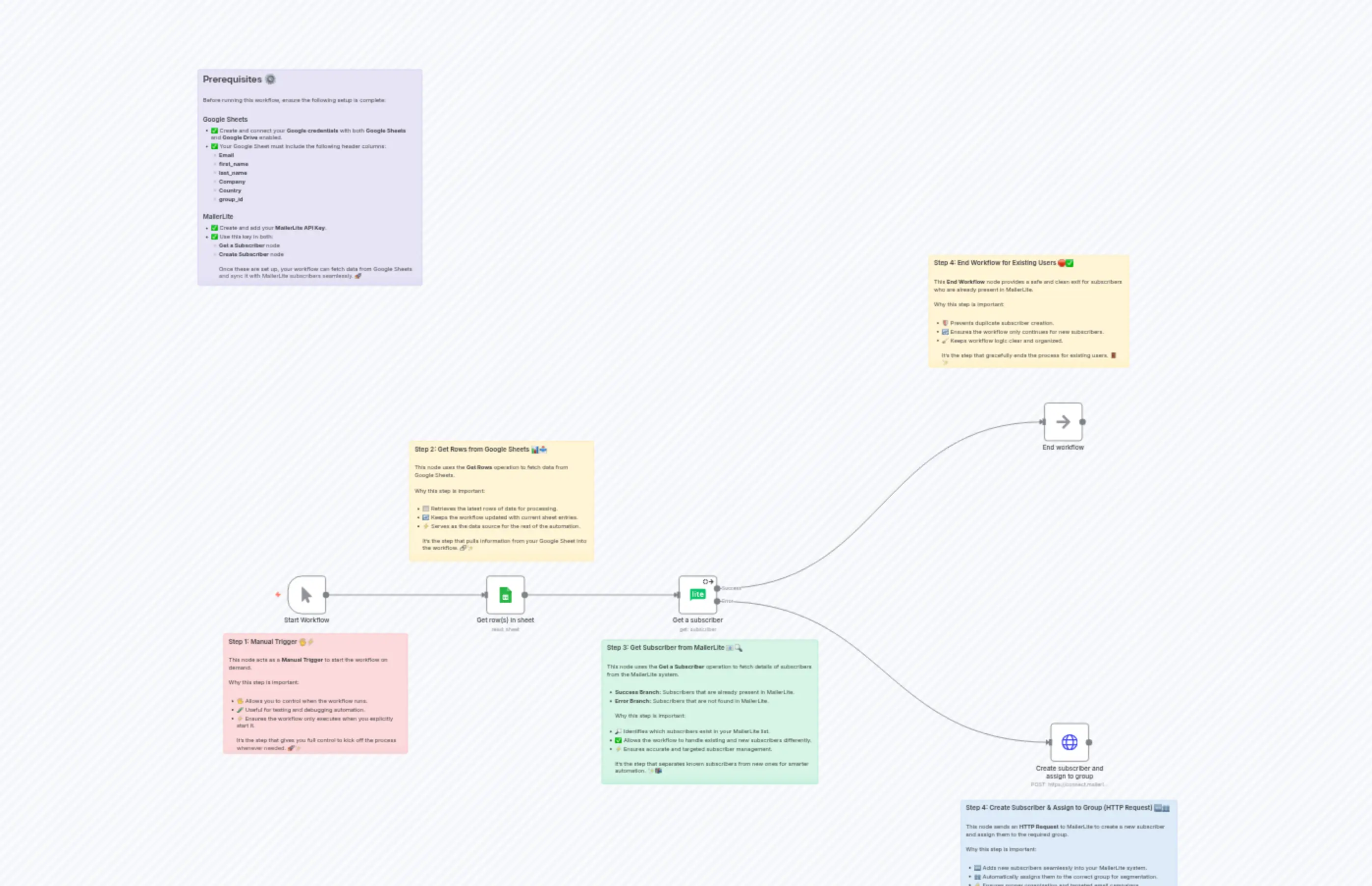
Create and assign subscriber in Mailerlite from Google Sheet
説明
Categories
🤖 AI & Machine Learning
Nodes Used
n8n-nodes-base.noOpn8n-nodes-base.mailerLiten8n-nodes-base.stickyNoten8n-nodes-base.stickyNoten8n-nodes-base.stickyNoten8n-nodes-base.stickyNoten8n-nodes-base.stickyNoten8n-nodes-base.stickyNoten8n-nodes-base.httpRequestn8n-nodes-base.googleSheets
Price無料
Views0
最終更新11/28/2025
workflow.json
{
  "id": "CQVAcWFM8iCOPZG5",
  "meta": {
    "instanceId": "{YOUR_INSTANCE_ID}",
    "templateCredsSetupCompleted": true
  },
  "name": "Create and assign subscriber in Mailerlite from Google Sheet",
  "tags": [],
  "nodes": [
    {
      "id": "a43ee8b3-37b3-4f0c-bcf0-60511054a2d7",
      "name": "Get row(s) in sheet",
      "type": "n8n-nodes-base.googleSheets",
      "position": [
        -220,
        40
      ],
      "parameters": {
        "options": {},
        "sheetName": {
          "__rl": true,
          "mode": "list",
          "value": "gid=0",
          "cachedResultUrl": "https://docs.google.com/spreadsheets/d/{YOUR_GOOGLE_SHEETS_DOCUMENT_ID}/edit#gid=0",
          "cachedResultName": "{YOUR_GOOGLE_SHEETS_SHEET_NAME}"
        },
        "documentId": {
          "__rl": true,
          "mode": "list",
          "value": "{YOUR_GOOGLE_SHEETS_DOCUMENT_ID}",
          "cachedResultUrl": "https://docs.google.com/spreadsheets/d/{YOUR_GOOGLE_SHEETS_DOCUMENT_ID}/edit?usp=drivesdk",
          "cachedResultName": "{YOUR_GOOGLE_SHEETS_DOCUMENT_NAME}"
        }
      },
      "credentials": {
        "googleSheetsOAuth2Api": {
          "id": "{YOUR_GOOGLE_SHEETS_API_ID}",
          "name": "{YOUR_GOOGLE_SHEETS_API_NAME}"
        }
      },
      "typeVersion": 4.6
    },
    {
      "id": "fbf4d989-1c36-40a1-b6f1-52ee12bde18a",
      "name": "Get a subscriber",
      "type": "n8n-nodes-base.mailerLite",
      "onError": "continueErrorOutput",
      "position": [
        260,
        40
      ],
      "parameters": {
        "operation": "get",
        "subscriberId": "={{ $json.Email }}"
      },
      "credentials": {
        "mailerLiteApi": {
          "id": "{YOUR_MAILERLITE_API_ID}",
          "name": "{YOUR_MAILERLITE_API_NAME}"
        }
      },
      "typeVersion": 2,
      "alwaysOutputData": true
    },
    {
      "id": "23910947-2fe9-4391-945a-d5c080c90ac6",
      "name": "Create subscriber and assign to group",
      "type": "n8n-nodes-base.httpRequest",
      "position": [
        1180,
        400
      ],
      "parameters": {
        "url": "https://connect.mailerlite.com/api/subscribers",
        "method": "POST",
        "options": {},
        "jsonBody": "={\n  \"email\": \"{{ $json.Email }}\",\n  \"fields\": {\n    \"name\": \"{{ $json.first_name }}\",\n    \"last_name\": \"{{ $json.last_name }}\",\n    \"company\": \"{{ $json.Company }}\",\n    \"country\": \"{{ $json.Country }}\"\n  },\n  \"groups\": [\"{{ $json.group_id }}\"]\n}\n",
        "sendBody": true,
        "specifyBody": "json",
        "authentication": "predefinedCredentialType",
        "nodeCredentialType": "mailerLiteApi"
      },
      "credentials": {
        "mailerLiteApi": {
          "id": "{YOUR_MAILERLITE_API_ID}",
          "name": "{YOUR_MAILERLITE_API_NAME}"
        }
      },
      "typeVersion": 4.2
    },
    {
      "id": "c26b4872-32ab-4b48-9a20-2d4be5b6baed",
      "name": "Start Workflow",
      "type": "n8n-nodes-base.manualTrigger",
      "position": [
        -720,
        40
      ],
      "parameters": {},
      "typeVersion": 1
    },
    {
      "id": "bc39a624-695d-48c7-a295-e40c3a7b84fa",
      "name": "Sticky Note",
      "type": "n8n-nodes-base.stickyNote",
      "position": [
        -880,
        180
      ],
      "parameters": {
        "color": 3,
        "width": 460,
        "height": 300,
        "content": "### Step 1: Manual Trigger 🖐️⚡\n\nThis node acts as a **Manual Trigger** to start the workflow on demand.\n\nWhy this step is important:\n\n- 🖐️ Allows you to control when the workflow runs.\n- 🧪 Useful for testing and debugging automation.\n- ⚡ Ensures the workflow only executes when you explicitly start it.\n\nIt’s the step that gives you full control to kick off the process whenever needed. 🚀✨\n"
      },
      "typeVersion": 1
    },
    {
      "id": "cbce1376-b59f-4a7d-a6a6-ac410ae1ca39",
      "name": "Sticky Note1",
      "type": "n8n-nodes-base.stickyNote",
      "position": [
        -420,
        -300
      ],
      "parameters": {
        "width": 460,
        "height": 300,
        "content": "### Step 2: Get Rows from Google Sheets 📊📥\n\nThis node uses the **Get Rows** operation to fetch data from Google Sheets.\n\nWhy this step is important:\n\n- 📋 Retrieves the latest rows of data for processing.\n- 🔄 Keeps the workflow updated with current sheet entries.\n- ⚡ Serves as the data source for the rest of the automation.\n\nIt’s the step that pulls information from your Google Sheet into the workflow. 🔗✨\n"
      },
      "typeVersion": 1
    },
    {
      "id": "3a331aef-f9c8-4368-984f-6221cd1a4a5b",
      "name": "Sticky Note2",
      "type": "n8n-nodes-base.stickyNote",
      "position": [
        60,
        200
      ],
      "parameters": {
        "color": 4,
        "width": 540,
        "height": 360,
        "content": "### Step 3: Get Subscriber from MailerLite 📧🔍\n\nThis node uses the **Get a Subscriber** operation to fetch details of subscribers from the MailerLite system.\n\n- **Success Branch:** Subscribers that are already present in MailerLite.  \n- **Error Branch:** Subscribers that are not found in MailerLite.  \n\nWhy this step is important:\n\n- 🔎 Identifies which subscribers exist in your MailerLite list.\n- ✅ Allows the workflow to handle existing and new subscribers differently.\n- ⚡ Ensures accurate and targeted subscriber management.\n\nIt’s the step that separates known subscribers from new ones for smarter automation. ✨📬\n"
      },
      "typeVersion": 1
    },
    {
      "id": "bf9b2275-debd-4113-830c-736d74cb135a",
      "name": "End workflow",
      "type": "n8n-nodes-base.noOp",
      "position": [
        1160,
        -400
      ],
      "parameters": {},
      "typeVersion": 1
    },
    {
      "id": "7a52a415-bd9d-4b39-85d6-d3cb8e0b4b8a",
      "name": "Sticky Note3",
      "type": "n8n-nodes-base.stickyNote",
      "position": [
        880,
        -760
      ],
      "parameters": {
        "width": 500,
        "height": 280,
        "content": "### Step 4: End Workflow for Existing Users 🛑✅\n\nThis **End Workflow** node provides a safe and clean exit for subscribers who are already present in MailerLite.\n\nWhy this step is important:\n\n- 🛡️ Prevents duplicate subscriber creation.\n- 🔄 Ensures the workflow only continues for new subscribers.\n- 🧹 Keeps workflow logic clear and organized.\n\nIt’s the step that gracefully ends the process for existing users. 🚪✨\n"
      },
      "typeVersion": 1
    },
    {
      "id": "55e7ee44-8deb-4c24-ba01-2cf8dc065acb",
      "name": "Sticky Note4",
      "type": "n8n-nodes-base.stickyNote",
      "position": [
        960,
        600
      ],
      "parameters": {
        "color": 5,
        "width": 540,
        "height": 300,
        "content": "### Step 4: Create Subscriber & Assign to Group (HTTP Request) 🆕👥\n\nThis node sends an **HTTP Request** to MailerLite to create a new subscriber and assign them to the required group.\n\nWhy this step is important:\n\n- 🆕 Adds new subscribers seamlessly into your MailerLite system.\n- 👥 Automatically assigns them to the correct group for segmentation.\n- ⚡ Ensures proper organization and targeted email campaigns.\n\nIt’s the step that grows your audience while keeping your mailing lists structured. 📧✨\n"
      },
      "typeVersion": 1
    },
    {
      "id": "5357d0af-ef67-4a17-b5c9-a861a948d478",
      "name": "Sticky Note5",
      "type": "n8n-nodes-base.stickyNote",
      "position": [
        -940,
        -1220
      ],
      "parameters": {
        "color": 6,
        "width": 560,
        "height": 540,
        "content": "## Prerequisites ⚙️\n\nBefore running this workflow, ensure the following setup is complete:\n\n### Google Sheets\n- ✅ Create and connect your **Google credentials** with both **Google Sheets** and **Google Drive** enabled.  \n- ✅ Your Google Sheet must include the following header columns:\n  - **Email**\n  - **first_name**\n  - **last_name**\n  - **Company**\n  - **Country**\n  - **group_id**\n\n### MailerLite\n- ✅ Create and add your **MailerLite API Key**.  \n- ✅ Use this key in both:\n  - **Get a Subscriber** node  \n  - **Create Subscriber** node  \n\nOnce these are set up, your workflow can fetch data from Google Sheets and sync it with MailerLite subscribers seamlessly. 🚀\n"
      },
      "typeVersion": 1
    }
  ],
  "active": false,
  "pinData": {},
  "settings": {
    "executionOrder": "v1"
  },
  "versionId": "3043305e-b7ac-47b3-a36a-cefdb7cd9e74",
  "connections": {
    "Start Workflow": {
      "main": [
        [
          {
            "node": "Get row(s) in sheet",
            "type": "main",
            "index": 0
          }
        ]
      ]
    },
    "Get a subscriber": {
      "main": [
        [
          {
            "node": "End workflow",
            "type": "main",
            "index": 0
          }
        ],
        [
          {
            "node": "Create subscriber and assign to group",
            "type": "main",
            "index": 0
          }
        ]
      ]
    },
    "Get row(s) in sheet": {
      "main": [
        [
          {
            "node": "Get a subscriber",
            "type": "main",
            "index": 0
          }
        ]
      ]
    }
  }
}