Automated Helpdesk Ticket Alerts to Microsoft Teams from Easy Redmine
説明
Categories
🤖 AI & Machine Learning
Nodes Used
n8n-nodes-base.setn8n-nodes-base.webhookn8n-nodes-base.stickyNoten8n-nodes-base.stickyNoten8n-nodes-base.stickyNoten8n-nodes-base.microsoftTeams@n8n/n8n-nodes-langchain.agent@n8n/n8n-nodes-langchain.lmChatOpenAi@easysoftware/n8n-nodes-easy-redmine.easyRedmine
Price無料
Views0
最終更新11/28/2025
workflow.json
{
  "id": "f0my04pVcHmlkRaA",
  "meta": {
    "instanceId": "ccf4e500c5536799e0925f03390f0fd338e2b5a5bc862f6a57b5552acfdf3861",
    "templateCredsSetupCompleted": true
  },
  "name": "Automated Helpdesk Ticket Alerts to Microsoft Teams from Easy Redmine",
  "tags": [],
  "nodes": [
    {
      "id": "3fd3ecf0-69fa-497f-8aed-a595de90fa40",
      "name": "OpenAI Chat Model",
      "type": "@n8n/n8n-nodes-langchain.lmChatOpenAi",
      "position": [
        1860,
        980
      ],
      "parameters": {
        "model": {
          "__rl": true,
          "mode": "list",
          "value": "gpt-4o-mini",
          "cachedResultName": "gpt-4o-mini"
        },
        "options": {}
      },
      "credentials": {
        "openAiApi": {
          "id": "abcd134abcd1234",
          "name": "OpenAI account"
        }
      },
      "typeVersion": 1.2
    },
    {
      "id": "ec36d331-a043-44b1-9c21-45f5e8348d55",
      "name": "Sticky Note2",
      "type": "n8n-nodes-base.stickyNote",
      "position": [
        740,
        540
      ],
      "parameters": {
        "color": 7,
        "width": 1980,
        "height": 660,
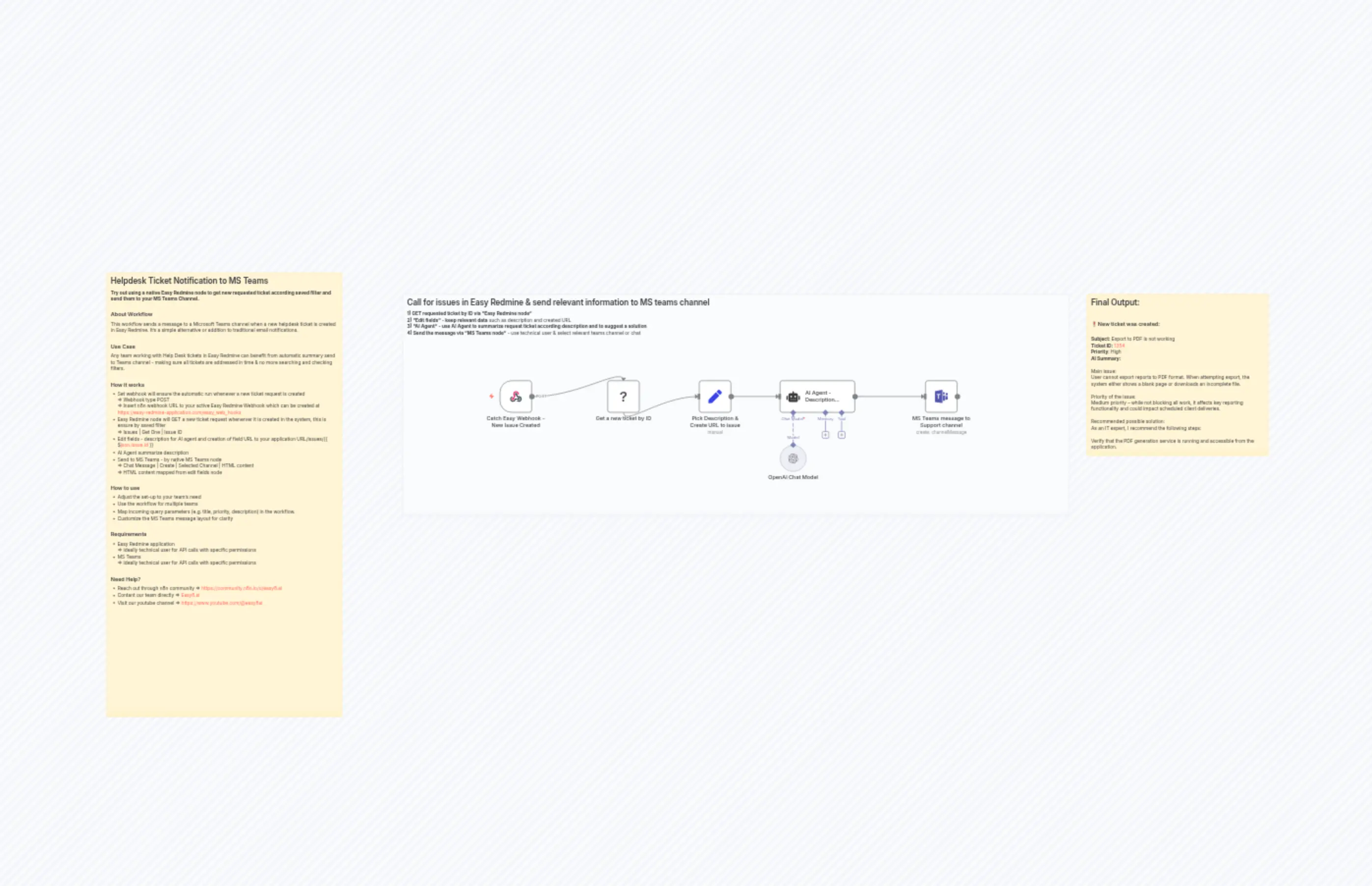
        "content": "## Call for issues in Easy Redmine & send relevant information to MS teams channel\n**1) GET requested ticket by ID via \"Easy Redmine node\"**\n**2) \"Edit fields\" - keep relevant data** such as description and created URL \n**3) \"AI Agent\" - use AI Agent to summarize request ticket according description and to suggest a solution**\n**4) Send the message via \"MS Teams node\"** - use technical user & select relevant teams channel or chat "
      },
      "typeVersion": 1
    },
    {
      "id": "2827963b-7463-42b6-ba1b-e37bb7cd619a",
      "name": "Sticky Note3",
      "type": "n8n-nodes-base.stickyNote",
      "position": [
        2760,
        540
      ],
      "parameters": {
        "width": 540,
        "height": 480,
        "content": "## Final Output:\n\n### ❗️New ticket was created:\n\n**Subject:** Export to PDF is not working\n**Ticket ID:** [1354](https://www.easyredmine.com)\n**Priority**: High \n**AI Summary:**\n\nMain issue:\nUser cannot export reports to PDF format. When attempting export, the system either shows a blank page or downloads an incomplete file.\n\nPriority of the issue:\nMedium priority – while not blocking all work, it affects key reporting functionality and could impact scheduled client deliveries.\n\nRecommended possible solution:\nAs an IT expert, I recommend the following steps:\n\nVerify that the PDF generation service is running and accessible from the application.\n\nCheck for recent changes in report templates that might cause rendering issues.\n\nReview application and server logs for error messages during the export process.\n\nTest PDF export with smaller datasets to see if file size or complexity is causing failures.\n\nEnsure the PDF library or export plugin is up to date and compatible with the current application version.\n\nIf the issue persists, provide users with an alternative export format (e.g., Excel) until resolved.Main issue:\nUser cannot export reports to PDF format. When attempting export, the system either shows a blank page or downloads an incomplete file.\n\nPriority of the issue:\nMedium priority – while not blocking all work, it affects key reporting functionality and could impact scheduled client deliveries.\n\nRecommended possible solution:\nAs an IT expert, I recommend the following steps:\n\nVerify that the PDF generation service is running and accessible from the application.\n\nCheck for recent changes in report templates that might cause rendering issues.\n\nReview application and server logs for error messages during the export process.\n\nTest PDF export with smaller datasets to see if file size or complexity is causing failures.\n\nEnsure the PDF library or export plugin is up to date and compatible with the current application version.\n\nIf the issue persists, provide users with an alternative export format (e.g., Excel) until resolved.\n \n"
      },
      "typeVersion": 1
    },
    {
      "id": "a949a591-36d1-4a7e-8ded-e6b6d1a9dc6b",
      "name": "Sticky Note4",
      "type": "n8n-nodes-base.stickyNote",
      "position": [
        -140,
        480
      ],
      "parameters": {
        "width": 700,
        "height": 1320,
        "content": "## Helpdesk Ticket Notification to MS Teams \n**Try out using a native Easy Redmine node to get new requested ticket according saved filter and send them to your MS Teams Channel.**\n\n### About Workflow\nThis workflow sends a message to a Microsoft Teams channel when a new helpdesk ticket is created in Easy Redmine. It’s a simple alternative or addition to traditional email notifications.\n\n### Use Case \nAny team working with Help Desk tickets in Easy Redmine can benefit from automatic summary send to Teams channel - making sure all tickets are addressed in time & no more searching and checking filters.\n\n\n### How it works\n- Set webhook will ensure the automatic run whenever a new ticket request is created\n=> Webhook type POST\n=> Insert n8n webhook URL to your active Easy Redmine Webhook which can be created at https://easy-redmine-application.com/easy_web_hooks\n- Easy Redmine node will GET a new ticket request whenerver it is created in the system, this is ensure by saved filter\n=> Issues | Get One | Issue ID\n- Edit fields - description for AI agent and creation of field URL to your application URL/issues/{{ $json.issue.id }} \n- AI Agent summarize description\n- Send to MS Teams - by native MS Teams node\n=> Chat Message | Create | Selected Channel | HTML content\n=> HTML content mapped from edit fields node\n\n### How to use\n- Adjust the set-up to your team's need\n- Use the workflow for multiple teams\n- Map incoming query parameters (e.g. title, priority, description) in the workflow.\n- Customize the MS Teams message layout for clarity\n\n### Requirements \n- Easy Redmine application\n=> ideally technical user for API calls with specific permissions\n- MS Teams\n=> ideally technical user for API calls with specific permissions\n\n### Need Help? \n- Reach out through n8n community => https://community.n8n.io/u/easy8.ai\n- Contant our team directly => Easy8.ai\n- Visit our youtube channel => https://www.youtube.com/@easy8ai "
      },
      "typeVersion": 1
    },
    {
      "id": "049a4a70-c6fa-418e-9107-943997791412",
      "name": "MS Teams message to Support channel",
      "type": "n8n-nodes-base.microsoftTeams",
      "position": [
        2280,
        800
      ],
      "webhookId": "e9c4b874-bc78-431b-b42c-001d3c0c7747",
      "parameters": {
        "teamId": {
          "__rl": true,
          "mode": "list",
          "value": "832f57c2-de38-4c98-8915-c41e0be4a64c",
          "cachedResultName": "Support Team"
        },
        "message": "=<b>❗️New ticket was created:</b>\n\n<br><br><b>Subject: </b>{{ $('Get a new ticket by ID').item.json.issue.subject }}\n<br><b><a href=\"{{ $('Pick Description & Create URL to issue').item.json['url link to issue'] }}\">Ticket ID:</b> {{ $('Get a new ticket by ID').item.json.issue.id }}</a>\n<br><b>Priority:</b> {{ $('Get a new ticket by ID').item.json.issue.priority.name }}\n<br><b>AI summary:</b> {{ $json.output }}\n\n\n\n",
        "options": {},
        "resource": "channelMessage",
        "channelId": {
          "__rl": true,
          "mode": "list",
          "value": "19:[email protected]",
          "cachedResultUrl": "https://teams.cloud.microsoft/l/channel/19%3AHQ7P4c0XwE-ztKDfUGKjE1Tgoiu6DXtmrAhetiIeY9A1%40thread.tacv2/Easy8%20Demo?groupId=832f57c2-de38-4c98-8915-c41e0be4a64c&tenantId=eb70cc06-ad73-44a6-ac58-5550fce11ed1&allowXTenantAccess=True&ngc=True",
          "cachedResultName": "General"
        },
        "contentType": "html"
      },
      "credentials": {
        "microsoftTeamsOAuth2Api": {
          "id": "abcd987654abcd",
          "name": "MS Teams"
        }
      },
      "typeVersion": 2
    },
    {
      "id": "a75a5da9-f772-490e-8edb-622c72025c40",
      "name": "Get a new ticket by ID",
      "type": "@easysoftware/n8n-nodes-easy-redmine.easyRedmine",
      "position": [
        1340,
        800
      ],
      "parameters": {
        "id": "={{ $json.body.issue.id }}",
        "operation": "get-one"
      },
      "credentials": {
        "easyRedmineApi": {
          "id": "abcd456123abcd",
          "name": "EasyRedmine"
        }
      },
      "typeVersion": 1
    },
    {
      "id": "5b605790-626c-47ea-aa25-aafcd23f8e47",
      "name": "Catch Easy Webhook - New Issue Created",
      "type": "n8n-nodes-base.webhook",
      "position": [
        1020,
        800
      ],
      "webhookId": "aabb1122-3344-5cd6-78ef-912345abcd",
      "parameters": {
        "path": "cc5d8044-9921-4b50-8ad4-9a2f1b6718ec",
        "options": {},
        "httpMethod": "POST"
      },
      "typeVersion": 2
    },
    {
      "id": "ee472d30-6b66-4f3b-a311-8aa285e2bc11",
      "name": "Pick Description & Create URL to issue",
      "type": "n8n-nodes-base.set",
      "position": [
        1620,
        800
      ],
      "parameters": {
        "options": {},
        "assignments": {
          "assignments": [
            {
              "id": "943b3727-1d25-4469-adf6-1be031f417eb",
              "name": "description",
              "type": "string",
              "value": "={{ $json.issue.description }}"
            },
            {
              "id": "ed4bba4d-d816-4255-8562-4889c8fcbe1c",
              "name": "url link to issue",
              "type": "string",
              "value": "=https://easyredmine-application.com/issues/{{ $json.issue.id }}"
            }
          ]
        }
      },
      "typeVersion": 3.4
    },
    {
      "id": "8f5c9110-7303-4076-9fd6-6eb97d7b8137",
      "name": "AI Agent - Description Summary",
      "type": "@n8n/n8n-nodes-langchain.agent",
      "position": [
        1860,
        800
      ],
      "parameters": {
        "text": "={{ $json.description }}",
        "options": {
          "systemMessage": "=You are a helpful assistant who summarise read descriptions of the task provided and created summary of the task description in form:\nMain issue: \nPriority of the issue:\nRecommend possible solution:\nWhen answering the \"recommended possible solution\" act as an IT expert.\n\nReturn response in HTML structure."
        },
        "promptType": "define"
      },
      "typeVersion": 2
    }
  ],
  "active": false,
  "pinData": {},
  "settings": {
    "executionOrder": "v1"
  },
  "versionId": "efd2260a-2e27-4e0b-a38a-84c83cb704db",
  "connections": {
    "OpenAI Chat Model": {
      "ai_languageModel": [
        [
          {
            "node": "AI Agent - Description Summary",
            "type": "ai_languageModel",
            "index": 0
          }
        ]
      ]
    },
    "Get a new ticket by ID": {
      "main": [
        [
          {
            "node": "Pick Description & Create URL to issue",
            "type": "main",
            "index": 0
          }
        ]
      ]
    },
    "AI Agent - Description Summary": {
      "main": [
        [
          {
            "node": "MS Teams message to Support channel",
            "type": "main",
            "index": 0
          }
        ]
      ]
    },
    "Catch Easy Webhook - New Issue Created": {
      "main": [
        [
          {
            "node": "Get a new ticket by ID",
            "type": "main",
            "index": 0
          }
        ]
      ]
    },
    "Pick Description & Create URL to issue": {
      "main": [
        [
          {
            "node": "AI Agent - Description Summary",
            "type": "main",
            "index": 0
          }
        ]
      ]
    }
  }
}