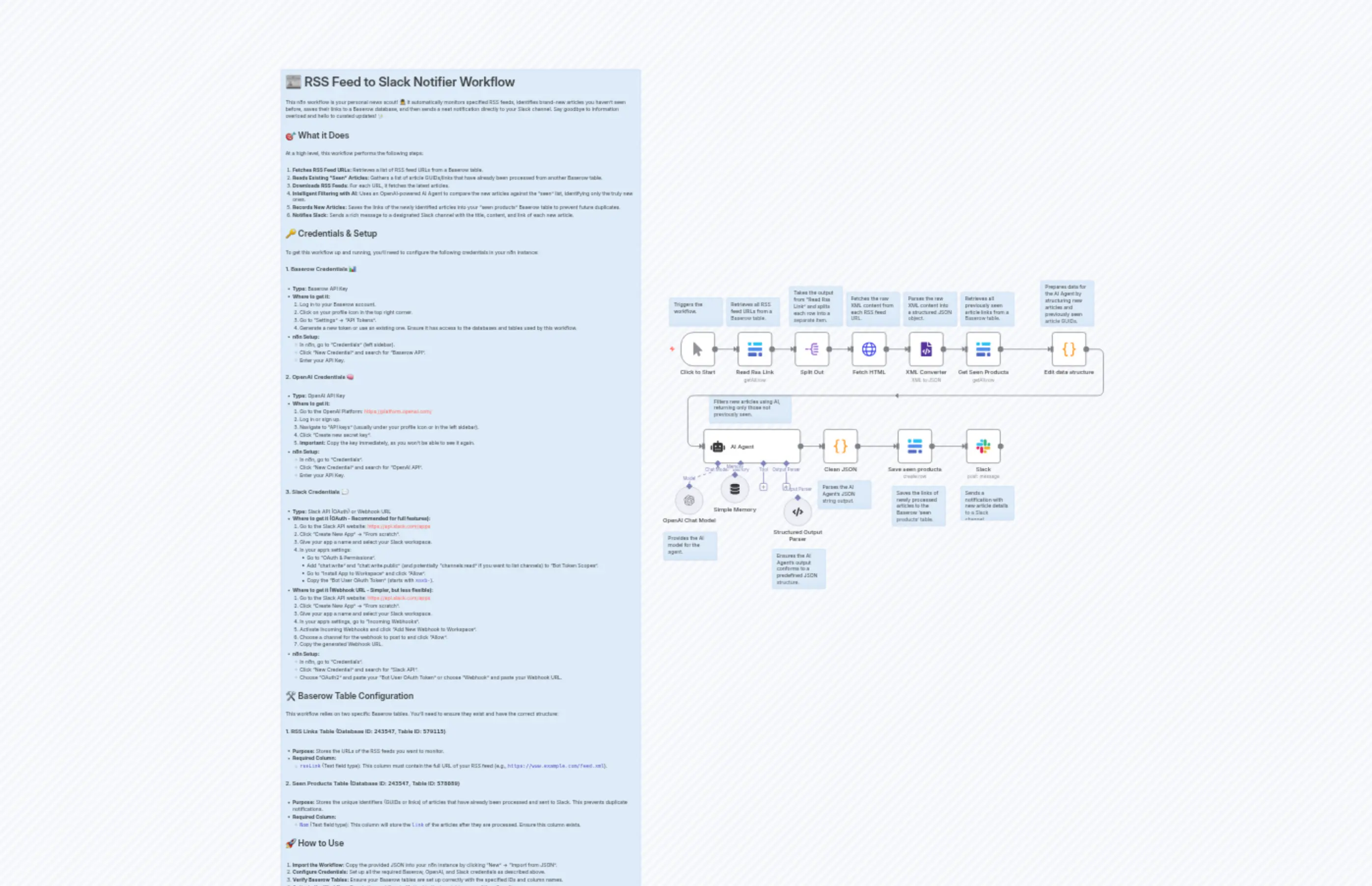
Smart RSS Feed Monitoring with AI Filtering, Baserow Storage, and Slack Alerts
説明
Categories
📢 Marketing🤖 AI & Machine Learning
Nodes Used
n8n-nodes-base.xmln8n-nodes-base.coden8n-nodes-base.coden8n-nodes-base.slackn8n-nodes-base.baserown8n-nodes-base.baserown8n-nodes-base.baserown8n-nodes-base.splitOutn8n-nodes-base.stickyNoten8n-nodes-base.stickyNote
Price無料
Views0
最終更新11/28/2025
workflow.json
{
"meta": {
"instanceId": "26f5531eecf6499e7c422aeb73185f0be958efc5f46695f90de5f82808ede6ac"
},
"nodes": [
{
"id": "8fb7a0bb-cb4e-43ed-a07c-b21f918331b9",
"name": "Slack",
"type": "n8n-nodes-base.slack",
"position": [
800,
272
],
"webhookId": "16638567-cb86-46f1-8922-ecca04819257",
"parameters": {
"text": "=Title : {{ $('Clean JSON').item.json.title }}\nContent : {{ $('Clean JSON').item.json.content }}\nLink : {{ $('Clean JSON').item.json.link }}",
"select": "channel",
"blocksUi": "={{ $json }}",
"channelId": {
"__rl": true,
"mode": "list",
"value": "C091X7ZNW4V",
"cachedResultName": "upwork"
},
"messageType": "block",
"otherOptions": {}
},
"typeVersion": 2.3
},
{
"id": "66b6cfe0-5709-459b-9695-1d3828856402",
"name": "AI Agent",
"type": "@n8n/n8n-nodes-langchain.agent",
"position": [
64,
272
],
"parameters": {
"text": "=\n\n\n\nYou receive a JSON object with two properties:\n\n- input: an array of articles. Each article has the following properties: title, link, guid, and content.\n- alreadyProcessedGuids: an array containing the guids of the articles that have already been processed.\n\nHere is the object to process:\n{{ JSON.stringify($json) }}\n\n🎯 Your task:\nLoop through the input array and return only the articles whose guid is **not** included in alreadyProcessedGuids: \n{{ JSON.stringify($json.alreadyProcessedGuids) }}\n📤 Output format:\nReturn a **valid JSON array** (not a string) containing only the new, unprocessed articles, with only these properties: title, link, guid, and content.\n\nIf all articles were already processed, return exactly: `[]`\n\n❌ Do NOT return anything else: \nNo text, no explanation, no markdown, no key like `\"output\"`, no wrapping object.\n\n⚠️ The output must be raw JSON and must end with `}]`, not `}]}`.\n\nExample of correct output:\n[\n {\n \"title\": \"Sample title\",\n \"link\": \"https://example.com\",\n \"guid\": \"https://example.com\",\n \"content\": \"Some text\"\n }\n]\n\n❌ Example of wrong output:\n[{...}]}\n{\"output\": \"[{...}]\"}\n",
"options": {},
"promptType": "define",
"hasOutputParser": true
},
"typeVersion": 2,
"alwaysOutputData": true
},
{
"id": "b2c24cce-ccb3-4126-a654-e77f8edb34f4",
"name": "OpenAI Chat Model",
"type": "@n8n/n8n-nodes-langchain.lmChatOpenAi",
"position": [
-16,
432
],
"parameters": {
"model": {
"__rl": true,
"mode": "list",
"value": "gpt-4o-mini"
},
"options": {}
},
"typeVersion": 1.2
},
{
"id": "4c60efd4-9834-4f4c-9a5d-1306ae7b0b93",
"name": "Simple Memory",
"type": "@n8n/n8n-nodes-langchain.memoryBufferWindow",
"position": [
112,
400
],
"parameters": {
"sessionKey": "=alreadyProcessedGuids",
"sessionIdType": "customKey",
"contextWindowLength": 50
},
"typeVersion": 1.3
},
{
"id": "a2fb91ac-6793-4b0e-b333-73029195ccce",
"name": "Structured Output Parser",
"type": "@n8n/n8n-nodes-langchain.outputParserStructured",
"position": [
288,
464
],
"parameters": {
"jsonSchemaExample": "\n{\n\"title\": \n\"\",\n\"link\": \n\"\",\n\"guid\": \n\"\",\n \"content\":\"\"\n}"
},
"typeVersion": 1.2
},
{
"id": "81cf4f31-2552-48e3-b76c-9f8f564fb056",
"name": "Split Out",
"type": "n8n-nodes-base.splitOut",
"position": [
320,
0
],
"parameters": {
"options": {},
"fieldToSplitOut": "rssLink"
},
"typeVersion": 1
},
{
"id": "13724965-1d7a-42e9-873f-8a467e2b892a",
"name": "Read Rss Link",
"type": "n8n-nodes-base.baserow",
"position": [
160,
0
],
"parameters": {
"tableId": 579115,
"returnAll": true,
"databaseId": 243547,
"additionalOptions": {}
},
"executeOnce": true,
"typeVersion": 1,
"alwaysOutputData": true
},
{
"id": "92e9980c-b0dc-4b0b-890f-5805f02b3349",
"name": "Save seen products",
"type": "n8n-nodes-base.baserow",
"position": [
608,
272
],
"parameters": {
"tableId": 578089,
"fieldsUi": {
"fieldValues": [
{
"fieldId": 4655790,
"fieldValue": "={{ $json.link }}"
}
]
},
"operation": "create",
"databaseId": 243547
},
"typeVersion": 1
},
{
"id": "f05017f3-7f71-45a5-b5b3-fc411d18feda",
"name": "Clean JSON",
"type": "n8n-nodes-base.code",
"position": [
400,
272
],
"parameters": {
"jsCode": "// Step 1: Get the raw JSON string from the input\nconst raw = $input.first().json.output;\n\nlet articles;\n\n articles = JSON.parse(raw);\n\n\n// Step 3: Return each article as a separate item in n8n format\nreturn articles.map(article => ({ json: article }));"
},
"typeVersion": 2
},
{
"id": "6a4d7f50-3e4e-480b-a4a5-e918bf479272",
"name": "Edit data structure",
"type": "n8n-nodes-base.code",
"position": [
1040,
0
],
"parameters": {
"jsCode": "/**\nreturn $('XML Converter').first().json.rss.channel.item;\n */\n\n\nconst articles = $('XML Converter').first().json.rss.channel.item.map(item => ({\n title: item.title,\n link: item.link,\n content: item.description\n}));\n\n// Pour l'exemple, on définit ici un tableau d'alreadyProcessedGuids\n// En vrai, récupère ce tableau depuis ta mémoire, ta base ou un autre noeud\nconst alreadyProcessedGuids = $input.all().map(item => item.json.Nom);\n\n// Retourner un objet contenant les deux tableaux\nreturn [\n {\n json: {\n input: articles,\n alreadyProcessedGuids:alreadyProcessedGuids\n }\n }\n];\n"
},
"typeVersion": 2
},
{
"id": "a2d81bd3-53e9-4b35-8e5c-96d40c3a36ab",
"name": "Sticky Note",
"type": "n8n-nodes-base.stickyNote",
"position": [
-1120,
-736
],
"parameters": {
"color": 5,
"width": 1008,
"height": 2384,
"content": "# 📰 RSS Feed to Slack Notifier Workflow\n\nThis n8n workflow is your personal news scout! 🕵️♂️ It automatically monitors specified RSS feeds, identifies brand-new articles you haven't seen before, saves their links to a Baserow database, and then sends a neat notification directly to your Slack channel. Say goodbye to information overload and hello to curated updates! ✨\n\n## 🎯 What it Does\n\nAt a high level, this workflow performs the following steps:\n\n1. **Fetches RSS Feed URLs:** Retrieves a list of RSS feed URLs from a Baserow table.\n2. **Reads Existing \"Seen\" Articles:** Gathers a list of article GUIDs/links that have already been processed from another Baserow table.\n3. **Downloads RSS Feeds:** For each URL, it fetches the latest articles.\n4. **Intelligent Filtering with AI:** Uses an OpenAI-powered AI Agent to compare the new articles against the \"seen\" list, identifying only the truly new ones.\n5. **Records New Articles:** Saves the links of the newly identified articles into your \"seen products\" Baserow table to prevent future duplicates.\n6. **Notifies Slack:** Sends a rich message to a designated Slack channel with the title, content, and link of each new article.\n\n## 🔑 Credentials & Setup\n\nTo get this workflow up and running, you'll need to configure the following credentials in your n8n instance:\n\n### 1. Baserow Credentials 📊\n\n* **Type:** Baserow API Key\n* **Where to get it:**\n 1. Log in to your Baserow account.\n 2. Click on your profile icon in the top right corner.\n 3. Go to \"Settings\" -> \"API Tokens\".\n 4. Generate a new token or use an existing one. Ensure it has access to the databases and tables used by this workflow.\n* **n8n Setup:**\n * In n8n, go to \"Credentials\" (left sidebar).\n * Click \"New Credential\" and search for \"Baserow API\".\n * Enter your API Key.\n\n### 2. OpenAI Credentials 🧠\n\n* **Type:** OpenAI API Key\n* **Where to get it:**\n 1. Go to the OpenAI Platform: [https://platform.openai.com/](https://platform.openai.com/)\n 2. Log in or sign up.\n 3. Navigate to \"API keys\" (usually under your profile icon or in the left sidebar).\n 4. Click \"Create new secret key\".\n 5. **Important:** Copy the key immediately, as you won't be able to see it again.\n* **n8n Setup:**\n * In n8n, go to \"Credentials\".\n * Click \"New Credential\" and search for \"OpenAI API\".\n * Enter your API Key.\n\n### 3. Slack Credentials 💬\n\n* **Type:** Slack API (OAuth) or Webhook URL\n* **Where to get it (OAuth - Recommended for full features):**\n 1. Go to the Slack API website: [https://api.slack.com/apps](https://api.slack.com/apps)\n 2. Click \"Create New App\" -> \"From scratch\".\n 3. Give your app a name and select your Slack workspace.\n 4. In your app's settings:\n * Go to \"OAuth & Permissions\".\n * Add \"chat:write\" and \"chat:write.public\" (and potentially \"channels:read\" if you want to list channels) to \"Bot Token Scopes\".\n * Go to \"Install App to Workspace\" and click \"Allow\".\n * Copy the \"Bot User OAuth Token\" (starts with `xoxb-`).\n* **Where to get it (Webhook URL - Simpler, but less flexible):**\n 1. Go to the Slack API website: [https://api.slack.com/apps](https://api.slack.com/apps)\n 2. Click \"Create New App\" -> \"From scratch\".\n 3. Give your app a name and select your Slack workspace.\n 4. In your app's settings, go to \"Incoming Webhooks\".\n 5. Activate Incoming Webhooks and click \"Add New Webhook to Workspace\".\n 6. Choose a channel for the webhook to post to and click \"Allow\".\n 7. Copy the generated Webhook URL.\n* **n8n Setup:**\n * In n8n, go to \"Credentials\".\n * Click \"New Credential\" and search for \"Slack API\".\n * Choose \"OAuth2\" and paste your \"Bot User OAuth Token\" or choose \"Webhook\" and paste your Webhook URL.\n\n## 🛠️ Baserow Table Configuration\n\nThis workflow relies on two specific Baserow tables. You'll need to ensure they exist and have the correct structure:\n\n### 1. RSS Links Table (Database ID: `243547`, Table ID: `579115`)\n\n* **Purpose:** Stores the URLs of the RSS feeds you want to monitor.\n* **Required Column:**\n * `rssLink` (Text field type): This column must contain the full URL of your RSS feed (e.g., `https://www.example.com/feed.xml`).\n\n### 2. Seen Products Table (Database ID: `243547`, Table ID: `578089`)\n\n* **Purpose:** Stores the unique identifiers (GUIDs or links) of articles that have already been processed and sent to Slack. This prevents duplicate notifications.\n* **Required Column:**\n * `Nom` (Text field type): This column will store the `link` of the articles after they are processed. Ensure this column exists.\n\n## 🚀 How to Use\n\n1. **Import the Workflow:** Copy the provided JSON into your n8n instance by clicking \"New\" -> \"Import from JSON\".\n2. **Configure Credentials:** Set up all the required Baserow, OpenAI, and Slack credentials as described above.\n3. **Verify Baserow Tables:** Ensure your Baserow tables are set up correctly with the specified IDs and column names.\n4. **Activate the Workflow:** Toggle the workflow to \"Active\" in the top right corner of the n8n editor.\n5. **Execute:** Click the \"Execute Workflow\" button to run it manually, or set up a schedule trigger if you want it to run automatically (e.g., every hour).\n\nEnjoy your automated news updates! 🎉\n"
},
"typeVersion": 1
},
{
"id": "9dbfcd34-071d-48f1-9d28-f29960f0297a",
"name": "Sticky Note1",
"type": "n8n-nodes-base.stickyNote",
"position": [
128,
-96
],
"parameters": {
"color": 5,
"width": 150,
"height": 80,
"content": "Retrieves all RSS feed URLs from a Baserow table.\n"
},
"typeVersion": 1
},
{
"id": "beb101f3-4f5d-41ce-8c2c-0ff12cdc4981",
"name": "Sticky Note2",
"type": "n8n-nodes-base.stickyNote",
"position": [
304,
-128
],
"parameters": {
"color": 5,
"width": 150,
"height": 112,
"content": "Takes the output from \"Read Rss Link\" and splits each row into a separate item. "
},
"typeVersion": 1
},
{
"id": "8da80169-36d4-4b07-9559-d120ef4a37f1",
"name": "Fetch HTML",
"type": "n8n-nodes-base.httpRequest",
"position": [
480,
0
],
"parameters": {
"url": "={{ $json.rssLink }}",
"options": {}
},
"typeVersion": 4.2
},
{
"id": "fb0fa089-3062-42bd-ad41-1a060834b3dd",
"name": "Sticky Note3",
"type": "n8n-nodes-base.stickyNote",
"position": [
464,
-112
],
"parameters": {
"color": 5,
"width": 150,
"height": 96,
"content": "Fetches the raw XML content from each RSS feed URL.\n"
},
"typeVersion": 1
},
{
"id": "4a972c2e-0256-487f-8375-d385c5730896",
"name": "XML Converter",
"type": "n8n-nodes-base.xml",
"position": [
640,
0
],
"parameters": {
"options": {}
},
"typeVersion": 1
},
{
"id": "f0a38201-e008-44c2-b164-2450f20fb00c",
"name": "Sticky Note4",
"type": "n8n-nodes-base.stickyNote",
"position": [
624,
-112
],
"parameters": {
"color": 5,
"width": 150,
"height": 96,
"content": "Parses the raw XML content into a structured JSON object.\n"
},
"typeVersion": 1
},
{
"id": "a38d4bc8-f76b-4461-a376-840f52220c10",
"name": "Sticky Note5",
"type": "n8n-nodes-base.stickyNote",
"position": [
784,
-112
],
"parameters": {
"color": 5,
"width": 150,
"height": 96,
"content": "Retrieves all previously seen article links from a Baserow table.\n"
},
"typeVersion": 1
},
{
"id": "80173c28-db72-4657-bee6-7867de66cedc",
"name": "Get Seen Products",
"type": "n8n-nodes-base.baserow",
"position": [
800,
0
],
"parameters": {
"tableId": 578089,
"returnAll": true,
"databaseId": 243547,
"additionalOptions": {}
},
"executeOnce": true,
"typeVersion": 1,
"alwaysOutputData": true
},
{
"id": "6743d642-91a1-4dfb-bee3-8f59a7f893ba",
"name": "Sticky Note6",
"type": "n8n-nodes-base.stickyNote",
"position": [
1008,
-144
],
"parameters": {
"color": 5,
"width": 150,
"height": 128,
"content": "Prepares data for the AI Agent by structuring new articles and previously seen article GUIDs."
},
"typeVersion": 1
},
{
"id": "30e955c8-ee4f-42bb-88e9-ea6efc2171f3",
"name": "Sticky Note7",
"type": "n8n-nodes-base.stickyNote",
"position": [
80,
176
],
"parameters": {
"color": 5,
"width": 230,
"height": 80,
"content": "Filters new articles using AI, returning only those not previously seen.\n"
},
"typeVersion": 1
},
{
"id": "94ee1b33-9bb1-49fc-840e-099eea2c5330",
"name": "Sticky Note8",
"type": "n8n-nodes-base.stickyNote",
"position": [
256,
608
],
"parameters": {
"color": 5,
"width": 150,
"height": 112,
"content": "Ensures the AI Agent's output conforms to a predefined JSON structure."
},
"typeVersion": 1
},
{
"id": "b43d5393-405d-4928-9979-0b95d598393a",
"name": "Sticky Note9",
"type": "n8n-nodes-base.stickyNote",
"position": [
384,
416
],
"parameters": {
"color": 5,
"width": 150,
"height": 80,
"content": "Parses the AI Agent's JSON string output."
},
"typeVersion": 1
},
{
"id": "a860323f-31fb-4555-949d-9cb4b9e63491",
"name": "Sticky Note10",
"type": "n8n-nodes-base.stickyNote",
"position": [
592,
432
],
"parameters": {
"color": 5,
"width": 150,
"height": 112,
"content": "Saves the links of newly processed articles to the Baserow 'seen products' table."
},
"typeVersion": 1
},
{
"id": "7fe68866-da49-4545-a7d0-d757932508e1",
"name": "Sticky Note11",
"type": "n8n-nodes-base.stickyNote",
"position": [
784,
432
],
"parameters": {
"color": 5,
"width": 150,
"height": 96,
"content": "Sends a notification with new article details to a Slack channel."
},
"typeVersion": 1
},
{
"id": "448de534-bb3b-4548-8419-3c8e53f2700a",
"name": "Click to Start",
"type": "n8n-nodes-base.manualTrigger",
"position": [
0,
0
],
"parameters": {},
"typeVersion": 1
},
{
"id": "5eca38d7-de00-4231-bb50-5ce0a7b9fe9d",
"name": "Sticky Note12",
"type": "n8n-nodes-base.stickyNote",
"position": [
-32,
-96
],
"parameters": {
"color": 5,
"width": 150,
"height": 80,
"content": "Triggers the workflow."
},
"typeVersion": 1
},
{
"id": "998a48c5-b88c-4fc9-ba9e-b9e689562571",
"name": "Sticky Note13",
"type": "n8n-nodes-base.stickyNote",
"position": [
-48,
560
],
"parameters": {
"color": 5,
"width": 150,
"height": 80,
"content": "Provides the AI model for the agent."
},
"typeVersion": 1
}
],
"pinData": {},
"connections": {
"AI Agent": {
"main": [
[
{
"node": "Clean JSON",
"type": "main",
"index": 0
}
]
]
},
"Split Out": {
"main": [
[
{
"node": "Fetch HTML",
"type": "main",
"index": 0
}
]
]
},
"Clean JSON": {
"main": [
[
{
"node": "Save seen products",
"type": "main",
"index": 0
}
]
]
},
"Fetch HTML": {
"main": [
[
{
"node": "XML Converter",
"type": "main",
"index": 0
}
]
]
},
"Read Rss Link": {
"main": [
[
{
"node": "Split Out",
"type": "main",
"index": 0
}
]
]
},
"Simple Memory": {
"ai_memory": [
[
{
"node": "AI Agent",
"type": "ai_memory",
"index": 0
}
]
]
},
"XML Converter": {
"main": [
[
{
"node": "Get Seen Products",
"type": "main",
"index": 0
}
]
]
},
"Click to Start": {
"main": [
[
{
"node": "Read Rss Link",
"type": "main",
"index": 0
}
]
]
},
"Get Seen Products": {
"main": [
[
{
"node": "Edit data structure",
"type": "main",
"index": 0
}
]
]
},
"OpenAI Chat Model": {
"ai_languageModel": [
[
{
"node": "AI Agent",
"type": "ai_languageModel",
"index": 0
}
]
]
},
"Save seen products": {
"main": [
[
{
"node": "Slack",
"type": "main",
"index": 0
}
]
]
},
"Edit data structure": {
"main": [
[
{
"node": "AI Agent",
"type": "main",
"index": 0
}
]
]
}
}
}