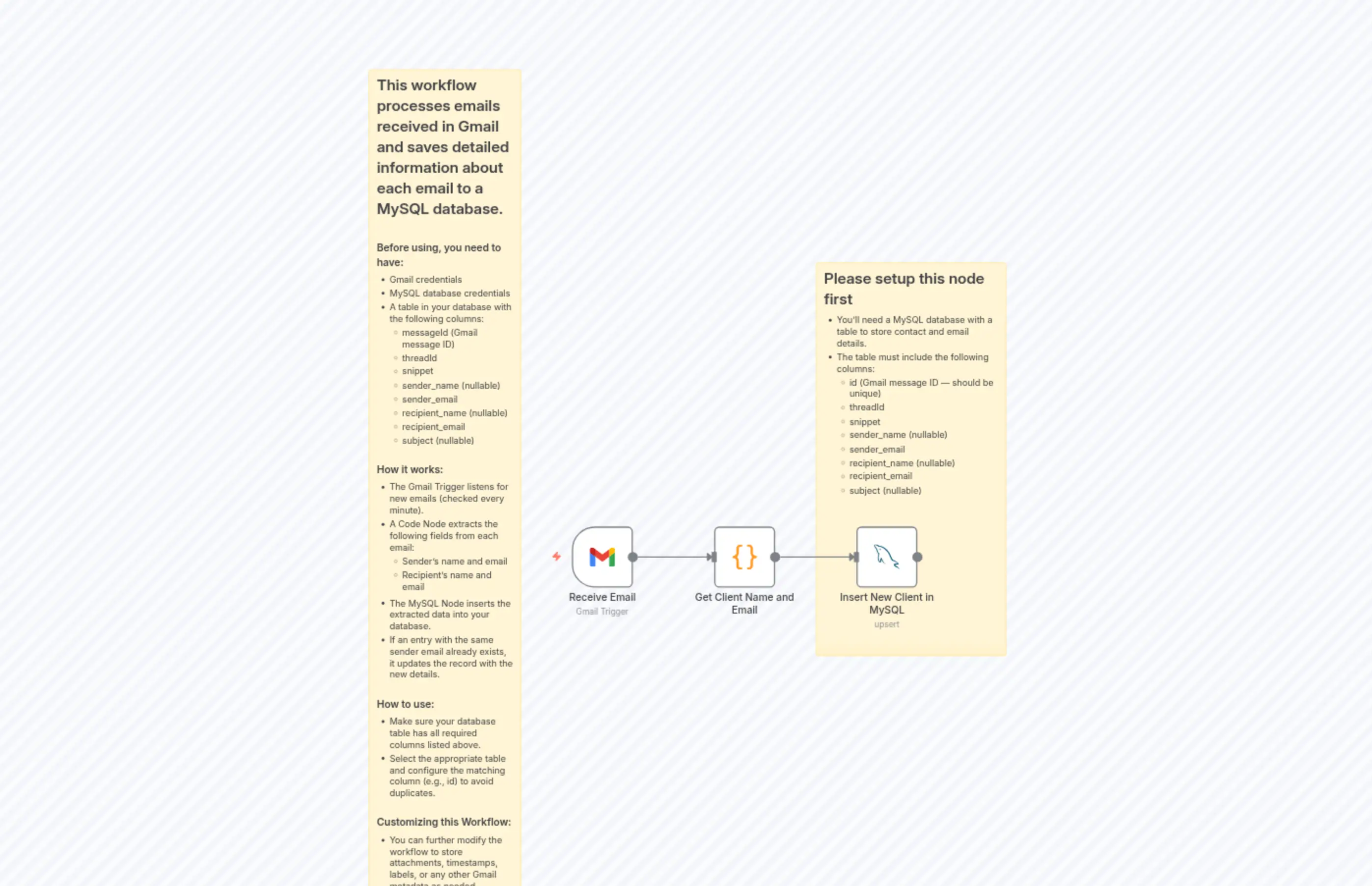
Store Gmail Email Details in MySQL Database
説明
Categories
⚙️ Automation
Nodes Used
n8n-nodes-base.coden8n-nodes-base.mySqln8n-nodes-base.stickyNoten8n-nodes-base.stickyNoten8n-nodes-base.gmailTrigger
Price無料
Views0
最終更新11/28/2025
workflow.json
{
  "meta": {
    "instanceId": "d6e2f2f655b1125bbcac14a4cac6d2e46c7a150e927f85fc96fdca1a6dc39e0e",
    "templateCredsSetupCompleted": true
  },
  "nodes": [
    {
      "id": "3a905012-05c9-4799-93e2-3d3faee8dec3",
      "name": "Receive Email",
      "type": "n8n-nodes-base.gmailTrigger",
      "position": [
        0,
        -120
      ],
      "parameters": {
        "filters": {},
        "pollTimes": {
          "item": [
            {
              "mode": "everyMinute"
            }
          ]
        }
      },
      "credentials": {
        "gmailOAuth2": {
          "id": "YVZiLPppXZw84rIU",
          "name": "Gmail account"
        }
      },
      "typeVersion": 1.2
    },
    {
      "id": "2b4de6f5-5fd4-449b-a708-b883a9606f29",
      "name": "Get Client Name and Email",
      "type": "n8n-nodes-base.code",
      "position": [
        220,
        -120
      ],
      "parameters": {
        "mode": "runOnceForEachItem",
        "jsCode": "// Extract Sender Info\nlet sender_email = $json.From.trim();\nlet sender_name = null;\n\nif (sender_email.includes('<')) {\n  sender_name = sender_email.split('<')[0].trim();\n  sender_email = sender_email.split('<')[1].replace('>', '').trim();\n}\n\n// Extract Recipient Info\nlet recipient_email = $json.To.trim();\nlet recipient_name = null;\n\nif (recipient_email.includes('<')) {\n  recipient_name = recipient_email.split('<')[0].trim();\n  recipient_email = recipient_email.split('<')[1].replace('>', '').trim();\n}\n\nreturn {\n  \"sender_name\": sender_name,\n  \"sender_email\": sender_email,\n  \"recipient_name\": recipient_name,\n  \"recipient_email\": recipient_email\n}"
      },
      "typeVersion": 2
    },
    {
      "id": "05206943-79b6-4bc6-a04b-218db9de7000",
      "name": "Insert New Client in MySQL",
      "type": "n8n-nodes-base.mySql",
      "onError": "continueRegularOutput",
      "position": [
        440,
        -120
      ],
      "parameters": {
        "table": {
          "__rl": true,
          "mode": "list",
          "value": "contacts",
          "cachedResultName": "contacts"
        },
        "options": {},
        "dataMode": "defineBelow",
        "operation": "upsert",
        "valuesToSend": {
          "values": [
            {
              "value": "={{ $('Receive Email').item.json.threadId }}",
              "column": "threadId"
            },
            {
              "value": "={{ $json.sender_name }}",
              "column": "sender_name"
            },
            {
              "value": "={{ $json.sender_email }}",
              "column": "sender_email"
            },
            {
              "value": "={{ $json.recipient_name }}",
              "column": "recipient_name"
            },
            {
              "value": "={{ $json.recipient_email }}",
              "column": "recipient_email"
            },
            {
              "value": "={{ $('Receive Email').item.json.Subject }}",
              "column": "subject"
            },
            {
              "value": "={{ $('Receive Email').item.json.snippet }}",
              "column": "snippet"
            }
          ]
        },
        "valueToMatchOn": "={{ $('Receive Email').item.json.id }}",
        "columnToMatchOn": "messageId"
      },
      "credentials": {
        "mySql": {
          "id": "MYdqb2i2fz5O21ui",
          "name": "BT Operations Database"
        }
      },
      "typeVersion": 2.4,
      "alwaysOutputData": true
    },
    {
      "id": "ce56a64f-0311-4e54-81a9-2d7291a9da10",
      "name": "Sticky Note",
      "type": "n8n-nodes-base.stickyNote",
      "position": [
        -320,
        -840
      ],
      "parameters": {
        "height": 1340,
        "content": "## This workflow processes emails received in Gmail and saves detailed information about each email to a MySQL database.\n\n### Before using, you need to have:\n- Gmail credentials\n- MySQL database credentials\n- A table in your database with the following columns:\n  - messageId (Gmail message ID)\n  - threadId\n  - snippet\n  - sender_name (nullable)\n  - sender_email\n  - recipient_name (nullable)\n  - recipient_email\n  - subject (nullable)\n\n\n### How it works:\n- The Gmail Trigger listens for new emails (checked every minute).\n- A Code Node extracts the following fields from each email:\n  - Sender's name and email\n  - Recipient's name and email\n- The MySQL Node inserts the extracted data into your database.\n- If an entry with the same sender email already exists, it updates the record with the new details.\n\n### How to use:\n- Make sure your database table has all required columns listed above.\n- Select the appropriate table and configure the matching column (e.g., id) to avoid duplicates.\n\n### Customizing this Workflow:\n- You can further modify the workflow to store attachments, timestamps, labels, or any other Gmail metadata as needed.\n"
      },
      "typeVersion": 1
    },
    {
      "id": "9b480e55-00f1-4cfb-af90-8038b5034679",
      "name": "Sticky Note1",
      "type": "n8n-nodes-base.stickyNote",
      "position": [
        380,
        -540
      ],
      "parameters": {
        "width": 300,
        "height": 620,
        "content": "## Please setup this node first\n- You'll need a MySQL database with a table to store contact and email details.\n- The table must include the following columns:\n  - id (Gmail message ID — should be unique)\n  - threadId\n  - snippet\n  - sender_name (nullable)\n  - sender_email\n  - recipient_name (nullable)\n  - recipient_email\n  - subject (nullable)"
      },
      "typeVersion": 1
    }
  ],
  "pinData": {},
  "connections": {
    "Receive Email": {
      "main": [
        [
          {
            "node": "Get Client Name and Email",
            "type": "main",
            "index": 0
          }
        ]
      ]
    },
    "Get Client Name and Email": {
      "main": [
        [
          {
            "node": "Insert New Client in MySQL",
            "type": "main",
            "index": 0
          }
        ]
      ]
    },
    "Insert New Client in MySQL": {
      "main": [
        []
      ]
    }
  }
}