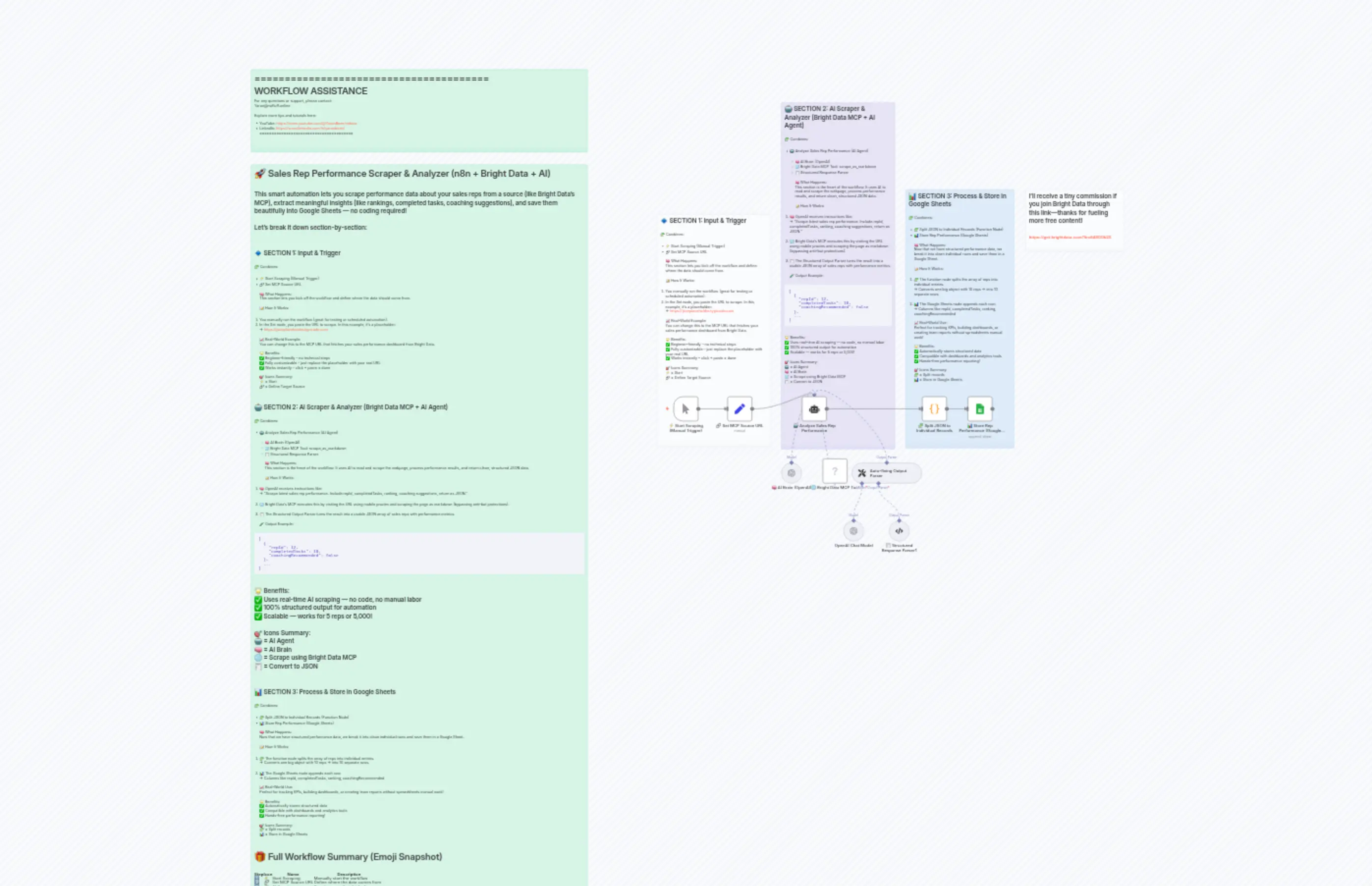
32 Track Sales Rep Performance
説明
Categories
🤖 AI & Machine Learning
Nodes Used
n8n-nodes-base.setn8n-nodes-base.coden8n-nodes-base.stickyNoten8n-nodes-base.stickyNoten8n-nodes-base.stickyNoten8n-nodes-base.stickyNoten8n-nodes-base.stickyNoten8n-nodes-base.stickyNoten8n-nodes-base.googleSheetsn8n-nodes-mcp.mcpClientTool
Price無料
Views0
最終更新11/28/2025
workflow.json
{
  "id": "bB57PHGi6PT6kDou",
  "meta": {
    "instanceId": "c38e3b8a7e4240e6cdca062743f016c1029f385bf40345b6291939dfd83bfd77",
    "templateCredsSetupCompleted": true
  },
  "name": "32  Track Sales Rep Performance",
  "tags": [],
  "nodes": [
    {
      "id": "3a81bea5-aad7-43af-a555-e7be29f9f59a",
      "name": "⚡ Start Scraping (Manual Trigger)",
      "type": "n8n-nodes-base.manualTrigger",
      "position": [
        -500,
        -80
      ],
      "parameters": {},
      "typeVersion": 1
    },
    {
      "id": "81b6c9eb-17b7-45b0-abf8-4cdf31bf3b50",
      "name": " 🔗 Set MCP Source URL",
      "type": "n8n-nodes-base.set",
      "position": [
        -280,
        -80
      ],
      "parameters": {
        "options": {},
        "assignments": {
          "assignments": [
            {
              "id": "5357cffe-b338-4852-a0ca-b9d9cf0700a1",
              "name": "activityURL",
              "type": "string",
              "value": "https://jsonplaceholder.typicode.com/todos"
            }
          ]
        }
      },
      "typeVersion": 3.4
    },
    {
      "id": "f9d0f0d5-1dd7-4d85-b55c-3e84cfbf6918",
      "name": "🤖 Analyze Sales Rep Performance ",
      "type": "@n8n/n8n-nodes-langchain.agent",
      "position": [
        0,
        -80
      ],
      "parameters": {
        "text": "=You are a web scraper and data analyzer connected to Bright Data’s MCP tool.\n\nScrape the following URL:\n{{ $json.activityURL }}\n\nEach item in the data represents a sales rep activity. The \"userId\" is the rep ID, \"title\" is the task name, and \"completed\" is task status.\n\nStep 1: Group tasks by each userId (rep).\nStep 2: For each rep, calculate:\n\ntotalTasks\n\ncompletedTasks\n\nincompleteTasks\n\ncompletionRate (as percentage)\nStep 3: Rank reps from highest to lowest completion rate.\nStep 4: Add a field coachingRecommended: true if completionRate is less than 70%, false otherwise.",
        "options": {},
        "promptType": "define",
        "hasOutputParser": true
      },
      "typeVersion": 2
    },
    {
      "id": "947d6147-93ed-49be-91ad-6f9970be50e7",
      "name": "🧠 AI Brain (OpenAI)",
      "type": "@n8n/n8n-nodes-langchain.lmChatOpenAi",
      "position": [
        -80,
        180
      ],
      "parameters": {
        "model": {
          "__rl": true,
          "mode": "list",
          "value": "gpt-4.1-mini"
        },
        "options": {}
      },
      "credentials": {
        "openAiApi": {
          "id": "kmqnyfHdWfA8k1KC",
          "name": "OpenAi account 3"
        }
      },
      "typeVersion": 1.2
    },
    {
      "id": "d5b17f70-e99e-4424-a047-9fafb86aa8dc",
      "name": "🌐 Bright Data MCP Tool",
      "type": "n8n-nodes-mcp.mcpClientTool",
      "position": [
        80,
        160
      ],
      "parameters": {
        "toolName": "scrape_as_markdown",
        "operation": "executeTool",
        "toolParameters": "={{ /*n8n-auto-generated-fromAI-override*/ $fromAI('Tool_Parameters', ``, 'json') }}"
      },
      "credentials": {
        "mcpClientApi": {
          "id": "dGu6Ys11ijXSTxcV",
          "name": "MCP Client (STDIO) account"
        }
      },
      "typeVersion": 1
    },
    {
      "id": "b3e71d48-9247-431f-a384-8b087f25157e",
      "name": "🧩 Split JSON to Individual Records",
      "type": "n8n-nodes-base.code",
      "position": [
        460,
        -80
      ],
      "parameters": {
        "jsCode": "return items[0].json.output.map(rep => {\nreturn {\njson: {\nrepId: rep.repId,\ntotalTasks: rep.totalTasks,\ncompletedTasks: rep.completedTasks,\nincompleteTasks: rep.incompleteTasks,\ncompletionRate: rep.completionRate,\ncoachingRecommended: rep.coachingRecommended\n}\n};\n});"
      },
      "typeVersion": 2
    },
    {
      "id": "a4b9a8a4-bca2-46d9-ab45-fee4e9cf49de",
      "name": " 📊 Store Rep Performance (Google Sheets)",
      "type": "n8n-nodes-base.googleSheets",
      "position": [
        640,
        -80
      ],
      "parameters": {
        "columns": {
          "value": {
            "repId": "={{ $json.repId }}",
            "totalTasks": "={{ $json.totalTasks }}",
            "completedTasks": "={{ $json.completedTasks }}",
            "completionRate": "={{ $json.completionRate }}",
            "incompletedTasks": "={{ $json.incompleteTasks }}",
            "coachingRecomended": "={{ $json.coachingRecommended }}"
          },
          "schema": [
            {
              "id": "repId",
              "type": "string",
              "display": true,
              "required": false,
              "displayName": "repId",
              "defaultMatch": false,
              "canBeUsedToMatch": true
            },
            {
              "id": "totalTasks",
              "type": "string",
              "display": true,
              "required": false,
              "displayName": "totalTasks",
              "defaultMatch": false,
              "canBeUsedToMatch": true
            },
            {
              "id": "completedTasks",
              "type": "string",
              "display": true,
              "required": false,
              "displayName": "completedTasks",
              "defaultMatch": false,
              "canBeUsedToMatch": true
            },
            {
              "id": "incompletedTasks",
              "type": "string",
              "display": true,
              "required": false,
              "displayName": "incompletedTasks",
              "defaultMatch": false,
              "canBeUsedToMatch": true
            },
            {
              "id": "completionRate",
              "type": "string",
              "display": true,
              "required": false,
              "displayName": "completionRate",
              "defaultMatch": false,
              "canBeUsedToMatch": true
            },
            {
              "id": "coachingRecomended",
              "type": "string",
              "display": true,
              "required": false,
              "displayName": "coachingRecomended",
              "defaultMatch": false,
              "canBeUsedToMatch": true
            }
          ],
          "mappingMode": "defineBelow",
          "matchingColumns": [],
          "attemptToConvertTypes": false,
          "convertFieldsToString": false
        },
        "options": {},
        "operation": "append",
        "sheetName": {
          "__rl": true,
          "mode": "list",
          "value": "gid=0",
          "cachedResultUrl": "https://docs.google.com/spreadsheets/d/1ybPVtArYMojjWfT5EJyiC8I666ZhfQAWAeQ0A8Qidjg/edit#gid=0",
          "cachedResultName": "Sheet1"
        },
        "documentId": {
          "__rl": true,
          "mode": "list",
          "value": "1ybPVtArYMojjWfT5EJyiC8I666ZhfQAWAeQ0A8Qidjg",
          "cachedResultUrl": "https://docs.google.com/spreadsheets/d/1ybPVtArYMojjWfT5EJyiC8I666ZhfQAWAeQ0A8Qidjg/edit?usp=drivesdk",
          "cachedResultName": "Track Sales Rep Performance"
        }
      },
      "credentials": {
        "googleSheetsOAuth2Api": {
          "id": "i899RBJ6SKiYYWwx",
          "name": "Google Sheets account"
        }
      },
      "typeVersion": 4.6
    },
    {
      "id": "2db26570-4de1-498b-ad8d-e49833ca8b48",
      "name": "Sticky Note",
      "type": "n8n-nodes-base.stickyNote",
      "position": [
        -560,
        -780
      ],
      "parameters": {
        "color": 7,
        "width": 440,
        "height": 900,
        "content": "## 🔹 SECTION 1: Input & Trigger\n\n🧩 Combines:\n\n* ⚡ Start Scraping (Manual Trigger)\n* 🔗 Set MCP Source URL\n\n🧠 What Happens:\nThis section lets you kick off the workflow and define where the data should come from.\n\n📝 How It Works:\n\n1. You manually run the workflow (great for testing or scheduled automation).\n2. In the Set node, you paste the URL to scrape. In this example, it's a placeholder:\n   → [https://jsonplaceholder.typicode.com](https://jsonplaceholder.typicode.com)\n\n📈 Real-World Example:\nYou can change this to the MCP URL that fetches your sales performance dashboard from Bright Data.\n\n🌟 Benefits:\n✅ Beginner-friendly – no technical steps\n✅ Fully customizable – just replace the placeholder with your real URL\n✅ Works instantly – click + paste = done\n\n🎯 Icons Summary:\n⚡ = Start\n🔗 = Define Target Source"
      },
      "typeVersion": 1
    },
    {
      "id": "ca28cb46-e2fd-46b9-b1b7-057bf4a20d24",
      "name": "Sticky Note1",
      "type": "n8n-nodes-base.stickyNote",
      "position": [
        -80,
        -1220
      ],
      "parameters": {
        "color": 6,
        "width": 440,
        "height": 1340,
        "content": "## 🤖 SECTION 2: AI Scraper & Analyzer (Bright Data MCP + AI Agent)\n\n🧩 Combines:\n\n* 🤖 Analyze Sales Rep Performance (AI Agent)\n\n  * 🧠 AI Brain (OpenAI)\n  * 🌐 Bright Data MCP Tool: scrape\\_as\\_markdown\n  * 🧾 Structured Response Parser\n\n🧠 What Happens:\nThis section is the heart of the workflow. It uses AI to read and scrape the webpage, process performance results, and return clean, structured JSON data.\n\n📝 How It Works:\n\n1. 🧠 OpenAI receives instructions like:\n   → “Scrape latest sales rep performance. Include repId, completedTasks, ranking, coaching suggestions, return as JSON.”\n\n2. 🌐 Bright Data’s MCP executes this by visiting the URL using mobile proxies and scraping the page as markdown (bypassing anti-bot protections).\n\n3. 🧾 The Structured Output Parser turns the result into a usable JSON array of sales reps with performance metrics.\n\n🧪 Output Example:\n\n```json\n[\n  {\n    \"repId\": 12,\n    \"completedTasks\": 18,\n    \"coachingRecommended\": false\n  },\n  ...\n]\n```\n\n🌟 Benefits:\n✅ Uses real-time AI scraping — no code, no manual labor\n✅ 100% structured output for automation\n✅ Scalable — works for 5 reps or 5,000!\n\n🎯 Icons Summary:\n🤖 = AI Agent\n🧠 = AI Brain\n🌐 = Scrape using Bright Data MCP\n🧾 = Convert to JSON"
      },
      "typeVersion": 1
    },
    {
      "id": "a63a1c64-7df3-41a4-9b1b-ece10b73ef60",
      "name": "Sticky Note2",
      "type": "n8n-nodes-base.stickyNote",
      "position": [
        400,
        -880
      ],
      "parameters": {
        "color": 5,
        "width": 420,
        "height": 1000,
        "content": "## 📊 SECTION 3: Process & Store in Google Sheets\n\n🧩 Combines:\n\n* 🧩 Split JSON to Individual Records (Function Node)\n* 📊 Store Rep Performance (Google Sheets)\n\n🧠 What Happens:\nNow that we have structured performance data, we break it into clean individual rows and save them in a Google Sheet.\n\n📝 How It Works:\n\n1. 🧩 The function node splits the array of reps into individual entries.\n   → Converts one big object with 10 reps → into 10 separate rows.\n\n2. 📊 The Google Sheets node appends each row:\n   → Columns like repId, completedTasks, ranking, coachingRecommended\n\n📈 Real-World Use:\nPerfect for tracking KPIs, building dashboards, or creating team reports without spreadsheets manual work!\n\n🌟 Benefits:\n✅ Automatically stores structured data\n✅ Compatible with dashboards and analytics tools\n✅ Hands-free performance reporting!\n\n🎯 Icons Summary:\n🧩 = Split records\n📊 = Store in Google Sheets\n"
      },
      "typeVersion": 1
    },
    {
      "id": "35bc1f15-dfa8-4435-a233-319da5da91a1",
      "name": "Sticky Note3",
      "type": "n8n-nodes-base.stickyNote",
      "position": [
        -2120,
        -980
      ],
      "parameters": {
        "color": 4,
        "width": 1300,
        "height": 2920,
        "content": "# 🚀 Sales Rep Performance Scraper & Analyzer (n8n + Bright Data + AI)\n\nThis smart automation lets you scrape performance data about your sales reps from a source (like Bright Data’s MCP), extract meaningful insights (like rankings, completed tasks, coaching suggestions), and save them beautifully into Google Sheets — no coding required!\n\nLet’s break it down section-by-section:\n\n---\n\n## 🔹 SECTION 1: Input & Trigger\n\n🧩 Combines:\n\n* ⚡ Start Scraping (Manual Trigger)\n* 🔗 Set MCP Source URL\n\n🧠 What Happens:\nThis section lets you kick off the workflow and define where the data should come from.\n\n📝 How It Works:\n\n1. You manually run the workflow (great for testing or scheduled automation).\n2. In the Set node, you paste the URL to scrape. In this example, it's a placeholder:\n   → [https://jsonplaceholder.typicode.com](https://jsonplaceholder.typicode.com)\n\n📈 Real-World Example:\nYou can change this to the MCP URL that fetches your sales performance dashboard from Bright Data.\n\n🌟 Benefits:\n✅ Beginner-friendly – no technical steps\n✅ Fully customizable – just replace the placeholder with your real URL\n✅ Works instantly – click + paste = done\n\n🎯 Icons Summary:\n⚡ = Start\n🔗 = Define Target Source\n\n---\n\n## 🤖 SECTION 2: AI Scraper & Analyzer (Bright Data MCP + AI Agent)\n\n🧩 Combines:\n\n* 🤖 Analyze Sales Rep Performance (AI Agent)\n\n  * 🧠 AI Brain (OpenAI)\n  * 🌐 Bright Data MCP Tool: scrape\\_as\\_markdown\n  * 🧾 Structured Response Parser\n\n🧠 What Happens:\nThis section is the heart of the workflow. It uses AI to read and scrape the webpage, process performance results, and return clean, structured JSON data.\n\n📝 How It Works:\n\n1. 🧠 OpenAI receives instructions like:\n   → “Scrape latest sales rep performance. Include repId, completedTasks, ranking, coaching suggestions, return as JSON.”\n\n2. 🌐 Bright Data’s MCP executes this by visiting the URL using mobile proxies and scraping the page as markdown (bypassing anti-bot protections).\n\n3. 🧾 The Structured Output Parser turns the result into a usable JSON array of sales reps with performance metrics.\n\n🧪 Output Example:\n\n```json\n[\n  {\n    \"repId\": 12,\n    \"completedTasks\": 18,\n    \"coachingRecommended\": false\n  },\n  ...\n]\n```\n\n🌟 Benefits:\n✅ Uses real-time AI scraping — no code, no manual labor\n✅ 100% structured output for automation\n✅ Scalable — works for 5 reps or 5,000!\n\n🎯 Icons Summary:\n🤖 = AI Agent\n🧠 = AI Brain\n🌐 = Scrape using Bright Data MCP\n🧾 = Convert to JSON\n\n---\n\n## 📊 SECTION 3: Process & Store in Google Sheets\n\n🧩 Combines:\n\n* 🧩 Split JSON to Individual Records (Function Node)\n* 📊 Store Rep Performance (Google Sheets)\n\n🧠 What Happens:\nNow that we have structured performance data, we break it into clean individual rows and save them in a Google Sheet.\n\n📝 How It Works:\n\n1. 🧩 The function node splits the array of reps into individual entries.\n   → Converts one big object with 10 reps → into 10 separate rows.\n\n2. 📊 The Google Sheets node appends each row:\n   → Columns like repId, completedTasks, ranking, coachingRecommended\n\n📈 Real-World Use:\nPerfect for tracking KPIs, building dashboards, or creating team reports without spreadsheets manual work!\n\n🌟 Benefits:\n✅ Automatically stores structured data\n✅ Compatible with dashboards and analytics tools\n✅ Hands-free performance reporting!\n\n🎯 Icons Summary:\n🧩 = Split records\n📊 = Store in Google Sheets\n\n---\n\n# 🎁 Full Workflow Summary (Emoji Snapshot)\n\n| Step | Icon | Name                 | Description                        |\n| ---- | ---- | -------------------- | ---------------------------------- |\n| 1️⃣  | ⚡    | Start Scraping       | Manually start the workflow        |\n| 2️⃣  | 🔗   | Set MCP Source URL   | Define where the data comes from   |\n| 3️⃣  | 🤖   | AI Agent             | Smart scraper that thinks for you  |\n|      | 🧠   | OpenAI Model         | Understands scraping instructions  |\n|      | 🌐   | Bright Data Tool     | Actually scrapes the source        |\n|      | 🧾   | Output Parser        | Formats everything into clean JSON |\n| 4️⃣  | 🧩   | Split JSON           | Breaks array into rows             |\n| 5️⃣  | 📊   | Save to Google Sheet | Appends results into spreadsheet   |\n\n"
      },
      "typeVersion": 1
    },
    {
      "id": "4e4b4be2-e443-40c4-b6a9-df32564c0843",
      "name": "Sticky Note5",
      "type": "n8n-nodes-base.stickyNote",
      "position": [
        860,
        -880
      ],
      "parameters": {
        "color": 7,
        "width": 380,
        "height": 240,
        "content": "## I’ll receive a tiny commission if you join Bright Data through this link—thanks for fueling more free content!\n\n### https://get.brightdata.com/1tndi4600b25"
      },
      "typeVersion": 1
    },
    {
      "id": "5ec158a5-1136-4047-9b42-0aa9d0816a0c",
      "name": "Sticky Note9",
      "type": "n8n-nodes-base.stickyNote",
      "position": [
        -2120,
        -1340
      ],
      "parameters": {
        "color": 4,
        "width": 1300,
        "height": 320,
        "content": "=======================================\n            WORKFLOW ASSISTANCE\n=======================================\nFor any questions or support, please contact:\n    [email protected]\n\nExplore more tips and tutorials here:\n   - YouTube: https://www.youtube.com/@YaronBeen/videos\n   - LinkedIn: https://www.linkedin.com/in/yaronbeen/\n=======================================\n"
      },
      "typeVersion": 1
    },
    {
      "id": "87667602-c4a6-44ae-8b02-a552e85de303",
      "name": "Auto-fixing Output Parser",
      "type": "@n8n/n8n-nodes-langchain.outputParserAutofixing",
      "position": [
        200,
        180
      ],
      "parameters": {
        "options": {}
      },
      "typeVersion": 1
    },
    {
      "id": "3e504880-d09a-44b5-9774-f89c1b7d85ad",
      "name": "OpenAI Chat Model",
      "type": "@n8n/n8n-nodes-langchain.lmChatOpenAi",
      "position": [
        160,
        400
      ],
      "parameters": {
        "model": {
          "__rl": true,
          "mode": "list",
          "value": "gpt-4.1-mini"
        },
        "options": {}
      },
      "credentials": {
        "openAiApi": {
          "id": "kmqnyfHdWfA8k1KC",
          "name": "OpenAi account 3"
        }
      },
      "typeVersion": 1.2
    },
    {
      "id": "ffc087e9-4d4a-4881-b731-6f0ecdbfc1d3",
      "name": "🧾 Structured Response Parser1",
      "type": "@n8n/n8n-nodes-langchain.outputParserStructured",
      "position": [
        340,
        400
      ],
      "parameters": {
        "jsonSchemaExample": "[\n  {\n    \"repId\": 5,\n    \"totalTasks\": 20,\n    \"completedTasks\": 13,\n    \"incompleteTasks\": 7,\n    \"completionRate\": 65,\n    \"coachingRecommended\": true\n  },\n  {\n    \"repId\": 1,\n    \"totalTasks\": 20,\n    \"completedTasks\": 11,\n    \"incompleteTasks\": 9,\n    \"completionRate\": 55,\n    \"coachingRecommended\": true\n  },\n  {\n    \"repId\": 2,\n    \"totalTasks\": 20,\n    \"completedTasks\": 10,\n    \"incompleteTasks\": 10,\n    \"completionRate\": 50,\n    \"coachingRecommended\": true\n  },\n  {\n    \"repId\": 3,\n    \"totalTasks\": 20,\n    \"completedTasks\": 8,\n    \"incompleteTasks\": 12,\n    \"completionRate\": 40,\n    \"coachingRecommended\": true\n  },\n  {\n    \"repId\": 10,\n    \"totalTasks\": 20,\n    \"completedTasks\": 11,\n    \"incompleteTasks\": 9,\n    \"completionRate\": 55,\n    \"coachingRecommended\": true\n  },\n  {\n    \"repId\": 9,\n    \"totalTasks\": 20,\n    \"completedTasks\": 9,\n    \"incompleteTasks\": 11,\n    \"completionRate\": 45,\n    \"coachingRecommended\": true\n  },\n  {\n    \"repId\": 4,\n    \"totalTasks\": 20,\n    \"completedTasks\": 7,\n    \"incompleteTasks\": 13,\n    \"completionRate\": 35,\n    \"coachingRecommended\": true\n  },\n  {\n    \"repId\": 6,\n    \"totalTasks\": 20,\n    \"completedTasks\": 6,\n    \"incompleteTasks\": 14,\n    \"completionRate\": 30,\n    \"coachingRecommended\": true\n  },\n  {\n    \"repId\": 7,\n    \"totalTasks\": 20,\n    \"completedTasks\": 10,\n    \"incompleteTasks\": 10,\n    \"completionRate\": 50,\n    \"coachingRecommended\": true\n  },\n  {\n    \"repId\": 8,\n    \"totalTasks\": 20,\n    \"completedTasks\": 13,\n    \"incompleteTasks\": 7,\n    \"completionRate\": 65,\n    \"coachingRecommended\": true\n  }\n]\n"
      },
      "typeVersion": 1.3
    }
  ],
  "active": false,
  "pinData": {},
  "settings": {
    "executionOrder": "v1"
  },
  "versionId": "e13736eb-09b4-4bd7-af0b-6b00f8b008bf",
  "connections": {
    "OpenAI Chat Model": {
      "ai_languageModel": [
        [
          {
            "node": "Auto-fixing Output Parser",
            "type": "ai_languageModel",
            "index": 0
          }
        ]
      ]
    },
    "🧠 AI Brain (OpenAI)": {
      "ai_languageModel": [
        [
          {
            "node": "🤖 Analyze Sales Rep Performance ",
            "type": "ai_languageModel",
            "index": 0
          }
        ]
      ]
    },
    " 🔗 Set MCP Source URL": {
      "main": [
        [
          {
            "node": "🤖 Analyze Sales Rep Performance ",
            "type": "main",
            "index": 0
          }
        ]
      ]
    },
    "Auto-fixing Output Parser": {
      "ai_outputParser": [
        [
          {
            "node": "🤖 Analyze Sales Rep Performance ",
            "type": "ai_outputParser",
            "index": 0
          }
        ]
      ]
    },
    "🌐 Bright Data MCP Tool": {
      "ai_tool": [
        [
          {
            "node": "🤖 Analyze Sales Rep Performance ",
            "type": "ai_tool",
            "index": 0
          }
        ]
      ]
    },
    "🧾 Structured Response Parser1": {
      "ai_outputParser": [
        [
          {
            "node": "Auto-fixing Output Parser",
            "type": "ai_outputParser",
            "index": 0
          }
        ]
      ]
    },
    "⚡ Start Scraping (Manual Trigger)": {
      "main": [
        [
          {
            "node": " 🔗 Set MCP Source URL",
            "type": "main",
            "index": 0
          }
        ]
      ]
    },
    "🤖 Analyze Sales Rep Performance ": {
      "main": [
        [
          {
            "node": "🧩 Split JSON to Individual Records",
            "type": "main",
            "index": 0
          }
        ]
      ]
    },
    "🧩 Split JSON to Individual Records": {
      "main": [
        [
          {
            "node": " 📊 Store Rep Performance (Google Sheets)",
            "type": "main",
            "index": 0
          }
        ]
      ]
    }
  }
}