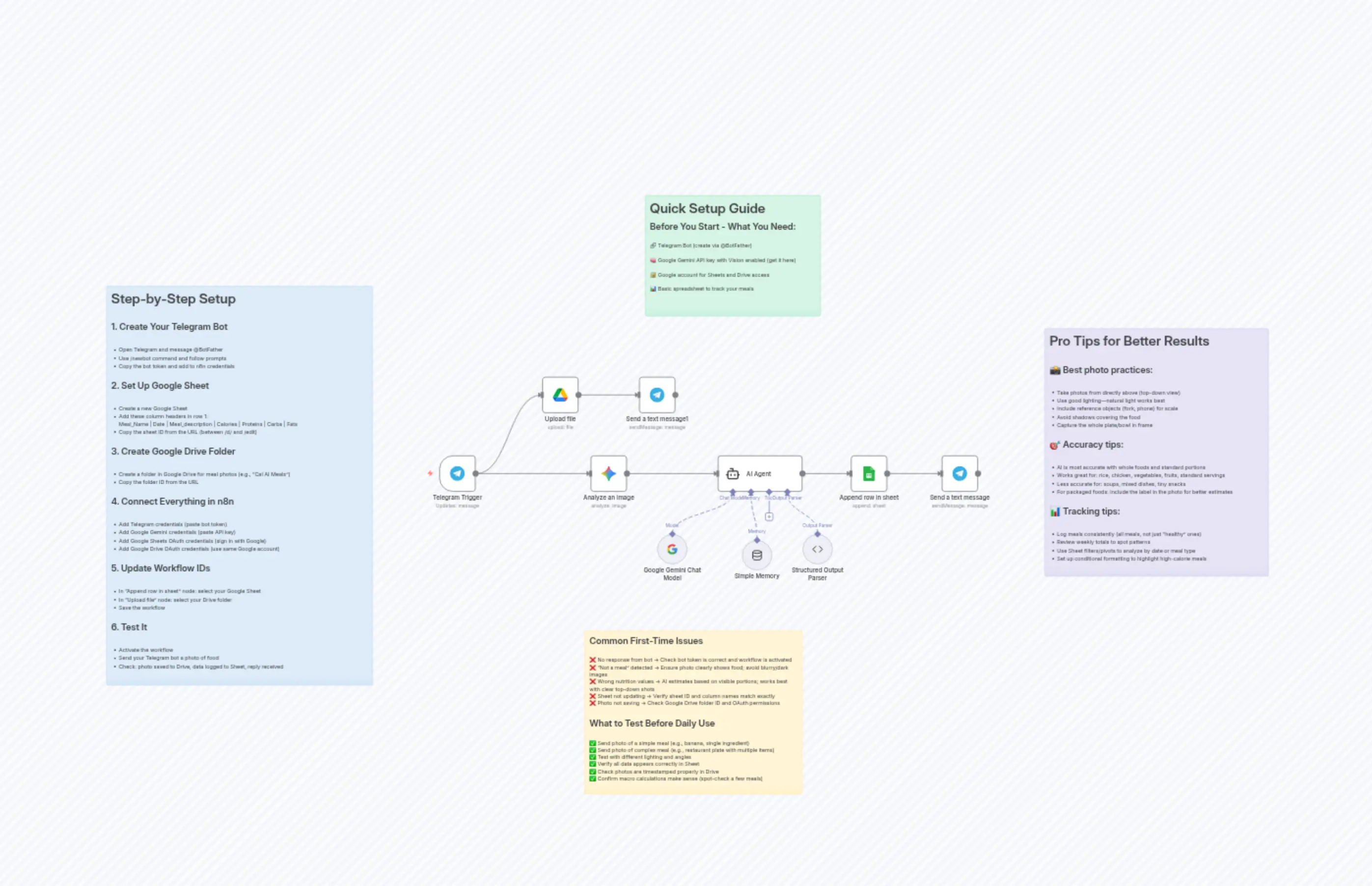
Snap & Track Nutrition: Telegram Food Photos → Gemini Vision AI → Google Sheets
説明
Categories
📊 Productivity🤖 AI & Machine Learning
Nodes Used
n8n-nodes-base.telegramn8n-nodes-base.telegramn8n-nodes-base.stickyNoten8n-nodes-base.stickyNoten8n-nodes-base.stickyNoten8n-nodes-base.stickyNoten8n-nodes-base.googleDriven8n-nodes-base.googleSheets@n8n/n8n-nodes-langchain.agentn8n-nodes-base.telegramTrigger
Price無料
Views0
最終更新11/28/2025
workflow.json
{
  "meta": {
    "instanceId": "db31bea69a53eada00777682bd2f0392fe4ec4364a135252e7113d3d2d2c1eb4",
    "templateCredsSetupCompleted": true
  },
  "nodes": [
    {
      "id": "693c6839-0ea4-4261-a0cf-50dd884903c2",
      "name": "Telegram Trigger",
      "type": "n8n-nodes-base.telegramTrigger",
      "position": [
        304,
        0
      ],
      "webhookId": "afd28603-91d2-425e-8e30-abbc17a9a3d5",
      "parameters": {
        "updates": [
          "message"
        ],
        "additionalFields": {
          "download": true
        }
      },
      "credentials": {
        "telegramApi": {
          "id": "zoS34yaqfznbZ6AL",
          "name": "Telegram account"
        }
      },
      "typeVersion": 1.2
    },
    {
      "id": "74d84279-ca5d-4ebe-b9c7-222defe14625",
      "name": "AI Agent",
      "type": "@n8n/n8n-nodes-langchain.agent",
      "position": [
        1040,
        0
      ],
      "parameters": {
        "text": "=You are a nutrition assistant. Your task is to analyze meal description and return structured nutrition data in the exact format below (YAML, JSON, or key-value pairs).\n\nINPUT:\ndescription: {{ $json.content.parts[0].text }}\ndatetime: {{ $now.format('yyyy-MM-dd HH:mm') }}\n\nOUTPUT (copy this format exactly):\n\nmeal_name: \ndate: \nmeal_description: \ncalories: \nprotein: \nfats: \ncarbs: \n\nExample:\nmeal_name: Banana Snack\ndate: 2025-10-24 19:30\nmeal_description: One medium-sized ripe banana with yellow skin and small brown spots (120g)\ncalories: 105\nprotein: 1\nfats: 0\ncarbs: 27\n\nRules:\n- Fill every field (do not leave any blank)\n- Use midpoint for calories/macros if uncertain\n- Keep meal_name short (2-4 words, e.g. \"Chicken Rice Bowl\")\n- Use date in YYYY-MM-DD HH:MM format\n- meal_description should summarize the food, portions, and context in under 15 words\n- Only output the formatted result above—do NOT add extra text or explanations!\n\nIf no food is detected, output:\nmeal_name: Not a meal\ndate: {{ $now.format('yyyy-MM-dd HH:mm') }}\nmeal_description: No human food detected\ncalories: 0\nprotein: 0\nfats: 0\ncarbs: 0\n",
        "options": {},
        "promptType": "define",
        "hasOutputParser": true
      },
      "typeVersion": 2.2
    },
    {
      "id": "ba964c1d-6535-444b-9f31-b6e401ea7ac4",
      "name": "Google Gemini Chat Model",
      "type": "@n8n/n8n-nodes-langchain.lmChatGoogleGemini",
      "position": [
        880,
        208
      ],
      "parameters": {
        "options": {}
      },
      "credentials": {
        "googlePalmApi": {
          "id": "5CctkrjhvRisPmai",
          "name": "Google Gemini(PaLM) Api account"
        }
      },
      "typeVersion": 1
    },
    {
      "id": "7e2cab17-2079-4002-bf35-27e55e78ac21",
      "name": "Analyze an image",
      "type": "@n8n/n8n-nodes-langchain.googleGemini",
      "position": [
        704,
        0
      ],
      "parameters": {
        "text": "You are a Nutrition Vision Assistant. Think like a food scientist and registered dietitian. Reason silently and do not reveal your steps. From a single food photo, identify the meal components, estimate portion weight in grams per component using geometric/visual cues, then compute total calories, protein, carbs, and fat.\n\nEstimation method (internal only; do not output these steps)\n\nIdentify components: list the main foods (e.g., chicken breast, white rice, mixed salad, sauce).\n\nChoose references: map each component to a standard reference food.\n\nEstimate volume/size: use visible objects for scale (plate ≈ 27 cm diameter, fork tines ≈ 3.5 cm, spoon bowl ≈ 5–6 cm). Approximate shapes (cuboid, cylinder, dome) to get volume in ml (≈ cm³).\n\nConvert to grams (densities, g/ml): meats 1.05; cooked rice 0.66; cooked pasta 0.60; potato/solid starchy veg 0.80; leafy salad 0.15; sauces creamy 1.00; oils 0.91. If the image clearly suggests deep-fried or glossy/oily coating, account for added oil.\n\nMacros & energy per 100 g (reference values):\n\nWhite rice, cooked: 130 kcal, P 2.7, C 28, F 0.3\n\nPasta, cooked: 131 kcal, P 5.0, C 25, F 1.1\n\nChicken breast, cooked skinless: 165 kcal, P 31, C 0, F 3.6\n\nSalmon, cooked: 208 kcal, P 20, C 0, F 13\n\nLean ground beef (≈10% fat), cooked: 217 kcal, P 26, C 0, F 12\n\nBlack beans, cooked: 132 kcal, P 8.9, C 23.7, F 0.5\n\nPotato, baked: 93 kcal, P 2.5, C 21, F 0.1\n\nLettuce/leafy salad: 15 kcal, P 1.4, C 2.9, F 0.2\n\nAvocado: 160 kcal, P 2, C 9, F 15\n\nBread (white): 265 kcal, P 9, C 49, F 3.2\n\nEgg, cooked: 155 kcal, P 13, C 1.1, F 11\n\nCheddar cheese: 403 kcal, P 25, C 1.3, F 33\n\nOlive oil: 884 kcal, P 0, C 0, F 100\n(If a food is not listed, pick the closest standard equivalent.)\n\nHidden oil & sauces: if pan-fried or visibly glossy, add ~1 tablespoon oil = 13.5 g = 120 kcal = 13.5 g fat per clearly coated serving; adjust by visual coverage.\n\nSum totals: compute grams per component × (per-100 g macros/energy) and add all components.\n\nValidation: enforce Calories ≈ 4×Protein + 4×Carbs + 9×Fat. If off by >8%, adjust fat first (oil/sauce most variable), then carbs (starches), keeping protein consistent with visible lean mass.\n\nRounding: round all final totals to integers. Never output ranges or decimals.\n\nOutput rules (must follow exactly)\n\nPlain text only.\n\nUse this exact structure and field order.\n\nValues are numbers only (no units, no “g” or “kcal”), no extra text, no JSON, no notes.\n\nMeal Description: [short description]\nCalories: [number]\nProteins: [number]\nCarbs: [number]\nFat: [number]",
        "modelId": {
          "__rl": true,
          "mode": "list",
          "value": "models/gemini-2.5-pro",
          "cachedResultName": "models/gemini-2.5-pro"
        },
        "options": {},
        "resource": "image",
        "inputType": "binary",
        "operation": "analyze"
      },
      "credentials": {
        "googlePalmApi": {
          "id": "5CctkrjhvRisPmai",
          "name": "Google Gemini(PaLM) Api account"
        }
      },
      "typeVersion": 1
    },
    {
      "id": "8fd5af40-ff69-4509-b1be-1470773529ff",
      "name": "Send a text message",
      "type": "n8n-nodes-base.telegram",
      "position": [
        1632,
        0
      ],
      "webhookId": "98614283-8405-4b19-a488-4ff4050e6c7c",
      "parameters": {
        "text": "={{ $('Analyze an image').item.json.content.parts[0].text }}\n\nImage saved in Google drive, and Data saved in database",
        "chatId": "={{ $('Telegram Trigger').item.json.message.from.id }}",
        "additionalFields": {
          "appendAttribution": false
        }
      },
      "credentials": {
        "telegramApi": {
          "id": "zoS34yaqfznbZ6AL",
          "name": "Telegram account"
        }
      },
      "typeVersion": 1.2
    },
    {
      "id": "f51dfc8d-4414-4524-9da4-159fdfc7b23e",
      "name": "Upload file",
      "type": "n8n-nodes-base.googleDrive",
      "position": [
        576,
        -208
      ],
      "parameters": {
        "name": "=Meal_{{ $now.format('yyyy-MM-dd HH:mm') }}",
        "driveId": {
          "__rl": true,
          "mode": "list",
          "value": "My Drive"
        },
        "options": {},
        "folderId": {
          "__rl": true,
          "mode": "list",
          "value": "1p2_SK-Fx8kun4gSxeNeFenFXhtEdpTY0",
          "cachedResultUrl": "https://drive.google.com/drive/folders/1p2_SK-Fx8kun4gSxeNeFenFXhtEdpTY0",
          "cachedResultName": "Cal AI Meals"
        }
      },
      "credentials": {
        "googleDriveOAuth2Api": {
          "id": "jtE8vU0TUyfje3N9",
          "name": "Google Drive account"
        }
      },
      "typeVersion": 3
    },
    {
      "id": "87716ad6-439c-4926-8cae-d92d343d5fee",
      "name": "Simple Memory",
      "type": "@n8n/n8n-nodes-langchain.memoryBufferWindow",
      "position": [
        1104,
        224
      ],
      "parameters": {
        "sessionKey": "={{ $json.content.parts[0].text }}",
        "sessionIdType": "customKey",
        "contextWindowLength": 60
      },
      "typeVersion": 1.3
    },
    {
      "id": "63d07e12-20ee-4abf-834c-de294c6c646b",
      "name": "Append row in sheet",
      "type": "n8n-nodes-base.googleSheets",
      "position": [
        1392,
        0
      ],
      "parameters": {
        "columns": {
          "value": {
            "Date": "={{ $json.output.date }}",
            "Fats": "={{ $json.output.carbs }}",
            "Carbs": "={{ $json.output.fats }}",
            "Calories": "={{ $json.output.calories }}",
            "Proteins": "={{ $json.output.protein }}",
            "Meal_Name": "={{ $json.output.meal_name }}",
            "Meal_description": "={{ $json.output.meal_description }}"
          },
          "schema": [
            {
              "id": "Meal_Name",
              "type": "string",
              "display": true,
              "required": false,
              "displayName": "Meal_Name",
              "defaultMatch": false,
              "canBeUsedToMatch": true
            },
            {
              "id": "Date",
              "type": "string",
              "display": true,
              "required": false,
              "displayName": "Date",
              "defaultMatch": false,
              "canBeUsedToMatch": true
            },
            {
              "id": "Meal_description",
              "type": "string",
              "display": true,
              "required": false,
              "displayName": "Meal_description",
              "defaultMatch": false,
              "canBeUsedToMatch": true
            },
            {
              "id": "Calories",
              "type": "string",
              "display": true,
              "required": false,
              "displayName": "Calories",
              "defaultMatch": false,
              "canBeUsedToMatch": true
            },
            {
              "id": "Proteins",
              "type": "string",
              "display": true,
              "required": false,
              "displayName": "Proteins",
              "defaultMatch": false,
              "canBeUsedToMatch": true
            },
            {
              "id": "Carbs",
              "type": "string",
              "display": true,
              "required": false,
              "displayName": "Carbs",
              "defaultMatch": false,
              "canBeUsedToMatch": true
            },
            {
              "id": "Fats",
              "type": "string",
              "display": true,
              "required": false,
              "displayName": "Fats",
              "defaultMatch": false,
              "canBeUsedToMatch": true
            }
          ],
          "mappingMode": "defineBelow",
          "matchingColumns": [],
          "attemptToConvertTypes": false,
          "convertFieldsToString": false
        },
        "options": {},
        "operation": "append",
        "sheetName": {
          "__rl": true,
          "mode": "list",
          "value": 14074018,
          "cachedResultUrl": "https://docs.google.com/spreadsheets/d/1OmfVqlo8G2ff7895Q-FyqFknJj1k2dYPKM0YpG_vEys/edit#gid=14074018",
          "cachedResultName": "Meals"
        },
        "documentId": {
          "__rl": true,
          "mode": "list",
          "value": "1OmfVqlo8G2ff7895Q-FyqFknJj1k2dYPKM0YpG_vEys",
          "cachedResultUrl": "https://docs.google.com/spreadsheets/d/1OmfVqlo8G2ff7895Q-FyqFknJj1k2dYPKM0YpG_vEys/edit?usp=drivesdk",
          "cachedResultName": "Cal AI"
        }
      },
      "credentials": {
        "googleSheetsOAuth2Api": {
          "id": "sPZTi75OujS3qDy2",
          "name": "Google Sheets account"
        }
      },
      "typeVersion": 4.7
    },
    {
      "id": "42132b5e-944f-43aa-9a02-537cb09939b4",
      "name": "Structured Output Parser",
      "type": "@n8n/n8n-nodes-langchain.outputParserStructured",
      "position": [
        1264,
        208
      ],
      "parameters": {
        "jsonSchemaExample": "{\n   \"meal_name\": \"\",\n   \"date\": \"\",\n   \"meal_description\": \"\",\n   \"calories\": \"\",\n   \"protein\": \"\",\n   \"fats\": \"\",\n   \"carbs\": \"\"\n}"
      },
      "typeVersion": 1.3
    },
    {
      "id": "e655016c-c383-4d79-b5d7-c6b17b30258f",
      "name": "Send a text message1",
      "type": "n8n-nodes-base.telegram",
      "position": [
        832,
        -208
      ],
      "webhookId": "e970214d-8b2c-4735-9006-cd4a0509854c",
      "parameters": {
        "text": "=The image of the meal is uploaded, please wait till I analyze it and I will give you back the calories and nutriants of the meal. ",
        "chatId": "={{ $('Telegram Trigger').item.json.message.from.id }}",
        "additionalFields": {
          "appendAttribution": false
        }
      },
      "credentials": {
        "telegramApi": {
          "id": "zoS34yaqfznbZ6AL",
          "name": "Telegram account"
        }
      },
      "typeVersion": 1.2
    },
    {
      "id": "01d51b94-531a-4a8a-ae52-9b89daa00bf0",
      "name": "Sticky Note",
      "type": "n8n-nodes-base.stickyNote",
      "position": [
        848,
        -688
      ],
      "parameters": {
        "color": 4,
        "width": 464,
        "height": 320,
        "content": "# Quick Setup Guide\n## Before You Start - What You Need:\n\n🔗 Telegram Bot (create via @BotFather)\n\n🧠 Google Gemini API key with Vision enabled (get it here)\n\n🔐 Google account for Sheets and Drive access\n\n📊 Basic spreadsheet to track your meals"
      },
      "typeVersion": 1
    },
    {
      "id": "47029503-a844-4d56-a97e-0ca4d8cf2704",
      "name": "Sticky Note1",
      "type": "n8n-nodes-base.stickyNote",
      "position": [
        -576,
        -448
      ],
      "parameters": {
        "color": 5,
        "width": 704,
        "height": 1056,
        "content": "# Step-by-Step Setup\n\n## 1. Create Your Telegram Bot\n\n- Open Telegram and message @BotFather\n- Use /newbot command and follow prompts\n- Copy the bot token and add to n8n credentials\n\n## 2. Set Up Google Sheet\n\n- Create a new Google Sheet\n- Add these column headers in row 1:\nMeal_Name | Date | Meal_description | Calories | Proteins | Carbs | Fats\n- Copy the sheet ID from the URL (between /d/ and /edit)\n\n## 3. Create Google Drive Folder\n\n- Create a folder in Google Drive for meal photos (e.g., \"Cal AI Meals\")\n- Copy the folder ID from the URL\n\n## 4. Connect Everything in n8n\n\n- Add Telegram credentials (paste bot token)\n- Add Google Gemini credentials (paste API key)\n- Add Google Sheets OAuth credentials (sign in with Google)\n- Add Google Drive OAuth credentials (use same Google account)\n\n## 5. Update Workflow IDs\n\n- In \"Append row in sheet\" node: select your Google Sheet\n- In \"Upload file\" node: select your Drive folder\n- Save the workflow\n\n## 6. Test It\n\n- Activate the workflow\n- Send your Telegram bot a photo of food\n- Check: photo saved to Drive, data logged to Sheet, reply received"
      },
      "typeVersion": 1
    },
    {
      "id": "24119be9-b4b6-416f-9ff2-973023da2f19",
      "name": "Sticky Note2",
      "type": "n8n-nodes-base.stickyNote",
      "position": [
        688,
        464
      ],
      "parameters": {
        "width": 576,
        "height": 432,
        "content": "## Common First-Time Issues\n\n❌ No response from bot → Check bot token is correct and workflow is activated\n❌ \"Not a meal\" detected → Ensure photo clearly shows food; avoid blurry/dark images\n❌ Wrong nutrition values → AI estimates based on visible portions; works best with clear top-down shots\n❌ Sheet not updating → Verify sheet ID and column names match exactly\n❌ Photo not saving → Check Google Drive folder ID and OAuth permissions\n\n## What to Test Before Daily Use\n\n✅ Send photo of a simple meal (e.g., banana, single ingredient)\n✅ Send photo of complex meal (e.g., restaurant plate with multiple items)\n✅ Test with different lighting and angles\n✅ Verify all data appears correctly in Sheet\n✅ Check photos are timestamped properly in Drive\n✅ Confirm macro calculations make sense (spot-check a few meals)"
      },
      "typeVersion": 1
    },
    {
      "id": "9ade9c57-c6ec-428d-aaa7-ab34698cca0e",
      "name": "Sticky Note3",
      "type": "n8n-nodes-base.stickyNote",
      "position": [
        1904,
        -336
      ],
      "parameters": {
        "color": 6,
        "width": 592,
        "height": 656,
        "content": "# Pro Tips for Better Results\n\n## 📸 Best photo practices:\n\n- Take photos from directly above (top-down view)\n- Use good lighting—natural light works best\n- Include reference objects (fork, phone) for scale\n- Avoid shadows covering the food\n- Capture the whole plate/bowl in frame\n\n## 🎯 Accuracy tips:\n\n- AI is most accurate with whole foods and standard portions\n- Works great for: rice, chicken, vegetables, fruits, standard servings\n- Less accurate for: soups, mixed dishes, tiny snacks\n- For packaged foods: include the label in the photo for better estimates\n\n## 📊 Tracking tips:\n\n- Log meals consistently (all meals, not just \"healthy\" ones)\n- Review weekly totals to spot patterns\n- Use Sheet filters/pivots to analyze by date or meal type\n- Set up conditional formatting to highlight high-calorie meals"
      },
      "typeVersion": 1
    }
  ],
  "pinData": {},
  "connections": {
    "AI Agent": {
      "main": [
        [
          {
            "node": "Append row in sheet",
            "type": "main",
            "index": 0
          }
        ]
      ]
    },
    "Upload file": {
      "main": [
        [
          {
            "node": "Send a text message1",
            "type": "main",
            "index": 0
          }
        ]
      ]
    },
    "Simple Memory": {
      "ai_memory": [
        [
          {
            "node": "AI Agent",
            "type": "ai_memory",
            "index": 0
          }
        ]
      ]
    },
    "Analyze an image": {
      "main": [
        [
          {
            "node": "AI Agent",
            "type": "main",
            "index": 0
          }
        ]
      ]
    },
    "Telegram Trigger": {
      "main": [
        [
          {
            "node": "Analyze an image",
            "type": "main",
            "index": 0
          },
          {
            "node": "Upload file",
            "type": "main",
            "index": 0
          }
        ]
      ]
    },
    "Append row in sheet": {
      "main": [
        [
          {
            "node": "Send a text message",
            "type": "main",
            "index": 0
          }
        ]
      ]
    },
    "Google Gemini Chat Model": {
      "ai_languageModel": [
        [
          {
            "node": "AI Agent",
            "type": "ai_languageModel",
            "index": 0
          }
        ]
      ]
    },
    "Structured Output Parser": {
      "ai_outputParser": [
        [
          {
            "node": "AI Agent",
            "type": "ai_outputParser",
            "index": 0
          }
        ]
      ]
    }
  }
}