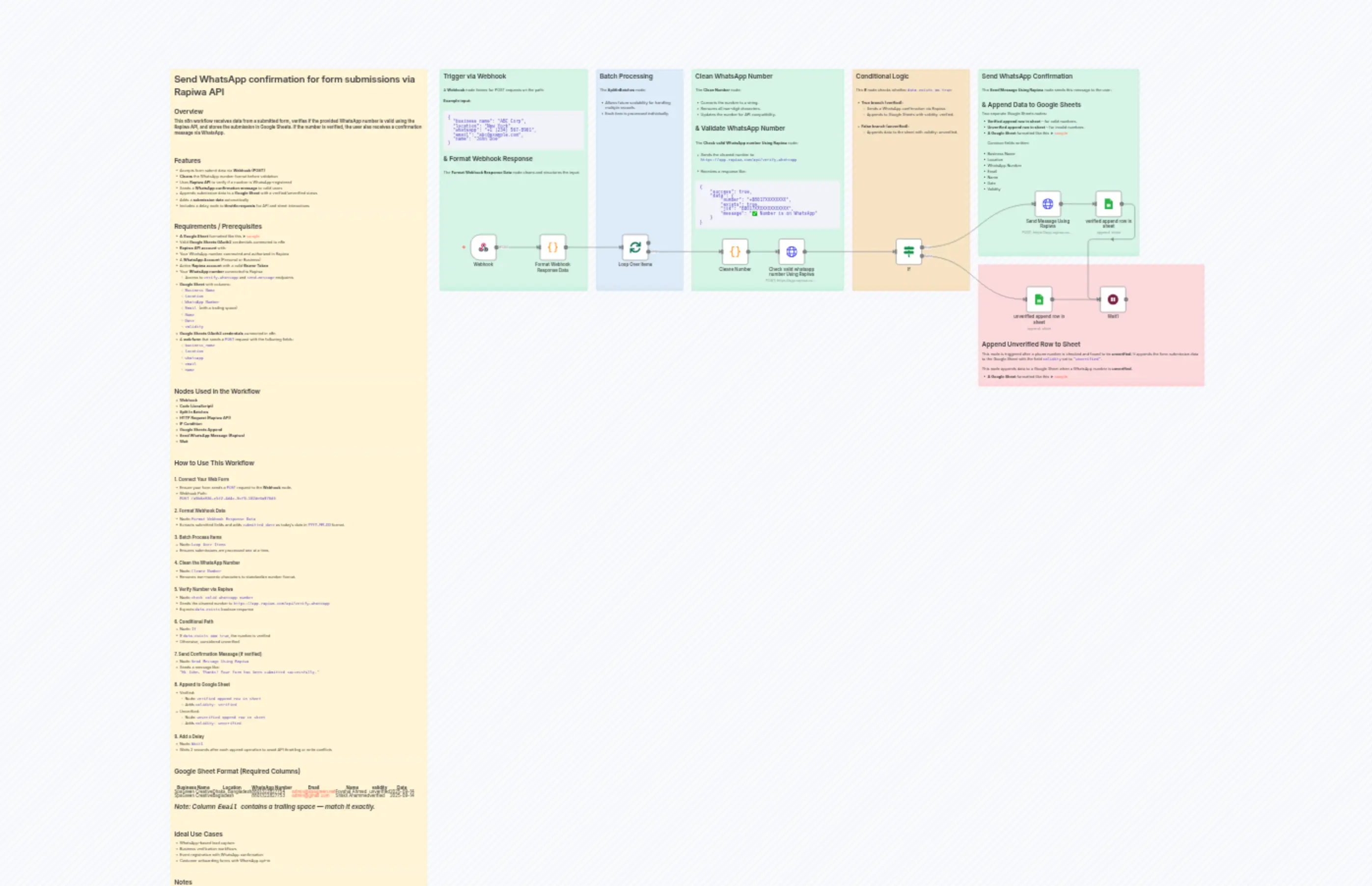
Send WhatsApp confirmation for form submissions via Rapiwa API
Description
Categories
🤖 AI & Machine Learning
Nodes Used
n8n-nodes-base.ifn8n-nodes-base.coden8n-nodes-base.coden8n-nodes-base.waitn8n-nodes-base.webhookn8n-nodes-base.stickyNoten8n-nodes-base.stickyNoten8n-nodes-base.stickyNoten8n-nodes-base.stickyNoten8n-nodes-base.stickyNote
PriceGratuit
Views0
Last Updated11/28/2025
workflow.json
{
"id": "kAOSKqqPXlCnisof",
"meta": {
"instanceId": "cb9a1e5321767b6316634728341237e564b2587ab15b74ca0a89eb02a53484d6",
"templateCredsSetupCompleted": true
},
"name": "Send WhatsApp confirmation for form submissions via Rapiwa API",
"tags": [],
"nodes": [
{
"id": "6cc792e7-eb4a-4e9e-8989-338986085fb8",
"name": "Cleane Number",
"type": "n8n-nodes-base.code",
"position": [
-624,
144
],
"parameters": {
"jsCode": "const items = $input.all();\nconst updatedItems = items.map((item) => {\n const waNo = item?.json[\"number\"];\n const waNoStr = typeof waNo === 'string' ? waNo : (waNo !== undefined && waNo !== null ? String(waNo) : \"\");\n const cleanedNumber = waNoStr.replace(/\\D/g, \"\");\n item.json[\"number\"] = cleanedNumber;\n return item;\n});\nreturn updatedItems;"
},
"typeVersion": 2
},
{
"id": "5707dc19-9692-40db-96f4-8e2061d0e0b2",
"name": "Loop Over Items",
"type": "n8n-nodes-base.splitInBatches",
"position": [
-992,
128
],
"parameters": {
"options": {}
},
"typeVersion": 3
},
{
"id": "78732045-d7d2-464d-85b5-e4069a76f6d5",
"name": "Webhook",
"type": "n8n-nodes-base.webhook",
"position": [
-1552,
128
],
"webhookId": "a9b6a936-e5f2-4d4c-9cf9-182de0a970d5",
"parameters": {
"path": "a9b6a936-e5f2-4d4c-9cf9-182de0a970d5",
"options": {},
"httpMethod": "POST"
},
"typeVersion": 2
},
{
"id": "05f4d013-f55c-43ad-90a3-e93db13a6482",
"name": "If",
"type": "n8n-nodes-base.if",
"position": [
16,
144
],
"parameters": {
"options": {},
"conditions": {
"options": {
"version": 2,
"leftValue": "",
"caseSensitive": true,
"typeValidation": "strict"
},
"combinator": "and",
"conditions": [
{
"id": "3ab8725a-9268-45fd-b91c-0e055fe6fa7c",
"operator": {
"type": "boolean",
"operation": "true",
"singleValue": true
},
"leftValue": "={{ $json.data.exists }}",
"rightValue": "=\"true\""
}
]
}
},
"typeVersion": 2.2
},
{
"id": "04cff67c-51e0-4516-9279-13349b9badfb",
"name": "unverified append row in sheet",
"type": "n8n-nodes-base.googleSheets",
"position": [
496,
320
],
"parameters": {
"columns": {
"value": {
"Date": "={{ $('Cleane Number').item.json.submitted_date }}",
"Name": "={{ $('Cleane Number').item.json.name }}",
"Email ": "={{ $('Cleane Number').item.json.email }}",
"Location": "={{ $('Cleane Number').item.json.location }}",
"validity": "unverified",
"Business Name": "={{ $('Cleane Number').item.json.business_name }}",
"WhatsApp Number": "={{ $('Cleane Number').item.json.whatsapp }}"
},
"schema": [
{
"id": "Business Name",
"type": "string",
"display": true,
"removed": false,
"required": false,
"displayName": "Business Name",
"defaultMatch": false,
"canBeUsedToMatch": true
},
{
"id": "Location",
"type": "string",
"display": true,
"removed": false,
"required": false,
"displayName": "Location",
"defaultMatch": false,
"canBeUsedToMatch": true
},
{
"id": "WhatsApp Number",
"type": "string",
"display": true,
"removed": false,
"required": false,
"displayName": "WhatsApp Number",
"defaultMatch": false,
"canBeUsedToMatch": true
},
{
"id": "Email ",
"type": "string",
"display": true,
"removed": false,
"required": false,
"displayName": "Email ",
"defaultMatch": false,
"canBeUsedToMatch": true
},
{
"id": "Name",
"type": "string",
"display": true,
"removed": false,
"required": false,
"displayName": "Name",
"defaultMatch": false,
"canBeUsedToMatch": true
},
{
"id": "validity",
"type": "string",
"display": true,
"removed": false,
"required": false,
"displayName": "validity",
"defaultMatch": false,
"canBeUsedToMatch": true
},
{
"id": "Date",
"type": "string",
"display": true,
"removed": false,
"required": false,
"displayName": "Date",
"defaultMatch": false,
"canBeUsedToMatch": true
}
],
"mappingMode": "defineBelow",
"matchingColumns": [],
"attemptToConvertTypes": false,
"convertFieldsToString": false
},
"options": {},
"operation": "append",
"sheetName": {
"__rl": true,
"mode": "list",
"value": "gid=0",
"cachedResultUrl": "https://docs.google.com/spreadsheets/d/1H29z_8tnsu8AvCsI7o1SjiV-5LDTwiVVQk-BNr8SMk0/edit#gid=0",
"cachedResultName": "Sheet1"
},
"documentId": {
"__rl": true,
"mode": "list",
"value": "1H29z_8tnsu8AvCsI7o1SjiV-5LDTwiVVQk-BNr8SMk0",
"cachedResultUrl": "https://docs.google.com/spreadsheets/d/1H29z_8tnsu8AvCsI7o1SjiV-5LDTwiVVQk-BNr8SMk0/edit?usp=drivesdk",
"cachedResultName": "Send WhatsApp Confirmation on Form Submission (Rapiwa API)"
}
},
"credentials": {
"googleSheetsOAuth2Api": {
"id": "gFH3Wjq6yYqSEAei",
"name": "Google Sheets"
}
},
"typeVersion": 4.6
},
{
"id": "50964759-12c0-42e3-a38a-6a317293bfac",
"name": "verified append row in sheet",
"type": "n8n-nodes-base.googleSheets",
"position": [
752,
-32
],
"parameters": {
"columns": {
"value": {
"Date": "={{ $('Cleane Number').item.json.submitted_date }}",
"Name": "={{ $('Cleane Number').item.json.name }}",
"Email ": "={{ $('Cleane Number').item.json.email }}",
"Location": "={{ $('Cleane Number').item.json.location }}",
"validity": "verified",
"Business Name": "={{ $('Cleane Number').item.json.business_name }}",
"WhatsApp Number": "={{ $('Cleane Number').item.json.whatsapp }}"
},
"schema": [
{
"id": "Business Name",
"type": "string",
"display": true,
"removed": false,
"required": false,
"displayName": "Business Name",
"defaultMatch": false,
"canBeUsedToMatch": true
},
{
"id": "Location",
"type": "string",
"display": true,
"removed": false,
"required": false,
"displayName": "Location",
"defaultMatch": false,
"canBeUsedToMatch": true
},
{
"id": "WhatsApp Number",
"type": "string",
"display": true,
"removed": false,
"required": false,
"displayName": "WhatsApp Number",
"defaultMatch": false,
"canBeUsedToMatch": true
},
{
"id": "Email ",
"type": "string",
"display": true,
"removed": false,
"required": false,
"displayName": "Email ",
"defaultMatch": false,
"canBeUsedToMatch": true
},
{
"id": "Name",
"type": "string",
"display": true,
"removed": false,
"required": false,
"displayName": "Name",
"defaultMatch": false,
"canBeUsedToMatch": true
},
{
"id": "validity",
"type": "string",
"display": true,
"removed": false,
"required": false,
"displayName": "validity",
"defaultMatch": false,
"canBeUsedToMatch": true
},
{
"id": "Date",
"type": "string",
"display": true,
"removed": false,
"required": false,
"displayName": "Date",
"defaultMatch": false,
"canBeUsedToMatch": true
}
],
"mappingMode": "defineBelow",
"matchingColumns": [],
"attemptToConvertTypes": false,
"convertFieldsToString": false
},
"options": {},
"operation": "append",
"sheetName": {
"__rl": true,
"mode": "list",
"value": "gid=0",
"cachedResultUrl": "https://docs.google.com/spreadsheets/d/1H29z_8tnsu8AvCsI7o1SjiV-5LDTwiVVQk-BNr8SMk0/edit#gid=0",
"cachedResultName": "Sheet1"
},
"documentId": {
"__rl": true,
"mode": "list",
"value": "1H29z_8tnsu8AvCsI7o1SjiV-5LDTwiVVQk-BNr8SMk0",
"cachedResultUrl": "https://docs.google.com/spreadsheets/d/1H29z_8tnsu8AvCsI7o1SjiV-5LDTwiVVQk-BNr8SMk0/edit?usp=drivesdk",
"cachedResultName": "Send WhatsApp Confirmation on Form Submission (Rapiwa API)"
}
},
"credentials": {
"googleSheetsOAuth2Api": {
"id": "gFH3Wjq6yYqSEAei",
"name": "Google Sheets"
}
},
"typeVersion": 4.6
},
{
"id": "deaa6822-f6d6-42c4-a2cd-64698c77611b",
"name": "Wait1",
"type": "n8n-nodes-base.wait",
"position": [
768,
320
],
"webhookId": "6c474e54-eb3c-4fcd-b455-948322cd0121",
"parameters": {
"amount": 2
},
"typeVersion": 1.1
},
{
"id": "0c2f6847-5472-4f5a-9fa1-e63fca06e2c1",
"name": "Format Webhook Response Data",
"type": "n8n-nodes-base.code",
"position": [
-1296,
128
],
"parameters": {
"jsCode": "const result = $input.all().map(item => {\n const body = item.json.body || {};\n\n // Get current date in YYYY-MM-DD format\n const submitted_date = new Date().toISOString().split('T')[0];\n\n return {\n business_name: body.business_name,\n location: body.location,\n whatsapp: body.whatsapp,\n email: body.email,\n name: body.name,\n submitted_date: submitted_date\n };\n});\n\nreturn result;\n"
},
"typeVersion": 2
},
{
"id": "0f832810-51fd-408a-9b41-68c12d0aaf9d",
"name": "Send Message Using Rapiwa",
"type": "n8n-nodes-base.httpRequest",
"position": [
528,
-32
],
"parameters": {
"url": "=https://app.rapiwa.com/api/send-message",
"method": "POST",
"options": {},
"sendBody": true,
"authentication": "genericCredentialType",
"bodyParameters": {
"parameters": [
{
"name": "number",
"value": "={{ $json.data.phone }}"
},
{
"name": "message_type",
"value": "text"
},
{
"name": "message",
"value": "=Hi {{ $('Cleane Number').item.json.name }}, \nThanks! Your form has been submitted successfully. "
}
]
},
"genericAuthType": "httpBearerAuth"
},
"credentials": {
"httpBearerAuth": {
"id": "jnaHCyYia9OAFozh",
"name": "Rapiwa Bearer Auth"
}
},
"typeVersion": 4.2
},
{
"id": "6a2c5979-109d-4e30-9c40-109aeef24632",
"name": "Sticky Note",
"type": "n8n-nodes-base.stickyNote",
"position": [
-2656,
-480
],
"parameters": {
"width": 944,
"height": 3136,
"content": "# Send WhatsApp confirmation for form submissions via Rapiwa API\n\n## Overview\n### This n8n workflow receives data from a submitted form, verifies if the provided WhatsApp number is valid using the Rapiwa API, and stores the submission in Google Sheets. If the number is verified, the user also receives a confirmation message via WhatsApp.\n\n---\n\n## Features\n- Accepts form submit data via **Webhook (POST)**\n- **Cleans** the WhatsApp number format before validation\n- Uses **Rapiwa API** to verify if a number is WhatsApp-registered\n- Sends a **WhatsApp confirmation message** to valid users\n- Appends submission data to a **Google Sheet** with a verified/unverified status\n- Adds a **submission date** automatically\n- Includes a delay node to **throttle requests** for API and sheet interactions\n\n---\n\n## Requirements / Prerequisites\n- **A Google Sheet** formatted like this ➤ [sample](https://docs.google.com/spreadsheets/d/1H29z_8tnsu8AvCsI7o1SjiV-5LDTwiVVQk-BNr8SMk0/edit?usp=sharing) \n- Valid **Google Sheets OAuth2** credentials connected to n8n\n- **Rapiwa API account** with:\n - Your WhatsApp number connected and authorized in Rapiwa\n- A **WhatsApp Account** (Personal or Business) \n- Active **Rapiwa account** with a valid **Bearer Token**\n- Your **WhatsApp number** connected to Rapiwa\n - Access to `verify-whatsapp` and `send-message` endpoints\n- **Google Sheet** with columns:\n - `Business Name`\n - `Location`\n - `WhatsApp Number`\n - `Email ` (with a trailing space)\n - `Name`\n - `Date`\n - `validity`\n- **Google Sheets OAuth2 credentials** connected in n8n\n- A **web form** that sends a `POST` request with the following fields:\n - `business_name`\n - `location`\n - `whatsapp`\n - `email`\n - `name`\n\n---\n\n## Nodes Used in the Workflow\n- **Webhook**\n- **Code (JavaScript)**\n- **Split In Batches**\n- **HTTP Request (Rapiwa API)**\n- **IF Condition**\n- **Google Sheets Append**\n- **Send WhatsApp Message (Rapiwa)**\n- **Wait**\n\n---\n\n## How to Use This Workflow\n\n### 1. Connect Your Web Form\n- Ensure your form sends a `POST` request to the **Webhook** node.\n- Webhook Path: \n `POST /a9b6a936-e5f2-4d4c-9cf9-182de0a970d5`\n\n### 2. Format Webhook Data\n- Node: `Format Webhook Response Data`\n- Extracts submitted fields and adds `submitted_date` as today's date in `YYYY-MM-DD` format.\n\n### 3. Batch Process Items\n- Node: `Loop Over Items`\n- Ensures submissions are processed one at a time.\n\n### 4. Clean the WhatsApp Number\n- Node: `Cleane Number`\n- Removes non-numeric characters to standardize number format.\n\n### 5. Verify Number via Rapiwa\n- Node: `check valid whatsapp number`\n- Sends the cleaned number to `https://app.rapiwa.com/api/verify-whatsapp`\n- Expects `data.exists` boolean response\n\n### 6. Conditional Path\n- Node: `If`\n- If `data.exists === true`, the number is verified\n- Otherwise, considered unverified\n\n### 7. Send Confirmation Message (if verified)\n- Node: `Send Message Using Rapiwa`\n- Sends a message like: \n `\"Hi John, Thanks! Your form has been submitted successfully.\"`\n\n### 8. Append to Google Sheet\n- Verified: \n - Node: `verified append row in sheet`\n - Adds `validity: verified`\n- Unverified: \n - Node: `unverified append row in sheet`\n - Adds `validity: unverified`\n\n### 9. Add a Delay\n- Node: `Wait1`\n- Waits 2 seconds after each append operation to avoid API throttling or write conflicts\n\n---\n\n## Google Sheet Format (Required Columns)\n\n| Business Name | Location | WhatsApp Number | Email | Name | validity | Date |\n|---------------------|--------------------|------------------|----------------------|------------------|------------|------------|\n| SpaGreen Creative | Dhaka, Bangladesh | 8801322827754 | [email protected] | Foyshal Ahmed | unverified | 2025-09-14 |\n| SpaGreen Creative | Bagladesh | 8801322827753 | [email protected] | Shakil Ahammed | verified | 2025-09-14 |\n\n\n*Note: Column `Email ` contains a trailing space — match it exactly.*\n\n---\n\n## Ideal Use Cases\n- WhatsApp-based lead capture\n- Business verification workflows\n- Event registration with WhatsApp confirmation\n- Customer onboarding forms with WhatsApp opt-in\n\n---\n\n## Notes\n- You can modify the message in the `Send Message Using Rapiwa` node to suit your brand.\n- Make sure your webhook URL is secure and not publicly exposed without authentication.\n- Adjust the wait time if you face API rate limits or Google Sheets errors.\n\n"
},
"typeVersion": 1
},
{
"id": "bf94c923-f333-4ea5-8cd1-82433fd9e92f",
"name": "Check valid whatsapp number Using Rapiwa",
"type": "n8n-nodes-base.httpRequest",
"position": [
-416,
144
],
"parameters": {
"url": "=https://app.rapiwa.com/api/verify-whatsapp",
"method": "POST",
"options": {},
"sendBody": true,
"authentication": "genericCredentialType",
"bodyParameters": {
"parameters": [
{
"name": "number",
"value": "={{ $json.whatsapp }}"
}
]
},
"genericAuthType": "httpBearerAuth"
},
"credentials": {
"httpBearerAuth": {
"id": "jnaHCyYia9OAFozh",
"name": "Rapiwa Bearer Auth"
}
},
"typeVersion": 4.2
},
{
"id": "7b625fbd-b299-4183-bb65-85c8bfa020a1",
"name": "Sticky Note1",
"type": "n8n-nodes-base.stickyNote",
"position": [
-1664,
-480
],
"parameters": {
"color": 4,
"width": 544,
"height": 816,
"content": "## Trigger via Webhook\n\nA **Webhook** node listens for POST requests on the path:\n\n**Example input:**\n\n```json\n{\n \"business_name\": \"ABC Corp\",\n \"location\": \"New York\",\n \"whatsapp\": \"+1 (234) 567-8901\",\n \"email\": \"[email protected]\",\n \"name\": \"John Doe\"\n}\n```\n## & Format Webhook Response\n\nThe **Format Webhook Response Data** node cleans and structures the input:"
},
"typeVersion": 1
},
{
"id": "c0e6db0e-ba2f-448e-a948-c6adb0d6301a",
"name": "Sticky Note2",
"type": "n8n-nodes-base.stickyNote",
"position": [
-1088,
-480
],
"parameters": {
"color": 5,
"width": 320,
"height": 816,
"content": "## Batch Processing\n\nThe **SplitInBatches** node:\n\n- Allows future scalability for handling multiple records.\n- Each item is processed individually.\n"
},
"typeVersion": 1
},
{
"id": "cacbf378-6483-42ac-a76a-ad221b657d37",
"name": "Sticky Note3",
"type": "n8n-nodes-base.stickyNote",
"position": [
-736,
-480
],
"parameters": {
"color": 4,
"width": 560,
"height": 816,
"content": "## Clean WhatsApp Number\n\nThe **Clean Number** node:\n\n- Converts the number to a string.\n- Removes all non-digit characters.\n- Updates the number for API compatibility.\n\n## & Validate WhatsApp Number\n\nThe **Check valid WhatsApp number Using Rapiwa** node:\n\n- Sends the cleaned number to: \n `https://app.rapiwa.com/api/verify-whatsapp`\n\n- Receives a response like:\n\n```json\n{\n \"success\": true,\n \"data\": {\n \"number\": \"+88017XXXXXXXX\",\n \"exists\": true,\n \"jid\": \"88017XXXXXXXXXXXXX\",\n \"message\": \"✅ Number is on WhatsApp\"\n }\n}\n"
},
"typeVersion": 1
},
{
"id": "1e2ba823-daa4-4760-872e-f2565e8148d7",
"name": "Sticky Note4",
"type": "n8n-nodes-base.stickyNote",
"position": [
-144,
-480
],
"parameters": {
"color": 2,
"width": 432,
"height": 816,
"content": "## Conditional Logic\n\nThe **If** node checks whether `data.exists == true`:\n\n- **True branch (verified):**\n - Sends a WhatsApp confirmation via Rapiwa.\n - Appends to Google Sheets with validity: verified.\n\n- **False branch (unverified):**\n - Appends data to the sheet with validity: unverified.\n"
},
"typeVersion": 1
},
{
"id": "7a599350-0eb0-4566-bd19-a3204d06e815",
"name": "Sticky Note5",
"type": "n8n-nodes-base.stickyNote",
"position": [
320,
-480
],
"parameters": {
"color": 4,
"width": 592,
"height": 688,
"content": "## Send WhatsApp Confirmation\n\nThe **Send Message Using Rapiwa** node sends this message to the user:\n\n\n## & Append Data to Google Sheets\nTwo separate Google Sheets nodes:\n- **Verified append row in sheet** – for valid numbers.\n- **Unverified append row in sheet** – for invalid numbers.\n- **A Google Sheet** formatted like this ➤ [sample](https://docs.google.com/spreadsheets/d/1H29z_8tnsu8AvCsI7o1SjiV-5LDTwiVVQk-BNr8SMk0/edit?usp=sharing) \n\nCommon fields written:\n\n- Business Name\n- Location\n- WhatsApp Number\n- Email\n- Name\n- Date\n- Validity\n"
},
"typeVersion": 1
},
{
"id": "a31d310f-f7b6-48f9-9c5f-6fdfd30fae5d",
"name": "Sticky Note6",
"type": "n8n-nodes-base.stickyNote",
"position": [
320,
240
],
"parameters": {
"color": 3,
"width": 832,
"height": 448,
"content": "\n\n\n\n\n\n\n\n\n\n\n\n\n\n\n\n\n\n\n\n\n## Append Unverified Row to Sheet\nThis node is triggered after a phone number is checked and found to be **unverified**. It appends the form submission data to the Google Sheet with the field `validity` set to `\"unverified\"`.\n\nThis node appends data to a Google Sheet when a WhatsApp number is **unverified**.\n- **A Google Sheet** formatted like this ➤ [sample](https://docs.google.com/spreadsheets/d/1H29z_8tnsu8AvCsI7o1SjiV-5LDTwiVVQk-BNr8SMk0/edit?usp=sharing) "
},
"typeVersion": 1
}
],
"active": false,
"pinData": {},
"settings": {
"executionOrder": "v1"
},
"versionId": "91d019e7-75a4-4288-b1ea-3e0a97479fc1",
"connections": {
"If": {
"main": [
[
{
"node": "Send Message Using Rapiwa",
"type": "main",
"index": 0
}
],
[
{
"node": "unverified append row in sheet",
"type": "main",
"index": 0
}
]
]
},
"Webhook": {
"main": [
[
{
"node": "Format Webhook Response Data",
"type": "main",
"index": 0
}
]
]
},
"Cleane Number": {
"main": [
[
{
"node": "Check valid whatsapp number Using Rapiwa",
"type": "main",
"index": 0
}
]
]
},
"Loop Over Items": {
"main": [
[],
[
{
"node": "Cleane Number",
"type": "main",
"index": 0
}
]
]
},
"Send Message Using Rapiwa": {
"main": [
[
{
"node": "verified append row in sheet",
"type": "main",
"index": 0
}
]
]
},
"Format Webhook Response Data": {
"main": [
[
{
"node": "Loop Over Items",
"type": "main",
"index": 0
}
]
]
},
"verified append row in sheet": {
"main": [
[
{
"node": "Wait1",
"type": "main",
"index": 0
}
]
]
},
"unverified append row in sheet": {
"main": [
[
{
"node": "Wait1",
"type": "main",
"index": 0
}
]
]
},
"Check valid whatsapp number Using Rapiwa": {
"main": [
[
{
"node": "If",
"type": "main",
"index": 0
}
]
]
}
}
}