Track Website Traffic Data with SEMrush API and Google Sheets
Description
Categories
🤖 AI & Machine Learning
Nodes Used
n8n-nodes-base.coden8n-nodes-base.stickyNoten8n-nodes-base.stickyNoten8n-nodes-base.stickyNoten8n-nodes-base.stickyNoten8n-nodes-base.stickyNoten8n-nodes-base.formTriggern8n-nodes-base.httpRequestn8n-nodes-base.googleSheets
PriceGratuit
Views0
Last Updated11/28/2025
workflow.json
{
  "meta": {
    "instanceId": "60c025075753afcab9f803964b4caaca9402f435deb4efafbb8e3b93b54d8752"
  },
  "nodes": [
    {
      "id": "c1f80a80-22bd-460a-b519-821eac8d8163",
      "name": "On form submission",
      "type": "n8n-nodes-base.formTrigger",
      "position": [
        640,
        220
      ],
      "webhookId": "5dc2478f-05eb-4c1e-9c2c-d88ddb6976bf",
      "parameters": {
        "options": {},
        "formTitle": "Website Traffic Checker",
        "formFields": {
          "values": [
            {
              "fieldLabel": "website",
              "requiredField": true
            }
          ]
        },
        "formDescription": "Website Traffic Checker"
      },
      "typeVersion": 2.2
    },
    {
      "id": "21719ba3-293a-46f8-9b5b-b768fae7961f",
      "name": "Reformat",
      "type": "n8n-nodes-base.code",
      "position": [
        1160,
        220
      ],
      "parameters": {
        "jsCode": "return $input.first().json.data.semrushAPI.trafficSummary;"
      },
      "typeVersion": 2
    },
    {
      "id": "0c8e4440-4788-4a57-b412-8eba19b4b99f",
      "name": "Sticky Note",
      "type": "n8n-nodes-base.stickyNote",
      "position": [
        -220,
        40
      ],
      "parameters": {
        "width": 740,
        "height": 820,
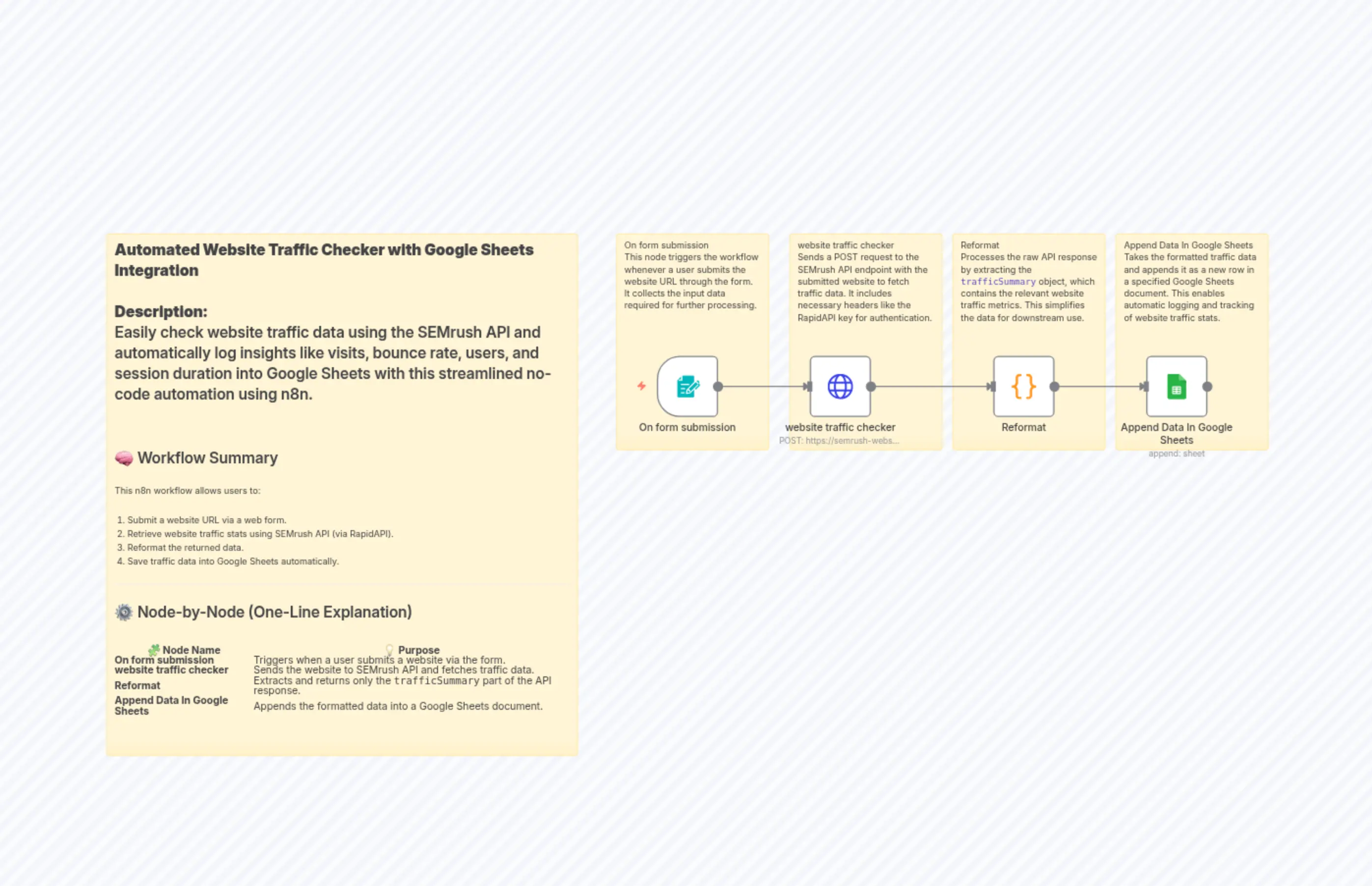
        "content": "**Automated Website Traffic Checker with Google Sheets Integration**\n\n**Description:**  \nEasily check website traffic data using the SEMrush API and automatically log insights like visits, bounce rate, users, and session duration into Google Sheets with this streamlined no-code automation using n8n.\n\n---\n\n## 🧠 Workflow Summary\n\nThis n8n workflow allows users to:\n\n1. Submit a website URL via a web form.\n2. Retrieve website traffic stats using SEMrush API (via RapidAPI).\n3. Reformat the returned data.\n4. Save traffic data into Google Sheets automatically.\n\n---\n\n## ⚙️ Node-by-Node (One-Line Explanation)\n\n| 🧩 Node Name             | 💡 Purpose |\n|--------------------------|------------|\n| **On form submission**   | Triggers when a user submits a website via the form. |\n| **website traffic checker**         | Sends the website to SEMrush API and fetches traffic data. |\n| **Reformat**             | Extracts and returns only the `trafficSummary` part of the API response. |\n| **Append Data In Google Sheets**        | Appends the formatted data into a Google Sheets document. |"
      },
      "typeVersion": 1
    },
    {
      "id": "98be917f-b2b1-4ac2-9f49-fbe10f8ac235",
      "name": "Sticky Note1",
      "type": "n8n-nodes-base.stickyNote",
      "position": [
        580,
        40
      ],
      "parameters": {
        "height": 340,
        "content": " On form submission  \nThis node triggers the workflow whenever a user submits the website URL through the form. It collects the input data required for further processing.\n"
      },
      "typeVersion": 1
    },
    {
      "id": "44763ea2-f711-4a7e-b0ad-3bb41e8e336e",
      "name": "Sticky Note2",
      "type": "n8n-nodes-base.stickyNote",
      "position": [
        840,
        40
      ],
      "parameters": {
        "height": 340,
        "content": "website traffic checker  \nSends a POST request to the SEMrush API endpoint with the submitted website to fetch traffic data. It includes necessary headers like the RapidAPI key for authentication.\n"
      },
      "typeVersion": 1
    },
    {
      "id": "b9cbd421-e2c8-4065-b5f1-a1e295ffb8ae",
      "name": "Sticky Note3",
      "type": "n8n-nodes-base.stickyNote",
      "position": [
        1100,
        40
      ],
      "parameters": {
        "height": 340,
        "content": "Reformat  \nProcesses the raw API response by extracting the `trafficSummary` object, which contains the relevant website traffic metrics. This simplifies the data for downstream use.\n"
      },
      "typeVersion": 1
    },
    {
      "id": "4ab092f2-b823-47c2-9d71-19c58385be19",
      "name": "Sticky Note4",
      "type": "n8n-nodes-base.stickyNote",
      "position": [
        1360,
        40
      ],
      "parameters": {
        "height": 340,
        "content": "Append Data In Google Sheets \nTakes the formatted traffic data and appends it as a new row in a specified Google Sheets document. This enables automatic logging and tracking of website traffic stats."
      },
      "typeVersion": 1
    },
    {
      "id": "e8f072af-bb51-418b-ba3a-f4acfbfd2690",
      "name": "website traffic checker",
      "type": "n8n-nodes-base.httpRequest",
      "position": [
        880,
        220
      ],
      "parameters": {
        "url": "https://semrush-website-traffic-checker.p.rapidapi.com/webtraffic.php",
        "method": "POST",
        "options": {},
        "sendBody": true,
        "contentType": "multipart-form-data",
        "sendHeaders": true,
        "bodyParameters": {
          "parameters": [
            {
              "name": "website",
              "value": "={{ $json.website }}"
            }
          ]
        },
        "headerParameters": {
          "parameters": [
            {
              "name": "x-rapidapi-host",
              "value": "semrush-website-traffic-checker.p.rapidapi.com"
            },
            {
              "name": "x-rapidapi-key",
              "value": "your key"
            }
          ]
        }
      },
      "typeVersion": 4.2
    },
    {
      "id": "e41d0762-84c1-48bf-b690-4617b5b0805a",
      "name": "Append Data In Google Sheets",
      "type": "n8n-nodes-base.googleSheets",
      "position": [
        1400,
        220
      ],
      "parameters": {
        "operation": "append",
        "sheetName": {
          "__rl": true,
          "mode": "url",
          "value": ""
        },
        "documentId": {
          "__rl": true,
          "mode": "url",
          "value": ""
        },
        "authentication": "serviceAccount"
      },
      "credentials": {
        "googleApi": {
          "id": "Rt0RWApx8PL9t0RF",
          "name": "Google Docs account"
        }
      },
      "typeVersion": 4.6
    }
  ],
  "pinData": {},
  "connections": {
    "Reformat": {
      "main": [
        [
          {
            "node": "Append Data In Google Sheets",
            "type": "main",
            "index": 0
          }
        ]
      ]
    },
    "On form submission": {
      "main": [
        [
          {
            "node": "website traffic checker",
            "type": "main",
            "index": 0
          }
        ]
      ]
    },
    "website traffic checker": {
      "main": [
        [
          {
            "node": "Reformat",
            "type": "main",
            "index": 0
          }
        ]
      ]
    }
  }
}