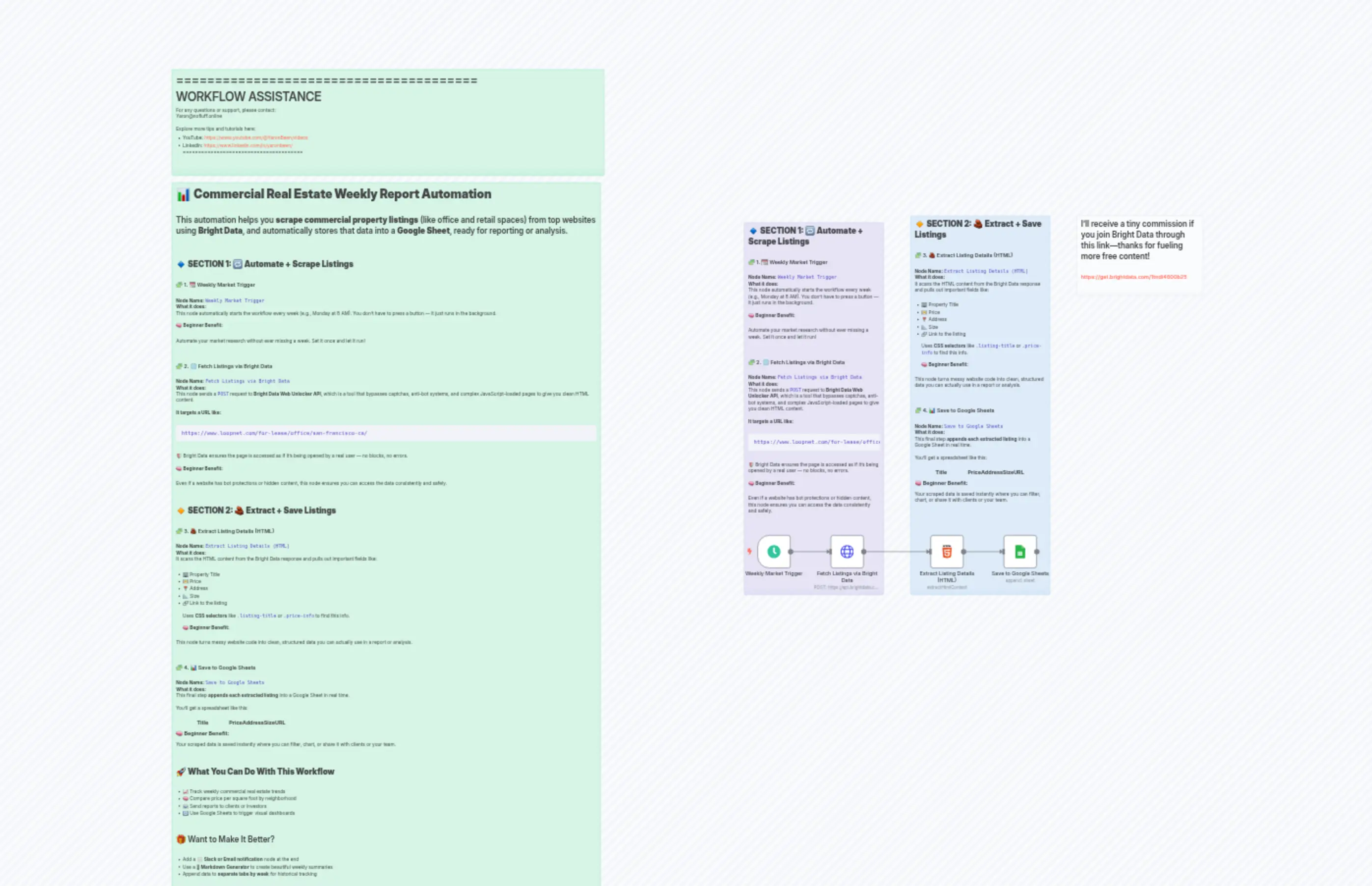
Property_Market_Report_via_Bright_data
Description
Categories
🤖 AI & Machine Learning
Nodes Used
n8n-nodes-base.htmln8n-nodes-base.stickyNoten8n-nodes-base.stickyNoten8n-nodes-base.stickyNoten8n-nodes-base.stickyNoten8n-nodes-base.stickyNoten8n-nodes-base.httpRequestn8n-nodes-base.googleSheetsn8n-nodes-base.scheduleTrigger
PriceGratuit
Views3
Last Updated6/17/2026
workflow.json
{
  "id": "TmVkR7VvM0nMMgE8",
  "meta": {
    "instanceId": "60046904b104f0f72b2629a9d88fe9f676be4035769f1f08dad1dd38a76b9480",
    "templateCredsSetupCompleted": true
  },
  "name": "Property_Market_Report_via_Bright_data",
  "tags": [],
  "nodes": [
    {
      "id": "8891d7b5-79a7-4270-9bf2-374928f36c2a",
      "name": "Sticky Note9",
      "type": "n8n-nodes-base.stickyNote",
      "position": [
        -2160,
        260
      ],
      "parameters": {
        "color": 4,
        "width": 1300,
        "height": 320,
        "content": "=======================================\n            WORKFLOW ASSISTANCE\n=======================================\nFor any questions or support, please contact:\n    [email protected]\n\nExplore more tips and tutorials here:\n   - YouTube: https://www.youtube.com/@YaronBeen/videos\n   - LinkedIn: https://www.linkedin.com/in/yaronbeen/\n=======================================\n"
      },
      "typeVersion": 1
    },
    {
      "id": "edafc05e-31ee-4451-b0cf-89f83db0cbca",
      "name": "Sticky Note4",
      "type": "n8n-nodes-base.stickyNote",
      "position": [
        -2160,
        600
      ],
      "parameters": {
        "color": 4,
        "width": 1289,
        "height": 2218,
        "content": "# 📊 **Commercial Real Estate Weekly Report Automation**\n\nThis automation helps you **scrape commercial property listings** (like office and retail spaces) from top websites using **Bright Data**, and automatically stores that data into a **Google Sheet**, ready for reporting or analysis.\n\n---\n\n## 🔹 **SECTION 1: 🔁 Automate + Scrape Listings**\n\n### 🧩 1. 📆 Weekly Market Trigger\n\n**Node Name:** `Weekly Market Trigger`\n**What it does:**\nThis node automatically starts the workflow every week (e.g., Monday at 8 AM). You don't have to press a button — it just runs in the background.\n\n🧠 **Beginner Benefit:**\n\n> Automate your market research without ever missing a week. Set it once and let it run!\n\n---\n\n### 🧩 2. 🌐 Fetch Listings via Bright Data\n\n**Node Name:** `Fetch Listings via Bright Data`\n**What it does:**\nThis node sends a `POST` request to **Bright Data Web Unlocker API**, which is a tool that bypasses captchas, anti-bot systems, and complex JavaScript-loaded pages to give you clean HTML content.\n\n**It targets a URL like:**\n\n```\nhttps://www.loopnet.com/for-lease/office/san-francisco-ca/\n```\n\n🛡️ Bright Data ensures the page is accessed as if it's being opened by a real user — no blocks, no errors.\n\n🧠 **Beginner Benefit:**\n\n> Even if a website has bot protections or hidden content, this node ensures you can access the data consistently and safely.\n\n---\n\n## 🔸 **SECTION 2: 🧱 Extract + Save Listings**\n\n### 🧩 3. 🧱 Extract Listing Details (HTML)\n\n**Node Name:** `Extract Listing Details (HTML)`\n**What it does:**\nIt scans the HTML content from the Bright Data response and pulls out important fields like:\n\n* 🏢 Property Title\n* 💵 Price\n* 📍 Address\n* 📐 Size\n* 🔗 Link to the listing\n\nUses **CSS selectors** like `.listing-title` or `.price-info` to find this info.\n\n🧠 **Beginner Benefit:**\n\n> This node turns messy website code into clean, structured data you can actually use in a report or analysis.\n\n---\n\n### 🧩 4. 📊 Save to Google Sheets\n\n**Node Name:** `Save to Google Sheets`\n**What it does:**\nThis final step **appends each extracted listing** into a Google Sheet in real time.\n\nYou’ll get a spreadsheet like this:\n\n| Title | Price | Address | Size | URL |\n| ----- | ----- | ------- | ---- | --- |\n\n🧠 **Beginner Benefit:**\n\n> Your scraped data is saved instantly where you can filter, chart, or share it with clients or your team.\n\n---\n\n## 🚀 **What You Can Do With This Workflow**\n\n* 📈 Track weekly commercial real estate trends\n* 🧠 Compare price per square foot by neighborhood\n* 📨 Send reports to clients or investors\n* 🔁 Use Google Sheets to trigger visual dashboards\n\n---\n\n## 🎁 Want to Make It Better?\n\n* Add a ✉️ **Slack or Email notification** node at the end\n* Use a 🪄 **Markdown Generator** to create beautiful weekly summaries\n* Append data to **separate tabs by week** for historical tracking\n\n---\n"
      },
      "typeVersion": 1
    },
    {
      "id": "f1c420c9-ad46-48a5-83cf-f43a6377241c",
      "name": "Weekly Market Trigger",
      "type": "n8n-nodes-base.scheduleTrigger",
      "position": [
        -400,
        1660
      ],
      "parameters": {
        "rule": {
          "interval": [
            {
              "field": "weeks",
              "triggerAtDay": [
                1
              ],
              "triggerAtHour": 9
            }
          ]
        }
      },
      "typeVersion": 1.2
    },
    {
      "id": "a8acbc10-66cf-4568-b81d-4fce0ec576e7",
      "name": "Fetch Listings via Bright Data",
      "type": "n8n-nodes-base.httpRequest",
      "position": [
        -180,
        1660
      ],
      "parameters": {
        "url": "https://api.brightdata.com/request",
        "method": "POST",
        "options": {},
        "sendBody": true,
        "sendHeaders": true,
        "bodyParameters": {
          "parameters": [
            {
              "name": "zone",
              "value": "n8n_unblocker"
            },
            {
              "name": "url",
              "value": "https://www.crexi.com/properties?geo=san-francisco-ca"
            },
            {
              "name": "country",
              "value": "us"
            },
            {
              "name": "format",
              "value": "raw"
            }
          ]
        },
        "headerParameters": {
          "parameters": [
            {
              "name": "Authorization",
              "value": "Bearer API_KEY"
            }
          ]
        }
      },
      "typeVersion": 4.2
    },
    {
      "id": "800989c9-af12-4c5f-b7a4-4a2ea290110f",
      "name": "Extract Listing Details (HTML)",
      "type": "n8n-nodes-base.html",
      "position": [
        120,
        1660
      ],
      "parameters": {
        "options": {},
        "operation": "extractHtmlContent",
        "extractionValues": {
          "values": [
            {
              "key": "Price",
              "cssSelector": "<span _ngcontent-ng-c2107907900=\"\" data-cy=\"propertyPrice\" class=\"ng-star-inserted\">$3,995,000</span>",
              "returnArray": true
            }
          ]
        }
      },
      "typeVersion": 1.2
    },
    {
      "id": "54724fca-c18d-44df-a0e7-f267ddd09d73",
      "name": "Save to Google Sheets",
      "type": "n8n-nodes-base.googleSheets",
      "position": [
        340,
        1660
      ],
      "parameters": {
        "operation": "append",
        "sheetName": {
          "__rl": true,
          "mode": "list",
          "value": ""
        },
        "documentId": {
          "__rl": true,
          "mode": "list",
          "value": ""
        }
      },
      "credentials": {
        "googleSheetsOAuth2Api": {
          "id": "r2mDaisH6e9VkwHl",
          "name": "Google Sheets account"
        }
      },
      "typeVersion": 4.6
    },
    {
      "id": "3d8af14f-3cb5-4f4f-aa71-be521322c113",
      "name": "Sticky Note3",
      "type": "n8n-nodes-base.stickyNote",
      "position": [
        -440,
        720
      ],
      "parameters": {
        "color": 6,
        "width": 420,
        "height": 1120,
        "content": "## 🔹 **SECTION 1: 🔁 Automate + Scrape Listings**\n\n### 🧩 1. 📆 Weekly Market Trigger\n\n**Node Name:** `Weekly Market Trigger`\n**What it does:**\nThis node automatically starts the workflow every week (e.g., Monday at 8 AM). You don't have to press a button — it just runs in the background.\n\n🧠 **Beginner Benefit:**\n\n> Automate your market research without ever missing a week. Set it once and let it run!\n\n---\n\n### 🧩 2. 🌐 Fetch Listings via Bright Data\n\n**Node Name:** `Fetch Listings via Bright Data`\n**What it does:**\nThis node sends a `POST` request to **Bright Data Web Unlocker API**, which is a tool that bypasses captchas, anti-bot systems, and complex JavaScript-loaded pages to give you clean HTML content.\n\n**It targets a URL like:**\n\n```\nhttps://www.loopnet.com/for-lease/office/san-francisco-ca/\n```\n\n🛡️ Bright Data ensures the page is accessed as if it's being opened by a real user — no blocks, no errors.\n\n🧠 **Beginner Benefit:**\n\n> Even if a website has bot protections or hidden content, this node ensures you can access the data consistently and safely.\n\n---\n"
      },
      "typeVersion": 1
    },
    {
      "id": "2fd2d9bb-ec9c-48c7-a745-bd5b653e76b5",
      "name": "Sticky Note",
      "type": "n8n-nodes-base.stickyNote",
      "position": [
        60,
        700
      ],
      "parameters": {
        "color": 5,
        "width": 420,
        "height": 1140,
        "content": "## 🔸 **SECTION 2: 🧱 Extract + Save Listings**\n\n### 🧩 3. 🧱 Extract Listing Details (HTML)\n\n**Node Name:** `Extract Listing Details (HTML)`\n**What it does:**\nIt scans the HTML content from the Bright Data response and pulls out important fields like:\n\n* 🏢 Property Title\n* 💵 Price\n* 📍 Address\n* 📐 Size\n* 🔗 Link to the listing\n\nUses **CSS selectors** like `.listing-title` or `.price-info` to find this info.\n\n🧠 **Beginner Benefit:**\n\n> This node turns messy website code into clean, structured data you can actually use in a report or analysis.\n\n---\n\n### 🧩 4. 📊 Save to Google Sheets\n\n**Node Name:** `Save to Google Sheets`\n**What it does:**\nThis final step **appends each extracted listing** into a Google Sheet in real time.\n\nYou’ll get a spreadsheet like this:\n\n| Title | Price | Address | Size | URL |\n| ----- | ----- | ------- | ---- | --- |\n\n🧠 **Beginner Benefit:**\n\n> Your scraped data is saved instantly where you can filter, chart, or share it with clients or your team.\n\n---\n"
      },
      "typeVersion": 1
    },
    {
      "id": "82aa81aa-39af-410e-9434-ee6189aabc7b",
      "name": "Sticky Note5",
      "type": "n8n-nodes-base.stickyNote",
      "position": [
        560,
        700
      ],
      "parameters": {
        "color": 7,
        "width": 380,
        "height": 240,
        "content": "## I’ll receive a tiny commission if you join Bright Data through this link—thanks for fueling more free content!\n\n### https://get.brightdata.com/1tndi4600b25"
      },
      "typeVersion": 1
    }
  ],
  "active": false,
  "pinData": {},
  "settings": {
    "executionOrder": "v1"
  },
  "versionId": "b60c01a8-a0b5-43de-bde0-5fa9fd1bb732",
  "connections": {
    "Weekly Market Trigger": {
      "main": [
        [
          {
            "node": "Fetch Listings via Bright Data",
            "type": "main",
            "index": 0
          }
        ]
      ]
    },
    "Extract Listing Details (HTML)": {
      "main": [
        [
          {
            "node": "Save to Google Sheets",
            "type": "main",
            "index": 0
          }
        ]
      ]
    },
    "Fetch Listings via Bright Data": {
      "main": [
        [
          {
            "node": "Extract Listing Details (HTML)",
            "type": "main",
            "index": 0
          }
        ]
      ]
    }
  }
}