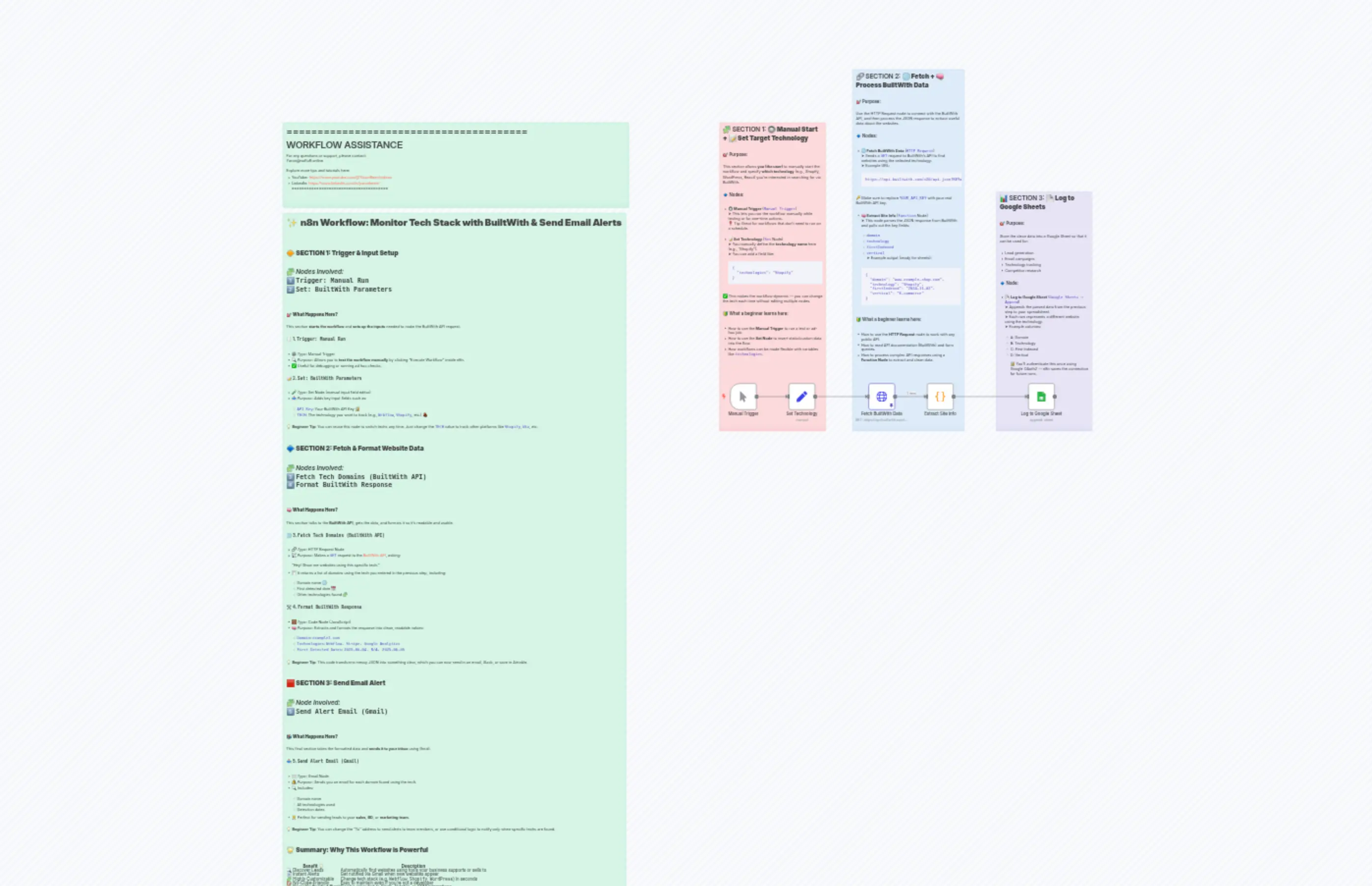
Builtwith Tracker To Email
Description
Categories
📢 Marketing
Nodes Used
n8n-nodes-base.setn8n-nodes-base.coden8n-nodes-base.stickyNoten8n-nodes-base.stickyNoten8n-nodes-base.stickyNoten8n-nodes-base.stickyNoten8n-nodes-base.stickyNoten8n-nodes-base.httpRequestn8n-nodes-base.googleSheetsn8n-nodes-base.manualTrigger
PriceGratuit
Views0
Last Updated11/28/2025
workflow.json
{
"id": "Gzj0XGbwdrkLDnf6",
"meta": {
"instanceId": "84ad02d6104594179f43f1ce9cfe3a81637b2faedb57dafcb9e649b7542988db",
"templateCredsSetupCompleted": true
},
"name": "Builtwith Tracker To Email",
"tags": [],
"nodes": [
{
"id": "c92c104a-6eba-4178-8bf6-991085ee1695",
"name": "Manual Trigger",
"type": "n8n-nodes-base.manualTrigger",
"position": [
0,
0
],
"parameters": {},
"typeVersion": 1
},
{
"id": "76e24861-9f7d-4b29-b522-6a844b9436bb",
"name": "Set Technology",
"type": "n8n-nodes-base.set",
"position": [
220,
0
],
"parameters": {
"options": {},
"assignments": {
"assignments": [
{
"id": "03833cf1-e817-4466-9507-f8ddb587b5cb",
"name": "Technology",
"type": "string",
"value": "Shopify"
}
]
}
},
"typeVersion": 3.4
},
{
"id": "15417d50-e7dd-4114-b907-fccc811868af",
"name": "Fetch BuiltWith Data",
"type": "n8n-nodes-base.httpRequest",
"position": [
520,
0
],
"parameters": {
"url": "https://api.builtwith.com/v20/api.json",
"options": {},
"sendQuery": true,
"queryParameters": {
"parameters": [
{
"name": "KEY",
"value": "YOUR_API_KEY"
},
{
"name": "TECH",
"value": "={{ $json.Technology }}"
},
{
"name": "START",
"value": "0"
}
]
}
},
"typeVersion": 4.2
},
{
"id": "c688d193-0f53-4a83-a60e-8f2c8d10ab33",
"name": "Extract Site Info",
"type": "n8n-nodes-base.code",
"position": [
740,
0
],
"parameters": {
"jsCode": "const techSearched = $json[\"technologies\"] || \"Unknown\"; // fallback in case it's not set\nconst results = $json.Results || [];\n\nreturn results.map(site => {\n return {\n json: {\n domain: site.ResultPath || \"\",\n technology: techSearched,\n firstIndexed: site.FirstIndexed || \"\",\n vertical: site.Vertical || \"\"\n }\n };\n});\n"
},
"typeVersion": 2
},
{
"id": "dda7e1db-6e29-4f2d-b98f-25e1473f4ac8",
"name": "Log to Google Sheet",
"type": "n8n-nodes-base.googleSheets",
"position": [
1120,
0
],
"parameters": {
"columns": {
"value": {
"Domain": "={{ $json.domain }}",
"Vertical": "={{ $json.vertical }}",
"Technology": "={{ $json.technology }}",
"First Indexed": "={{ $json.firstIndexed }}"
},
"schema": [
{
"id": "Domain",
"type": "string",
"display": true,
"required": false,
"displayName": "Domain",
"defaultMatch": false,
"canBeUsedToMatch": true
},
{
"id": "Technology",
"type": "string",
"display": true,
"required": false,
"displayName": "Technology",
"defaultMatch": false,
"canBeUsedToMatch": true
},
{
"id": "First Indexed",
"type": "string",
"display": true,
"required": false,
"displayName": "First Indexed",
"defaultMatch": false,
"canBeUsedToMatch": true
},
{
"id": "Vertical",
"type": "string",
"display": true,
"required": false,
"displayName": "Vertical",
"defaultMatch": false,
"canBeUsedToMatch": true
}
],
"mappingMode": "defineBelow",
"matchingColumns": [],
"attemptToConvertTypes": false,
"convertFieldsToString": false
},
"options": {},
"operation": "append",
"sheetName": {
"__rl": true,
"mode": "list",
"value": "gid=0",
"cachedResultUrl": "https://docs.google.com/spreadsheets/d/1lDu3HvxcpA1nRDJq6Ge-OrMO0v592UfLBIjt3Ylc3Mo/edit#gid=0",
"cachedResultName": "Sheet1"
},
"documentId": {
"__rl": true,
"mode": "list",
"value": "1lDu3HvxcpA1nRDJq6Ge-OrMO0v592UfLBIjt3Ylc3Mo",
"cachedResultUrl": "https://docs.google.com/spreadsheets/d/1lDu3HvxcpA1nRDJq6Ge-OrMO0v592UfLBIjt3Ylc3Mo/edit?usp=drivesdk",
"cachedResultName": "Builtwith"
}
},
"credentials": {
"googleSheetsOAuth2Api": {
"id": "Rp7XiR3hxJfv03ZO",
"name": "Google Sheets account"
}
},
"typeVersion": 4.5
},
{
"id": "9e1ffa72-734e-4a66-a3e8-2b45b8979e4a",
"name": "Sticky Note",
"type": "n8n-nodes-base.stickyNote",
"position": [
-40,
-980
],
"parameters": {
"color": 3,
"width": 400,
"height": 1160,
"content": "## 🧩 SECTION 1: **🔘 Manual Start + 📝 Set Target Technology**\n\n### 🎯 Purpose:\n\nThis section allows **you (the user)** to manually start the workflow and specify **which technology** (e.g., Shopify, WordPress, React) you're interested in searching for via BuiltWith.\n\n### 🔹 Nodes:\n\n* **🔘 Manual Trigger** (`Manual Trigger`)\n ➤ This lets you run the workflow manually while testing or for one-time actions.\n 📍 Tip: Great for workflows that don't need to run on a schedule.\n\n* **📝 Set Technology** (`Set` Node)\n ➤ You manually define the **technology name** here (e.g., \"Shopify\").\n ➤ You can add a field like:\n\n ```json\n {\n \"technologies\": \"Shopify\"\n }\n ```\n\n ✅ This makes the workflow dynamic — you can change the tech each time without editing multiple nodes.\n\n### 🔰 What a beginner learns here:\n\n* How to use the **Manual Trigger** to run a test or ad-hoc job.\n* How to use the **Set Node** to insert static/custom data into the flow.\n* How workflows can be made flexible with variables like `technologies`.\n\n---\n\n"
},
"typeVersion": 1
},
{
"id": "a43fadd2-cf70-4f67-aa99-f513ea0e404a",
"name": "Sticky Note1",
"type": "n8n-nodes-base.stickyNote",
"position": [
460,
-1180
],
"parameters": {
"color": 5,
"width": 420,
"height": 1360,
"content": "## 🔗 SECTION 2: **🌐 Fetch + 🧠 Process BuiltWith Data**\n\n### 🎯 Purpose:\n\nUse the HTTP Request node to connect with the BuiltWith API, and then process the JSON response to extract useful data about the websites.\n\n### 🔹 Nodes:\n\n* **🌐 Fetch BuiltWith Data** (`HTTP Request`)\n ➤ Sends a `GET` request to BuiltWith’s API to find websites using the selected technology.\n ➤ Example URL:\n\n ```\n https://api.builtwith.com/v20/api.json?KEY=YOUR_API_KEY&TECH=Shopify&START=0\n ```\n\n 🔑 Make sure to replace `YOUR_API_KEY` with your real BuiltWith API key.\n\n* **🧠 Extract Site Info** (`Function` Node)\n ➤ This node parses the JSON response from BuiltWith and pulls out the key fields:\n\n * `domain`\n * `technology`\n * `firstIndexed`\n * `vertical`\n ➤ Example output (ready for sheets):\n\n ```json\n {\n \"domain\": \"www.example-shop.com\",\n \"technology\": \"Shopify\",\n \"firstIndexed\": \"2024-11-02\",\n \"vertical\": \"E-commerce\"\n }\n ```\n\n### 🔰 What a beginner learns here:\n\n* How to use the **HTTP Request** node to work with any public API.\n* How to read API documentation (BuiltWith) and form queries.\n* How to process complex API responses using a **Function Node** to extract and clean data.\n\n---\n\n\n"
},
"typeVersion": 1
},
{
"id": "97ce7536-bc81-4f00-966d-7375c6563fa3",
"name": "Sticky Note2",
"type": "n8n-nodes-base.stickyNote",
"position": [
1000,
-720
],
"parameters": {
"color": 6,
"width": 360,
"height": 900,
"content": "## 📊 SECTION 3: **📄 Log to Google Sheets**\n\n### 🎯 Purpose:\n\nStore the clean data into a Google Sheet so that it can be used for:\n\n* Lead generation\n* Email campaigns\n* Technology tracking\n* Competitor research\n\n### 🔹 Node:\n\n* **📄 Log to Google Sheet** (`Google Sheets → Append`)\n ➤ Appends the parsed data from the previous step to your spreadsheet.\n ➤ Each row represents a different website using the technology.\n ➤ Example columns:\n\n * A: Domain\n * B: Technology\n * C: First Indexed\n * D: Vertical\n\n🔐 You’ll authenticate this once using Google OAuth2 — n8n saves the connection for future runs.\n\n"
},
"typeVersion": 1
},
{
"id": "dd0c5a1a-c155-4f8b-8680-8ccd4dd4196d",
"name": "Sticky Note9",
"type": "n8n-nodes-base.stickyNote",
"position": [
-1680,
-980
],
"parameters": {
"color": 4,
"width": 1300,
"height": 320,
"content": "=======================================\n WORKFLOW ASSISTANCE\n=======================================\nFor any questions or support, please contact:\n [email protected]\n\nExplore more tips and tutorials here:\n - YouTube: https://www.youtube.com/@YaronBeen/videos\n - LinkedIn: https://www.linkedin.com/in/yaronbeen/\n=======================================\n"
},
"typeVersion": 1
},
{
"id": "d3a277a7-ad8c-4f8c-bd08-5ac2b3e7f87e",
"name": "Sticky Note4",
"type": "n8n-nodes-base.stickyNote",
"position": [
-1680,
-640
],
"parameters": {
"color": 4,
"width": 1289,
"height": 2658,
"content": "# ✨ **n8n Workflow: Monitor Tech Stack with BuiltWith & Send Email Alerts**\n\n---\n\n## 🔶 **SECTION 1: Trigger & Input Setup**\n\n🧩 *Nodes Involved:*\n1️⃣ `Trigger: Manual Run`\n2️⃣ `Set: BuiltWith Parameters`\n\n---\n\n### 🎯 **What Happens Here?**\n\nThis section **starts the workflow** and **sets up the inputs** needed to make the BuiltWith API request.\n\n#### 🖱️ 1. `Trigger: Manual Run`\n\n* ⚙️ *Type:* Manual Trigger\n* 🔍 *Purpose:* Allows you to **test the workflow manually** by clicking “Execute Workflow” inside n8n.\n* ✅ Useful for debugging or running ad hoc checks.\n\n#### 📝 2. `Set: BuiltWith Parameters`\n\n* 🧪 *Type:* Set Node (manual input field editor)\n* 📤 *Purpose:* Adds key input fields such as:\n\n * `API Key`: Your BuiltWith API Key 🔐\n * `TECH`: The technology you want to track (e.g., `Webflow`, `Shopify`, etc.) 🧱\n\n> 💡 **Beginner Tip:** You can reuse this node to switch techs any time. Just change the `TECH` value to track other platforms like `Shopify`, `Wix`, etc.\n\n---\n\n## 🔷 **SECTION 2: Fetch & Format Website Data**\n\n🧩 *Nodes Involved:*\n3️⃣ `Fetch Tech Domains (BuiltWith API)`\n4️⃣ `Format BuiltWith Response`\n\n---\n\n### 🧠 **What Happens Here?**\n\nThis section talks to the **BuiltWith API**, gets the data, and formats it so it's readable and usable.\n\n#### 🌐 3. `Fetch Tech Domains (BuiltWith API)`\n\n* 🔗 *Type:* HTTP Request Node\n* 📡 *Purpose:* Makes a `GET` request to the [BuiltWith API](https://builtwith.com/), asking:\n\n > “Hey! Show me websites using this specific tech.”\n* 🧾 It returns a list of domains using the tech you entered in the previous step, including:\n\n * Domain name 🌐\n * First detected date 📅\n * Other technologies found 🧩\n\n#### 🛠️ 4. `Format BuiltWith Response`\n\n* 🧮 *Type:* Code Node (JavaScript)\n* 🧠 *Purpose:* Extracts and formats the response into clean, readable values:\n\n * `Domain`: `example1.com`\n * `Technologies`: `Webflow, Stripe, Google Analytics`\n * `First Detected Dates`: `2025-06-04, N/A, 2025-06-05`\n\n> 💡 **Beginner Tip:** This code transforms messy JSON into something clear, which you can now send in an email, Slack, or save in Airtable.\n\n---\n\n## 🟥 **SECTION 3: Send Email Alert**\n\n🧩 *Node Involved:*\n5️⃣ `Send Alert Email (Gmail)`\n\n---\n\n### 📬 **What Happens Here?**\n\nThis final section takes the formatted data and **sends it to your inbox** using Gmail.\n\n#### 📤 5. `Send Alert Email (Gmail)`\n\n* ✉️ *Type:* Gmail Node\n* 🔔 *Purpose:* Sends you an email for each domain found using the tech.\n* 🔍 Includes:\n\n * Domain name\n * All technologies used\n * Detection dates\n* 🧑💼 Perfect for sending leads to your **sales**, **BD**, or **marketing team**.\n\n> 💡 **Beginner Tip:** You can change the \"To\" address to send alerts to team members, or use conditional logic to notify only when specific techs are found.\n\n---\n\n## 🌟 **Summary: Why This Workflow is Powerful**\n\n| Benefit 💡 | Description |\n| --------------------------- | -------------------------------------------------------------------------- |\n| 🔍 Discover Leads | Automatically find websites using tools your business supports or sells to |\n| 📧 Instant Alerts | Get notified via Gmail when new websites appear |\n| 🧩 Highly Customizable | Change tech stack (e.g. `Webflow`, `Shopify`, `WordPress`) in seconds |\n| 🚫 No-Code-Friendly | Easy to maintain even if you're not a developer |\n| 🏗️ Reusable Building Block | Can be extended to Slack, Airtable, or CRM integrations |\n\n---\n\n"
},
"typeVersion": 1
}
],
"active": false,
"pinData": {
"Fetch BuiltWith Data": [
{
"json": {
"Next": 2,
"Limit": 2,
"Start": 0,
"Total": 2345,
"Results": [
{
"Vertical": "E-commerce",
"ResultPath": "www.example-shop.com",
"FirstIndexed": "2024-11-02",
"Technologies": [
{
"Name": "Shopify",
"Categories": [
"Ecommerce",
"Hosted Solution"
],
"Description": "Shopify is a hosted ecommerce platform.",
"LastDetected": "2025-06-01",
"FirstDetected": "2024-10-15"
},
{
"Name": "jQuery",
"LastDetected": "2025-06-01",
"FirstDetected": "2024-10-15"
}
]
},
{
"Vertical": "Retail",
"ResultPath": "www.coolstore.net",
"FirstIndexed": "2024-12-18",
"Technologies": [
{
"Name": "Shopify",
"LastDetected": "2025-05-30",
"FirstDetected": "2024-12-01"
}
]
}
]
}
}
]
},
"settings": {
"executionOrder": "v1"
},
"versionId": "97826b84-6499-4d64-b608-f6a256cb8684",
"connections": {
"Manual Trigger": {
"main": [
[
{
"node": "Set Technology",
"type": "main",
"index": 0
}
]
]
},
"Set Technology": {
"main": [
[
{
"node": "Fetch BuiltWith Data",
"type": "main",
"index": 0
}
]
]
},
"Extract Site Info": {
"main": [
[
{
"node": "Log to Google Sheet",
"type": "main",
"index": 0
}
]
]
},
"Fetch BuiltWith Data": {
"main": [
[
{
"node": "Extract Site Info",
"type": "main",
"index": 0
}
]
]
}
}
}