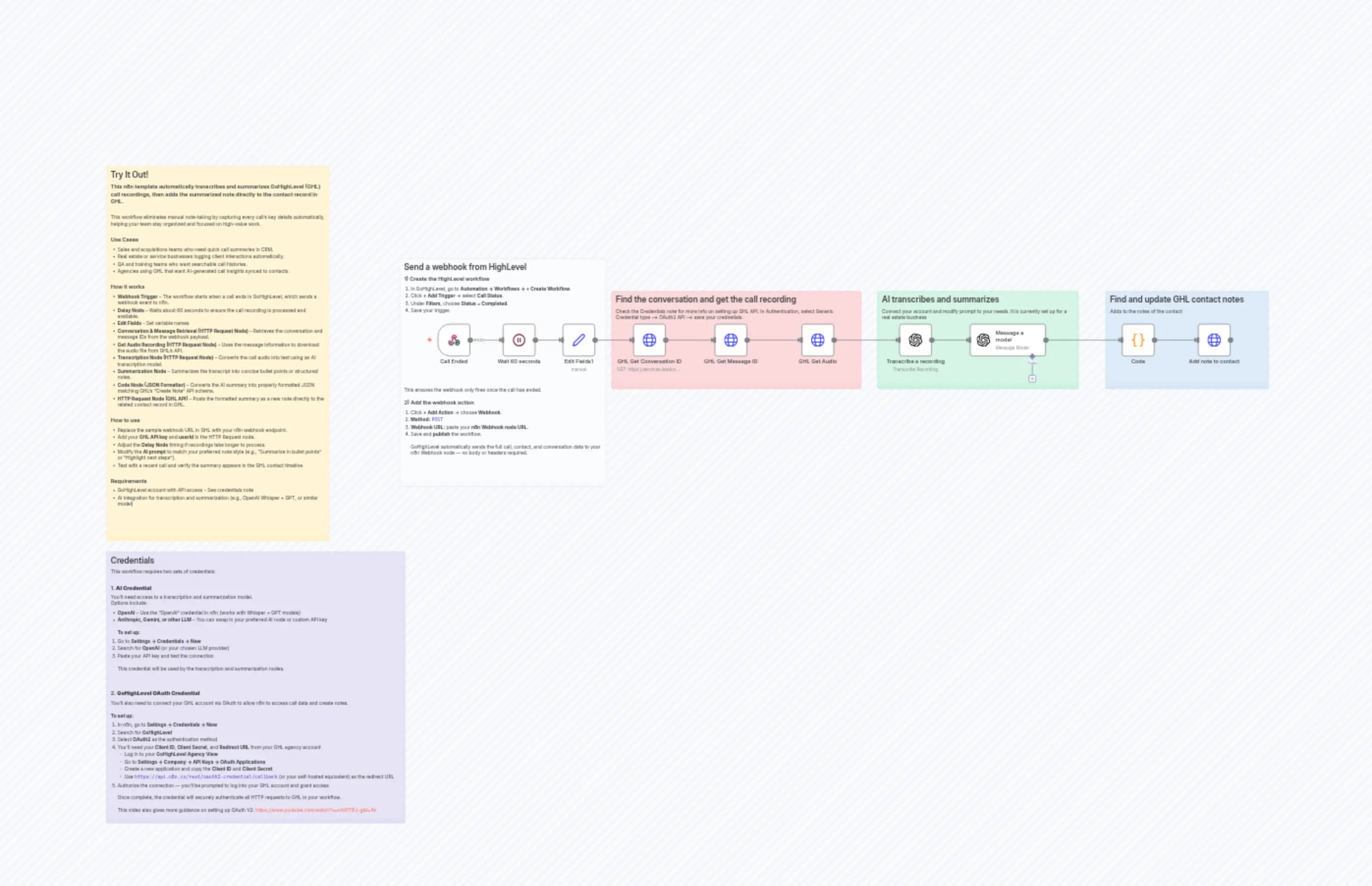
GHL AI Call Summaries
Description
Categories
🤖 AI & Machine Learning
Nodes Used
n8n-nodes-base.setn8n-nodes-base.coden8n-nodes-base.waitn8n-nodes-base.webhookn8n-nodes-base.stickyNoten8n-nodes-base.stickyNoten8n-nodes-base.stickyNoten8n-nodes-base.stickyNoten8n-nodes-base.stickyNoten8n-nodes-base.stickyNote
PriceGratuit
Views0
Last Updated11/28/2025
workflow.json
{
  "id": "Gl42xEYFxeKPDz3J",
  "meta": {
    "instanceId": "2aa1e708fef72b335d0b91f52e423607ee1fc85ca2d0967514a06c4b17d7fee2",
    "templateCredsSetupCompleted": true
  },
  "name": "GHL AI Call Summaries",
  "tags": [
    {
      "id": "rat6cvakoZZK8ks3",
      "name": "Creator",
      "createdAt": "2025-10-28T14:44:45.794Z",
      "updatedAt": "2025-10-28T14:44:45.794Z"
    }
  ],
  "nodes": [
    {
      "id": "2878a20f-46dc-4ebd-b5a8-4ad9792ec540",
      "name": "Message a model",
      "type": "@n8n/n8n-nodes-langchain.openAi",
      "position": [
        1760,
        -304
      ],
      "parameters": {
        "modelId": {
          "__rl": true,
          "mode": "list",
          "value": "gpt-4o-mini",
          "cachedResultName": "GPT-4O-MINI"
        },
        "options": {},
        "messages": {
          "values": [
            {
              "content": "=Summarize the following sales or real estate call into clear, concise bullet points suitable for CRM notes.  \nThe call is typically between a sales or acquisitions representative and a client, agent, or lead.  \nUse context clues to infer the contact type (e.g., realtor, buyer, seller, vendor, etc.).\n\nFocus on:\n- Current situation or status of the deal or opportunity  \n- Key details about circumstances, constraints, or important context  \n- Agreed next actions or follow-ups  \n\nIf applicable, include:\n- Motivation or situation of the other party  \n- Property or project condition (if discussed)  \n- Timeline (include dates or specific timeframes if mentioned)  \n- Price or terms (only if explicitly stated)  \n- Any risks, objections, or concerns raised  \n\nRules:\n- Do **not** invent or assume any information.  \n- Only include details explicitly present in the transcript.  \n- If a number or date is mentioned, include it **exactly as stated**.  \n- Exclude property data (addresses, bed/bath count, ARV, Zillow links) unless the speaker mentioned them.  \n- If a topic wasn’t discussed, simply omit it — don’t write “not discussed.”\n\nTranscript:\n\"\"\"\n{{ $json.text }}\n\"\"\""
            },
            {
              "role": "system",
              "content": "You are an **EXTRACTIVE summarizer** for sales and real estate calls.  \nUse **only facts** explicitly present in the transcript.  \nIf a detail is missing, write “Not discussed.”  \nNever infer property details, prices, dates, or locations unless clearly stated.  \nExclude any platform mentions (e.g., Zillow) unless explicitly referenced in the call.  \nOutput **5–8 concise bullet points**, each no longer than 20 words, plain text with hyphens."
            }
          ]
        }
      },
      "credentials": {
        "openAiApi": {
          "id": "arpaxjtIV5CQrdNF",
          "name": "OpenAi account"
        }
      },
      "typeVersion": 1.8
    },
    {
      "id": "933026be-3617-4c59-bcd5-c2a603b07475",
      "name": "Transcribe a recording",
      "type": "@n8n/n8n-nodes-langchain.openAi",
      "position": [
        1552,
        -304
      ],
      "parameters": {
        "options": {},
        "resource": "audio",
        "operation": "transcribe"
      },
      "credentials": {
        "openAiApi": {
          "id": "arpaxjtIV5CQrdNF",
          "name": "OpenAi account"
        }
      },
      "typeVersion": 1.8
    },
    {
      "id": "4c473d82-c204-4f59-a56a-f9c9e8d82d2b",
      "name": "Sticky Note",
      "type": "n8n-nodes-base.stickyNote",
      "position": [
        -784,
        -768
      ],
      "parameters": {
        "width": 656,
        "height": 1104,
        "content": "## Try It Out!\n### This n8n template automatically transcribes and summarizes GoHighLevel (GHL) call recordings, then adds the summarized note directly to the contact record in GHL.\n\nThis workflow eliminates manual note-taking by capturing every call’s key details automatically, helping your team stay organized and focused on high-value work.\n\n### Use Cases\n* Sales and acquisitions teams who need quick call summaries in CRM.  \n* Real estate or service businesses logging client interactions automatically.  \n* QA and training teams who want searchable call histories.  \n* Agencies using GHL that want AI-generated call insights synced to contacts.  \n\n### How it works\n* **Webhook Trigger** – The workflow starts when a call ends in GoHighLevel, which sends a webhook event to n8n.  \n* **Delay Node** – Waits about 60 seconds to ensure the call recording is processed and available. \n* **Edit Fields** - Set variable names\n* **Conversation & Message Retrieval (HTTP Request Node)** – Retrieves the conversation and message IDs from the webhook payload.  \n* **Get Audio Recording (HTTP Request Node)** – Uses the message information to download the audio file from GHL’s API.  \n* **Transcription Node (HTTP Request Node)** – Converts the call audio into text using an AI transcription model.  \n* **Summarization Node** – Summarizes the transcript into concise bullet points or structured notes.  \n* **Code Node (JSON Formatter)** – Converts the AI summary into properly formatted JSON matching GHL’s “Create Note” API schema.  \n* **HTTP Request Node (GHL API)** – Posts the formatted summary as a new note directly to the related contact record in GHL.  \n\n### How to use\n* Replace the sample webhook URL in GHL with your n8n webhook endpoint.  \n* Add your **GHL API key** and **userId** in the HTTP Request node.  \n* Adjust the **Delay Node** timing if recordings take longer to process.  \n* Modify the **AI prompt** to match your preferred note style (e.g., “Summarize in bullet points” or “Highlight next steps”).  \n* Test with a recent call and verify the summary appears in the GHL contact timeline.  \n\n### Requirements\n* GoHighLevel account with API access - See credentials note\n* AI integration for transcription and summarization (e.g., OpenAI Whisper + GPT, or similar model)  "
      },
      "typeVersion": 1
    },
    {
      "id": "8a84e80a-017f-4659-9044-ad8c45c9d5d7",
      "name": "GHL Get Audio",
      "type": "n8n-nodes-base.httpRequest",
      "position": [
        1264,
        -304
      ],
      "parameters": {
        "url": "=https://services.leadconnectorhq.com/conversations/messages/{{ $json.messages.messages[0].id }}/locations/{{ $json.messages.messages[1].locationId }}/recording",
        "options": {},
        "sendHeaders": true,
        "headerParameters": {
          "parameters": [
            {
              "name": "Version",
              "value": "2021-07-28"
            }
          ]
        }
      },
      "typeVersion": 4.2
    },
    {
      "id": "6fb40130-2da2-41a2-9876-443586157af7",
      "name": "GHL Get Conversation ID",
      "type": "n8n-nodes-base.httpRequest",
      "position": [
        768,
        -304
      ],
      "parameters": {
        "url": "https://services.leadconnectorhq.com/conversations/search",
        "options": {},
        "sendQuery": true,
        "sendHeaders": true,
        "queryParameters": {
          "parameters": [
            {
              "name": "contactId",
              "value": "={{ $('Edit Fields1').item.json.contact_id }}"
            }
          ]
        },
        "headerParameters": {
          "parameters": [
            {
              "name": "Version",
              "value": "2021-07-28"
            }
          ]
        }
      },
      "typeVersion": 4.2
    },
    {
      "id": "39ddbd75-cf56-4079-884d-9111ca4dd98d",
      "name": "GHL Get Message ID",
      "type": "n8n-nodes-base.httpRequest",
      "position": [
        1008,
        -304
      ],
      "parameters": {
        "url": "=https://services.leadconnectorhq.com/conversations/{{ $json.conversations[0].id }}/messages",
        "options": {},
        "sendQuery": true,
        "sendHeaders": true,
        "queryParameters": {
          "parameters": [
            {
              "name": "type",
              "value": "=TYPE_CALL"
            }
          ]
        },
        "headerParameters": {
          "parameters": [
            {
              "name": "Version",
              "value": "2021-07-28"
            }
          ]
        }
      },
      "typeVersion": 4.2
    },
    {
      "id": "a557d6d4-63c7-4306-93d6-af05ea8ef599",
      "name": "Sticky Note1",
      "type": "n8n-nodes-base.stickyNote",
      "position": [
        704,
        -400
      ],
      "parameters": {
        "color": 3,
        "width": 736,
        "height": 288,
        "content": "## Find the conversation and get the call recording\nCheck the Credentials note for more info on setting up GHL API. In Authentication, select Generic Credential type —> OAuth2 API —> save your crednetials."
      },
      "typeVersion": 1
    },
    {
      "id": "2aa1e8d6-f687-469d-85ac-1f44b2d157f8",
      "name": "Sticky Note2",
      "type": "n8n-nodes-base.stickyNote",
      "position": [
        1488,
        -400
      ],
      "parameters": {
        "color": 4,
        "width": 592,
        "height": 288,
        "content": "## AI transcribes and summarizes\nConnect your account and modify prompt to your needs. It is currently set up for a real estate business\n"
      },
      "typeVersion": 1
    },
    {
      "id": "e6f9d8e9-367b-474d-b859-797093735f2f",
      "name": "Sticky Note3",
      "type": "n8n-nodes-base.stickyNote",
      "position": [
        2160,
        -400
      ],
      "parameters": {
        "color": 5,
        "width": 480,
        "height": 288,
        "content": "## Find and update GHL contact notes\nAdds to the notes of the contact"
      },
      "typeVersion": 1
    },
    {
      "id": "facf7a0c-0289-47fb-901f-703fc6f5f7ee",
      "name": "Edit Fields1",
      "type": "n8n-nodes-base.set",
      "position": [
        560,
        -304
      ],
      "parameters": {
        "options": {},
        "assignments": {
          "assignments": [
            {
              "id": "80f07c1f-1e91-450e-be42-8cc8404a9008",
              "name": "full_name",
              "type": "string",
              "value": "={{ $(\"Call Ended\").first().json.body.full_name }}"
            },
            {
              "id": "f2e2330f-e763-4a0c-903d-d952ba5d7179",
              "name": "phone",
              "type": "string",
              "value": "={{ $(\"Call Ended\").first().json.body.phone  }}"
            },
            {
              "id": "809d7415-fc51-4be9-ae6e-828472c02f34",
              "name": "contact_id",
              "type": "string",
              "value": "={{ $(\"Call Ended\").first().json.body.contact_id }}"
            }
          ]
        }
      },
      "typeVersion": 3.4
    },
    {
      "id": "813260b3-3d41-4e0f-8366-85574a18bf76",
      "name": "Call Ended",
      "type": "n8n-nodes-base.webhook",
      "position": [
        192,
        -304
      ],
      "webhookId": "39c6861d-8b65-40f3-b146-6233c6b3f29a",
      "parameters": {
        "path": "sample",
        "options": {},
        "httpMethod": "POST"
      },
      "typeVersion": 2.1
    },
    {
      "id": "1c1dab8f-2bca-40fe-9979-050da7329fcd",
      "name": "Add note to contact",
      "type": "n8n-nodes-base.httpRequest",
      "position": [
        2432,
        -304
      ],
      "parameters": {
        "url": "=https://services.leadconnectorhq.com/contacts/{{ $('Call Ended').item.json.body.contact_id }}/notes",
        "method": "POST",
        "options": {},
        "jsonBody": "={{ $json }}",
        "sendBody": true,
        "sendQuery": true,
        "sendHeaders": true,
        "specifyBody": "json",
        "queryParameters": {
          "parameters": [
            {}
          ]
        },
        "headerParameters": {
          "parameters": [
            {
              "name": "Version",
              "value": "2021-07-28"
            }
          ]
        }
      },
      "typeVersion": 4.2
    },
    {
      "id": "be6a1a89-bda9-4f9f-aa3d-e099208265af",
      "name": "Code",
      "type": "n8n-nodes-base.code",
      "position": [
        2208,
        -304
      ],
      "parameters": {
        "jsCode": "// n8n Code node (JavaScript)\n\nconst DEFAULT_USER_ID = 'QLOTR0qfCRK9TMKR9jHs';\n// ======================\n\nfunction extractContent(obj) {\n  // Handles several possible shapes:\n  // 1) { message: { content: \"...\" } }\n  // 2) { result: [ { message: { content: \"...\" } }, ... ] }\n  // 3) [ { message: { content: \"...\" } }, ... ] directly in json\n  if (!obj) return null;\n\n  if (obj.message?.content) return obj.message.content;\n\n  if (Array.isArray(obj.result) && obj.result[0]?.message?.content) {\n    return obj.result[0].message.content;\n  }\n\n  if (Array.isArray(obj) && obj[0]?.message?.content) {\n    return obj[0].message.content;\n  }\n\n  return null;\n}\n\nfunction normalizeBody(text) {\n  if (typeof text !== 'string') return '';\n  // Convert Windows line breaks, remove trailing double-space markdown breaks,\n  // collapse excessive blank lines, and trim edges.\n  return text\n    .replace(/\\r\\n/g, '\\n')\n    .replace(/[ \\t]+\\n/g, '\\n')\n    .replace(/\\n{3,}/g, '\\n\\n')\n    .trim();\n}\n\nconst out = [];\n\nfor (const item of items) {\n  const j = item.json ?? {};\n\n  // Try multiple places to find the AI message content\n  const content =\n    extractContent(j) ??\n    extractContent(j.data) ??          // sometimes nested\n    extractContent(j.output) ??\n    null;\n\n  const body = normalizeBody(content);\n\n  // Choose userId: prefer one passed in via the item (e.g., from a Set node), else default\n  const userId = j.userId || DEFAULT_USER_ID;\n\n  if (!userId) {\n    throw new Error('userId is required. Set DEFAULT_USER_ID or pass userId in the incoming item.');\n  }\n  if (!body) {\n    throw new Error('No note content found from the AI node output.');\n  }\n\n  // Output one item per incoming item, ready for an HTTP Request node (JSON body)\n  out.push({\n    json: {\n      userId,\n      body,\n    },\n  });\n}\n\nreturn out;\n"
      },
      "typeVersion": 2
    },
    {
      "id": "bbba3a38-c31b-4141-9127-15c7f33f6e6d",
      "name": "Wait 60 seconds",
      "type": "n8n-nodes-base.wait",
      "position": [
        384,
        -304
      ],
      "webhookId": "b7e19d61-a7ef-4427-a1b0-9b92307326d8",
      "parameters": {
        "amount": 60
      },
      "typeVersion": 1.1
    },
    {
      "id": "f21cca8e-c450-4e93-a989-703d262df180",
      "name": "Sticky Note5",
      "type": "n8n-nodes-base.stickyNote",
      "position": [
        -784,
        368
      ],
      "parameters": {
        "color": 6,
        "width": 880,
        "height": 800,
        "content": "\n## Credentials\nThis workflow requires two sets of credentials:\n\n#### 1. **AI Credential**\nYou’ll need access to a transcription and summarization model.  \nOptions include:\n* **OpenAI** – Use the “OpenAI” credential in n8n (works with Whisper + GPT models)  \n* **Anthropic, Gemini, or other LLM** – You can swap in your preferred AI node or custom API key  \n\n**To set up:**\n1. Go to **Settings → Credentials → New**  \n2. Search for **OpenAI** (or your chosen LLM provider)  \n3. Paste your API key and test the connection  \n\nThis credential will be used by the transcription and summarization nodes.\n\n---\n\n#### 2. **GoHighLevel OAuth Credential**\nYou’ll also need to connect your GHL account via OAuth to allow n8n to access call data and create notes.\n\n**To set up:**\n1. In n8n, go to **Settings → Credentials → New**  \n2. Search for **GoHighLevel**  \n3. Select **OAuth2** as the authentication method  \n4. You’ll need your **Client ID**, **Client Secret**, and **Redirect URL** from your GHL agency account  \n   * Log in to your **GoHighLevel Agency View**  \n   * Go to **Settings → Company → API Keys → OAuth Applications**  \n   * Create a new application and copy the **Client ID** and **Client Secret**  \n   * Use `https://api.n8n.io/rest/oauth2-credential/callback` (or your self-hosted equivalent) as the redirect URL  \n5. Authorize the connection — you’ll be prompted to log into your GHL account and grant access  \n\nOnce complete, the credential will securely authenticate all HTTP requests to GHL in your workflow.\n\nThis video also gives more guidance on setting up OAuth V2: https://www.youtube.com/watch?v=vrbi5TiFJ-g&t=4s\n\n"
      },
      "typeVersion": 1
    },
    {
      "id": "cc6d5cb5-62c4-4c31-ab5d-21a6ae984ab0",
      "name": "Sticky Note4",
      "type": "n8n-nodes-base.stickyNote",
      "position": [
        80,
        -496
      ],
      "parameters": {
        "color": 7,
        "width": 608,
        "height": 672,
        "content": "## Send a webhook from HighLevel \n### 1) Create the HighLevel workflow\n1. In GoHighLevel, go to **Automation → Workflows → + Create Workflow**.  \n2. Click **+ Add Trigger** → select **Call Status**.  \n3. Under **Filters**, choose **Status = Completed**.  \n4. Save your trigger.\n\n\n\n\n\n\n\n\n\n\n\n\n\n\n\n> This ensures the webhook only fires once the call has ended.\n\n### 2) Add the webhook action\n1. Click **+ Add Action** → choose **Webhook**.  \n2. **Method:** `POST`  \n3. **Webhook URL:** paste your **n8n Webhook node URL**.  \n4. Save and **publish** the workflow.\n\nGoHighLevel automatically sends the full call, contact, and conversation data to your n8n Webhook node — no body or headers required.\n"
      },
      "typeVersion": 1
    }
  ],
  "active": false,
  "pinData": {},
  "settings": {
    "executionOrder": "v1"
  },
  "versionId": "a485dd7c-aa07-4310-ae9a-1ae99ff85668",
  "connections": {
    "Code": {
      "main": [
        [
          {
            "node": "Add note to contact",
            "type": "main",
            "index": 0
          }
        ]
      ]
    },
    "Call Ended": {
      "main": [
        [
          {
            "node": "Wait 60 seconds",
            "type": "main",
            "index": 0
          }
        ]
      ]
    },
    "Edit Fields1": {
      "main": [
        [
          {
            "node": "GHL Get Conversation ID",
            "type": "main",
            "index": 0
          }
        ]
      ]
    },
    "GHL Get Audio": {
      "main": [
        [
          {
            "node": "Transcribe a recording",
            "type": "main",
            "index": 0
          }
        ]
      ]
    },
    "Message a model": {
      "main": [
        [
          {
            "node": "Code",
            "type": "main",
            "index": 0
          }
        ]
      ]
    },
    "Wait 60 seconds": {
      "main": [
        [
          {
            "node": "Edit Fields1",
            "type": "main",
            "index": 0
          }
        ]
      ]
    },
    "GHL Get Message ID": {
      "main": [
        [
          {
            "node": "GHL Get Audio",
            "type": "main",
            "index": 0
          }
        ]
      ]
    },
    "Transcribe a recording": {
      "main": [
        [
          {
            "node": "Message a model",
            "type": "main",
            "index": 0
          }
        ]
      ]
    },
    "GHL Get Conversation ID": {
      "main": [
        [
          {
            "node": "GHL Get Message ID",
            "type": "main",
            "index": 0
          }
        ]
      ]
    }
  }
}