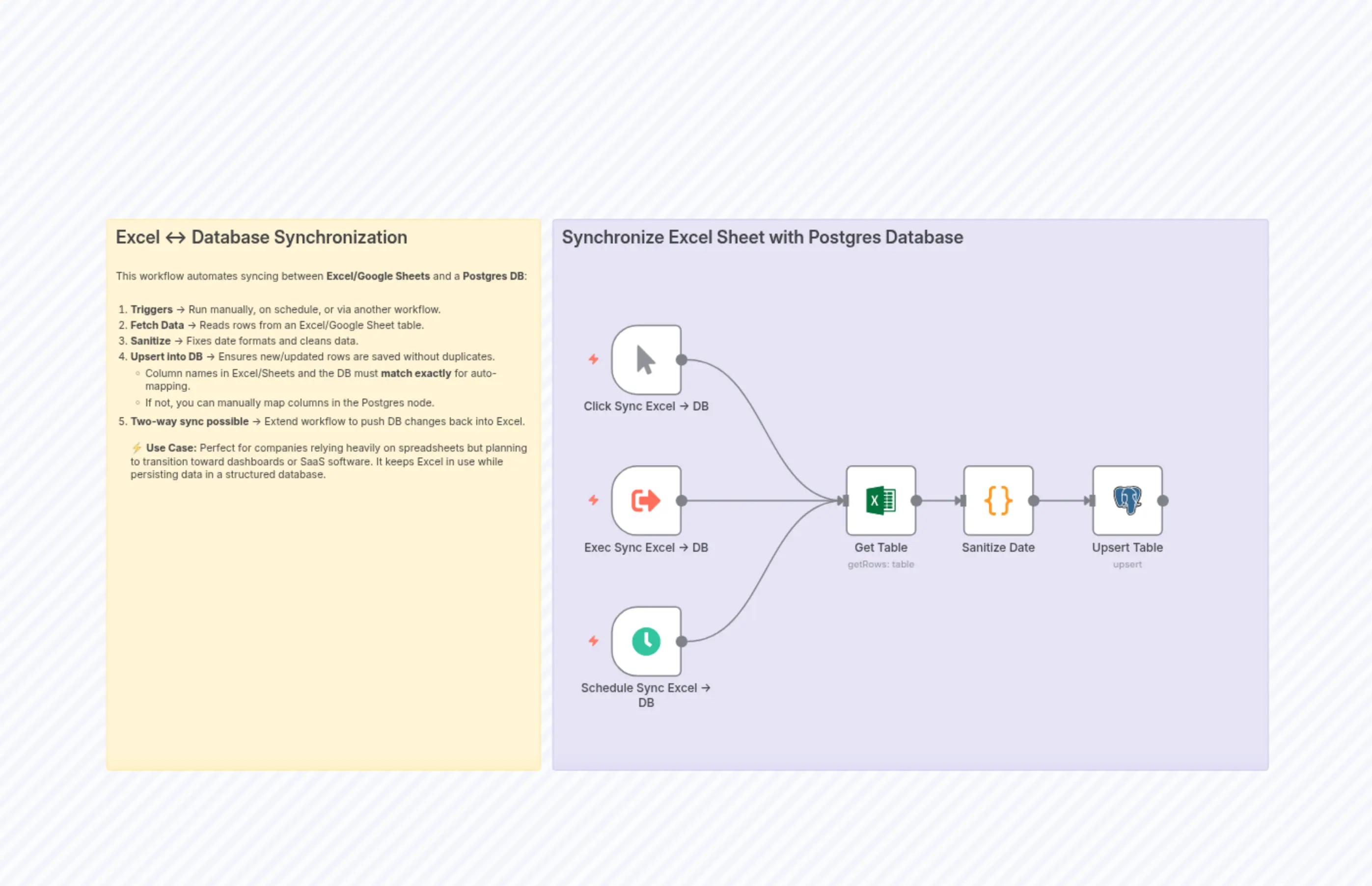
Synchronize Excel or Google Sheets with Postgres (bi-directional)
Description
Categories
🤖 AI & Machine Learning
Nodes Used
n8n-nodes-base.coden8n-nodes-base.postgresn8n-nodes-base.stickyNoten8n-nodes-base.stickyNoten8n-nodes-base.manualTriggern8n-nodes-base.microsoftExceln8n-nodes-base.scheduleTriggern8n-nodes-base.executeWorkflowTrigger
PriceGratis
Views0
Last Updated11/28/2025
workflow.json
{
  "meta": {
    "instanceId": "04c7c3f1743831184e4a6edaf1f906dbab0c745cc98b8af3ef7660bbefe74cb4"
  },
  "nodes": [
    {
      "id": "e6bc660d-99b9-4321-ad7b-73f4b73a80f9",
      "name": "Sticky Note2",
      "type": "n8n-nodes-base.stickyNote",
      "position": [
        -656,
        -320
      ],
      "parameters": {
        "color": 6,
        "width": 976,
        "height": 752,
        "content": "## Synchronize Excel Sheet with Postgres Database"
      },
      "typeVersion": 1
    },
    {
      "id": "9a97bb0b-9428-424f-952c-0d83dca0e94f",
      "name": "Sanitize Date",
      "type": "n8n-nodes-base.code",
      "position": [
        -96,
        16
      ],
      "parameters": {
        "jsCode": "return items.map(item => {\n  const inputDate = item.json[\"date\"];\n  let formattedDate = null;\n  let dateObj;\n\n  // Handle Excel serial number\n  if (typeof inputDate === \"number\") {\n    const baseDate = new Date(Date.UTC(1899, 11, 30));\n    baseDate.setDate(baseDate.getDate() + inputDate);\n    dateObj = baseDate;\n  }\n\n  // Handle string format\n  else if (typeof inputDate === \"string\") {\n    const parsed = new Date(inputDate);\n    if (!isNaN(parsed)) {\n      dateObj = parsed;\n    }\n  }\n\n  // Format date as MM/DD/YYYY\n  if (dateObj) {\n    const M = String(dateObj.getMonth() + 1).padStart(2, '0');\n    const D = String(dateObj.getDate()).padStart(2, '0');\n    const Y = dateObj.getFullYear();\n    formattedDate = `${M}/${D}/${Y}`;\n  }\n\n  item.json[\"date\"] = formattedDate;\n  return { json: item.json };\n});\n"
      },
      "typeVersion": 2
    },
    {
      "id": "71ef2eee-cb60-48ad-9050-df5a27f1a568",
      "name": "Click Sync Excel -> DB",
      "type": "n8n-nodes-base.manualTrigger",
      "position": [
        -576,
        -176
      ],
      "parameters": {},
      "typeVersion": 1
    },
    {
      "id": "a3a85552-617f-4aa2-b29f-2d7196c7148c",
      "name": "Exec Sync Excel -> DB",
      "type": "n8n-nodes-base.executeWorkflowTrigger",
      "position": [
        -576,
        16
      ],
      "parameters": {
        "inputSource": "passthrough"
      },
      "typeVersion": 1.1
    },
    {
      "id": "a17a319e-ef1e-4a2a-b5f4-302628b811c5",
      "name": "Schedule Sync Excel -> DB",
      "type": "n8n-nodes-base.scheduleTrigger",
      "position": [
        -576,
        208
      ],
      "parameters": {
        "rule": {
          "interval": [
            {}
          ]
        }
      },
      "typeVersion": 1.2
    },
    {
      "id": "705234f6-2f3b-45fd-a072-09da5ea65ce1",
      "name": "Get Table",
      "type": "n8n-nodes-base.microsoftExcel",
      "position": [
        -256,
        16
      ],
      "parameters": {
        "limit": 200,
        "table": {
          "__rl": true,
          "mode": "list",
          "value": "",
          "cachedResultUrl": "",
          "cachedResultName": "Clients"
        },
        "filters": {},
        "resource": "table",
        "workbook": {
          "__rl": true,
          "mode": "list",
          "value": "",
          "cachedResultUrl": "",
          "cachedResultName": ""
        },
        "operation": "getRows",
        "worksheet": {
          "__rl": true,
          "mode": "list",
          "value": "",
          "cachedResultUrl": "",
          "cachedResultName": "CLIENTS"
        }
      },
      "credentials": {
        "microsoftExcelOAuth2Api": {
          "id": "",
          "name": ""
        }
      },
      "typeVersion": 2.1
    },
    {
      "id": "b674a99d-e5a1-45d4-9092-e9b66a7943f8",
      "name": "Upsert Table",
      "type": "n8n-nodes-base.postgres",
      "position": [
        80,
        16
      ],
      "parameters": {
        "table": {
          "__rl": true,
          "mode": "list",
          "value": "clients",
          "cachedResultName": "clients"
        },
        "schema": {
          "__rl": true,
          "mode": "list",
          "value": "public",
          "cachedResultName": "public"
        },
        "columns": {
          "value": {
            "no": 0
          },
          "schema": [
            {
              "id": "no",
              "type": "number",
              "display": true,
              "removed": false,
              "required": true,
              "displayName": "no",
              "defaultMatch": false,
              "canBeUsedToMatch": true
            }
          ],
          "mappingMode": "autoMapInputData",
          "matchingColumns": [
            "no"
          ],
          "attemptToConvertTypes": false,
          "convertFieldsToString": false
        },
        "options": {},
        "operation": "upsert"
      },
      "credentials": {
        "postgres": {
          "id": "",
          "name": ""
        }
      },
      "typeVersion": 2.6
    },
    {
      "id": "30ed085e-d0ba-4271-a92e-61dece670542",
      "name": "Sticky Note",
      "type": "n8n-nodes-base.stickyNote",
      "position": [
        -1264,
        -320
      ],
      "parameters": {
        "width": 592,
        "height": 752,
        "content": "## Excel ↔ Database Synchronization\n\nThis workflow automates syncing between **Excel/Google Sheets** and a **Postgres DB**:  \n\n1. **Triggers** → Run manually, on schedule, or via another workflow.  \n2. **Fetch Data** → Reads rows from an Excel/Google Sheet table.  \n3. **Sanitize** → Fixes date formats and cleans data.  \n4. **Upsert into DB** → Ensures new/updated rows are saved without duplicates.  \n   - Column names in Excel/Sheets and the DB must **match exactly** for auto-mapping.  \n   - If not, you can manually map columns in the Postgres node.  \n5. **Two-way sync possible** → Extend workflow to push DB changes back into Excel.  \n\n⚡ **Use Case:** Perfect for companies relying heavily on spreadsheets but planning to transition toward dashboards or SaaS software. It keeps Excel in use while persisting data in a structured database.  \n\n"
      },
      "typeVersion": 1
    }
  ],
  "pinData": {},
  "connections": {
    "Get Table": {
      "main": [
        [
          {
            "node": "Sanitize Date",
            "type": "main",
            "index": 0
          }
        ]
      ]
    },
    "Sanitize Date": {
      "main": [
        [
          {
            "node": "Upsert Table",
            "type": "main",
            "index": 0
          }
        ]
      ]
    },
    "Exec Sync Excel -> DB": {
      "main": [
        [
          {
            "node": "Get Table",
            "type": "main",
            "index": 0
          }
        ]
      ]
    },
    "Click Sync Excel -> DB": {
      "main": [
        [
          {
            "node": "Get Table",
            "type": "main",
            "index": 0
          }
        ]
      ]
    },
    "Schedule Sync Excel -> DB": {
      "main": [
        [
          {
            "node": "Get Table",
            "type": "main",
            "index": 0
          }
        ]
      ]
    }
  }
}