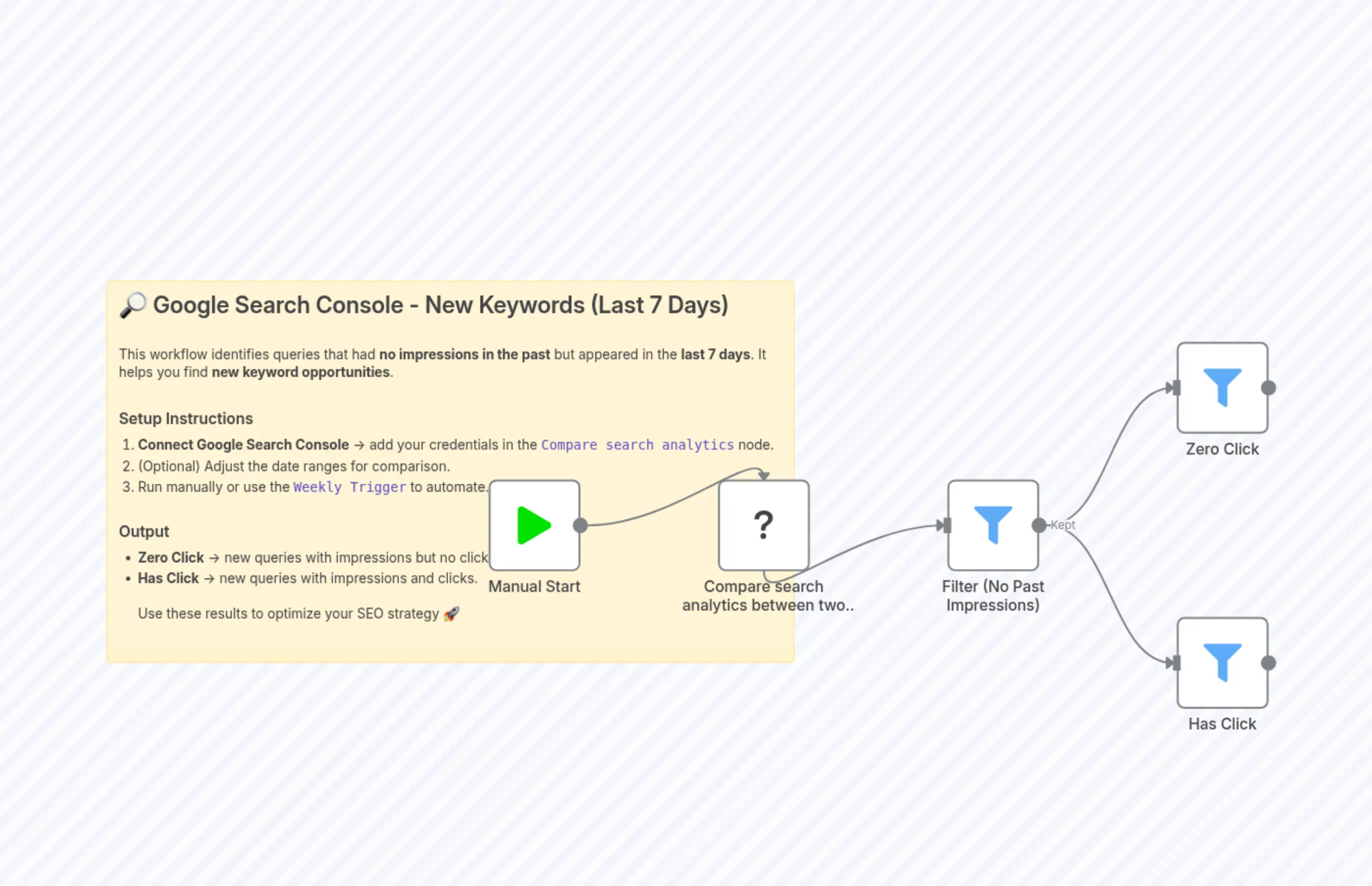
Track New Search Queries with Zero-Click Analysis in Google Search Console
Description
Categories
📢 Marketing🤖 AI & Machine Learning
Nodes Used
n8n-nodes-base.startn8n-nodes-base.filtern8n-nodes-base.filtern8n-nodes-base.filtern8n-nodes-base.stickyNoten8n-nodes-google-search-console.googleSearchConsole
PriceGratis
Views0
Last Updated11/28/2025
workflow.json
{
  "meta": {
    "instanceId": "370f0437fbf8d71caf7e9230e115239afcf5012c55ac368aa9dee29869df4a6b",
    "templateCredsSetupCompleted": true
  },
  "nodes": [
    {
      "id": "3b30f5b7-5a0a-4310-9722-663e578e4763",
      "name": "Manual Start",
      "type": "n8n-nodes-base.start",
      "position": [
        -64,
        576
      ],
      "parameters": {},
      "typeVersion": 1
    },
    {
      "id": "af4d9520-25e7-48ba-9213-51ba0de3d0e1",
      "name": "Compare search analytics between two date ranges",
      "type": "n8n-nodes-google-search-console.googleSearchConsole",
      "position": [
        176,
        576
      ],
      "parameters": {
        "endDateB": "2025-08-12T00:00:00",
        "operation": "comparePageInsights",
        "startDateB": "2024-08-01T00:00:00",
        "compareMode": "custom",
        "dateRangeModeA": "last7d",
        "dateRangeModeB": "custom",
        "siteUrlCompare": "sc-domain:example.com",
        "rowLimitCompare": 10000,
        "dimensionsCompare": [
          "query"
        ]
      },
      "typeVersion": 1
    },
    {
      "id": "adc872fb-54e2-457d-b821-8a9b4edad7e2",
      "name": "Filter (No Past Impressions)",
      "type": "n8n-nodes-base.filter",
      "position": [
        416,
        576
      ],
      "parameters": {
        "options": {},
        "conditions": {
          "options": {
            "version": 2,
            "caseSensitive": true,
            "typeValidation": "loose"
          },
          "combinator": "and",
          "conditions": [
            {
              "operator": {
                "name": "filter.operator.equals",
                "type": "string",
                "operation": "equals"
              },
              "leftValue": "={{ $json.impr_b }}",
              "rightValue": "0"
            }
          ]
        }
      },
      "typeVersion": 2.2
    },
    {
      "id": "70a69524-a92b-4798-83b0-6973e73465a3",
      "name": "Zero Click",
      "type": "n8n-nodes-base.filter",
      "position": [
        656,
        432
      ],
      "parameters": {
        "options": {},
        "conditions": {
          "options": {
            "version": 2,
            "caseSensitive": true,
            "typeValidation": "loose"
          },
          "combinator": "and",
          "conditions": [
            {
              "operator": {
                "name": "filter.operator.equals",
                "type": "string",
                "operation": "equals"
              },
              "leftValue": "={{ $json.clicks_a }}",
              "rightValue": "0"
            }
          ]
        }
      },
      "typeVersion": 2.2
    },
    {
      "id": "f19d81ee-f725-42f0-aa0c-243da7985a02",
      "name": "Has Click",
      "type": "n8n-nodes-base.filter",
      "position": [
        656,
        720
      ],
      "parameters": {
        "options": {},
        "conditions": {
          "options": {
            "version": 2,
            "caseSensitive": true,
            "typeValidation": "loose"
          },
          "combinator": "and",
          "conditions": [
            {
              "operator": {
                "type": "number",
                "operation": "gt"
              },
              "leftValue": "={{ $json.clicks_a }}",
              "rightValue": 0
            }
          ]
        }
      },
      "typeVersion": 2.2
    },
    {
      "id": "aaab352f-b8e6-4d64-a8f1-aaa8ef431ddf",
      "name": "Sticky Note",
      "type": "n8n-nodes-base.stickyNote",
      "position": [
        -464,
        368
      ],
      "parameters": {
        "width": 720,
        "height": 400,
        "content": "## 🔎 Google Search Console - New Keywords (Last 7 Days)\n\nThis workflow identifies queries that had **no impressions in the past** but appeared in the **last 7 days**. It helps you find **new keyword opportunities**.\n\n### Setup Instructions\n1. **Connect Google Search Console** → add your credentials in the `Compare search analytics` node.\n2. (Optional) Adjust the date ranges for comparison.\n3. Run manually or use the `Weekly Trigger` to automate.\n\n### Output\n- **Zero Click** → new queries with impressions but no clicks yet.\n- **Has Click** → new queries with impressions and clicks.\n\nUse these results to optimize your SEO strategy 🚀"
      },
      "typeVersion": 1
    }
  ],
  "pinData": {},
  "connections": {
    "Manual Start": {
      "main": [
        [
          {
            "node": "Compare search analytics between two date ranges",
            "type": "main",
            "index": 0
          }
        ]
      ]
    },
    "Filter (No Past Impressions)": {
      "main": [
        [
          {
            "node": "Zero Click",
            "type": "main",
            "index": 0
          },
          {
            "node": "Has Click",
            "type": "main",
            "index": 0
          }
        ]
      ]
    },
    "Compare search analytics between two date ranges": {
      "main": [
        [
          {
            "node": "Filter (No Past Impressions)",
            "type": "main",
            "index": 0
          }
        ]
      ]
    }
  }
}