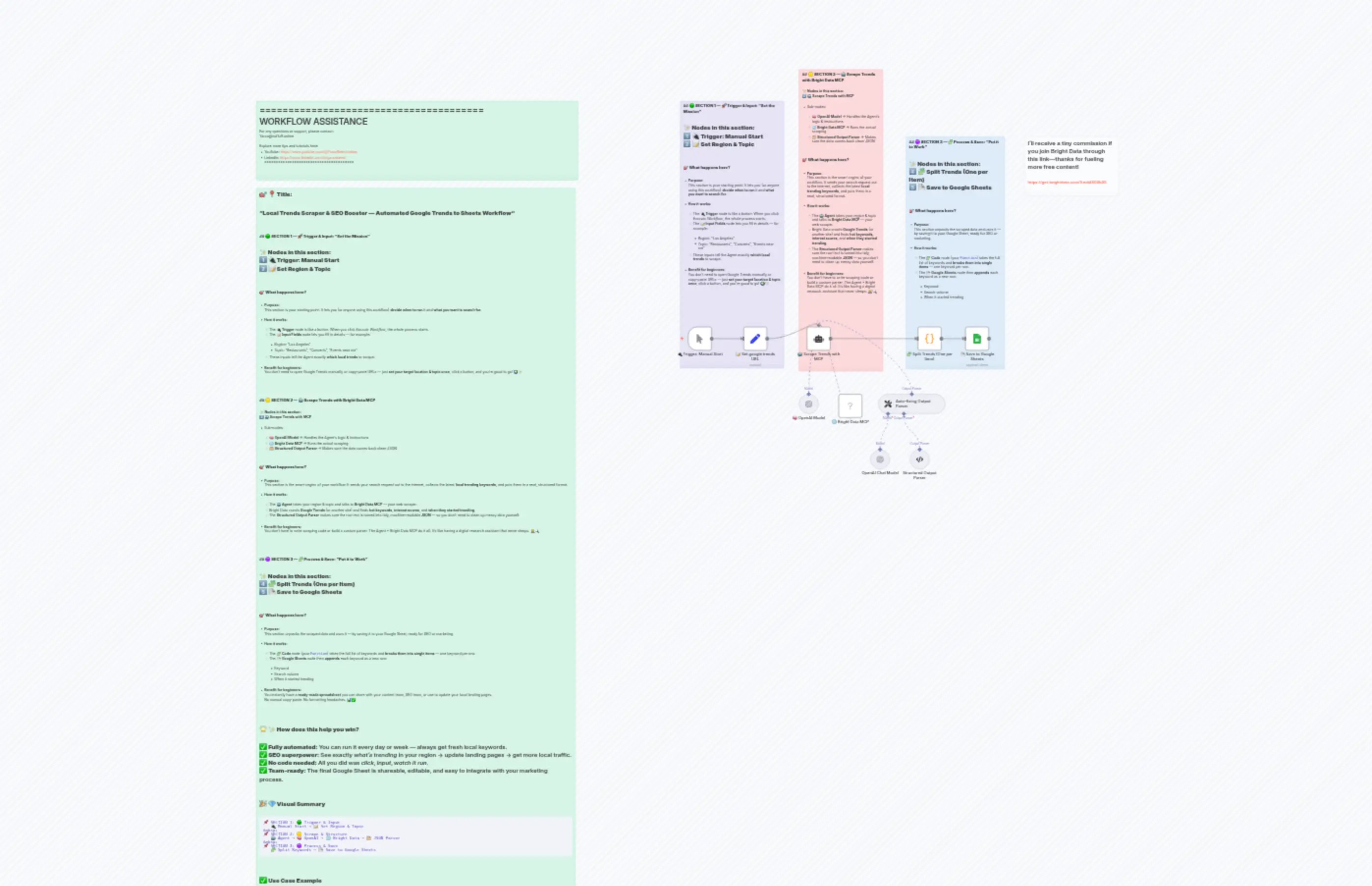
21 Track Local Search Trends
Description
Categories
📢 Marketing🤖 AI & Machine Learning
Nodes Used
n8n-nodes-base.setn8n-nodes-base.coden8n-nodes-base.stickyNoten8n-nodes-base.stickyNoten8n-nodes-base.stickyNoten8n-nodes-base.stickyNoten8n-nodes-base.stickyNoten8n-nodes-base.stickyNoten8n-nodes-base.googleSheetsn8n-nodes-mcp.mcpClientTool
PriceGratis
Views0
Last Updated11/28/2025
workflow.json
{
"id": "CE8hCLPGBDqK8M07",
"meta": {
"instanceId": "60046904b104f0f72b2629a9d88fe9f676be4035769f1f08dad1dd38a76b9480",
"templateCredsSetupCompleted": true
},
"name": "21 Track Local Search Trends",
"tags": [],
"nodes": [
{
"id": "9ea32a48-a56e-404a-aa0b-878a6e17f117",
"name": "🔌 Trigger: Manual Start",
"type": "n8n-nodes-base.manualTrigger",
"position": [
-40,
0
],
"parameters": {},
"typeVersion": 1
},
{
"id": "d35de7e1-5b66-4e93-b812-dff0b195ccff",
"name": "📝 Set google trends URL",
"type": "n8n-nodes-base.set",
"position": [
180,
0
],
"parameters": {
"options": {},
"assignments": {
"assignments": [
{
"id": "bbb89709-875d-4064-8d35-652dc4ec0f44",
"name": "url",
"type": "string",
"value": "https://trends.google.com/trending?geo=US"
}
]
}
},
"typeVersion": 3.4
},
{
"id": "910da821-530a-4830-ae98-a49c42346f4f",
"name": "🤖 Scrape Trends with MCP",
"type": "@n8n/n8n-nodes-langchain.agent",
"position": [
440,
0
],
"parameters": {
"text": "=Use Bright Data MCP to scrape the following Google Trends URL and return with keywords, score, and date.\n\nURL: {{ $json.url }}",
"options": {},
"promptType": "define",
"hasOutputParser": true
},
"typeVersion": 2
},
{
"id": "a1be70b4-e0c6-4ab8-b4a6-d8debbbb5310",
"name": "🧩 Split Trends (One per Item)",
"type": "n8n-nodes-base.code",
"position": [
880,
0
],
"parameters": {
"jsCode": "// Get the Agent response\nconst input = items[0].json;\n\n// Access the trending keywords array\nconst keywords = input.output.trending_keywords;\n\n// Prepare each keyword as a single item\nreturn keywords.map(keyword => {\n return {\n json: {\n keyword: keyword.keyword,\n score: keyword.score,\n date: keyword.date\n }\n };\n});\n"
},
"typeVersion": 2
},
{
"id": "6e969c7b-276f-412f-976b-2298468eca70",
"name": "📄 Save to Google Sheets",
"type": "n8n-nodes-base.googleSheets",
"position": [
1080,
0
],
"parameters": {
"columns": {
"value": {
"Date": "={{ $json.date }}",
"Score": "={{ $json.score }}",
"Keyword": "={{ $json.keyword }}"
},
"schema": [
{
"id": "Keyword",
"type": "string",
"display": true,
"required": false,
"displayName": "Keyword",
"defaultMatch": false,
"canBeUsedToMatch": true
},
{
"id": "Score",
"type": "string",
"display": true,
"required": false,
"displayName": "Score",
"defaultMatch": false,
"canBeUsedToMatch": true
},
{
"id": "Date",
"type": "string",
"display": true,
"required": false,
"displayName": "Date",
"defaultMatch": false,
"canBeUsedToMatch": true
}
],
"mappingMode": "defineBelow",
"matchingColumns": [],
"attemptToConvertTypes": false,
"convertFieldsToString": false
},
"options": {},
"operation": "append",
"sheetName": {
"__rl": true,
"mode": "list",
"value": "gid=0",
"cachedResultUrl": "https://docs.google.com/spreadsheets/d/1U3JIgUjCjjOUssjcwDcV5v5dFI_ssjzMHb9DzjtH4nU/edit#gid=0",
"cachedResultName": "Sheet1"
},
"documentId": {
"__rl": true,
"mode": "list",
"value": "1U3JIgUjCjjOUssjcwDcV5v5dFI_ssjzMHb9DzjtH4nU",
"cachedResultUrl": "https://docs.google.com/spreadsheets/d/1U3JIgUjCjjOUssjcwDcV5v5dFI_ssjzMHb9DzjtH4nU/edit?usp=drivesdk",
"cachedResultName": "Google trends"
}
},
"credentials": {
"googleSheetsOAuth2Api": {
"id": "r2mDaisH6e9VkwHl",
"name": "Google Sheets account"
}
},
"typeVersion": 4.6
},
{
"id": "511ebc56-696d-4830-b119-c959e9539294",
"name": "🧠 OpenAI Model",
"type": "@n8n/n8n-nodes-langchain.lmChatOpenAi",
"position": [
400,
280
],
"parameters": {
"model": {
"__rl": true,
"mode": "list",
"value": "gpt-4o-mini"
},
"options": {}
},
"credentials": {
"openAiApi": {
"id": "8sEyPDkC5p4w4Jha",
"name": "OpenAi account"
}
},
"typeVersion": 1.2
},
{
"id": "8edd4a28-ee73-4431-80b2-b4d0d2680337",
"name": "🌐 Bright Data MCP",
"type": "n8n-nodes-mcp.mcpClientTool",
"position": [
560,
280
],
"parameters": {
"toolName": "scrape_as_markdown",
"operation": "executeTool",
"toolParameters": "={{ /*n8n-auto-generated-fromAI-override*/ $fromAI('Tool_Parameters', ``, 'json') }}"
},
"credentials": {
"mcpClientApi": {
"id": "eqq94k789oJCd6jU",
"name": "MCP Client (STDIO) account"
}
},
"typeVersion": 1
},
{
"id": "c00d74fc-2698-463e-8598-42a2a9a0ece9",
"name": "Sticky Note",
"type": "n8n-nodes-base.stickyNote",
"position": [
-80,
-900
],
"parameters": {
"color": 6,
"width": 420,
"height": 1080,
"content": "### ## 🟢 **SECTION 1 — 🚀 Trigger & Input: “Set the Mission”**\n\n**✨ Nodes in this section:**\n1️⃣ **🔌 Trigger: Manual Start**\n2️⃣ **📝 Set Region & Topic**\n\n---\n\n### 🎯 **What happens here?**\n\n* **Purpose:**\n This section is your *starting point*. It lets *you* (or anyone using this workflow) **decide when to run** it and **what you want to search for**.\n\n* **How it works:**\n\n * The **🔌 Trigger** node is like a *button*. When you click *Execute Workflow*, the whole process starts.\n * The **📝 Input Fields** node lets you fill in details — for example:\n\n * *Region:* “Los Angeles”\n * *Topic:* “Restaurants”, “Concerts”, “Events near me”\n * These inputs tell the Agent exactly **which local trends** to scrape.\n\n* **Benefit for beginners:**\n You don’t need to open Google Trends manually or copy-paste URLs — just **set your target location & topic once**, click a button, and you’re good to go! 🌍✨\n\n---\n\n---\n\n"
},
"typeVersion": 1
},
{
"id": "1a71f611-b7ce-42e1-9f91-e0281dee05ae",
"name": "Sticky Note1",
"type": "n8n-nodes-base.stickyNote",
"position": [
400,
-1040
],
"parameters": {
"color": 3,
"width": 340,
"height": 1220,
"content": "### ## 🟡 **SECTION 2 — 🤖 Scrape Trends with Bright Data MCP**\n\n**✨ Nodes in this section:**\n3️⃣ **🤖 Scrape Trends with MCP**\n\n* Sub-nodes:\n\n * 🧠 **OpenAI Model** → Handles the Agent’s logic & instructions\n * 🌐 **Bright Data MCP** → Runs the actual scraping\n * 🗂️ **Structured Output Parser** → Makes sure the data comes back clean JSON\n\n---\n\n### 🎯 **What happens here?**\n\n* **Purpose:**\n This section is the *smart engine* of your workflow. It sends your search request out to the internet, collects the latest **local trending keywords**, and puts them in a neat, structured format.\n\n* **How it works:**\n\n * The **🤖 Agent** takes your region & topic and talks to **Bright Data MCP** — your web scraper.\n * Bright Data crawls **Google Trends** (or another site) and finds **hot keywords**, **interest scores**, and **when they started trending**.\n * The **Structured Output Parser** makes sure the raw text is turned into tidy, machine-readable **JSON** — so you don’t need to clean up messy data yourself.\n\n* **Benefit for beginners:**\n You don’t have to write scraping code or build a custom parser. The Agent + Bright Data MCP do it all. It’s like having a digital research assistant that never sleeps. 🧑💻🔍\n\n---\n\n---\n\n"
},
"typeVersion": 1
},
{
"id": "420b543a-0ed0-43f0-91b3-616c3b7d9f48",
"name": "Sticky Note2",
"type": "n8n-nodes-base.stickyNote",
"position": [
840,
-760
],
"parameters": {
"color": 5,
"width": 400,
"height": 940,
"content": "### ## 🟣 **SECTION 3 — 🧩 Process & Save: “Put it to Work”**\n\n**✨ Nodes in this section:**\n4️⃣ **🧩 Split Trends (One per Item)**\n5️⃣ **📄 Save to Google Sheets**\n\n---\n\n### 🎯 **What happens here?**\n\n* **Purpose:**\n This section *unpacks* the scraped data and *uses* it — by saving it to your Google Sheet, ready for SEO or marketing.\n\n* **How it works:**\n\n * The **🧩 Code** node (your `Function`) takes the full list of keywords and **breaks them into single items** — one keyword per row.\n * The **📄 Google Sheets** node then **appends** each keyword as a new row:\n\n * Keyword\n * Search volume\n * When it started trending\n\n"
},
"typeVersion": 1
},
{
"id": "4ee00b42-8838-4ba3-8c5e-96d0b068c501",
"name": "Sticky Note5",
"type": "n8n-nodes-base.stickyNote",
"position": [
1320,
-760
],
"parameters": {
"color": 7,
"width": 380,
"height": 240,
"content": "## I’ll receive a tiny commission if you join Bright Data through this link—thanks for fueling more free content!\n\n### https://get.brightdata.com/1tndi4600b25"
},
"typeVersion": 1
},
{
"id": "1397f12a-47ee-4b41-be66-2b9818abcc20",
"name": "Sticky Note9",
"type": "n8n-nodes-base.stickyNote",
"position": [
-1780,
-900
],
"parameters": {
"color": 4,
"width": 1300,
"height": 320,
"content": "=======================================\n WORKFLOW ASSISTANCE\n=======================================\nFor any questions or support, please contact:\n [email protected]\n\nExplore more tips and tutorials here:\n - YouTube: https://www.youtube.com/@YaronBeen/videos\n - LinkedIn: https://www.linkedin.com/in/yaronbeen/\n=======================================\n"
},
"typeVersion": 1
},
{
"id": "6d7d3cc4-67dc-45a9-9670-571190d0cefd",
"name": "Sticky Note4",
"type": "n8n-nodes-base.stickyNote",
"position": [
-1780,
-560
],
"parameters": {
"color": 4,
"width": 1289,
"height": 2958,
"content": "## 🎯 **📍 Title:**\n\n**“Local Trends Scraper & SEO Booster — Automated Google Trends to Sheets Workflow”**\n\n---\n\n\n### ## 🟢 **SECTION 1 — 🚀 Trigger & Input: “Set the Mission”**\n\n**✨ Nodes in this section:**\n1️⃣ **🔌 Trigger: Manual Start**\n2️⃣ **📝 Set Region & Topic**\n\n---\n\n### 🎯 **What happens here?**\n\n* **Purpose:**\n This section is your *starting point*. It lets *you* (or anyone using this workflow) **decide when to run** it and **what you want to search for**.\n\n* **How it works:**\n\n * The **🔌 Trigger** node is like a *button*. When you click *Execute Workflow*, the whole process starts.\n * The **📝 Input Fields** node lets you fill in details — for example:\n\n * *Region:* “Los Angeles”\n * *Topic:* “Restaurants”, “Concerts”, “Events near me”\n * These inputs tell the Agent exactly **which local trends** to scrape.\n\n* **Benefit for beginners:**\n You don’t need to open Google Trends manually or copy-paste URLs — just **set your target location & topic once**, click a button, and you’re good to go! 🌍✨\n\n---\n\n---\n\n### ## 🟡 **SECTION 2 — 🤖 Scrape Trends with Bright Data MCP**\n\n**✨ Nodes in this section:**\n3️⃣ **🤖 Scrape Trends with MCP**\n\n* Sub-nodes:\n\n * 🧠 **OpenAI Model** → Handles the Agent’s logic & instructions\n * 🌐 **Bright Data MCP** → Runs the actual scraping\n * 🗂️ **Structured Output Parser** → Makes sure the data comes back clean JSON\n\n---\n\n### 🎯 **What happens here?**\n\n* **Purpose:**\n This section is the *smart engine* of your workflow. It sends your search request out to the internet, collects the latest **local trending keywords**, and puts them in a neat, structured format.\n\n* **How it works:**\n\n * The **🤖 Agent** takes your region & topic and talks to **Bright Data MCP** — your web scraper.\n * Bright Data crawls **Google Trends** (or another site) and finds **hot keywords**, **interest scores**, and **when they started trending**.\n * The **Structured Output Parser** makes sure the raw text is turned into tidy, machine-readable **JSON** — so you don’t need to clean up messy data yourself.\n\n* **Benefit for beginners:**\n You don’t have to write scraping code or build a custom parser. The Agent + Bright Data MCP do it all. It’s like having a digital research assistant that never sleeps. 🧑💻🔍\n\n---\n\n---\n\n### ## 🟣 **SECTION 3 — 🧩 Process & Save: “Put it to Work”**\n\n**✨ Nodes in this section:**\n4️⃣ **🧩 Split Trends (One per Item)**\n5️⃣ **📄 Save to Google Sheets**\n\n---\n\n### 🎯 **What happens here?**\n\n* **Purpose:**\n This section *unpacks* the scraped data and *uses* it — by saving it to your Google Sheet, ready for SEO or marketing.\n\n* **How it works:**\n\n * The **🧩 Code** node (your `Function`) takes the full list of keywords and **breaks them into single items** — one keyword per row.\n * The **📄 Google Sheets** node then **appends** each keyword as a new row:\n\n * Keyword\n * Search volume\n * When it started trending\n\n* **Benefit for beginners:**\n You instantly have a **ready-made spreadsheet** you can share with your content team, SEO team, or use to update your local landing pages.\n No manual copy-paste. No formatting headaches. 📊✅\n\n---\n\n---\n\n## 🌟 **✨ How does this help you win?**\n\n✅ **Fully automated:** You can run it every day or week — always get fresh local keywords.\n✅ **SEO superpower:** See exactly *what’s trending* in your region → update landing pages → get more local traffic.\n✅ **No code needed:** All you did was *click*, *input*, *watch it run*.\n✅ **Team-ready:** The final Google Sheet is shareable, editable, and easy to integrate with your marketing process.\n\n---\n\n## 🎉 **💎 Visual Summary**\n\n```\n📌 SECTION 1: 🟢 Trigger & Input \n 🔌 Manual Start → 📝 Set Region & Topic\n\n📌 SECTION 2: 🟡 Scrape & Structure \n 🤖 Agent → 🧠 OpenAI → 🌐 Bright Data → 🗂️ JSON Parser\n\n📌 SECTION 3: 🟣 Process & Save \n 🧩 Split Keywords → 📄 Save to Google Sheets\n```\n\n---\n\n## ✅ **Use Case Example**\n\n> **Example:**\n> Local bakery in Los Angeles wants to know trending searches for “best cake shops” or “Independence Day treats” → this workflow finds hot search trends → your SEO person adds those phrases to landing pages → you rank higher locally → more customers! 🎂🎆\n\n---\n\n"
},
"typeVersion": 1
},
{
"id": "e1108517-eac3-4ac9-a2a7-cac91566ce03",
"name": "Auto-fixing Output Parser",
"type": "@n8n/n8n-nodes-langchain.outputParserAutofixing",
"position": [
720,
280
],
"parameters": {
"options": {}
},
"typeVersion": 1
},
{
"id": "6080dcb4-3ef7-41b3-bb05-b85e1e2d7737",
"name": "OpenAI Chat Model",
"type": "@n8n/n8n-nodes-langchain.lmChatOpenAi",
"position": [
700,
500
],
"parameters": {
"model": {
"__rl": true,
"mode": "list",
"value": "gpt-4o-mini"
},
"options": {}
},
"credentials": {
"openAiApi": {
"id": "8sEyPDkC5p4w4Jha",
"name": "OpenAi account"
}
},
"typeVersion": 1.2
},
{
"id": "4858d36d-3eca-46da-bb9a-a6f224e80f4d",
"name": "Structured Output Parser",
"type": "@n8n/n8n-nodes-langchain.outputParserStructured",
"position": [
860,
500
],
"parameters": {
"jsonSchemaExample": "{\n \"trending_keywords\": [\n {\n \"keyword\": \"Julian McMahon\",\n \"score\": \"1M+ searches\",\n \"date\": \"5 hours ago\"\n },\n {\n \"keyword\": \"Camp Mystic\",\n \"score\": \"1M+ searches\",\n \"date\": \"13 hours ago\"\n },\n {\n \"keyword\": \"Palmeiras vs Chelsea\",\n \"score\": \"200K+ searches\",\n \"date\": \"8 hours ago\"\n },\n {\n \"keyword\": \"Cuatro de Julio\",\n \"score\": \"100K+ searches\",\n \"date\": \"23 hours ago\"\n },\n {\n \"keyword\": \"Independence Day Celebrations Near Me\",\n \"score\": \"100K+ searches\",\n \"date\": \"23 hours ago\"\n },\n {\n \"keyword\": \"What Time Do Fireworks Start\",\n \"score\": \"200K+ searches\",\n \"date\": \"7 hours ago\"\n },\n {\n \"keyword\": \"Astros vs Dodgers\",\n \"score\": \"50K+ searches\",\n \"date\": \"3 hours ago\"\n },\n {\n \"keyword\": \"Young Noble\",\n \"score\": \"20K+ searches\",\n \"date\": \"7 hours ago\"\n },\n {\n \"keyword\": \"Fluminense vs Al-Hilal\",\n \"score\": \"200K+ searches\",\n \"date\": \"10 hours ago\"\n },\n {\n \"keyword\": \"Brewsers vs Marlins\",\n \"score\": \"10K+ searches\",\n \"date\": \"5 hours ago\"\n }\n ]\n}\n"
},
"typeVersion": 1.2
}
],
"active": false,
"pinData": {},
"settings": {
"executionOrder": "v1"
},
"versionId": "a4dd65b0-e789-488c-882f-2094f0a5f1a7",
"connections": {
"OpenAI Chat Model": {
"ai_languageModel": [
[
{
"node": "Auto-fixing Output Parser",
"type": "ai_languageModel",
"index": 0
}
]
]
},
"🧠 OpenAI Model": {
"ai_languageModel": [
[
{
"node": "🤖 Scrape Trends with MCP",
"type": "ai_languageModel",
"index": 0
}
]
]
},
"🌐 Bright Data MCP": {
"ai_tool": [
[
{
"node": "🤖 Scrape Trends with MCP",
"type": "ai_tool",
"index": 0
}
]
]
},
"Structured Output Parser": {
"ai_outputParser": [
[
{
"node": "Auto-fixing Output Parser",
"type": "ai_outputParser",
"index": 0
}
]
]
},
"Auto-fixing Output Parser": {
"ai_outputParser": [
[
{
"node": "🤖 Scrape Trends with MCP",
"type": "ai_outputParser",
"index": 0
}
]
]
},
"📝 Set google trends URL": {
"main": [
[
{
"node": "🤖 Scrape Trends with MCP",
"type": "main",
"index": 0
}
]
]
},
"🔌 Trigger: Manual Start": {
"main": [
[
{
"node": "📝 Set google trends URL",
"type": "main",
"index": 0
}
]
]
},
"🤖 Scrape Trends with MCP": {
"main": [
[
{
"node": "🧩 Split Trends (One per Item)",
"type": "main",
"index": 0
}
]
]
},
"🧩 Split Trends (One per Item)": {
"main": [
[
{
"node": "📄 Save to Google Sheets",
"type": "main",
"index": 0
}
]
]
}
}
}