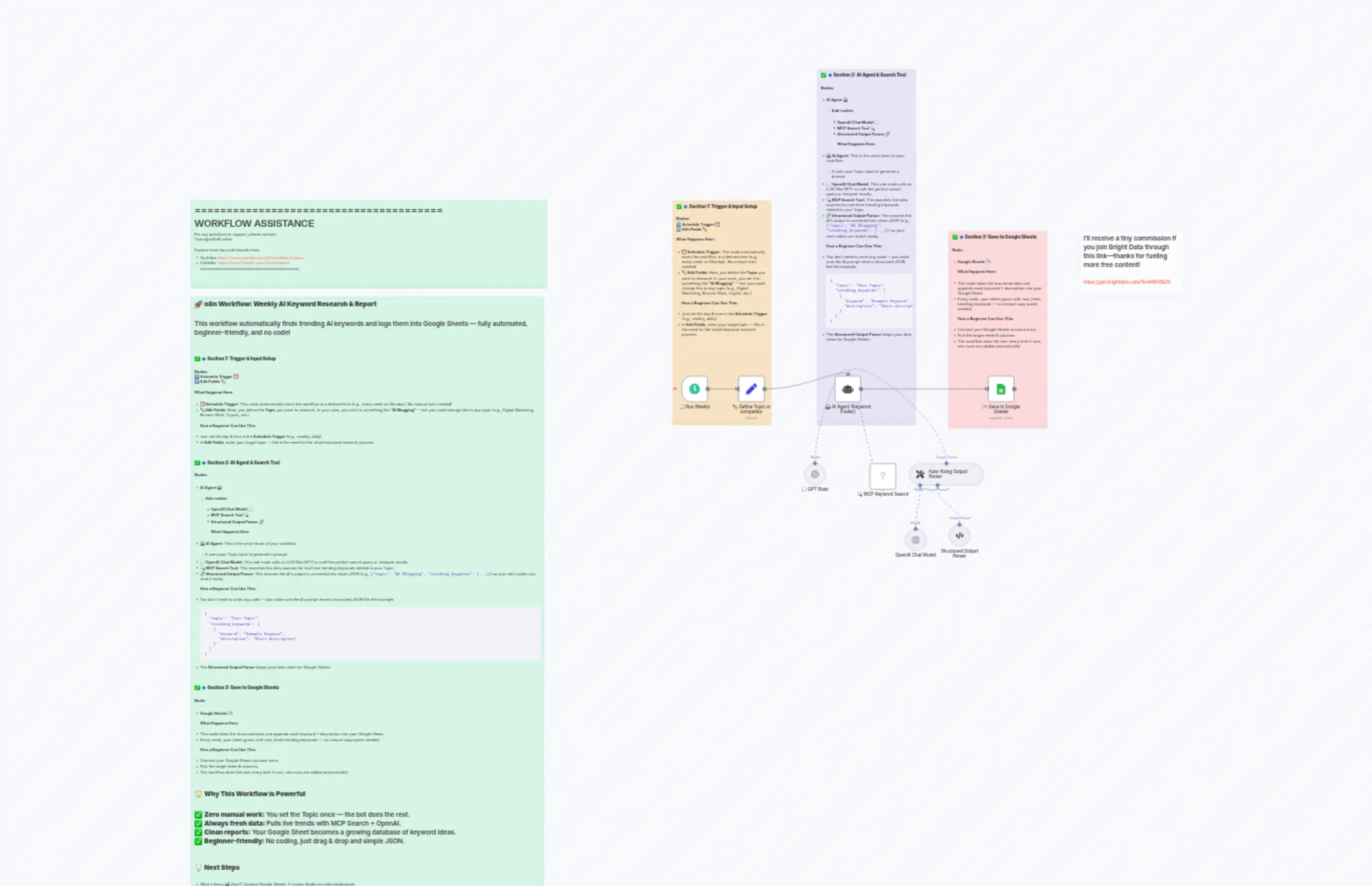
5 Weekly Competitor Keyword Research & Report
Description
Categories
📢 Marketing🤖 AI & Machine Learning
Nodes Used
n8n-nodes-base.setn8n-nodes-base.stickyNoten8n-nodes-base.stickyNoten8n-nodes-base.stickyNoten8n-nodes-base.stickyNoten8n-nodes-base.stickyNoten8n-nodes-base.stickyNoten8n-nodes-base.googleSheetsn8n-nodes-mcp.mcpClientTool@n8n/n8n-nodes-langchain.agent
PriceGratis
Views0
Last Updated11/28/2025
workflow.json
{
  "id": "KfktECZW8CIxE58G",
  "meta": {
    "instanceId": "60046904b104f0f72b2629a9d88fe9f676be4035769f1f08dad1dd38a76b9480",
    "templateCredsSetupCompleted": true
  },
  "name": "5 Weekly Competitor Keyword Research & Report",
  "tags": [],
  "nodes": [
    {
      "id": "472a607e-b991-4b4a-920e-9d44b1df7c1e",
      "name": "🕒 Run Weekly",
      "type": "n8n-nodes-base.scheduleTrigger",
      "position": [
        220,
        0
      ],
      "parameters": {
        "rule": {
          "interval": [
            {
              "field": "weeks",
              "triggerAtDay": [
                1
              ],
              "triggerAtHour": 9
            }
          ]
        }
      },
      "typeVersion": 1.2
    },
    {
      "id": "6bb1bb2b-0c50-4544-a2d2-0a5f2feff15c",
      "name": "✏️ Define Topic or competitor",
      "type": "n8n-nodes-base.set",
      "position": [
        440,
        0
      ],
      "parameters": {
        "options": {},
        "assignments": {
          "assignments": [
            {
              "id": "7b6a112e-356f-4808-a762-7ef95a605fff",
              "name": "Topic",
              "type": "string",
              "value": "AI blogging"
            }
          ]
        }
      },
      "typeVersion": 3.4
    },
    {
      "id": "11572b3e-dc79-447e-a211-3816158d2bb2",
      "name": "🤖 AI Agent (Keyword Finder)",
      "type": "@n8n/n8n-nodes-langchain.agent",
      "position": [
        780,
        0
      ],
      "parameters": {
        "text": "=Provide me trending keywords for the topic below.\n{{ $json.Topic }}",
        "options": {},
        "promptType": "define",
        "hasOutputParser": true
      },
      "typeVersion": 2
    },
    {
      "id": "07a66e43-de41-428d-b82b-2542a35ca7d3",
      "name": "💬 GPT Brain",
      "type": "@n8n/n8n-nodes-langchain.lmChatOpenAi",
      "position": [
        680,
        320
      ],
      "parameters": {
        "model": {
          "__rl": true,
          "mode": "list",
          "value": "gpt-4o-mini"
        },
        "options": {}
      },
      "credentials": {
        "openAiApi": {
          "id": "8sEyPDkC5p4w4Jha",
          "name": "OpenAi account"
        }
      },
      "typeVersion": 1.2
    },
    {
      "id": "37682954-1b3e-40aa-b2b7-97089c2322e2",
      "name": "🔍 MCP Keyword Search",
      "type": "n8n-nodes-mcp.mcpClientTool",
      "position": [
        920,
        320
      ],
      "parameters": {
        "toolName": "search_engine",
        "operation": "executeTool",
        "toolParameters": "={{ /*n8n-auto-generated-fromAI-override*/ $fromAI('Tool_Parameters', ``, 'json') }}"
      },
      "credentials": {
        "mcpClientApi": {
          "id": "eqq94k789oJCd6jU",
          "name": "MCP Client (STDIO) account"
        }
      },
      "typeVersion": 1
    },
    {
      "id": "7f570ced-86eb-4058-b1fe-8e15225779bb",
      "name": "📄 Save to Google Sheets",
      "type": "n8n-nodes-base.googleSheets",
      "position": [
        1340,
        0
      ],
      "parameters": {
        "columns": {
          "value": {
            "Topic": "={{ $json.output.topic }}",
            "Trending Keyword": "={{ $json.output.description }}"
          },
          "schema": [
            {
              "id": "Topic",
              "type": "string",
              "display": true,
              "required": false,
              "displayName": "Topic",
              "defaultMatch": false,
              "canBeUsedToMatch": true
            },
            {
              "id": "Trending Keyword",
              "type": "string",
              "display": true,
              "required": false,
              "displayName": "Trending Keyword",
              "defaultMatch": false,
              "canBeUsedToMatch": true
            }
          ],
          "mappingMode": "defineBelow",
          "matchingColumns": [],
          "attemptToConvertTypes": false,
          "convertFieldsToString": false
        },
        "options": {},
        "operation": "append",
        "sheetName": {
          "__rl": true,
          "mode": "list",
          "value": "gid=0",
          "cachedResultUrl": "https://docs.google.com/spreadsheets/d/1s-MXdNem9pPMeziIbiPVoOiyZcBG3qIJCsf7xf-z7gc/edit#gid=0",
          "cachedResultName": "Sheet1"
        },
        "documentId": {
          "__rl": true,
          "mode": "list",
          "value": "1s-MXdNem9pPMeziIbiPVoOiyZcBG3qIJCsf7xf-z7gc",
          "cachedResultUrl": "https://docs.google.com/spreadsheets/d/1s-MXdNem9pPMeziIbiPVoOiyZcBG3qIJCsf7xf-z7gc/edit?usp=drivesdk",
          "cachedResultName": "Trending Competitor keywords"
        }
      },
      "credentials": {
        "googleSheetsOAuth2Api": {
          "id": "r2mDaisH6e9VkwHl",
          "name": "Google Sheets account"
        }
      },
      "typeVersion": 4.6
    },
    {
      "id": "6c326c68-dc7a-49e7-b5bd-517142a05450",
      "name": "Sticky Note",
      "type": "n8n-nodes-base.stickyNote",
      "position": [
        200,
        -640
      ],
      "parameters": {
        "color": 2,
        "width": 360,
        "height": 820,
        "content": "### ✅ **🔹 Section 1: Trigger & Input Setup**\n\n**Nodes:**\n1️⃣ **Schedule Trigger** ⏰\n2️⃣ **Edit Fields** ✏️\n\n**What Happens Here:**\n\n* **⏰ Schedule Trigger:** This node automatically starts the workflow at a defined time (e.g., every week on Monday). No manual start needed!\n* **✏️ Edit Fields:** Here, you define the **Topic** you want to research. In your case, you set it to something like **“AI Blogging”** — but you could change this to *any* topic (e.g., *Digital Marketing*, *Remote Work*, *Crypto*, etc.).\n\n**How a Beginner Can Use This:**\n\n* Just set the day & time in the **Schedule Trigger** (e.g., weekly, daily).\n* In **Edit Fields**, enter your target topic — this is the seed for the whole keyword research process.\n\n---\n\n"
      },
      "typeVersion": 1
    },
    {
      "id": "10e40040-c88d-4340-990e-f13f2e6e3e64",
      "name": "Sticky Note1",
      "type": "n8n-nodes-base.stickyNote",
      "position": [
        720,
        -1120
      ],
      "parameters": {
        "color": 6,
        "width": 360,
        "height": 1300,
        "content": "### ✅ **🔹 Section 2: AI Agent & Search Tool**\n\n**Nodes:**\n\n* **AI Agent 🤖**\n\n  * **Sub-nodes:**\n\n    * **OpenAI Chat Model 💬**\n    * **MCP Search Tool 🔍**\n    * **Structured Output Parser 🧩**\n\n**What Happens Here:**\n\n* **🤖 AI Agent:** This is the smart brain of your workflow.\n\n  * It uses your Topic input to generate a prompt.\n* **💬 OpenAI Chat Model:** This sub-node calls an LLM (like GPT) to craft the perfect search query or interpret results.\n* **🔍 MCP Search Tool:** This searches live data sources for real-time trending keywords related to your Topic.\n* **🧩 Structured Output Parser:** This ensures the AI’s output is converted into *clean JSON* (e.g., `{\"topic\": \"AI Blogging\", \"trending_keywords\": [...]}`) so your next nodes can read it easily.\n\n**How a Beginner Can Use This:**\n\n* You don’t need to write any code — just make sure the AI prompt returns structured JSON like the example:\n\n  ```json\n  {\n    \"topic\": \"Your Topic\",\n    \"trending_keywords\": [\n      {\n        \"keyword\": \"Example Keyword\",\n        \"description\": \"Short description\"\n      }\n    ]\n  }\n  ```\n* The **Structured Output Parser** keeps your data clean for Google Sheets.\n\n---\n\n"
      },
      "typeVersion": 1
    },
    {
      "id": "3b10ee5d-ee17-4e76-80b8-4aa81a091d59",
      "name": "Sticky Note2",
      "type": "n8n-nodes-base.stickyNote",
      "position": [
        1200,
        -540
      ],
      "parameters": {
        "color": 3,
        "width": 360,
        "height": 720,
        "content": "### ✅ **🔹 Section 3: Save to Google Sheets**\n\n**Node:**\n\n* **Google Sheets 📄**\n\n**What Happens Here:**\n\n* This node takes the structured data and appends each keyword + description into your Google Sheet.\n* Every week, your sheet grows with new, fresh trending keywords — no manual copy-paste needed.\n\n**How a Beginner Can Use This:**\n\n* Connect your Google Sheets account once.\n* Pick the target sheet & columns.\n* The workflow does the rest: every time it runs, new rows are added automatically!\n\n---\n\n"
      },
      "typeVersion": 1
    },
    {
      "id": "43bf1df0-74b0-4a9c-a22b-d11f85d7c9fd",
      "name": "Sticky Note9",
      "type": "n8n-nodes-base.stickyNote",
      "position": [
        -1560,
        -640
      ],
      "parameters": {
        "color": 4,
        "width": 1300,
        "height": 320,
        "content": "=======================================\n            WORKFLOW ASSISTANCE\n=======================================\nFor any questions or support, please contact:\n    [email protected]\n\nExplore more tips and tutorials here:\n   - YouTube: https://www.youtube.com/@YaronBeen/videos\n   - LinkedIn: https://www.linkedin.com/in/yaronbeen/\n=======================================\n"
      },
      "typeVersion": 1
    },
    {
      "id": "58c0b683-86ed-4b71-b561-bbe9fdfde8f4",
      "name": "Sticky Note4",
      "type": "n8n-nodes-base.stickyNote",
      "position": [
        -1560,
        -300
      ],
      "parameters": {
        "color": 4,
        "width": 1289,
        "height": 2278,
        "content": "## 🚀 **n8n Workflow: Weekly AI Keyword Research & Report**\n\nThis workflow automatically finds trending AI keywords and logs them into Google Sheets — fully automated, beginner-friendly, and no code!\n\n---\n\n### ✅ **🔹 Section 1: Trigger & Input Setup**\n\n**Nodes:**\n1️⃣ **Schedule Trigger** ⏰\n2️⃣ **Edit Fields** ✏️\n\n**What Happens Here:**\n\n* **⏰ Schedule Trigger:** This node automatically starts the workflow at a defined time (e.g., every week on Monday). No manual start needed!\n* **✏️ Edit Fields:** Here, you define the **Topic** you want to research. In your case, you set it to something like **“AI Blogging”** — but you could change this to *any* topic (e.g., *Digital Marketing*, *Remote Work*, *Crypto*, etc.).\n\n**How a Beginner Can Use This:**\n\n* Just set the day & time in the **Schedule Trigger** (e.g., weekly, daily).\n* In **Edit Fields**, enter your target topic — this is the seed for the whole keyword research process.\n\n---\n\n### ✅ **🔹 Section 2: AI Agent & Search Tool**\n\n**Nodes:**\n\n* **AI Agent 🤖**\n\n  * **Sub-nodes:**\n\n    * **OpenAI Chat Model 💬**\n    * **MCP Search Tool 🔍**\n    * **Structured Output Parser 🧩**\n\n**What Happens Here:**\n\n* **🤖 AI Agent:** This is the smart brain of your workflow.\n\n  * It uses your Topic input to generate a prompt.\n* **💬 OpenAI Chat Model:** This sub-node calls an LLM (like GPT) to craft the perfect search query or interpret results.\n* **🔍 MCP Search Tool:** This searches live data sources for real-time trending keywords related to your Topic.\n* **🧩 Structured Output Parser:** This ensures the AI’s output is converted into *clean JSON* (e.g., `{\"topic\": \"AI Blogging\", \"trending_keywords\": [...]}`) so your next nodes can read it easily.\n\n**How a Beginner Can Use This:**\n\n* You don’t need to write any code — just make sure the AI prompt returns structured JSON like the example:\n\n  ```json\n  {\n    \"topic\": \"Your Topic\",\n    \"trending_keywords\": [\n      {\n        \"keyword\": \"Example Keyword\",\n        \"description\": \"Short description\"\n      }\n    ]\n  }\n  ```\n* The **Structured Output Parser** keeps your data clean for Google Sheets.\n\n---\n\n### ✅ **🔹 Section 3: Save to Google Sheets**\n\n**Node:**\n\n* **Google Sheets 📄**\n\n**What Happens Here:**\n\n* This node takes the structured data and appends each keyword + description into your Google Sheet.\n* Every week, your sheet grows with new, fresh trending keywords — no manual copy-paste needed.\n\n**How a Beginner Can Use This:**\n\n* Connect your Google Sheets account once.\n* Pick the target sheet & columns.\n* The workflow does the rest: every time it runs, new rows are added automatically!\n\n---\n\n## 🌟 **Why This Workflow is Powerful**\n\n✅ **Zero manual work:** You set the Topic once — the bot does the rest.\n✅ **Always fresh data:** Pulls live trends with MCP Search + OpenAI.\n✅ **Clean reports:** Your Google Sheet becomes a growing database of keyword ideas.\n✅ **Beginner-friendly:** No coding, just drag & drop and simple JSON.\n\n---\n\n## 💡 **Next Steps**\n\n* Want a fancy 📊 chart? Connect Google Sheets → Looker Studio to make dashboards.\n* Want Slack updates? Add a Slack node after Google Sheets to get notified when new keywords arrive.\n* Want multiple topics? Use a Google Sheet or Airtable to loop through multiple Topics automatically!\n\n---\n\n"
      },
      "typeVersion": 1
    },
    {
      "id": "91a50e32-b630-4883-9076-33d39b11bd23",
      "name": "Sticky Note3",
      "type": "n8n-nodes-base.stickyNote",
      "position": [
        1680,
        -540
      ],
      "parameters": {
        "color": 7,
        "width": 380,
        "height": 240,
        "content": "## I’ll receive a tiny commission if you join Bright Data through this link—thanks for fueling more free content!\n\n### https://get.brightdata.com/1tndi4600b25"
      },
      "typeVersion": 1
    },
    {
      "id": "8e3d2f82-8f9c-43e0-8fbe-afc371695852",
      "name": "Auto-fixing Output Parser",
      "type": "@n8n/n8n-nodes-langchain.outputParserAutofixing",
      "position": [
        1060,
        320
      ],
      "parameters": {
        "options": {}
      },
      "typeVersion": 1
    },
    {
      "id": "a544d206-3cbf-4fdc-a577-805d83d01cc0",
      "name": "OpenAI Chat Model",
      "type": "@n8n/n8n-nodes-langchain.lmChatOpenAi",
      "position": [
        1040,
        560
      ],
      "parameters": {
        "model": {
          "__rl": true,
          "mode": "list",
          "value": "gpt-4o-mini"
        },
        "options": {}
      },
      "credentials": {
        "openAiApi": {
          "id": "8sEyPDkC5p4w4Jha",
          "name": "OpenAi account"
        }
      },
      "typeVersion": 1.2
    },
    {
      "id": "9f8a8a3c-a6ee-434d-ace6-8e68df836953",
      "name": "Structured Output Parser",
      "type": "@n8n/n8n-nodes-langchain.outputParserStructured",
      "position": [
        1200,
        540
      ],
      "parameters": {
        "jsonSchemaExample": "{\n  \"topic\": \"AI Blogging\",\n      \"keyword\": \"Artificial Intelligence\",\n      \"description\": \"General discussions about AI technologies.\"\n    }"
      },
      "typeVersion": 1.2
    }
  ],
  "active": false,
  "pinData": {},
  "settings": {
    "executionOrder": "v1"
  },
  "versionId": "1b78c4be-b73a-4b7e-a0b8-8117e2d06fea",
  "connections": {
    "💬 GPT Brain": {
      "ai_languageModel": [
        [
          {
            "node": "🤖 AI Agent (Keyword Finder)",
            "type": "ai_languageModel",
            "index": 0
          }
        ]
      ]
    },
    "🕒 Run Weekly": {
      "main": [
        [
          {
            "node": "✏️ Define Topic or competitor",
            "type": "main",
            "index": 0
          }
        ]
      ]
    },
    "OpenAI Chat Model": {
      "ai_languageModel": [
        [
          {
            "node": "Auto-fixing Output Parser",
            "type": "ai_languageModel",
            "index": 0
          }
        ]
      ]
    },
    "🔍 MCP Keyword Search": {
      "ai_tool": [
        [
          {
            "node": "🤖 AI Agent (Keyword Finder)",
            "type": "ai_tool",
            "index": 0
          }
        ]
      ]
    },
    "Structured Output Parser": {
      "ai_outputParser": [
        [
          {
            "node": "Auto-fixing Output Parser",
            "type": "ai_outputParser",
            "index": 0
          }
        ]
      ]
    },
    "Auto-fixing Output Parser": {
      "ai_outputParser": [
        [
          {
            "node": "🤖 AI Agent (Keyword Finder)",
            "type": "ai_outputParser",
            "index": 0
          }
        ]
      ]
    },
    "🤖 AI Agent (Keyword Finder)": {
      "main": [
        [
          {
            "node": "📄 Save to Google Sheets",
            "type": "main",
            "index": 0
          }
        ]
      ]
    },
    "✏️ Define Topic or competitor": {
      "main": [
        [
          {
            "node": "🤖 AI Agent (Keyword Finder)",
            "type": "main",
            "index": 0
          }
        ]
      ]
    }
  }
}