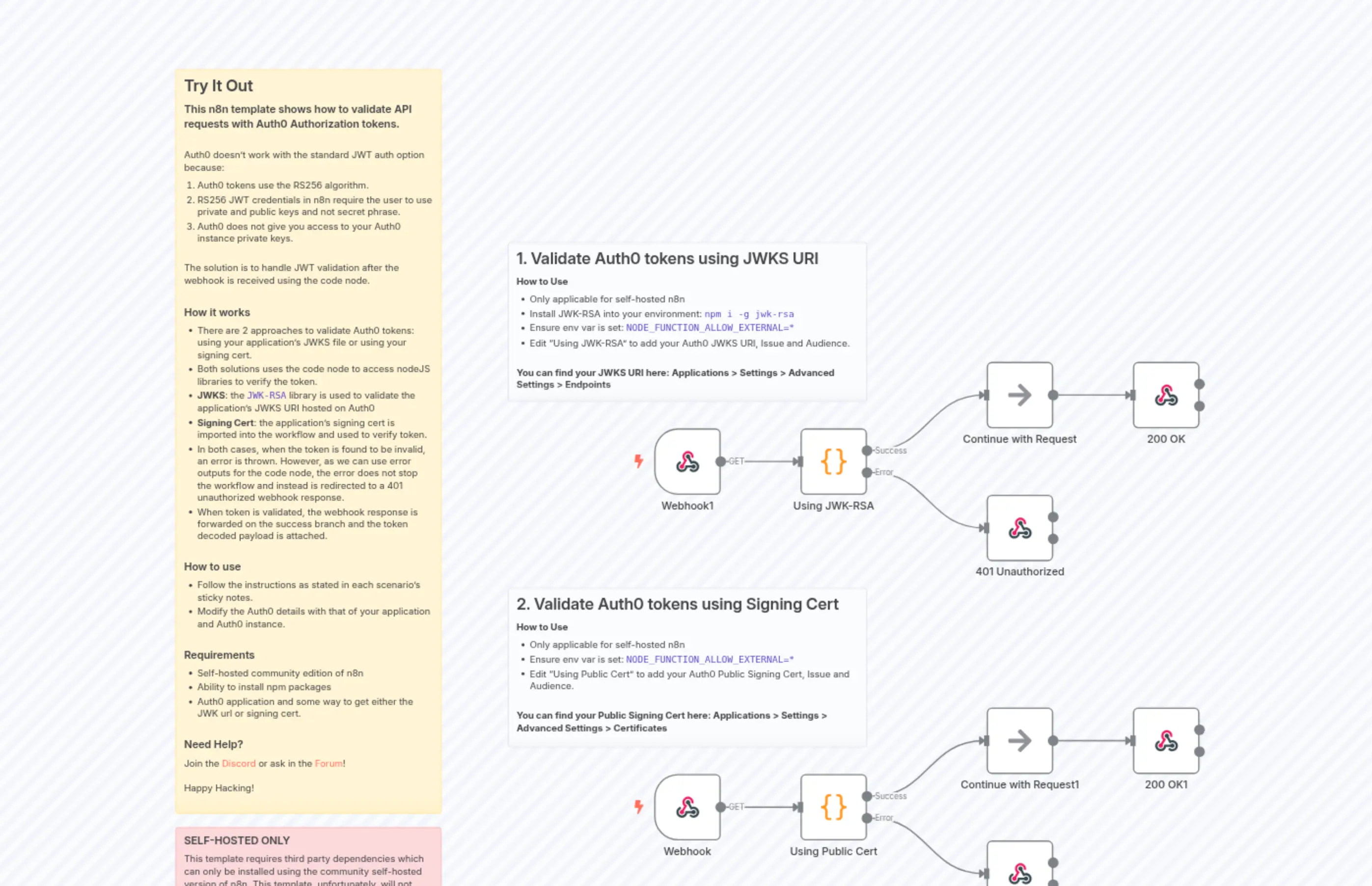
Validate Auth0 JWT Tokens using JWKS or Signing Cert
Description
Categories
🔧 Engineering
Nodes Used
n8n-nodes-base.coden8n-nodes-base.coden8n-nodes-base.noOpn8n-nodes-base.noOpn8n-nodes-base.webhookn8n-nodes-base.webhookn8n-nodes-base.stickyNoten8n-nodes-base.stickyNoten8n-nodes-base.stickyNoten8n-nodes-base.stickyNote
PriceGratis
Views0
Last Updated11/28/2025
workflow.json
{
  "meta": {
    "instanceId": "408f9fb9940c3cb18ffdef0e0150fe342d6e655c3a9fac21f0f644e8bedabcd9",
    "templateCredsSetupCompleted": true
  },
  "nodes": [
    {
      "id": "2939d06d-d135-4ab4-9ec0-e4864b798df3",
      "name": "Webhook",
      "type": "n8n-nodes-base.webhook",
      "position": [
        -100,
        640
      ],
      "webhookId": "6b1e6a3d-9b6a-4b11-8d18-759b4073e651",
      "parameters": {
        "path": "6b1e6a3d-9b6a-4b11-8d18-759b4073e651",
        "options": {}
      },
      "typeVersion": 2
    },
    {
      "id": "0c25066d-57eb-4511-94d8-77914f7377ef",
      "name": "Using JWK-RSA",
      "type": "n8n-nodes-base.code",
      "onError": "continueErrorOutput",
      "position": [
        120,
        120
      ],
      "parameters": {
        "mode": "runOnceForEachItem",
        "jsCode": "const jwt = require('jsonwebtoken');\nconst jwksClient = require('jwks-rsa');\n\nconst client = jwksClient({\n  jwksUri: 'https://dev-abcdef.us.auth0.com/.well-known/jwks.json',\n});\n\nconst config = {\n  audience: 'https://dev-abcdef.us.auth0.com/api/v2/',\n  issuer: 'https://dev-abcdef.us.auth0.com/',\n  algorithms: ['RS256'],\n};\n\nfunction getKey(header, callback) {\n  client.getSigningKey(header.kid, (err, key) => {\n    if (err) return callback(err);\n    callback(null, key.getPublicKey());\n  });\n}\n\nfunction verifyToken(token) {\n  return new Promise((res,rej) => {\n    jwt.verify(\n      token,\n      getKey,\n      config,\n      (err, decoded) => {\n        if (err) {\n          rej('invalid token');\n        } else {\n          res(decoded);\n        }\n      }\n    );\n  });\n}\n\nconst [_, token] = $json.headers.Authorization.split(' ');\nconst payload = await verifyToken(token);\nreturn {\n  ...$input.item.json,\n  jwtPayload: payload\n};\n"
      },
      "executeOnce": false,
      "typeVersion": 2
    },
    {
      "id": "267a3136-cbf1-4567-b203-863bdbc736f5",
      "name": "401 Unauthorized",
      "type": "n8n-nodes-base.respondToWebhook",
      "position": [
        400,
        220
      ],
      "parameters": {
        "options": {
          "responseCode": 401
        },
        "respondWith": "json",
        "responseBody": "{\n  \"error\": 401,\n  \"message\": \"Unauthorized\"\n}"
      },
      "typeVersion": 1.3
    },
    {
      "id": "d191045f-0897-46d3-8262-10f14c35d924",
      "name": "Using Public Cert",
      "type": "n8n-nodes-base.code",
      "onError": "continueErrorOutput",
      "position": [
        120,
        640
      ],
      "parameters": {
        "mode": "runOnceForEachItem",
        "jsCode": "const jwt = require('jsonwebtoken');\n\nconst config = {\n  audience: 'https://dev-abcdef.us.auth0.com/api/v2/',\n  issuer: 'https://dev-abcdef.us.auth0.com/',\n  algorithms: ['RS256'],\n};\n\n// Signing Cert can be found via\n// applications > settings > advanced settings > certificates\nconst cert = `-----BEGIN CERTIFICATE-----\n...\n-----END CERTIFICATE-----`;\n\nconst [_, token] = $json.headers.Authorization.split(' ');\n\ntry {\n  const payload = jwt.verify(token, cert, config);\n  return {\n    ...$input.item.json,\n    jwtPayload: payload\n  }\n} catch (e) {\n  throw new Error('Invalid Token!');\n}"
      },
      "typeVersion": 2
    },
    {
      "id": "81ed6596-dc8e-4e0c-8de3-e73ad9c4b3c3",
      "name": "401 Unauthorized1",
      "type": "n8n-nodes-base.respondToWebhook",
      "position": [
        400,
        740
      ],
      "parameters": {
        "options": {
          "responseCode": 401
        },
        "respondWith": "json",
        "responseBody": "{\n  \"error\": 401,\n  \"message\": \"Unauthorized\"\n}"
      },
      "typeVersion": 1.3
    },
    {
      "id": "6725156d-8d92-4bf6-a0a4-985173d60155",
      "name": "Webhook1",
      "type": "n8n-nodes-base.webhook",
      "position": [
        -100,
        120
      ],
      "webhookId": "6b1e6a3d-9b6a-4b11-8d18-759b4073e651",
      "parameters": {
        "path": "6b1e6a3d-9b6a-4b11-8d18-759b4073e651",
        "options": {}
      },
      "typeVersion": 2
    },
    {
      "id": "cbbdae78-6827-43df-a5bc-44a4039eb95e",
      "name": "Continue with Request",
      "type": "n8n-nodes-base.noOp",
      "position": [
        400,
        20
      ],
      "parameters": {},
      "typeVersion": 1
    },
    {
      "id": "1624c7d1-1dc7-4ee9-bae6-b13cd67bbdf6",
      "name": "Continue with Request1",
      "type": "n8n-nodes-base.noOp",
      "position": [
        400,
        540
      ],
      "parameters": {},
      "typeVersion": 1
    },
    {
      "id": "93e19396-3126-4657-a190-95aa65dd6a60",
      "name": "200 OK",
      "type": "n8n-nodes-base.respondToWebhook",
      "position": [
        620,
        20
      ],
      "parameters": {
        "options": {
          "responseCode": 200
        },
        "respondWith": "json",
        "responseBody": "{\n  \"error\": null\n}"
      },
      "typeVersion": 1.3
    },
    {
      "id": "f819e2d8-8718-43d1-b0b6-b668bb74013c",
      "name": "200 OK1",
      "type": "n8n-nodes-base.respondToWebhook",
      "position": [
        620,
        540
      ],
      "parameters": {
        "options": {
          "responseCode": 200
        },
        "respondWith": "json",
        "responseBody": "{\n  \"error\": null\n}"
      },
      "typeVersion": 1.3
    },
    {
      "id": "11efede9-4f16-4d90-85ab-facbda2d97c4",
      "name": "Sticky Note",
      "type": "n8n-nodes-base.stickyNote",
      "position": [
        -320,
        -160
      ],
      "parameters": {
        "color": 7,
        "width": 540,
        "height": 240,
        "content": "## 1. Validate Auth0 tokens using JWKS URI\n**How to Use**\n* Only applicable for self-hosted n8n\n* Install JWK-RSA into your environment: `npm i -g jwk-rsa`\n* Ensure env var is set: `NODE_FUNCTION_ALLOW_EXTERNAL=*`\n* Edit \"Using JWK-RSA\" to add your Auth0 JWKS URI, Issue and Audience.\n\n\n**You can find your JWKS URI here: Applications > Settings > Advanced Settings > Endpoints**"
      },
      "typeVersion": 1
    },
    {
      "id": "25dfb1dc-afb1-43b1-ad00-136454ef321b",
      "name": "Sticky Note1",
      "type": "n8n-nodes-base.stickyNote",
      "position": [
        -320,
        360
      ],
      "parameters": {
        "color": 7,
        "width": 540,
        "height": 240,
        "content": "## 2. Validate Auth0 tokens using Signing Cert\n**How to Use**\n* Only applicable for self-hosted n8n\n* Ensure env var is set: `NODE_FUNCTION_ALLOW_EXTERNAL=*`\n* Edit \"Using Public Cert\" to add your Auth0 Public Signing Cert, Issue and Audience.\n\n\n**You can find your Public Signing Cert here: Applications > Settings > Advanced Settings > Certificates**"
      },
      "typeVersion": 1
    },
    {
      "id": "fdb77df6-fcb6-47f9-896d-1f12222575d1",
      "name": "Sticky Note2",
      "type": "n8n-nodes-base.stickyNote",
      "position": [
        -820,
        -420
      ],
      "parameters": {
        "width": 400,
        "height": 1120,
        "content": "## Try It Out\n### This n8n template shows how to validate API requests with Auth0 Authorization tokens.\n\nAuth0 doesn't work with the standard JWT auth option because:\n1) Auth0 tokens use the RS256 algorithm.\n2) RS256 JWT credentials in n8n require the user to use private and public keys and not secret phrase.\n3) Auth0 does not give you access to your Auth0 instance private keys.\n\n\nThe solution is to handle JWT validation after the webhook is received using the code node.\n\n### How it works\n* There are 2 approaches to validate Auth0 tokens: using your application's JWKS file or using your signing cert.\n* Both solutions uses the code node to access nodeJS libraries to verify the token.\n* **JWKS**: the `JWK-RSA` library is used to validate the application's JWKS URI hosted on Auth0\n* **Signing Cert**: the application's signing cert is imported into the workflow and used to verify token.\n* In both cases, when the token is found to be invalid, an error is thrown. However, as we can use error outputs for the code node, the error does not stop the workflow and instead is redirected to a 401 unauthorized webhook response.\n* When token is validated, the webhook response is forwarded on the success branch and the token decoded payload is attached.\n\n### How to use\n* Follow the instructions as stated in each scenario's sticky notes.\n* Modify the Auth0 details with that of your application and Auth0 instance.\n\n### Requirements\n* Self-hosted community edition of n8n\n* Ability to install npm packages\n* Auth0 application and some way to get either the JWK url or signing cert.\n\n### Need Help?\nJoin the [Discord](https://discord.com/invite/XPKeKXeB7d) or ask in the [Forum](https://community.n8n.io/)!\n\nHappy Hacking!"
      },
      "typeVersion": 1
    },
    {
      "id": "35fb0df0-e871-44b1-b164-511d30a49bbb",
      "name": "Sticky Note3",
      "type": "n8n-nodes-base.stickyNote",
      "position": [
        -820,
        720
      ],
      "parameters": {
        "color": 3,
        "width": 400,
        "height": 140,
        "content": "### SELF-HOSTED ONLY\nThis template requires third party dependencies which can only be installed using the community self-hosted version of n8n. This template, unfortunately, will not work on n8n cloud."
      },
      "typeVersion": 1
    }
  ],
  "pinData": {},
  "connections": {
    "Webhook": {
      "main": [
        [
          {
            "node": "Using Public Cert",
            "type": "main",
            "index": 0
          }
        ]
      ]
    },
    "Webhook1": {
      "main": [
        [
          {
            "node": "Using JWK-RSA",
            "type": "main",
            "index": 0
          }
        ]
      ]
    },
    "Using JWK-RSA": {
      "main": [
        [
          {
            "node": "Continue with Request",
            "type": "main",
            "index": 0
          }
        ],
        [
          {
            "node": "401 Unauthorized",
            "type": "main",
            "index": 0
          }
        ]
      ]
    },
    "Using Public Cert": {
      "main": [
        [
          {
            "node": "Continue with Request1",
            "type": "main",
            "index": 0
          }
        ],
        [
          {
            "node": "401 Unauthorized1",
            "type": "main",
            "index": 0
          }
        ]
      ]
    },
    "Continue with Request": {
      "main": [
        [
          {
            "node": "200 OK",
            "type": "main",
            "index": 0
          }
        ]
      ]
    },
    "Continue with Request1": {
      "main": [
        [
          {
            "node": "200 OK1",
            "type": "main",
            "index": 0
          }
        ]
      ]
    }
  }
}