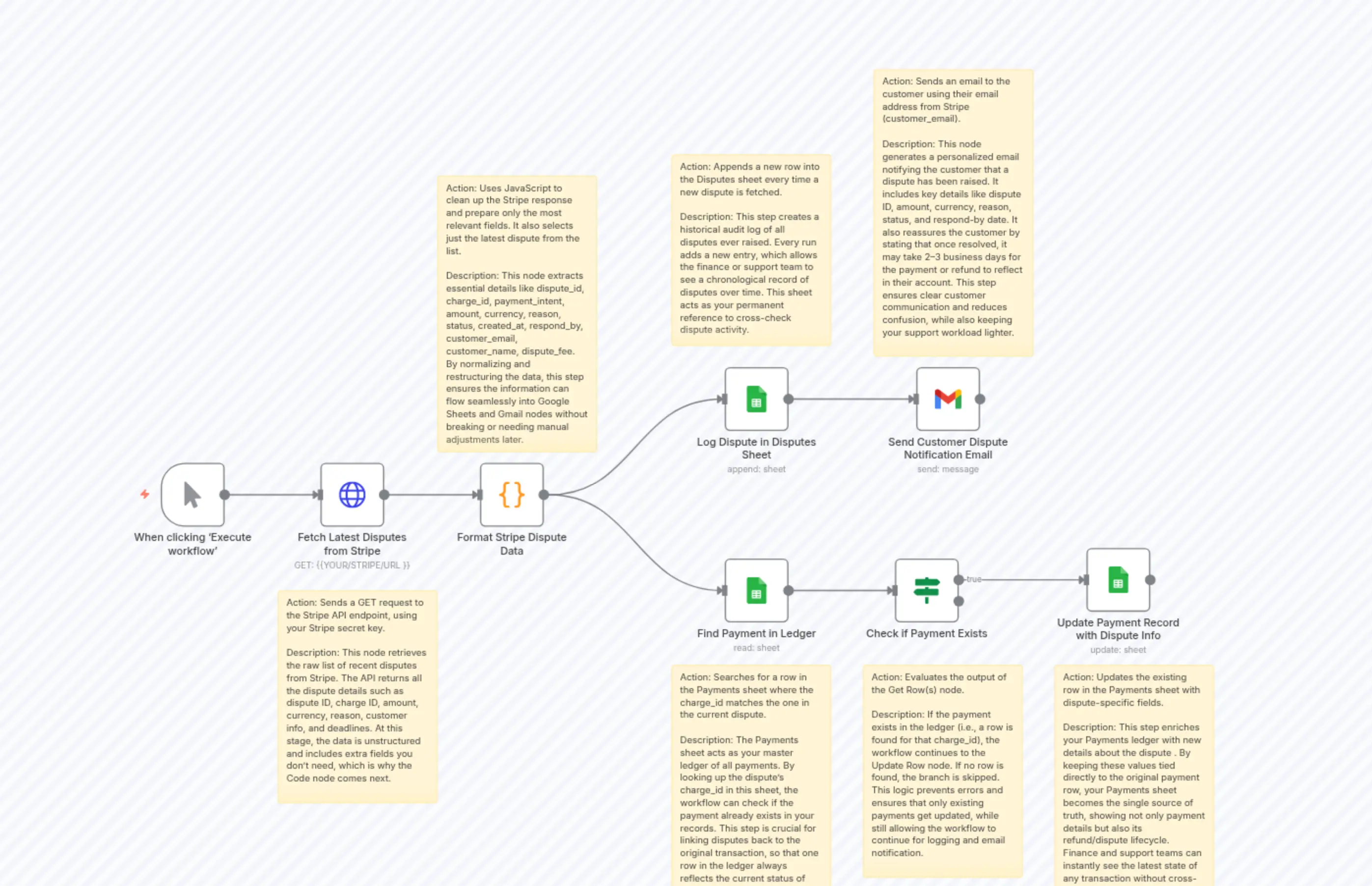
Refund Sync + Customer Notification
Description
Categories
🤖 AI & Machine Learning
Nodes Used
n8n-nodes-base.ifn8n-nodes-base.coden8n-nodes-base.gmailn8n-nodes-base.stickyNoten8n-nodes-base.stickyNoten8n-nodes-base.stickyNoten8n-nodes-base.stickyNoten8n-nodes-base.stickyNoten8n-nodes-base.stickyNoten8n-nodes-base.stickyNote
PriceFree
Views0
Last Updated11/28/2025
workflow.json
{
  "id": "8qlWHFgfTXIg4fe2",
  "meta": {
    "instanceId": "8443f10082278c46aa5cf3acf8ff0f70061a2c58bce76efac814b16290845177",
    "templateCredsSetupCompleted": true
  },
  "name": "Refund Sync + Customer Notification",
  "tags": [],
  "nodes": [
    {
      "id": "67a71551-678b-4a04-bb39-a14e54c36c0c",
      "name": "When clicking ‘Execute workflow’",
      "type": "n8n-nodes-base.manualTrigger",
      "position": [
        -128,
        208
      ],
      "parameters": {},
      "typeVersion": 1
    },
    {
      "id": "b72c4012-d202-450f-90a6-b99e392343af",
      "name": "Sticky Note",
      "type": "n8n-nodes-base.stickyNote",
      "position": [
        928,
        512
      ],
      "parameters": {
        "height": 320,
        "content": "Action: Evaluates the output of the Get Row(s) node.\n\nDescription: If the payment exists in the ledger (i.e., a row is found for that charge_id), the workflow continues to the Update Row node. If no row is found, the branch is skipped. This logic prevents errors and ensures that only existing payments get updated, while still allowing the workflow to continue for logging and email notification."
      },
      "typeVersion": 1
    },
    {
      "id": "87cb1c73-99c3-409f-86fa-d49c97074a9a",
      "name": "Sticky Note1",
      "type": "n8n-nodes-base.stickyNote",
      "position": [
        944,
        -384
      ],
      "parameters": {
        "height": 432,
        "content": "Action: Sends an email to the customer using their email address from Stripe (customer_email).\n\nDescription: This node generates a personalized email notifying the customer that a dispute has been raised. It includes key details like dispute ID, amount, currency, reason, status, and respond-by date. It also reassures the customer by stating that once resolved, it may take 2–3 business days for the payment or refund to reflect in their account. This step ensures clear customer communication and reduces confusion, while also keeping your support workload lighter."
      },
      "typeVersion": 1
    },
    {
      "id": "c8f1645c-d695-4861-b009-f905f64185fe",
      "name": "Sticky Note2",
      "type": "n8n-nodes-base.stickyNote",
      "position": [
        640,
        -256
      ],
      "parameters": {
        "height": 288,
        "content": "Action: Appends a new row into the Disputes sheet every time a new dispute is fetched.\n\nDescription: This step creates a historical audit log of all disputes ever raised. Every run adds a new entry, which allows the finance or support team to see a chronological record of disputes over time. This sheet acts as your permanent reference to cross-check dispute activity."
      },
      "typeVersion": 1
    },
    {
      "id": "f7312b74-0370-4282-bd6c-a47dda17d737",
      "name": "Sticky Note3",
      "type": "n8n-nodes-base.stickyNote",
      "position": [
        640,
        512
      ],
      "parameters": {
        "height": 384,
        "content": "Action: Searches for a row in the Payments sheet where the charge_id matches the one in the current dispute.\n\nDescription: The Payments sheet acts as your master ledger of all payments. By looking up the dispute’s charge_id in this sheet, the workflow can check if the payment already exists in your records. This step is crucial for linking disputes back to the original transaction, so that one row in the ledger always reflects the current status of that payment."
      },
      "typeVersion": 1
    },
    {
      "id": "83a18437-73c4-4062-9681-1003e3064958",
      "name": "Sticky Note4",
      "type": "n8n-nodes-base.stickyNote",
      "position": [
        288,
        -224
      ],
      "parameters": {
        "height": 416,
        "content": "Action: Uses JavaScript to clean up the Stripe response and prepare only the most relevant fields. It also selects just the latest dispute from the list.\n\nDescription: This node extracts essential details like dispute_id, charge_id, payment_intent, amount, currency, reason, status, created_at, respond_by, customer_email, customer_name, dispute_fee. By normalizing and restructuring the data, this step ensures the information can flow seamlessly into Google Sheets and Gmail nodes without breaking or needing manual adjustments later."
      },
      "typeVersion": 1
    },
    {
      "id": "48cba95b-90ac-47ed-879a-ac1a5a6f8283",
      "name": "Sticky Note5",
      "type": "n8n-nodes-base.stickyNote",
      "position": [
        48,
        400
      ],
      "parameters": {
        "height": 320,
        "content": "Action: Sends a GET request to the Stripe API endpoint, using your Stripe secret key.\n\nDescription: This node retrieves the raw list of recent disputes from Stripe. The API returns all the dispute details such as dispute ID, charge ID, amount, currency, reason, customer info, and deadlines. At this stage, the data is unstructured and includes extra fields you don’t need, which is why the Code node comes next."
      },
      "typeVersion": 1
    },
    {
      "id": "33bd715b-5140-4af5-8734-37c90bb2abcc",
      "name": "Sticky Note6",
      "type": "n8n-nodes-base.stickyNote",
      "position": [
        1216,
        512
      ],
      "parameters": {
        "height": 384,
        "content": "Action: Updates the existing row in the Payments sheet with dispute-specific fields.\n\nDescription: This step enriches your Payments ledger with new details about the dispute . By keeping these values tied directly to the original payment row, your Payments sheet becomes the single source of truth, showing not only payment details but also its refund/dispute lifecycle. Finance and support teams can instantly see the latest state of any transaction without cross-checking multiple sheets."
      },
      "typeVersion": 1
    },
    {
      "id": "25b4f24d-99e0-448a-b7f7-7e84e3557243",
      "name": "Fetch Latest Disputes from Stripe",
      "type": "n8n-nodes-base.httpRequest",
      "position": [
        112,
        208
      ],
      "parameters": {
        "url": "{{YOUR/STRIPE/URL }}",
        "options": {},
        "sendHeaders": true,
        "headerParameters": {
          "parameters": [
            {
              "name": "Authorization",
              "value": "Bearer{{YOUR/STRIPE/ SECRETEKEY}}"
            }
          ]
        }
      },
      "typeVersion": 4.2
    },
    {
      "id": "acc142aa-346a-4812-9849-16ad5f1c4c95",
      "name": "Format Stripe Dispute Data",
      "type": "n8n-nodes-base.code",
      "position": [
        352,
        208
      ],
      "parameters": {
        "jsCode": "// Input is the whole response with data[]\nconst disputes = $json.data || [];\nif (disputes.length === 0) {\n  return [];\n}\n\n// Stripe returns newest first, so just take index 0\nconst d = disputes[0];\n\nreturn [{\n  dispute_id: d.id,\n  charge_id: d.charge,\n  payment_intent: d.payment_intent,\n  amount: (d.amount / 100).toFixed(2),\n  currency: d.currency.toUpperCase(),\n  reason: d.reason,\n  status: d.status,\n  created_at: new Date(d.created * 1000).toISOString(),\n  respond_by: new Date(d.evidence_details.due_by * 1000).toISOString(),\n  customer_email: d.evidence.customer_email_address || \"\",\n  customer_name: d.evidence.customer_name || \"\",\n  dispute_fee: d.balance_transactions?.[0]?.fee || 0,\n  fee_currency: d.balance_transactions?.[0]?.currency || d.currency\n}];\n"
      },
      "typeVersion": 2
    },
    {
      "id": "b9356ab5-af6c-46db-b84b-4f906cc5f259",
      "name": "Log Dispute in Disputes Sheet",
      "type": "n8n-nodes-base.googleSheets",
      "position": [
        720,
        64
      ],
      "parameters": {
        "columns": {
          "value": {},
          "schema": [],
          "mappingMode": "defineBelow",
          "matchingColumns": [],
          "attemptToConvertTypes": false,
          "convertFieldsToString": false
        },
        "options": {},
        "operation": "append",
        "sheetName": {
          "__rl": true,
          "mode": "url",
          "value": "{{YOUR/SHEET/URL}}"
        },
        "documentId": {
          "__rl": true,
          "mode": "url",
          "value": "{{YOUR/SPREADSHEET/URL}}"
        }
      },
      "credentials": {
        "googleSheetsOAuth2Api": {
          "id": "kpPEOLCGn963qpoh",
          "name": "[email protected]"
        }
      },
      "typeVersion": 4.6
    },
    {
      "id": "81fc2bb6-7077-4b81-8d65-396685a6cb65",
      "name": "Find Payment in Ledger",
      "type": "n8n-nodes-base.googleSheets",
      "position": [
        720,
        352
      ],
      "parameters": {
        "options": {},
        "sheetName": {
          "__rl": true,
          "mode": "url",
          "value": "{{YOUR/SHEET/URL}}"
        },
        "documentId": {
          "__rl": true,
          "mode": "url",
          "value": "{{YOUR/SPREADSHEET/URL}}"
        }
      },
      "credentials": {
        "googleSheetsOAuth2Api": {
          "id": "kpPEOLCGn963qpoh",
          "name": "[email protected]"
        }
      },
      "typeVersion": 4.6
    },
    {
      "id": "7c4e0a80-3377-4d2a-a424-36cd0f23a09b",
      "name": "Check if Payment Exists",
      "type": "n8n-nodes-base.if",
      "position": [
        976,
        352
      ],
      "parameters": {
        "options": {},
        "conditions": {
          "options": {
            "version": 2,
            "leftValue": "",
            "caseSensitive": true,
            "typeValidation": "strict"
          },
          "combinator": "and",
          "conditions": [
            {
              "id": "45cf7e42-5355-45db-838b-fb4630423d90",
              "operator": {
                "type": "string",
                "operation": "exists",
                "singleValue": true
              },
              "leftValue": "{{$json.charge_id}}",
              "rightValue": ""
            }
          ]
        }
      },
      "typeVersion": 2.2
    },
    {
      "id": "bc710438-8e6f-4711-ba2b-11c3c9ea06ab",
      "name": "Update Payment Record with Dispute Info",
      "type": "n8n-nodes-base.googleSheets",
      "position": [
        1264,
        336
      ],
      "parameters": {
        "columns": {
          "value": {},
          "schema": [],
          "mappingMode": "defineBelow",
          "matchingColumns": [],
          "attemptToConvertTypes": false,
          "convertFieldsToString": false
        },
        "options": {},
        "operation": "update",
        "sheetName": {
          "__rl": true,
          "mode": "url",
          "value": "{{YOUR/SHEET/URL}}"
        },
        "documentId": {
          "__rl": true,
          "mode": "url",
          "value": "{{YOUR/SPREADSHEET/URL}}"
        }
      },
      "credentials": {
        "googleSheetsOAuth2Api": {
          "id": "kpPEOLCGn963qpoh",
          "name": "[email protected]"
        }
      },
      "typeVersion": 4.6
    },
    {
      "id": "7f6a9fe0-6123-4b8a-9c13-5a24a6117043",
      "name": "Send Customer Dispute Notification Email",
      "type": "n8n-nodes-base.gmail",
      "position": [
        1008,
        64
      ],
      "webhookId": "0c82c299-6938-42ed-bda6-5007d79af34f",
      "parameters": {
        "sendTo": "={{ $json['customer_email '] }}",
        "message": "=Hello, {{ $json['customer_name '] }}\n\nWe’ve received a dispute related to your payment.\n\n🧾 Details of the dispute:\n- Dispute ID: {{ $json['dispute_id '] }}\n- Amount: {{ $json['amount '] }} {{ $json['currency '] }}\n- Reason: {{ $json['reason '] }}\n- Status: {{ $json['status '] }}\n- Respond by: {{ $json['respond_by '] }}\n\nIf you did not intend to raise this dispute, please contact our support team immediately so we can help resolve it.\n\nPlease note: Once the dispute is resolved, it may take 2–3 business days for the payment status or any refund to be reflected in your account, depending on your bank.\n\nThank you,  \n— Team Support\n",
        "options": {},
        "subject": "=⚠️ New Dispute: {{ $json['amount '] }} {{ $json['currency '] }} – Respond by {{ $json['respond_by '] }}\n",
        "emailType": "text"
      },
      "credentials": {
        "gmailOAuth2": {
          "id": "RchiXdmY8WaQhOSJ",
          "name": "Gmail account"
        }
      },
      "typeVersion": 2.1
    }
  ],
  "active": false,
  "pinData": {},
  "settings": {
    "executionOrder": "v1"
  },
  "versionId": "a40bc07e-eb8a-4e61-bb9d-04e01c292052",
  "connections": {
    "Find Payment in Ledger": {
      "main": [
        [
          {
            "node": "Check if Payment Exists",
            "type": "main",
            "index": 0
          }
        ]
      ]
    },
    "Check if Payment Exists": {
      "main": [
        [
          {
            "node": "Update Payment Record with Dispute Info",
            "type": "main",
            "index": 0
          }
        ]
      ]
    },
    "Format Stripe Dispute Data": {
      "main": [
        [
          {
            "node": "Log Dispute in Disputes Sheet",
            "type": "main",
            "index": 0
          },
          {
            "node": "Find Payment in Ledger",
            "type": "main",
            "index": 0
          }
        ]
      ]
    },
    "Log Dispute in Disputes Sheet": {
      "main": [
        [
          {
            "node": "Send Customer Dispute Notification Email",
            "type": "main",
            "index": 0
          }
        ]
      ]
    },
    "Fetch Latest Disputes from Stripe": {
      "main": [
        [
          {
            "node": "Format Stripe Dispute Data",
            "type": "main",
            "index": 0
          }
        ]
      ]
    },
    "When clicking ‘Execute workflow’": {
      "main": [
        [
          {
            "node": "Fetch Latest Disputes from Stripe",
            "type": "main",
            "index": 0
          }
        ]
      ]
    }
  }
}