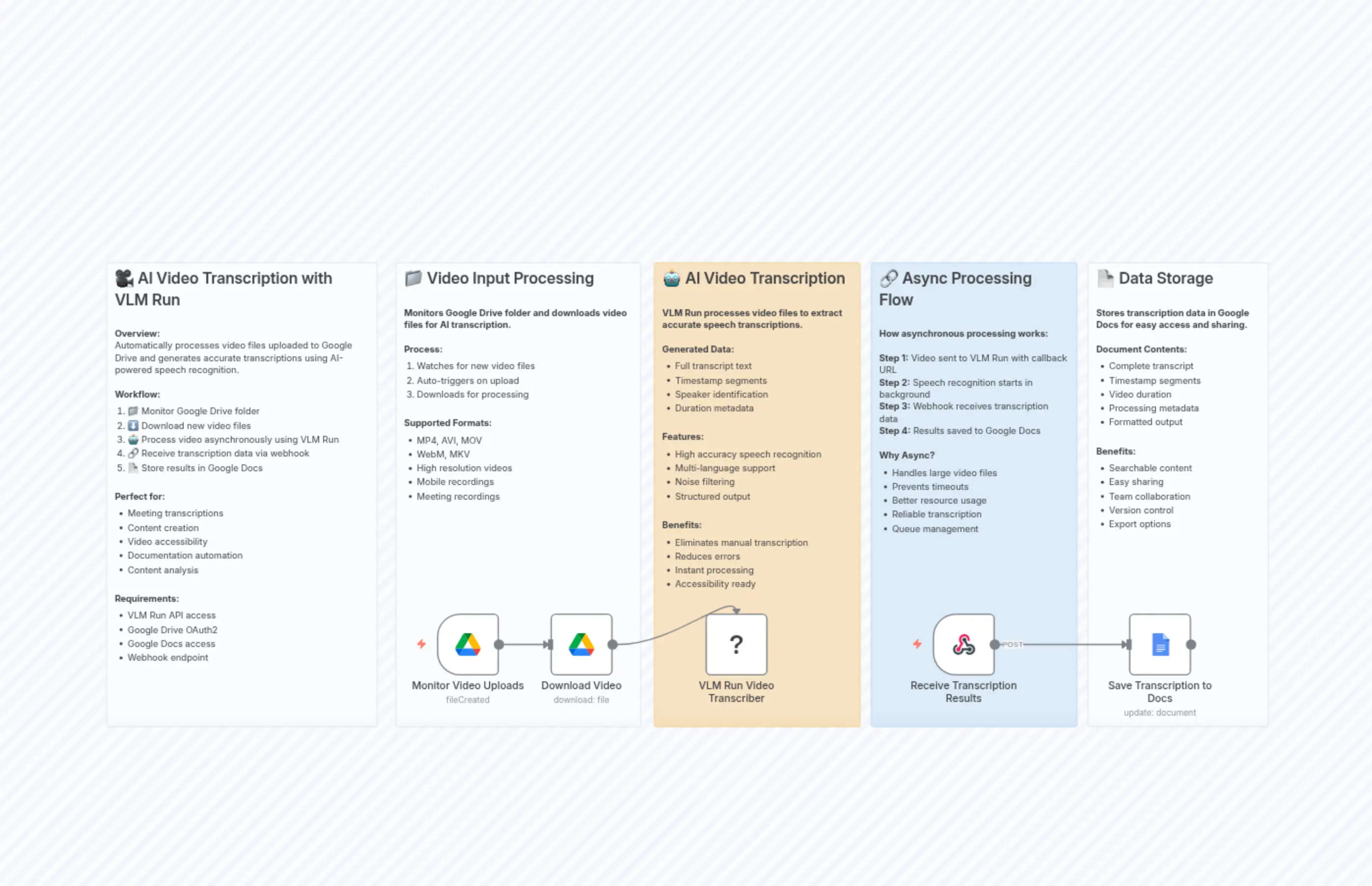
Video Transcription Automation with VLM Run, Google Drive and Docs
Description
Categories
🤖 AI & Machine Learning
Nodes Used
n8n-nodes-base.webhookn8n-nodes-base.googleDocsn8n-nodes-base.stickyNoten8n-nodes-base.stickyNoten8n-nodes-base.stickyNoten8n-nodes-base.stickyNoten8n-nodes-base.stickyNoten8n-nodes-base.googleDrive@vlm-run/n8n-nodes-vlmrun.vlmRunn8n-nodes-base.googleDriveTrigger
PriceFree
Views0
Last Updated11/28/2025
workflow.json
{
  "meta": {
    "instanceId": "0a7ae129a7d703150135f6cc24d0469f20ffd22b5ed59c23ee3e0608264e6d98",
    "templateCredsSetupCompleted": true
  },
  "nodes": [
    {
      "id": "94b539fa-9877-47a6-a727-e195f27ebf73",
      "name": "🎥 Workflow Overview",
      "type": "n8n-nodes-base.stickyNote",
      "position": [
        180,
        1500
      ],
      "parameters": {
        "color": 7,
        "width": 420,
        "height": 720,
        "content": "## 🎥 AI Video Transcription with VLM Run\n\n**Overview:**\nAutomatically processes video files uploaded to Google Drive and generates accurate transcriptions using AI-powered speech recognition.\n\n**Workflow:**\n1. 📁 Monitor Google Drive folder\n2. ⬇️ Download new video files\n3. 🤖 Process video asynchronously using VLM Run\n4. 🔗 Receive transcription data via webhook\n5. 📄 Store results in Google Docs\n\n\n**Perfect for:**\n- Meeting transcriptions\n- Content creation\n- Video accessibility\n- Documentation automation\n- Content analysis\n\n\n**Requirements:**\n- VLM Run API access\n- Google Drive OAuth2\n- Google Docs access\n- Webhook endpoint"
      },
      "typeVersion": 1
    },
    {
      "id": "1d2add63-d03f-4942-9133-f333292b1997",
      "name": "📄 Output Documentation",
      "type": "n8n-nodes-base.stickyNote",
      "position": [
        1700,
        1500
      ],
      "parameters": {
        "color": 7,
        "width": 280,
        "height": 720,
        "content": "## 📄 Data Storage\n\n**Stores transcription data in Google Docs for easy access and sharing.**\n\n**Document Contents:**\n- Complete transcript\n- Timestamp segments\n- Video duration\n- Processing metadata\n- Formatted output\n\n\n**Benefits:**\n- Searchable content\n- Easy sharing\n- Team collaboration\n- Version control\n- Export options"
      },
      "typeVersion": 1
    },
    {
      "id": "5b1c2e5c-18c3-4eb5-be25-e13bff63b5b3",
      "name": "VLM Run Video Transcriber",
      "type": "@vlm-run/n8n-nodes-vlmrun.vlmRun",
      "notes": "Processes video files using VLM AI to generate accurate speech transcriptions with timestamps and metadata. Runs asynchronously for reliable processing.",
      "position": [
        1100,
        2040
      ],
      "parameters": {
        "domain": "video.transcription",
        "operation": "video",
        "callbackUrl": "https://playground.vlm.run/webhook/video-transcription-vlm-run",
        "processAsynchronously": true
      },
      "credentials": {
        "vlmRunApi": {
          "id": "8RlnEQwTTJHhbvrE",
          "name": "VLM Run account 4"
        }
      },
      "typeVersion": 1
    },
    {
      "id": "cdfb1da6-96be-448a-a9ca-7339699853dd",
      "name": "Monitor Video Uploads",
      "type": "n8n-nodes-base.googleDriveTrigger",
      "notes": "Watches designated Google Drive folder for new video files and triggers transcription processing automatically when files are uploaded.",
      "position": [
        680,
        2040
      ],
      "parameters": {
        "event": "fileCreated",
        "options": {},
        "pollTimes": {
          "item": [
            {
              "mode": "everyMinute"
            }
          ]
        },
        "triggerOn": "specificFolder",
        "folderToWatch": {
          "__rl": true,
          "mode": "url",
          "value": "https://drive.google.com/drive/folders/1"
        }
      },
      "credentials": {
        "googleDriveOAuth2Api": {
          "id": "zwJCIAH4tAPcgGzI",
          "name": "Google Drive account 2"
        }
      },
      "typeVersion": 1
    },
    {
      "id": "93c7c96d-5b81-49e6-adeb-37d0ec18f062",
      "name": "Receive Transcription Results",
      "type": "n8n-nodes-base.webhook",
      "notes": "Receives the completed video transcription data from VLM AI when asynchronous processing is finished.",
      "position": [
        1460,
        2040
      ],
      "webhookId": "1072bfce-6a7b-4fa8-ba4a-69d159350154",
      "parameters": {
        "path": "video-transcription-vlm-run",
        "options": {},
        "httpMethod": "POST"
      },
      "typeVersion": 2
    },
    {
      "id": "c27f4400-c459-4bb7-a5ea-ba223ef1c12f",
      "name": "Download Video",
      "type": "n8n-nodes-base.googleDrive",
      "notes": "Downloads the uploaded video file from Google Drive and prepares it for AI-powered speech transcription.",
      "position": [
        860,
        2040
      ],
      "parameters": {
        "fileId": {
          "__rl": true,
          "mode": "id",
          "value": "={{ $json.id }}"
        },
        "options": {},
        "operation": "download"
      },
      "credentials": {
        "googleDriveOAuth2Api": {
          "id": "zwJCIAH4tAPcgGzI",
          "name": "Google Drive account 2"
        }
      },
      "typeVersion": 3
    },
    {
      "id": "faad711b-8490-429f-81aa-fded34249ed9",
      "name": "Save Transcription to Docs",
      "type": "n8n-nodes-base.googleDocs",
      "position": [
        1760,
        2040
      ],
      "parameters": {
        "actionsUi": {
          "actionFields": [
            {
              "text": "=🎥 Video Transcription Report\n\n🗓️ Date: {{ new Date().toLocaleString('en-US', { dateStyle: 'medium', timeStyle: 'short' }) }}\n⏱️ Total Duration: {{ $json.body.response.metadata.duration }} seconds\n\n{{ $json.body.response.segments.map((segment, index) => `\n🔹 Segment ${index + 1}\n⏰ Time: ${segment.start_time.toFixed(2)}s → ${segment.end_time.toFixed(2)}s\n\n🎤 Audio Transcript:\n\"${segment.audio.content.trim()}\"\n\n📹 Video Description:\n\"${segment.video.content.trim()}\"\n\n${'─'.repeat(50)}` ).join('\\n') }}",
              "action": "insert"
            }
          ]
        },
        "operation": "update",
        "documentURL": "https://docs.google.com/document/d/19"
      },
      "credentials": {
        "googleDocsOAuth2Api": {
          "id": "3x0WI9iZ6ToA2fXw",
          "name": "Google Docs account"
        }
      },
      "typeVersion": 2
    },
    {
      "id": "0c1f6206-8728-47de-aff5-456aeec93328",
      "name": "📁 Input Documentation1",
      "type": "n8n-nodes-base.stickyNote",
      "position": [
        620,
        1500
      ],
      "parameters": {
        "color": 7,
        "width": 380,
        "height": 720,
        "content": "## 📁 Video Input Processing\n\n**Monitors Google Drive folder and downloads video files for AI transcription.**\n\n**Process:**\n1. Watches for new video files\n2. Auto-triggers on upload\n3. Downloads for processing\n\n\n**Supported Formats:**\n- MP4, AVI, MOV\n- WebM, MKV\n- High resolution videos\n- Mobile recordings\n- Meeting recordings"
      },
      "typeVersion": 1
    },
    {
      "id": "5b8dd7a1-f625-49bb-b133-fddcf9a97530",
      "name": "🤖 AI Processing Documentation1",
      "type": "n8n-nodes-base.stickyNote",
      "position": [
        1020,
        1500
      ],
      "parameters": {
        "color": 2,
        "width": 320,
        "height": 720,
        "content": "## 🤖 AI Video Transcription\n\n**VLM Run processes video files to extract accurate speech transcriptions.**\n\n**Generated Data:**\n- Full transcript text\n- Timestamp segments\n- Speaker identification\n- Duration metadata\n\n\n**Features:**\n- High accuracy speech recognition\n- Multi-language support\n- Noise filtering\n- Structured output\n\n\n**Benefits:**\n- Eliminates manual transcription\n- Reduces errors\n- Instant processing\n- Accessibility ready"
      },
      "typeVersion": 1
    },
    {
      "id": "eb8f4d04-0f6f-4243-80d7-5a483b30ce04",
      "name": "🔗 Async Processing Documentation1",
      "type": "n8n-nodes-base.stickyNote",
      "position": [
        1360,
        1500
      ],
      "parameters": {
        "color": 5,
        "width": 320,
        "height": 720,
        "content": "## 🔗 Async Processing Flow\n\n**How asynchronous processing works:**\n\n**Step 1:** Video sent to VLM Run with callback URL\n**Step 2:** Speech recognition starts in background\n**Step 3:** Webhook receives transcription data\n**Step 4:** Results saved to Google Docs\n\n**Why Async?**\n- Handles large video files\n- Prevents timeouts\n- Better resource usage\n- Reliable transcription\n- Queue management"
      },
      "typeVersion": 1
    }
  ],
  "pinData": {},
  "connections": {
    "Download Video": {
      "main": [
        [
          {
            "node": "VLM Run Video Transcriber",
            "type": "main",
            "index": 0
          }
        ]
      ]
    },
    "Monitor Video Uploads": {
      "main": [
        [
          {
            "node": "Download Video",
            "type": "main",
            "index": 0
          }
        ]
      ]
    },
    "Receive Transcription Results": {
      "main": [
        [
          {
            "node": "Save Transcription to Docs",
            "type": "main",
            "index": 0
          }
        ]
      ]
    }
  }
}