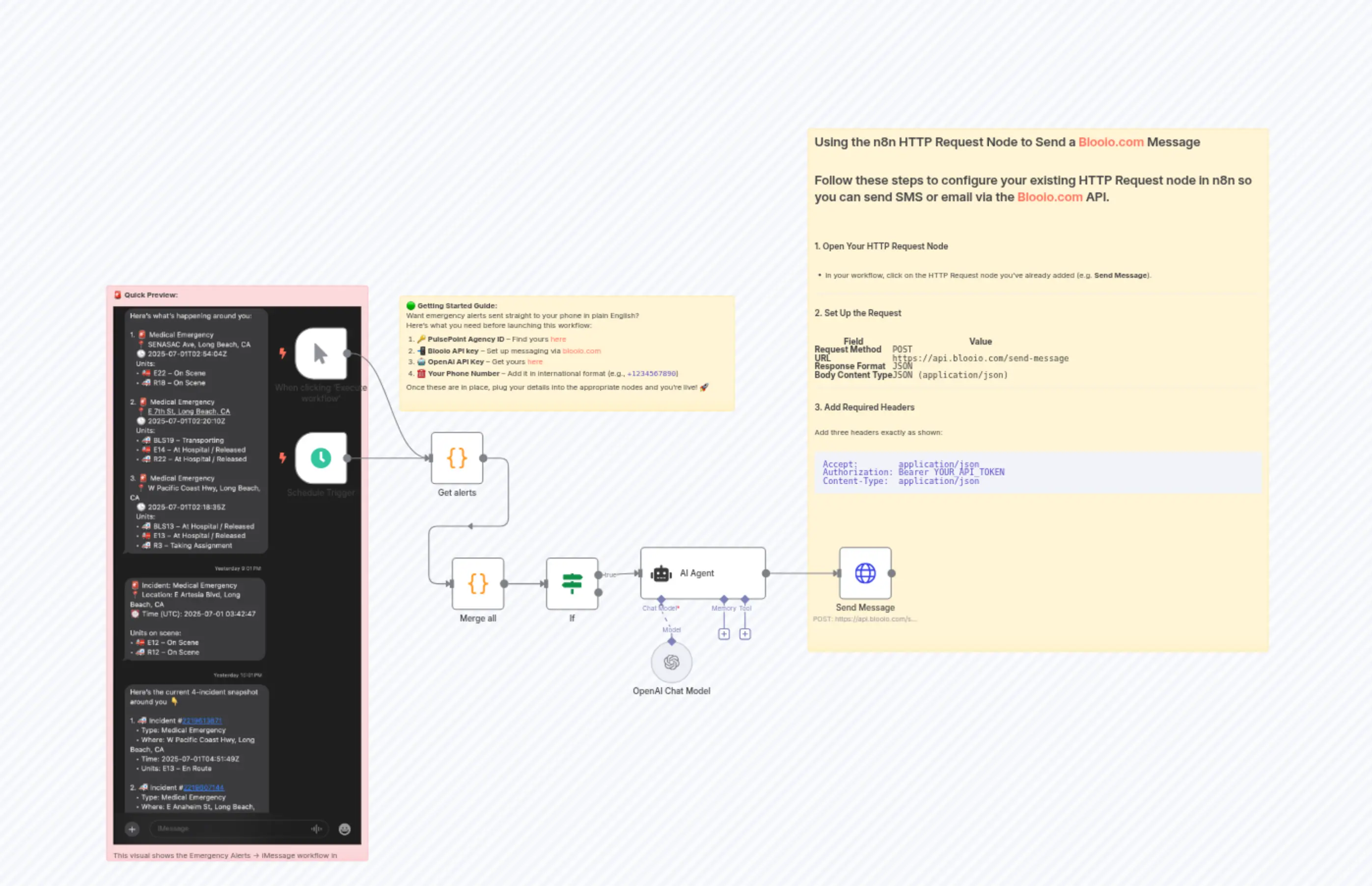
Real-time PulsePoint Emergency Alerts to iMessage with AI Summaries
Description
Categories
📊 Productivity🤖 AI & Machine Learning
Nodes Used
n8n-nodes-base.ifn8n-nodes-base.coden8n-nodes-base.coden8n-nodes-base.stickyNoten8n-nodes-base.stickyNoten8n-nodes-base.stickyNoten8n-nodes-base.httpRequestn8n-nodes-base.manualTrigger@n8n/n8n-nodes-langchain.agentn8n-nodes-base.scheduleTrigger
PriceFree
Views0
Last Updated11/28/2025
workflow.json
{
"meta": {
"instanceId": "9fe2e2e308ee9fa575b11a458a16465194c029a4f53a09a925eb0b5fa7b5761a",
"templateCredsSetupCompleted": true
},
"nodes": [
{
"id": "07757d09-129a-48f0-9a11-965ac480c490",
"name": "Sticky Note",
"type": "n8n-nodes-base.stickyNote",
"position": [
1020,
-340
],
"parameters": {
"width": 880,
"height": 1000,
"content": "## Using the n8n HTTP Request Node to Send a Blooio.com Message\n\nFollow these steps to configure your existing HTTP Request node in n8n so you can send SMS or email via the Blooio.com API.\n\n---\n\n### 1. Open Your HTTP Request Node\n\n- In your workflow, click on the HTTP Request node you’ve already added (e.g. **Send Message**).\n\n---\n\n### 2. Set Up the Request\n\n| Field | Value |\n|-----------------------|----------------------------------------------------|\n| **Request Method** | `POST` |\n| **URL** | `https://api.blooio.com/send-message` |\n| **Response Format** | `JSON` |\n| **Body Content Type** | `JSON (application/json)` |\n\n---\n\n### 3. Add Required Headers\n\nAdd three headers exactly as shown:\n\n```text\nAccept: application/json\nAuthorization: Bearer YOUR_API_TOKEN\nContent-Type: application/json"
},
"typeVersion": 1
},
{
"id": "75f418c3-3f51-4be0-812b-57077fefbcb8",
"name": "Send Message",
"type": "n8n-nodes-base.httpRequest",
"position": [
1080,
460
],
"parameters": {
"url": "https://api.blooio.com/send-message",
"method": "POST",
"options": {},
"sendBody": true,
"sendHeaders": true,
"authentication": "genericCredentialType",
"bodyParameters": {
"parameters": [
{
"name": "identifier",
"value": "=+11111111111"
},
{
"name": "message",
"value": "={{ $json.output }}"
}
]
},
"genericAuthType": "httpBearerAuth",
"headerParameters": {
"parameters": [
{
"name": "accept",
"value": "application/json"
}
]
}
},
"credentials": {
"httpBearerAuth": {
"id": "WxjvtozS2uLOEBkw",
"name": "Blooio Bearer Auth account"
}
},
"typeVersion": 4.2
},
{
"id": "d9285e13-a035-4ba1-a9ff-3c512715e192",
"name": "When clicking ‘Execute workflow’",
"type": "n8n-nodes-base.manualTrigger",
"position": [
40,
40
],
"parameters": {},
"typeVersion": 1
},
{
"id": "f90fe9a1-d266-479a-b2f4-bbb047afc46c",
"name": "Schedule Trigger",
"type": "n8n-nodes-base.scheduleTrigger",
"position": [
40,
240
],
"parameters": {
"rule": {
"interval": [
{
"field": "minutes",
"minutesInterval": 60
}
]
}
},
"typeVersion": 1.2
},
{
"id": "0fc5a46b-17a4-42e8-941c-fd5c1df53600",
"name": "AI Agent",
"type": "@n8n/n8n-nodes-langchain.agent",
"position": [
700,
460
],
"parameters": {
"text": "={{$input}}",
"options": {
"systemMessage": "Your only purpose is to brief the user on what is happening around them. Be concise. Use emojis and tell them what's happening around them. Give them a full report like\nWhat is happening, where, the time, units and the status of the units"
},
"promptType": "define"
},
"typeVersion": 2
},
{
"id": "dab24453-cb4b-499e-917c-428a2e579ee1",
"name": "Merge all",
"type": "n8n-nodes-base.code",
"position": [
340,
480
],
"parameters": {
"jsCode": "const allIncidents = items.map(item => item.json);\n\nreturn [\n {\n json: {\n incidents: allIncidents\n }\n }\n];"
},
"typeVersion": 2
},
{
"id": "fe7343f7-1b42-48f4-9a80-121e1596f3e2",
"name": "If",
"type": "n8n-nodes-base.if",
"position": [
520,
480
],
"parameters": {
"options": {},
"conditions": {
"options": {
"version": 2,
"leftValue": "",
"caseSensitive": true,
"typeValidation": "strict"
},
"combinator": "and",
"conditions": [
{
"id": "ae6c4ed0-033e-4fba-8472-77293d616a00",
"operator": {
"type": "array",
"operation": "lengthGt",
"rightType": "number"
},
"leftValue": "={{ $json.incidents }}",
"rightValue": 0
}
]
}
},
"typeVersion": 2.2
},
{
"id": "4bcdb173-a75b-4b6a-8d79-30115b853e94",
"name": "OpenAI Chat Model",
"type": "@n8n/n8n-nodes-langchain.lmChatOpenAi",
"position": [
720,
640
],
"parameters": {
"model": {
"__rl": true,
"mode": "list",
"value": "o4-mini",
"cachedResultName": "o4-mini"
},
"options": {}
},
"credentials": {
"openAiApi": {
"id": "JrqIdyKAvwxNgaEM",
"name": "Tay - SLUG"
}
},
"typeVersion": 1.2
},
{
"id": "9c308697-6b1b-4475-a1d0-fdad0b562bdd",
"name": "Get alerts",
"type": "n8n-nodes-base.code",
"position": [
300,
240
],
"parameters": {
"jsCode": "const crypto = require('crypto');\nconst fetch = require('node-fetch');\n\n// Step 1: Fetch encrypted PulsePoint incident data\nconst url = \"https://api.pulsepoint.org/v1/webapp?resource=incidents&agencyid=19100\";\nconst response = await fetch(url);\nconst data = await response.json();\n\n// Step 2: Decrypt response\nconst ct = Buffer.from(data.ct, \"base64\");\nconst iv = Buffer.from(data.iv, \"hex\");\nconst salt = Buffer.from(data.s, \"hex\");\n\nconst e = \"CommonIncidents\";\nconst password =\n e[13] +\n e[1] +\n e[2] +\n \"brady\" +\n \"5\" +\n \"r\" +\n e.toLowerCase()[6] +\n e[5] +\n \"gs\";\n\n// Key derivation (Python-style)\nlet key = Buffer.alloc(0);\nlet block = null;\nwhile (key.length < 32) {\n const hasher = crypto.createHash(\"md5\");\n if (block) hasher.update(block);\n hasher.update(Buffer.from(password, \"utf8\"));\n hasher.update(salt);\n block = hasher.digest();\n key = Buffer.concat([key, block], key.length + block.length);\n}\nkey = key.slice(0, 32);\n\n// Decrypt\nconst decipher = crypto.createDecipheriv(\"aes-256-cbc\", key, iv);\nlet decrypted = decipher.update(ct);\ndecrypted += decipher.final(\"utf8\");\n\nconst cleanedOutput = decrypted\n .slice(1, decrypted.lastIndexOf('\"'))\n .replace(/\\\\\"/g, '\"');\nconst finalData = JSON.parse(cleanedOutput);\nconst active = finalData.incidents.active;\n\n// Step 3: Use static data to track seen incident IDs\nconst workflowStaticData = $getWorkflowStaticData('global');\n\nif (!workflowStaticData.hasOwnProperty('seenIncidentIDs')) {\n workflowStaticData.seenIncidentIDs = [];\n}\n\nconst seenIDs = workflowStaticData.seenIncidentIDs;\nconst newIncidents = active.filter(i => !seenIDs.includes(i.ID));\nconst newIDs = newIncidents.map(i => i.ID);\n\n// Update static data and prune to last 100 entries\nworkflowStaticData.seenIncidentIDs = [...new Set([...seenIDs, ...newIDs])].slice(-100);\n\n// Incident call type mapping\nconst incidentCodeMapping = {\n ME: \"Medical Emergency\",\n IFT: \"Interfacility Transfer\",\n CA: \"Canceled Assignment\",\n ER: \"Emergency Response\",\n CMA: \"Community Medical Assistance\",\n VEG: \"Vegetation Fire\",\n TC: \"Traffic Collision\",\n OI: \"Other Incidents\",\n AA: \"Auto Aid\",\n MU: \"Mutual Aid\",\n ST: \"Strike Team\",\n AE: \"Aircraft Emergency\",\n AES: \"Aircraft Emergency Standby\",\n AC: \"Aircraft Crash\",\n LZ: \"Landing Zone\",\n FULL: \"Full Assignment\",\n AF: \"Appliance Fire\",\n CHIM: \"Chimney Fire\",\n CB: \"Controlled Burn / Prescribed Fire\",\n ELF: \"Electrical Fire\",\n FIRE: \"Fire\",\n GAS: \"Gas Main\",\n HC: \"Hazardous Condition\",\n MCI: \"Multi Casualty Incident\",\n FLW: \"Flood Warning\",\n TOW: \"Tornado Warning\",\n TSW: \"Tsunami Warning\",\n EQ: \"Earthquake\",\n RL: \"Residential Lockout\",\n VL: \"Vehicle Lockout\",\n CL: \"Commercial Lockout\",\n SF: \"Structural Fire\",\n OD: \"Overdose\",\n HM: \"Hazardous Materials Incident\",\n MA: \"Medical Alert\",\n ES: \"Emergency Services\",\n AR: \"Animal Rescue\",\n ELR: \"Elevator Rescue\",\n USAR: \"Urban Search and Rescue\",\n VS: \"Vessel Sinking\",\n TCE: \"Expanded Traffic Collision\",\n TCT: \"Traffic Collision Involving Train\",\n RTE: \"Railroad/Train Emergency\",\n IF: \"Illegal Fire\",\n MF: \"Marine Fire\",\n OF: \"Outside Fire\",\n PF: \"Pole Fire\",\n GF: \"Garbage Fire\",\n};\n\n// Unit dispatch status mapping (example)\nconst statusMapping = {\n ER: \"En Route\",\n OS: \"On Scene\",\n AR: \"At Hospital / Released\",\n TR: \"Transporting\",\n TA: \"Taking Assignment\",\n CA: \"Canceled\",\n CL: \"Cleared\",\n};\n\nreturn newIncidents.map((incident) => {\n const callTypeCode = incident.PulsePointIncidentCallType;\n const callType = incidentCodeMapping[callTypeCode] || callTypeCode;\n\n const units = incident.Unit.map((unit) => ({\n UnitID: unit.UnitID,\n Status: statusMapping[unit.PulsePointDispatchStatus] || unit.PulsePointDispatchStatus,\n ClearedAt: unit.UnitClearedDateTime || null,\n }));\n\n return {\n json: {\n ID: incident.ID,\n Type: callType,\n Address: incident.FullDisplayAddress,\n Time: incident.CallReceivedDateTime,\n Location: {\n Lat: incident.Latitude,\n Lng: incident.Longitude,\n },\n Units: units,\n },\n };\n});\n\n"
},
"typeVersion": 2
},
{
"id": "8adc042a-87a7-4586-9afc-957a7ca4b578",
"name": "Sticky Note1",
"type": "n8n-nodes-base.stickyNote",
"position": [
-320,
-40
],
"parameters": {
"color": 3,
"width": 500,
"height": 1100,
"content": "> 🚨 **Quick Preview:** \n>  \n> This visual shows the Emergency Alerts → iMessage workflow in action. It pulls real-time PulsePoint incidents, summarizes them with AI, and sends friendly updates straight to your phone. Use it as a reference when setting up or tweaking the flow.\n"
},
"typeVersion": 1
},
{
"id": "26a5f634-3f48-477a-b063-e03ec9eb0b0c",
"name": "Sticky Note2",
"type": "n8n-nodes-base.stickyNote",
"position": [
240,
-20
],
"parameters": {
"width": 640,
"height": 220,
"content": "> 🟢 **Getting Started Guide:** \n> Want emergency alerts sent straight to your phone in plain English? \n> Here's what you need before launching this workflow:\n> \n> 1. 🔑 **PulsePoint Agency ID** – Find yours [here](https://web.pulsepoint.org) \n> 2. 📲 **Blooio API key** – Set up messaging via [blooio.com](https://blooio.com) \n> 3. 🤖 **OpenAI API Key** – Get yours [here](https://platform.openai.com/account/api-keys) \n> 4. ☎️ **Your Phone Number** – Add it in international format (e.g., `+1234567890`)\n> \n> Once these are in place, plug your details into the appropriate nodes and you're live! 🚀\n"
},
"typeVersion": 1
}
],
"pinData": {},
"connections": {
"If": {
"main": [
[
{
"node": "AI Agent",
"type": "main",
"index": 0
}
]
]
},
"AI Agent": {
"main": [
[
{
"node": "Send Message",
"type": "main",
"index": 0
}
]
]
},
"Merge all": {
"main": [
[
{
"node": "If",
"type": "main",
"index": 0
}
]
]
},
"Get alerts": {
"main": [
[
{
"node": "Merge all",
"type": "main",
"index": 0
}
]
]
},
"Schedule Trigger": {
"main": [
[
{
"node": "Get alerts",
"type": "main",
"index": 0
}
]
]
},
"OpenAI Chat Model": {
"ai_languageModel": [
[
{
"node": "AI Agent",
"type": "ai_languageModel",
"index": 0
}
]
]
},
"When clicking ‘Execute workflow’": {
"main": [
[
{
"node": "Get alerts",
"type": "main",
"index": 0
}
]
]
}
}
}