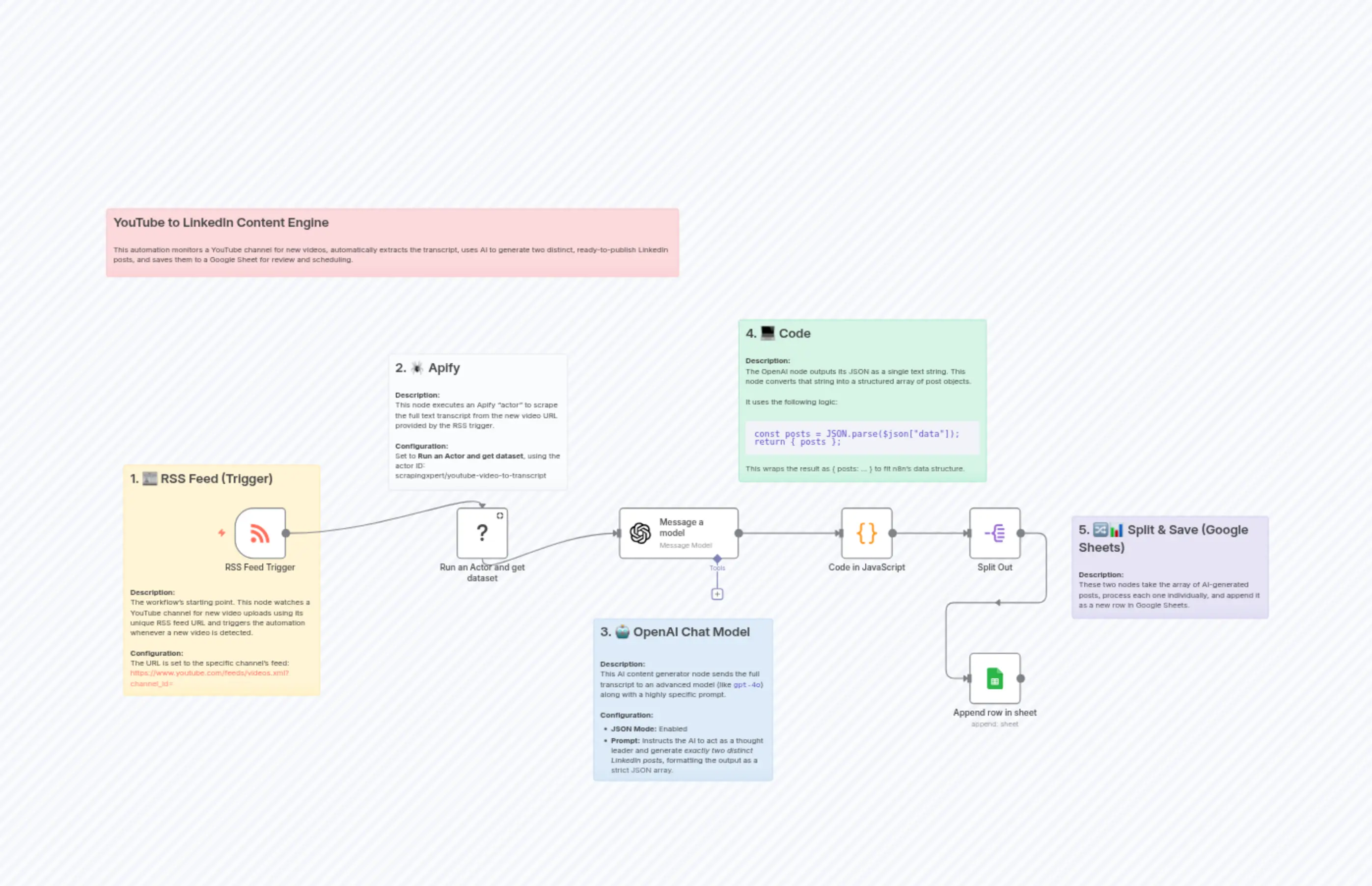
YouTube to LinkedIn Content Engine
Description
Categories
⚙️ Automation
Nodes Used
n8n-nodes-base.coden8n-nodes-base.splitOutn8n-nodes-base.stickyNoten8n-nodes-base.stickyNoten8n-nodes-base.stickyNoten8n-nodes-base.stickyNoten8n-nodes-base.stickyNoten8n-nodes-base.stickyNoten8n-nodes-base.googleSheets@apify/n8n-nodes-apify.apify
PriceKostenlos
Views0
Last Updated11/28/2025
workflow.json
{
  "id": "XzUP6yumql5XeBG0",
  "meta": {
    "instanceId": "6f9154af9a553539a562e1f56ce4984b18a1715ff5057e0132aa6f60c4247c8b",
    "templateCredsSetupCompleted": true
  },
  "name": "YouTube to LinkedIn Content Engine",
  "tags": [],
  "nodes": [
    {
      "id": "f0406549-bb99-45b9-86dc-6ea2e5426fab",
      "name": "RSS Feed Trigger",
      "type": "n8n-nodes-base.rssFeedReadTrigger",
      "position": [
        208,
        368
      ],
      "parameters": {
        "feedUrl": "https://www.youtube.com/feeds/videos.xml?channel_id=REPLACE_THIS_ID",
        "pollTimes": {
          "item": [
            {
              "hour": 9
            }
          ]
        }
      },
      "typeVersion": 1
    },
    {
      "id": "6f912873-c9de-493c-9d9a-a50a896fe4cb",
      "name": "Run an Actor and get dataset",
      "type": "@apify/n8n-nodes-apify.apify",
      "position": [
        624,
        368
      ],
      "parameters": {
        "actorId": {
          "__rl": true,
          "mode": "list",
          "value": "ACirYOwWR3EeEmcqc",
          "cachedResultUrl": "https://console.apify.com/actors/ACirYOwWR3EeEmcqc/input",
          "cachedResultName": "YouTube video to Transcript (scrapingxpert/youtube-video-to-transcript)"
        },
        "operation": "Run actor and get dataset",
        "customBody": "={\n  \"start_urls\": [\n    {\n      \"url\": \"{{ $json.link }}\"\n    }\n  ]\n}",
        "actorSource": "store",
        "authentication": "apifyOAuth2Api"
      },
      "typeVersion": 1,
      "alwaysOutputData": true
    },
    {
      "id": "92edb466-0034-43c4-a937-d35c7f62aa77",
      "name": "Message a model",
      "type": "@n8n/n8n-nodes-langchain.openAi",
      "position": [
        928,
        368
      ],
      "parameters": {
        "modelId": {
          "__rl": true,
          "mode": "list",
          "value": "gpt-4.1-mini",
          "cachedResultName": "GPT-4.1-MINI"
        },
        "options": {},
        "messages": {
          "values": [
            {
              "role": "assistant",
              "content": "=**Persona:** You are a respected thought leader and subject matter expert. Your expertise is in synthesizing complex information and presenting it as clear, factual, and authoritative insights for a professional LinkedIn audience.\n\n**Context:** You will be given the full transcript of a video. Your goal is to distill the key messages and present them as your own core insights.\n\n<TASK_DEFINITION>\nYour primary task is to analyze the provided transcript and generate a JSON array containing **exactly 2 distinct LinkedIn posts**. Each post must be a standalone piece of valuable content derived from a core theme in the transcript.\n</TASK_DEFINITION>\n\n<JSON_OUTPUT_SPECIFICATION>\nYour entire response WILL be a single, valid JSON array `[]`. NO other text, explanations, or markdown formatting will precede or follow the JSON array. The array must contain exactly 2 post objects. Each object MUST strictly adhere to the following schema:\n{\n  \"theme\": \"(String) A brief 2-5 word description of the main topic of this specific post.\",\n  \"hook\": \"(String) A compelling, attention-grabbing opening sentence. This can be a provocative question, a surprising statistic, or a bold statement.\",\n  \"body\": \"(String) The main content of the post. This should be 3-5 short paragraphs. Use bullet points (using the '\\\\n\\\\u2022 ' format) for lists of takeaways or key points.\",\n  \"cta\": \"(String) An engaging call-to-action that is a question posed to the reader to encourage comments.\",\n  \"hashtags\": \"(Array of Strings) An array of 3-5 specific, lowercase, and relevant hashtags.\"\n}\n</JSON_OUTPUT_SPECIFICATION>\n\n<CONTENT_RULES>\n1.  **Direct & Factual Tone:** You MUST present the information directly. Do not refer to the source material (e.g., \"the video explains...\"). You are the expert presenting the insight.\n2.  **Synthesize, Don't Summarize:** Do not simply restate what was said. Extract the core ideas and present them as a coherent, valuable insight.\n3.  **Prioritize Data:** If the transcript contains specific facts, figures, statistics, or data points, you MUST include them in the `body` of the post to add credibility and value.\n4.  **Generate Two Distinct Posts:** **You MUST generate exactly two posts. The second post must analyze a different theme, perspective, or section of the transcript than the first post. They should not be simple variations of each other.**\n</CONTENT_RULES>\n\nAdhere strictly to all rules. Analyze the following transcript. Your final and ONLY output will be the JSON array containing two post objects.\n\n<TRANSCRIPT>\n{{ $json.transcript }}\n</TRANSCRIPT>"
            }
          ]
        },
        "simplify": false
      },
      "credentials": {
        "openAiApi": {
          "id": "vIlM1t9OfiVy3LPf",
          "name": "n8n free OpenAI API credits"
        }
      },
      "typeVersion": 1.8
    },
    {
      "id": "e35b7e6e-8aee-4cf3-b858-ac7701f33caf",
      "name": "Code in JavaScript",
      "type": "n8n-nodes-base.code",
      "position": [
        1344,
        368
      ],
      "parameters": {
        "mode": "runOnceForEachItem",
        "jsCode": "const response = $input.item.json.choices[0].message.content;\nconst parsedData = JSON.parse(response);\n\n// Wrap the array in an object with a key, for example, 'posts'\n// n8n will correctly handle this structured output.\nreturn { posts: parsedData };"
      },
      "typeVersion": 2
    },
    {
      "id": "d6e75636-0e5d-4699-a9a4-da0bca62d1d4",
      "name": "Append row in sheet",
      "type": "n8n-nodes-base.googleSheets",
      "position": [
        1584,
        640
      ],
      "parameters": {
        "columns": {
          "value": {
            "CTA": "={{ $json.cta }}",
            "Body": "={{ $json.body }}",
            "Hook": "={{ $json.hook }}",
            "Theme": "={{ $json.theme }}",
            "Hashtags": "={{ $json.hashtags }}",
            "Video Link": "={{ $('RSS Feed Trigger').item.json.link }}"
          },
          "schema": [
            {
              "id": "Video Link",
              "type": "string",
              "display": true,
              "required": false,
              "displayName": "Video Link",
              "defaultMatch": false,
              "canBeUsedToMatch": true
            },
            {
              "id": "Theme",
              "type": "string",
              "display": true,
              "required": false,
              "displayName": "Theme",
              "defaultMatch": false,
              "canBeUsedToMatch": true
            },
            {
              "id": "Hook",
              "type": "string",
              "display": true,
              "required": false,
              "displayName": "Hook",
              "defaultMatch": false,
              "canBeUsedToMatch": true
            },
            {
              "id": "Body",
              "type": "string",
              "display": true,
              "required": false,
              "displayName": "Body",
              "defaultMatch": false,
              "canBeUsedToMatch": true
            },
            {
              "id": "CTA",
              "type": "string",
              "display": true,
              "required": false,
              "displayName": "CTA",
              "defaultMatch": false,
              "canBeUsedToMatch": true
            },
            {
              "id": "Hashtags",
              "type": "string",
              "display": true,
              "required": false,
              "displayName": "Hashtags",
              "defaultMatch": false,
              "canBeUsedToMatch": true
            }
          ],
          "mappingMode": "defineBelow",
          "matchingColumns": [],
          "attemptToConvertTypes": false,
          "convertFieldsToString": false
        },
        "options": {},
        "operation": "append",
        "sheetName": {
          "__rl": true,
          "mode": "list",
          "value": "gid=0",
          "cachedResultUrl": "",
          "cachedResultName": ""
        },
        "documentId": {
          "__rl": true,
          "mode": "list",
          "value": "",
          "cachedResultUrl": "",
          "cachedResultName": ""
        }
      },
      "typeVersion": 4.7
    },
    {
      "id": "ad264b8d-a481-4d95-9cf9-39083f101aec",
      "name": "Split Out",
      "type": "n8n-nodes-base.splitOut",
      "position": [
        1584,
        368
      ],
      "parameters": {
        "options": {},
        "fieldToSplitOut": "posts"
      },
      "typeVersion": 1
    },
    {
      "id": "d940b31e-9844-4c00-bef3-5b32d3a03567",
      "name": "Sticky Note",
      "type": "n8n-nodes-base.stickyNote",
      "position": [
        -32,
        -192
      ],
      "parameters": {
        "color": 3,
        "width": 1072,
        "height": 128,
        "content": "## YouTube to LinkedIn Content Engine\n\nThis automation monitors a YouTube channel for new videos, automatically extracts the transcript, uses AI to generate two distinct, ready-to-publish LinkedIn posts, and saves them to a Google Sheet for review and scheduling."
      },
      "typeVersion": 1
    },
    {
      "id": "8bff5219-9818-4bc3-8639-9436ab98e2c5",
      "name": "Sticky Note1",
      "type": "n8n-nodes-base.stickyNote",
      "position": [
        0,
        288
      ],
      "parameters": {
        "width": 368,
        "height": 432,
        "content": "## 1. 📰 RSS Feed (Trigger)\n\n\n\n\n\n\n\n\n\n\n\n\n\n**Description:**  \nThe workflow's starting point. This node watches a YouTube channel for new video uploads using its unique RSS feed URL and triggers the automation whenever a new video is detected.\n\n**Configuration:**  \nThe URL is set to the specific channel's feed: https://www.youtube.com/feeds/videos.xml?channel_id="
      },
      "typeVersion": 1
    },
    {
      "id": "b947839f-cd2a-4ec4-ad68-d920e0483bf0",
      "name": "Sticky Note2",
      "type": "n8n-nodes-base.stickyNote",
      "position": [
        496,
        80
      ],
      "parameters": {
        "color": 7,
        "width": 336,
        "height": 256,
        "content": "## 2. 🕷️ Apify\n\n**Description:**  \nThis node executes an Apify “actor” to scrape the full text transcript from the new video URL provided by the RSS trigger.\n\n**Configuration:**  \nSet to **Run an Actor and get dataset**, using the actor ID:\nscrapingxpert/youtube-video-to-transcript"
      },
      "typeVersion": 1
    },
    {
      "id": "e8945fc8-610a-41df-8f12-3cf18bc1e824",
      "name": "Sticky Note3",
      "type": "n8n-nodes-base.stickyNote",
      "position": [
        880,
        576
      ],
      "parameters": {
        "color": 5,
        "width": 336,
        "height": 304,
        "content": "## 3. 🤖 OpenAI Chat Model \n\n\n**Description:**  \nThis AI content generator node sends the full transcript to an advanced model (like `gpt-4o`) along with a highly specific prompt.\n\n**Configuration:**  \n- **JSON Mode:** Enabled  \n- **Prompt:** Instructs the AI to act as a thought leader and generate *exactly two distinct LinkedIn posts*, formatting the output as a strict JSON array."
      },
      "typeVersion": 1
    },
    {
      "id": "81951797-3890-4504-97e9-f09124b296e7",
      "name": "Sticky Note4",
      "type": "n8n-nodes-base.stickyNote",
      "position": [
        1152,
        16
      ],
      "parameters": {
        "color": 4,
        "width": 464,
        "height": 304,
        "content": "## 4. 💻 Code\n\n**Description:**  \nThe OpenAI node outputs its JSON as a single text string. This node converts that string into a structured array of post objects.\n\nIt uses the following logic:\n\n```javascript\nconst posts = JSON.parse($json[\"data\"]);\nreturn { posts };\n```\nThis wraps the result as { posts: ... } to fit n8n’s data structure."
      },
      "typeVersion": 1
    },
    {
      "id": "5a568cde-c21d-4783-a40a-16c039248639",
      "name": "Sticky Note5",
      "type": "n8n-nodes-base.stickyNote",
      "position": [
        1776,
        384
      ],
      "parameters": {
        "color": 6,
        "width": 368,
        "height": 192,
        "content": "## 5. 🔀📊 Split & Save (Google Sheets)\n\n**Description:**\nThese two nodes take the array of AI-generated posts, process each one individually, and append it as a new row in Google Sheets."
      },
      "typeVersion": 1
    }
  ],
  "active": true,
  "pinData": {},
  "settings": {
    "executionOrder": "v1"
  },
  "versionId": "907ed0a1-6c18-494e-9ea2-b6b848617560",
  "connections": {
    "Split Out": {
      "main": [
        [
          {
            "node": "Append row in sheet",
            "type": "main",
            "index": 0
          }
        ]
      ]
    },
    "Message a model": {
      "main": [
        [
          {
            "node": "Code in JavaScript",
            "type": "main",
            "index": 0
          }
        ]
      ]
    },
    "RSS Feed Trigger": {
      "main": [
        [
          {
            "node": "Run an Actor and get dataset",
            "type": "main",
            "index": 0
          }
        ]
      ]
    },
    "Code in JavaScript": {
      "main": [
        [
          {
            "node": "Split Out",
            "type": "main",
            "index": 0
          }
        ]
      ]
    },
    "Run an Actor and get dataset": {
      "main": [
        [
          {
            "node": "Message a model",
            "type": "main",
            "index": 0
          }
        ]
      ]
    }
  }
}