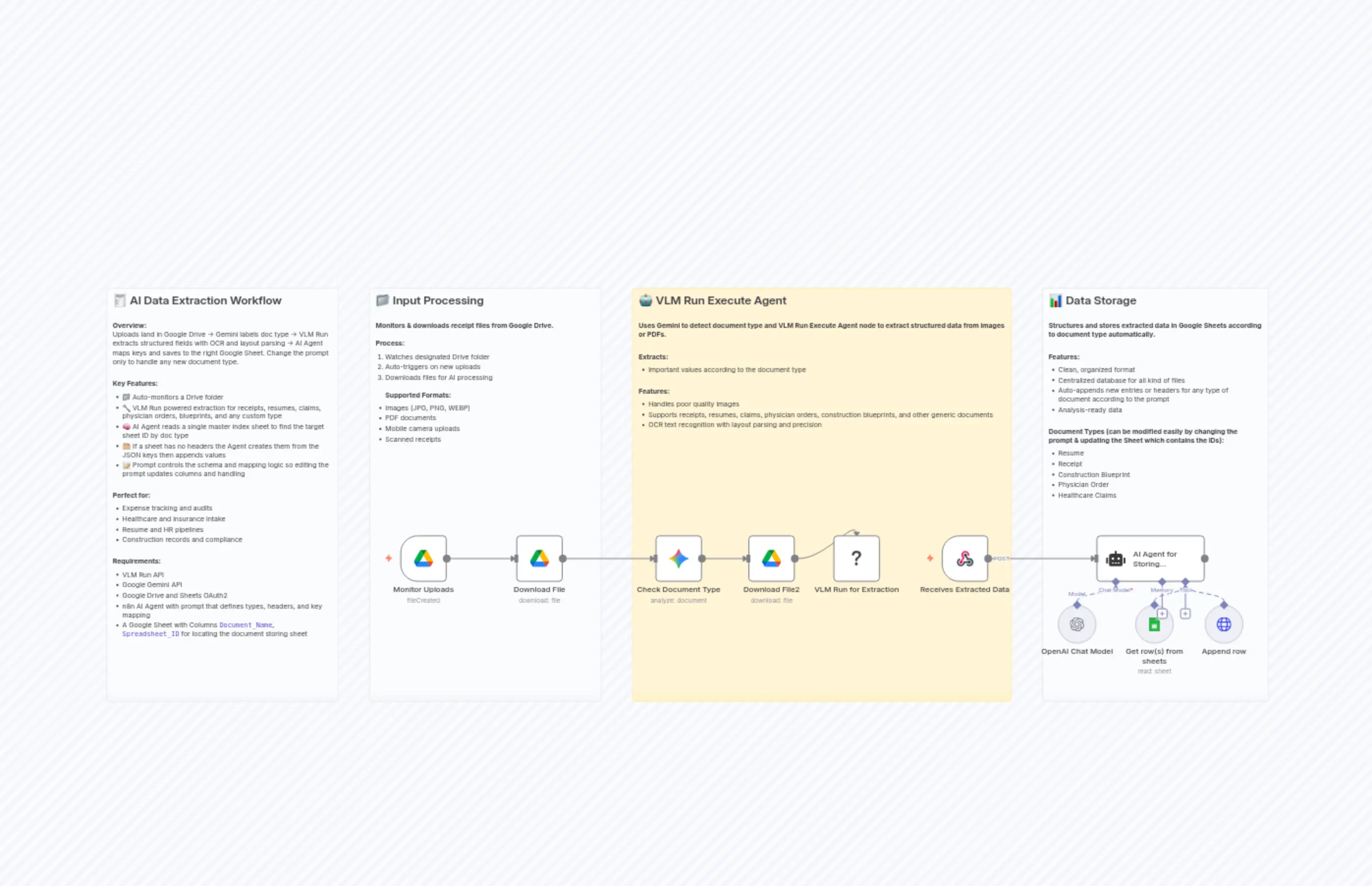
AI-Powered Document Processing & Organization with Gemini, VLM Run & Google Sheets
Description
Categories
🤖 AI & Machine Learning
Nodes Used
n8n-nodes-base.webhookn8n-nodes-base.stickyNoten8n-nodes-base.stickyNoten8n-nodes-base.stickyNoten8n-nodes-base.stickyNoten8n-nodes-base.googleDriven8n-nodes-base.googleDrive@n8n/n8n-nodes-langchain.agentn8n-nodes-base.httpRequestTooln8n-nodes-base.googleSheetsTool
PriceKostenlos
Views2
Last Updated2/26/2026
workflow.json
{
  "meta": {
    "instanceId": "96d35e452e0d9a182973416b7532cfc5643239aaaa764a5bf74d52ca84f4a35c",
    "templateCredsSetupCompleted": true
  },
  "nodes": [
    {
      "id": "038c1631-168a-4539-a4ba-66bb15213f9a",
      "name": "🧾 Workflow Overview",
      "type": "n8n-nodes-base.stickyNote",
      "position": [
        -1952,
        -496
      ],
      "parameters": {
        "color": 7,
        "width": 480,
        "height": 856,
        "content": "## 🧾 AI Data Extraction Workflow\n\n**Overview:**\nUploads land in Google Drive → Gemini labels doc type → VLM Run extracts structured fields with OCR and layout parsing → AI Agent maps keys and saves to the right Google Sheet. Change the prompt only to handle any new document type.\n\n\n**Key Features:**\n- 📁 Auto-monitors a Drive folder\n- 🔧 VLM Run powered extraction for receipts, resumes, claims, physician orders, blueprints, and any custom type\n- 🧠 AI Agent reads a single master index sheet to find the target sheet ID by doc type\n- 🗂️ If a sheet has no headers the Agent creates them from the JSON keys then appends values\n- 📝 Prompt controls the schema and mapping logic so editing the prompt updates columns and handling\n\n\n**Perfect for:**\n- Expense tracking and audits\n- Healthcare and insurance intake\n- Resume and HR pipelines\n- Construction records and compliance\n\n\n**Requirements:**\n- VLM Run API\n- Google Gemini API\n- Google Drive and Sheets OAuth2\n- n8n AI Agent with prompt that defines types, headers, and key mapping\n- A Google Sheet with Columns `Document_Name`, `Spreadsheet_ID` for locating the document storing sheet\n"
      },
      "typeVersion": 1
    },
    {
      "id": "7ff45131-2c0b-4a9c-87e4-3e933b8ede3e",
      "name": "📁 Input Processing Documentation",
      "type": "n8n-nodes-base.stickyNote",
      "position": [
        -1408,
        -496
      ],
      "parameters": {
        "color": 7,
        "width": 480,
        "height": 856,
        "content": "## 📁 Input Processing\n\n**Monitors & downloads receipt files from Google Drive.**\n\n**Process:**\n1. Watches designated Drive folder\n2. Auto-triggers on new uploads\n3. Downloads files for AI processing\n\n**Supported Formats:**\n- Images (JPG, PNG, WEBP)\n- PDF documents\n- Mobile camera uploads\n- Scanned receipts"
      },
      "typeVersion": 1
    },
    {
      "id": "ba119800-f50b-4802-9cde-2815f6671742",
      "name": "🤖 AI Extraction Documentation",
      "type": "n8n-nodes-base.stickyNote",
      "position": [
        -864,
        -496
      ],
      "parameters": {
        "width": 784,
        "height": 856,
        "content": "## 🤖 VLM Run Execute Agent\n\n**Uses Gemini to detect document type and VLM Run Execute Agent node to extract structured data from images or PDFs.**\n\n\n**Extracts:**\n* Important values according to the document type\n\n\n**Features:**\n* Handles poor quality images\n* Supports receipts, resumes, claims, physician orders, construction blueprints, and other generic documents\n* OCR text recognition with layout parsing and precision"
      },
      "typeVersion": 1
    },
    {
      "id": "4f12e813-9f9d-4eed-b87c-b2b2099318b6",
      "name": "📊 Storage Documentation",
      "type": "n8n-nodes-base.stickyNote",
      "position": [
        -16,
        -496
      ],
      "parameters": {
        "color": 7,
        "width": 468,
        "height": 856,
        "content": "## 📊 Data Storage\n\n**Structures and stores extracted data in Google Sheets according to document type automatically.**\n\n\n**Features:**\n- Clean, organized format\n- Centralized database for all kind of files\n- Auto-appends new entries or headers for any type of document according to the prompt\n- Analysis-ready data\n\n\n**Document Types (can be modified easily by changing the prompt & updating the Sheet which contains the IDs):**\n- Resume\n- Receipt\n- Construction Blueprint\n- Physician Order\n- Healthcare Claims"
      },
      "typeVersion": 1
    },
    {
      "id": "1439fa01-eb2e-4e60-8b32-9b1808ea7caf",
      "name": "Monitor Uploads",
      "type": "n8n-nodes-base.googleDriveTrigger",
      "notes": "Monitors Google Drive folder for new receipt uploads and triggers processing automatically.",
      "position": [
        -1344,
        16
      ],
      "parameters": {
        "event": "fileCreated",
        "options": {},
        "pollTimes": {
          "item": [
            {
              "mode": "everyMinute"
            }
          ]
        },
        "triggerOn": "specificFolder",
        "folderToWatch": {
          "__rl": true,
          "mode": "list",
          "value": "1E8rvLEWKguorMT36yCD1jY78G0u8g6g7",
          "cachedResultUrl": "https://drive.google.com/drive/folders/1E8rvLEWKguorMT36yCD1jY78G0u8g6g7",
          "cachedResultName": "test_data"
        }
      },
      "credentials": {
        "googleDriveOAuth2Api": {
          "id": "oCzY5bzObKMMfjpu",
          "name": "Google Drive account 3"
        }
      },
      "typeVersion": 1
    },
    {
      "id": "dc267443-93f4-40b2-a1cb-fca4137fd76a",
      "name": "Download File",
      "type": "n8n-nodes-base.googleDrive",
      "notes": "Downloads receipt files from Google Drive for AI processing.",
      "position": [
        -1104,
        16
      ],
      "parameters": {
        "fileId": {
          "__rl": true,
          "mode": "id",
          "value": "={{ $json.id }}"
        },
        "options": {
          "binaryPropertyName": "data"
        },
        "operation": "download"
      },
      "credentials": {
        "googleDriveOAuth2Api": {
          "id": "oCzY5bzObKMMfjpu",
          "name": "Google Drive account 3"
        }
      },
      "typeVersion": 3
    },
    {
      "id": "968205e6-d178-4fca-9c21-b91c5070402d",
      "name": "OpenAI Chat Model",
      "type": "@n8n/n8n-nodes-langchain.lmChatOpenAi",
      "position": [
        16,
        160
      ],
      "parameters": {
        "model": {
          "__rl": true,
          "mode": "list",
          "value": "gpt-4.1",
          "cachedResultName": "gpt-4.1"
        },
        "options": {}
      },
      "credentials": {
        "openAiApi": {
          "id": "WqqkexJ7QGbexoAz",
          "name": "OpenAi account 4"
        }
      },
      "typeVersion": 1.2
    },
    {
      "id": "c8a157b6-381f-4768-bbc6-419621cd1270",
      "name": "Append row",
      "type": "n8n-nodes-base.httpRequestTool",
      "position": [
        320,
        160
      ],
      "parameters": {
        "url": "={{ /*n8n-auto-generated-fromAI-override*/ $fromAI('URL', `must match this format:\nhttps://sheets.googleapis.com/v4/spreadsheets/1g60FR2dAZ6OtJ1NM06le85agaxCWOW11TbxQj45S2Ug/values/Sheet1!A:Z:append`, 'string') }}",
        "method": "POST",
        "options": {},
        "jsonBody": "={{ /*n8n-auto-generated-fromAI-override*/ $fromAI('JSON', `must match this format:\n{ \"majorDimension\": \"ROWS\",   \"values\": [     [\"val1\", \"val2\"]   ] }`, 'json') }}",
        "sendBody": true,
        "sendQuery": true,
        "sendHeaders": true,
        "specifyBody": "json",
        "authentication": "predefinedCredentialType",
        "queryParameters": {
          "parameters": [
            {
              "name": "valueInputOption",
              "value": "RAW"
            },
            {
              "name": "insertDataOption",
              "value": "INSERT_ROWS"
            },
            {
              "name": "includeValuesInResponse",
              "value": "true"
            }
          ]
        },
        "headerParameters": {
          "parameters": [
            {
              "name": "Content-Type",
              "value": "application/json"
            }
          ]
        },
        "nodeCredentialType": "googleSheetsOAuth2Api"
      },
      "credentials": {
        "googleSheetsOAuth2Api": {
          "id": "lxV2oXYXJq9hllrs",
          "name": "Google Sheets account 5"
        }
      },
      "typeVersion": 4.2
    },
    {
      "id": "63064bdd-7eaa-44be-853d-98aea26fa69b",
      "name": "Get row(s) from sheets",
      "type": "n8n-nodes-base.googleSheetsTool",
      "position": [
        176,
        160
      ],
      "parameters": {
        "options": {},
        "sheetName": {
          "__rl": true,
          "mode": "name",
          "value": "Sheet1"
        },
        "documentId": {
          "__rl": true,
          "mode": "id",
          "value": "={{ /*n8n-auto-generated-fromAI-override*/ $fromAI('Document', ``, 'string') }}"
        }
      },
      "credentials": {
        "googleSheetsOAuth2Api": {
          "id": "lxV2oXYXJq9hllrs",
          "name": "Google Sheets account 5"
        }
      },
      "typeVersion": 4.7
    },
    {
      "id": "65b1be08-0bf4-4511-852f-7fbe230c076d",
      "name": "VLM Run for Extraction",
      "type": "@vlm-run/n8n-nodes-vlmrun.vlmRun",
      "position": [
        -448,
        16
      ],
      "parameters": {
        "file": "data2",
        "operation": "executeAgent",
        "agentPrompt": "=check the {{ $json.content.parts[0].text }} document and extract data according to the document type.",
        "agentCallbackUrl": "https://playground.attensys.ai/webhook/auto"
      },
      "credentials": {
        "vlmRunApi": {
          "id": "7JF2kdNzjhKZsHGg",
          "name": "VLM Run account 2"
        }
      },
      "typeVersion": 1
    },
    {
      "id": "188e6cd1-9d9f-4c33-9731-104f61a02fdc",
      "name": "Receives Extracted Data",
      "type": "n8n-nodes-base.webhook",
      "position": [
        -224,
        16
      ],
      "webhookId": "cf8e4d73-56de-4ac6-8ed8-28bfa20e7957",
      "parameters": {
        "path": "auto",
        "options": {},
        "httpMethod": "POST"
      },
      "typeVersion": 2.1
    },
    {
      "id": "a9831503-4094-486b-a0f9-2275b7554a7a",
      "name": "Check Document Type",
      "type": "@n8n/n8n-nodes-langchain.googleGemini",
      "position": [
        -816,
        16
      ],
      "parameters": {
        "text": "analyze the document and reply the document type only",
        "modelId": {
          "__rl": true,
          "mode": "list",
          "value": "models/gemini-2.5-flash",
          "cachedResultName": "models/gemini-2.5-flash"
        },
        "options": {},
        "resource": "document",
        "inputType": "binary"
      },
      "credentials": {
        "googlePalmApi": {
          "id": "f24qXJq84ChbMZGo",
          "name": "Google Gemini(PaLM) Api account 3"
        }
      },
      "typeVersion": 1
    },
    {
      "id": "4d92bf87-046e-4df9-bff8-dae23deec32f",
      "name": "AI Agent for Storing Dynamically",
      "type": "@n8n/n8n-nodes-langchain.agent",
      "position": [
        96,
        16
      ],
      "parameters": {
        "text": "=JSON Input: {{ JSON.stringify($('Receives Extracted Data').item.json.body) }}",
        "options": {
          "maxIterations": 10,
          "systemMessage": "Complete the following tasks using the google sheet tools for the provided json and do not suggest user how to do, complete it yourself using the available tools and just reply necessary failures or success:\n\nFirst analyze the document(ie. Physician order, claims processing, construction blueprint etc) and search the spreadsheet with ID: '1-e3vUMW_xJ8Gqj7Ifp7hlESl726tnHaqqFf9DYc_1kE' with get rows if its first column has similar document type.\nIf yes, grab the spreadsheet ID of that document from the second column of the same spreadsheet then simply append the necessary values from the json there as a new row using append row http node(make sure to map the keys accordingly as the header name from the default json keys). If no header was found in the spreadsheet use append row http tool  to create one(make sure to input the key names as headers not the values), then append the values from the json using append row tool again(now the values in its designated key), make sure the first row is the header with key names and second one is with the values.\n\nIf no, append a new row with the generalize document name in that spreadsheet and in spreadsheet ID column assign nothing\n\nmake sure to follow these format in tools:\n\n-“url” demo in append row http node: https://sheets.googleapis.com/v4/spreadsheets/1g60FR2dAZ6OtJ1NM06le85agaxCWOW11TbxQj45S2Ug/values/Sheet1!A:Z:append\nthe spreadsheet id will be changed accordingly\n\n-pass spreadsheet ID only in get rows tool’s “document” field\n\n-make sure to check spreadsheet header before sending to append rows http tool\n\n-follow this exact json format in append row’s body, with necessary values or keys:\n{\n  \"majorDimension\": \"ROWS\",\n  \"values\": [[\"val1\", \"val2\"]]\n}\n\n- make sure to use natural key names and natural values without any nested objects simple natural \"key\": \"value\" structure, if value is big use endline(\\n) comma etc in it to format naturally and extract the fields as given for each doc type(try to map all the values inside these keys) and pass them accordingly:
\nResume: Name, Email, Phone no, Github URL, Linkedin URL, Education, Technical Skills, Projects, Additional Section, Score(according to structure), Comment(all over suitableness)\n\nReceipt: receipt_id, transaction_date, merchant_name, merchant_address, merchant_phone, cashier_name, register_number, customer_name, customer_id, items, subtotal, tax, total, currency, payment_method, discount_amount, discount_description, tip_amount, return_policy, barcode, additional_charges, notes, others\n\nClaims Processing: form_type, form_version, carrier_name, insurance_type, insured_id_number, patient_name, patient_birth_date, patient_sex, patient_address, patient_relationship, insured_name, insured_policy_group, current_illness_date, referring_physician_name, hospitalization_from, hospitalization_to, diagnosis_codes, service_lines, total_charge, amount_paid, balance_due, accept_assignment, billing_provider, service_facility, physician_signature, omb_number\n\nPhysician Order: patient_full_name, patient_address_line1, patient_address_city, patient_address_state, patient_address_zip, patient_phone, patient_dob, physician_full_name, referring_clinic, referring_clinic_address_line1, referring_clinic_city, referring_clinic_state, referring_clinic_zip, physician_phone, physician_fax, additional_notes, form_signed_date\n\nConstruction Blueprint: project_name, project_id, project_location_line1, project_location_city, project_location_state, project_location_zip, client_full_name, general_contractor_full_name, project_period, permits_approvals, document_type, document_number, document_issue_date, document_author, drawing_titles_numbers, scale_legends, annotations_markups, cad_bim_metadata, title_job_name, title_address_line1, title_address_city, title_address_state, title_address_zip, title_drawing_number, title_revision, title_drawn_by, title_checked_by, title_date, title_scale, title_agency_name, title_document_title, title_sheet_number, title_work_order_number, title_issue_date, title_revision_date, drawing_type, scale_information, environmental_impact\n\nHere’s three example flow:\n1. you analyze the json and found its a claims processing type doc, you search the '1-e3vUMW_xJ8Gqj7Ifp7hlESl726tnHaqqFf9DYc_1kE’ spreadsheet for such type, you found a matching row, fetch the spreadsheet ID of that type, check the header columns using get rows tool and append the json values to that spreadsheet according to columns using append row tool.\n2. you analyze the json and found its a construction blueprint type doc, you search the '1-e3vUMW_xJ8Gqj7Ifp7hlESl726tnHaqqFf9DYc_1kE’ spreadsheet for such type, you found a matching row, fetch the spreadsheet ID of that type, use get rows to that and found its blank, use append row tool to add header columns with keys, then check using get rows again and send the values according to header column using append row tool again with the values\n3. you analyze the json and found its a resume type doc, you search the fixed spreadsheet and found no such row, then you create a new row with suitable name like resume and in spreadsheet id field assign nothing"
        },
        "promptType": "define"
      },
      "typeVersion": 2.2
    },
    {
      "id": "702f47dc-5d19-49e2-9f2a-ef8afcac5360",
      "name": "Download File2",
      "type": "n8n-nodes-base.googleDrive",
      "notes": "Downloads receipt files from Google Drive for AI processing.",
      "position": [
        -624,
        16
      ],
      "parameters": {
        "fileId": {
          "__rl": true,
          "mode": "id",
          "value": "={{ $('Monitor Uploads').item.json.id }}"
        },
        "options": {
          "binaryPropertyName": "data2"
        },
        "operation": "download"
      },
      "credentials": {
        "googleDriveOAuth2Api": {
          "id": "oCzY5bzObKMMfjpu",
          "name": "Google Drive account 3"
        }
      },
      "typeVersion": 3
    }
  ],
  "pinData": {},
  "connections": {
    "Append row": {
      "ai_tool": [
        [
          {
            "node": "AI Agent for Storing Dynamically",
            "type": "ai_tool",
            "index": 0
          }
        ]
      ]
    },
    "Download File": {
      "main": [
        [
          {
            "node": "Check Document Type",
            "type": "main",
            "index": 0
          }
        ]
      ]
    },
    "Download File2": {
      "main": [
        [
          {
            "node": "VLM Run for Extraction",
            "type": "main",
            "index": 0
          }
        ]
      ]
    },
    "Monitor Uploads": {
      "main": [
        [
          {
            "node": "Download File",
            "type": "main",
            "index": 0
          }
        ]
      ]
    },
    "OpenAI Chat Model": {
      "ai_languageModel": [
        [
          {
            "node": "AI Agent for Storing Dynamically",
            "type": "ai_languageModel",
            "index": 0
          }
        ]
      ]
    },
    "Check Document Type": {
      "main": [
        [
          {
            "node": "Download File2",
            "type": "main",
            "index": 0
          }
        ]
      ]
    },
    "Get row(s) from sheets": {
      "ai_tool": [
        [
          {
            "node": "AI Agent for Storing Dynamically",
            "type": "ai_tool",
            "index": 0
          }
        ]
      ]
    },
    "Receives Extracted Data": {
      "main": [
        [
          {
            "node": "AI Agent for Storing Dynamically",
            "type": "main",
            "index": 0
          }
        ]
      ]
    }
  }
}