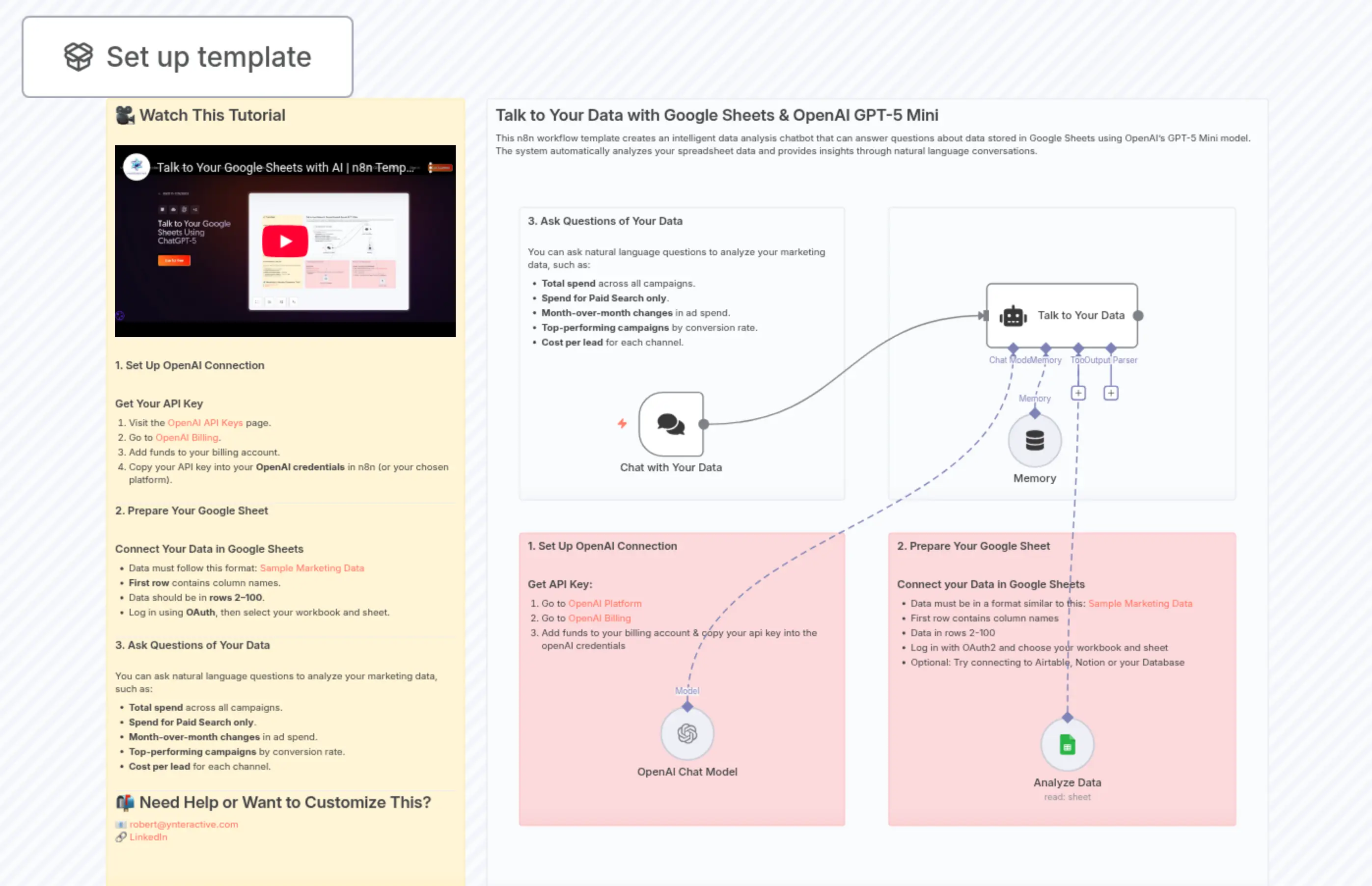
Talk to Your Google Sheets Using ChatGPT-5
Description
Categories
🤖 AI & Machine Learning
Nodes Used
n8n-nodes-base.stickyNoten8n-nodes-base.stickyNoten8n-nodes-base.stickyNoten8n-nodes-base.stickyNoten8n-nodes-base.stickyNoten8n-nodes-base.stickyNote@n8n/n8n-nodes-langchain.agentn8n-nodes-base.googleSheetsTool@n8n/n8n-nodes-langchain.chatTrigger@n8n/n8n-nodes-langchain.lmChatOpenAi
PriceKostenlos
Views0
Last Updated11/28/2025
workflow.json
{
  "meta": {
    "instanceId": "a2eaba9e45ad7aab18b25cf863df1e910fb6dd3b85279bde97d9bae4a72f6862",
    "templateId": "7449"
  },
  "nodes": [
    {
      "id": "cee2b611-5d08-4328-9c51-096bc979b6f7",
      "name": "Analyze Data",
      "type": "n8n-nodes-base.googleSheetsTool",
      "position": [
        768,
        1776
      ],
      "parameters": {
        "options": {},
        "sheetName": {
          "__rl": true,
          "mode": "list",
          "value": 365710158,
          "cachedResultUrl": "https://docs.google.com/spreadsheets/d/1UDWt0-Z9fHqwnSNfU3vvhSoYCFG6EG3E-ZewJC_CLq4/edit#gid=365710158",
          "cachedResultName": "Data"
        },
        "documentId": {
          "__rl": true,
          "mode": "list",
          "value": "1UDWt0-Z9fHqwnSNfU3vvhSoYCFG6EG3E-ZewJC_CLq4",
          "cachedResultUrl": "https://docs.google.com/spreadsheets/d/1UDWt0-Z9fHqwnSNfU3vvhSoYCFG6EG3E-ZewJC_CLq4/edit?usp=drivesdk",
          "cachedResultName": "Sample Marketing Data - n8n"
        }
      },
      "typeVersion": 4.7
    },
    {
      "id": "8a231798-9b25-457d-a9cd-f4e6286958bb",
      "name": "OpenAI Chat Model",
      "type": "@n8n/n8n-nodes-langchain.lmChatOpenAi",
      "position": [
        208,
        1760
      ],
      "parameters": {
        "model": {
          "__rl": true,
          "mode": "list",
          "value": "gpt-4.1-nano",
          "cachedResultName": "gpt-4.1-nano"
        },
        "options": {}
      },
      "typeVersion": 1.2
    },
    {
      "id": "05badec7-f61b-4492-9fd2-6e571ed12541",
      "name": "Sticky Note2",
      "type": "n8n-nodes-base.stickyNote",
      "position": [
        -48,
        864
      ],
      "parameters": {
        "color": 7,
        "width": 1152,
        "height": 1168,
        "content": "## Talk to Your Data with Google Sheets & OpenAI GPT-5 Mini\nThis n8n workflow template creates an intelligent data analysis chatbot that can answer questions about data stored in Google Sheets using OpenAI's GPT-5 Mini model. The system automatically analyzes your spreadsheet data and provides insights through natural language conversations.\n"
      },
      "typeVersion": 1
    },
    {
      "id": "3abf3803-0403-4ea1-ac66-373b6821c2a1",
      "name": "Talk to Your Data",
      "type": "@n8n/n8n-nodes-langchain.agent",
      "position": [
        688,
        1136
      ],
      "parameters": {
        "options": {
          "systemMessage": "Google Sheets Ask-Data \n\n\nYou are Ask-Data. Answer questions using Google Sheets ONLY via the tool below. Be precise and conservative. \n\nThere is only one dataset. dont ask what dataset it is. \n\nUse the data tool to answer the question."
        },
        "hasOutputParser": true
      },
      "typeVersion": 2.2
    },
    {
      "id": "7736cb8c-0508-4bb5-a92a-850922e00f41",
      "name": "Sticky Note7",
      "type": "n8n-nodes-base.stickyNote",
      "position": [
        0,
        1024
      ],
      "parameters": {
        "color": 7,
        "width": 480,
        "height": 432,
        "content": "### 3. Ask Questions of Your Data\n\nYou can ask natural language questions to analyze your marketing data, such as:\n- **Total spend** across all campaigns.\n- **Spend for Paid Search only**.\n- **Month-over-month changes** in ad spend.\n- **Top-performing campaigns** by conversion rate.\n- **Cost per lead** for each channel."
      },
      "typeVersion": 1
    },
    {
      "id": "dc761ff8-ef7b-4535-989b-7d03886bd70c",
      "name": "Sticky Note8",
      "type": "n8n-nodes-base.stickyNote",
      "position": [
        -608,
        864
      ],
      "parameters": {
        "width": 528,
        "height": 1168,
        "content": "## 🎥 Watch This Tutorial\n\n@[youtube](qsrVPdo6svc)\n\n\n### 1. Set Up OpenAI Connection\n\n#### Get Your API Key\n1. Visit the [OpenAI API Keys](https://platform.openai.com/api-keys) page.\n2. Go to [OpenAI Billing](https://platform.openai.com/settings/organization/billing/overview).\n3. Add funds to your billing account.\n4. Copy your API key into your **OpenAI credentials** in n8n (or your chosen platform).\n\n---\n### 2. Prepare Your Google Sheet\n\n#### Connect Your Data in Google Sheets\n- Data must follow this format: [Sample Marketing Data](https://docs.google.com/spreadsheets/d/1UDWt0-Z9fHqwnSNfU3vvhSoYCFG6EG3E-ZewJC_CLq4/edit?gid=365710158#gid=365710158)\n- **First row** contains column names.\n- Data should be in **rows 2–100**.\n- Log in using **OAuth**, then select your workbook and sheet.\n\n---\n### 3. Ask Questions of Your Data\n\nYou can ask natural language questions to analyze your marketing data, such as:\n- **Total spend** across all campaigns.\n- **Spend for Paid Search only**.\n- **Month-over-month changes** in ad spend.\n- **Top-performing campaigns** by conversion rate.\n- **Cost per lead** for each channel.\n\n---\n## 📬 Need Help or Want to Customize This?\n📧 [[email protected]](mailto:[email protected])  \n🔗 [LinkedIn](https://www.linkedin.com/in/robert-breen-29429625/)\n\n"
      },
      "typeVersion": 1
    },
    {
      "id": "4137e8dc-aab2-486f-bf23-4a129f5f8241",
      "name": "Sticky Note9",
      "type": "n8n-nodes-base.stickyNote",
      "position": [
        0,
        1504
      ],
      "parameters": {
        "color": 3,
        "width": 480,
        "height": 432,
        "content": "### 1. Set Up OpenAI Connection\n\n#### Get API Key:\n1. Go to [OpenAI Platform](https://platform.openai.com/api-keys)\n1. Go to [OpenAI Billing](https://platform.openai.com/settings/organization/billing/overview)\n2. Add funds to your billing account & copy your api key into the openAI credentials\n"
      },
      "typeVersion": 1
    },
    {
      "id": "4c4db6fc-6973-4bb9-8dbd-c02086c25c47",
      "name": "Sticky Note10",
      "type": "n8n-nodes-base.stickyNote",
      "position": [
        544,
        1504
      ],
      "parameters": {
        "color": 3,
        "width": 512,
        "height": 432,
        "content": "### 2. Prepare Your Google Sheet\n\n#### Connect your Data in Google Sheets\n- Data must be in a format similar to this: [Sample Marketing Data](https://docs.google.com/spreadsheets/d/1UDWt0-Z9fHqwnSNfU3vvhSoYCFG6EG3E-ZewJC_CLq4/edit?gid=365710158#gid=365710158)\n- First row contains column names\n- Data in rows 2-100\n- Log in with OAuth2 and choose your workbook and sheet\n- Optional: Try connecting to Airtable, Notion or your Database"
      },
      "typeVersion": 1
    },
    {
      "id": "75869f50-156d-4723-a128-204c29f1b49d",
      "name": "Chat with Your Data",
      "type": "@n8n/n8n-nodes-langchain.chatTrigger",
      "position": [
        176,
        1296
      ],
      "webhookId": "edca0f0a-77c3-43e5-8ece-e514a29446f5",
      "parameters": {
        "options": {}
      },
      "typeVersion": 1.3
    },
    {
      "id": "81eb1883-633a-4c09-b78c-2999dc9c60be",
      "name": "Memory",
      "type": "@n8n/n8n-nodes-langchain.memoryBufferWindow",
      "position": [
        720,
        1328
      ],
      "parameters": {},
      "typeVersion": 1.3
    },
    {
      "id": "bcf7f68a-0ce7-4a8f-9eed-a2cc5cb9124a",
      "name": "Sticky Note",
      "type": "n8n-nodes-base.stickyNote",
      "position": [
        544,
        1024
      ],
      "parameters": {
        "color": 7,
        "width": 512,
        "height": 432,
        "content": ""
      },
      "typeVersion": 1
    }
  ],
  "pinData": {},
  "connections": {
    "Memory": {
      "ai_memory": [
        [
          {
            "node": "Talk to Your Data",
            "type": "ai_memory",
            "index": 0
          }
        ]
      ]
    },
    "Analyze Data": {
      "ai_tool": [
        [
          {
            "node": "Talk to Your Data",
            "type": "ai_tool",
            "index": 0
          }
        ]
      ]
    },
    "OpenAI Chat Model": {
      "ai_languageModel": [
        [
          {
            "node": "Talk to Your Data",
            "type": "ai_languageModel",
            "index": 0
          }
        ]
      ]
    },
    "Chat with Your Data": {
      "main": [
        [
          {
            "node": "Talk to Your Data",
            "type": "main",
            "index": 0
          }
        ]
      ]
    }
  }
}