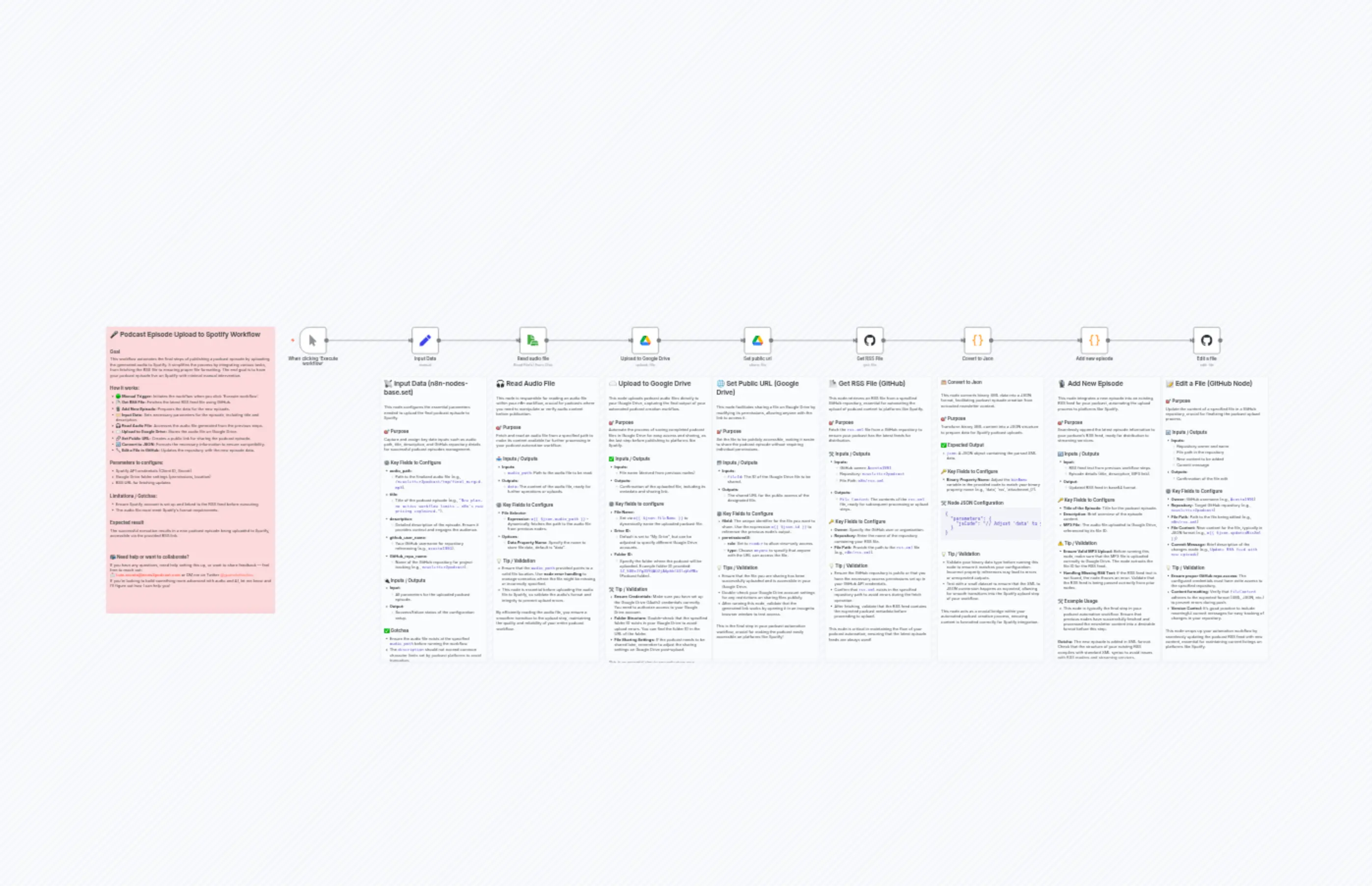
Upload Spotify Template v2
Description
Categories
🤖 AI & Machine Learning
Nodes Used
n8n-nodes-base.setn8n-nodes-base.coden8n-nodes-base.coden8n-nodes-base.githubn8n-nodes-base.githubn8n-nodes-base.stickyNoten8n-nodes-base.stickyNoten8n-nodes-base.stickyNoten8n-nodes-base.stickyNoten8n-nodes-base.stickyNote
PriceKostenlos
Views0
Last Updated11/28/2025
workflow.json
{
"id": "5ryAv7xA8KzgHNga",
"meta": {
"instanceId": "e3b8c25a8cb5935de24fc3d0e60a61032f6dc1d69388fb7fdac79d48279775d0"
},
"name": "Upload Spotify Template v2",
"tags": [],
"nodes": [
{
"id": "39e5e9eb-2a6c-4896-a699-563357cbdd3a",
"name": "When clicking ‘Execute workflow’",
"type": "n8n-nodes-base.manualTrigger",
"position": [
-2640,
64
],
"parameters": {},
"typeVersion": 1
},
{
"id": "9a628f2e-862f-43d9-811c-569b82f6d31d",
"name": "Get RSS File",
"type": "n8n-nodes-base.github",
"position": [
-656,
64
],
"webhookId": "bf2ec8ed-dde0-498e-a2dc-7d621a5bb7e0",
"parameters": {
"owner": {
"__rl": true,
"mode": "list",
"value": "Acosta1991",
"cachedResultUrl": "https://github.com/Acosta1991",
"cachedResultName": "Acosta1991"
},
"filePath": "n8n/rss.xml",
"resource": "file",
"operation": "get",
"repository": {
"__rl": true,
"mode": "list",
"value": "newsletter2podcast",
"cachedResultUrl": "https://github.com/Acosta1991/newsletter2podcast",
"cachedResultName": "newsletter2podcast"
},
"additionalParameters": {}
},
"credentials": {
"githubApi": {
"id": "nWTBSQQanD3nfwNk",
"name": "GitHub account"
}
},
"typeVersion": 1.1
},
{
"id": "998a64a6-b0d7-49ab-9360-74510af896a4",
"name": "Add new episode",
"type": "n8n-nodes-base.code",
"position": [
144,
64
],
"parameters": {
"jsCode": "// 1. Grab the RSS text from the .data property\nconst rssText = $input.first().json.xml\n\nif (!rssText) {\n throw new Error(\"No RSS text found in $input.first().json.data\");\n}\n\n// 2. Build your new item\nconst fileId = $('Upload to Google Drive').first().json.id;\nconst mp3Link = `https://drive.google.com/uc?export=download&id=${fileId}`;\nconst titulo = $('Input Data').first().json.title\nconst description = $('Input Data').first().json.description\nconst pubDate = new Date().toUTCString();\nconst newItem = `\n<item>\n <title>${titulo}</title>\n <description>${description}</description>\n <pubDate>${pubDate}</pubDate>\n <enclosure url=\"${mp3Link}\" length=\"1234567\" type=\"audio/mpeg\" />\n <guid isPermaLink=\"false\">${Date.now()}</guid>\n</item>\n`;\n\n// 3. Insert that into the existing RSS feed\nconst updatedRss = rssText.replace(\n \"</channel>\\n</rss>\", \n `${newItem}\\n</channel>\\n</rss>`\n);\n\n// 4. Convert to base64 (if your workflow requires it)\nreturn {\n updatedRssXml: Buffer.from(updatedRss, \"utf-8\").toString(\"base64\")\n};"
},
"typeVersion": 2
},
{
"id": "2ffc7356-af5c-40d6-8887-9a91bc678f7f",
"name": "Input Data",
"type": "n8n-nodes-base.set",
"position": [
-2240,
64
],
"parameters": {
"options": {},
"assignments": {
"assignments": [
{
"id": "4ec5472f-e708-4883-9302-d55fbf795df9",
"name": "audio_path",
"type": "string",
"value": "/newsletter2podcast/tmp/final_merged.mp3"
},
{
"id": "cad31fc0-237c-446e-be0a-7a691c57a7f0",
"name": "title",
"type": "string",
"value": "New plan, no active workflow limits — n8n's new pricing explained."
},
{
"id": "87a2acf4-37eb-4e08-ad41-44701c316607",
"name": "description",
"type": "string",
"value": "If you have feedback or want to build something similar, contact Luis at [email protected]. You can also support my work using the following link to try ElevenLabs and create your own project: https://try.elevenlabs.io/ds0cvdfiufax\\n\\nIn this episode of the n8n Podcast, hosts Alex and Chris dive deep into the recent updates on n8n’s pricing model, inviting listeners to explore how these changes impact users across various scales—from solo developers to large enterprises. Drawing insights from a new blog post, they uncover the company’s commitment to fostering creativity and experimentation without financial constraints. Listeners will learn about the introduction of unlimited workflows, steps, and users under every plan, eliminating barriers that once hindered innovation. Additionally, the new Business Plan and revised Enterprise pricing offer tailored solutions for growing teams and larger organizations, enhancing collaboration while ensuring predictable budgeting. Join Alex and Chris as they discuss these transformative changes designed to empower users and facilitate widespread automation adoption. Don’t miss out on understanding how n8n is reshaping the automation landscape, and tune in for valuable insights that could inspire your own projects!"
},
{
"id": "1a5e4cce-80e7-427c-89e0-f6593756eb53",
"name": "github_user_name",
"type": "string",
"value": "acosta1991"
},
{
"id": "67eeff6d-10d3-44c5-b5a1-4192c5bcf59b",
"name": "GitHub_repo_name",
"type": "string",
"value": "newsletter2podcast"
}
]
}
},
"typeVersion": 3.4
},
{
"id": "1f2c60ed-24ac-443d-8093-406dc2b3e561",
"name": "Read audio file",
"type": "n8n-nodes-base.readWriteFile",
"position": [
-1856,
64
],
"parameters": {
"options": {
"dataPropertyName": "data"
},
"fileSelector": "={{ $json.audio_path }}"
},
"typeVersion": 1,
"alwaysOutputData": false
},
{
"id": "d30bce5d-4550-4038-a2c2-81a5468f810c",
"name": "Upload to Google Drive",
"type": "n8n-nodes-base.googleDrive",
"position": [
-1456,
64
],
"parameters": {
"name": "={{ $json.fileName }}",
"driveId": {
"__rl": true,
"mode": "list",
"value": "My Drive",
"cachedResultUrl": "https://drive.google.com/drive/my-drive",
"cachedResultName": "My Drive"
},
"options": {},
"folderId": {
"__rl": true,
"mode": "list",
"value": "1Z_5DEzJYg2DYQAQ2jA6phkCOIlqVzMBx",
"cachedResultUrl": "https://drive.google.com/drive/folders/1Z_5DEzJYg2DYQAQ2jA6phkCOIlqVzMBx",
"cachedResultName": "Podcast"
}
},
"credentials": {
"googleDriveOAuth2Api": {
"id": "7E5SooUoqcRXUOzN",
"name": "Google Drive account"
}
},
"typeVersion": 3
},
{
"id": "0ae568b4-08df-49de-a32a-70a9804150ef",
"name": "Set public url",
"type": "n8n-nodes-base.googleDrive",
"position": [
-1056,
64
],
"parameters": {
"fileId": {
"__rl": true,
"mode": "id",
"value": "={{ $json.id }}"
},
"options": {},
"operation": "share",
"permissionsUi": {
"permissionsValues": {
"role": "reader",
"type": "anyone"
}
}
},
"credentials": {
"googleDriveOAuth2Api": {
"id": "7E5SooUoqcRXUOzN",
"name": "Google Drive account"
}
},
"typeVersion": 3
},
{
"id": "fb3ae0b9-4289-4a01-89a1-7de8eb1a8b7d",
"name": "Covert to Json",
"type": "n8n-nodes-base.code",
"position": [
-272,
64
],
"parameters": {
"jsCode": "// Adjust 'data' to your binary property name (e.g., 'rss', 'attachment_0', etc.)\nconst binName = 'data';\nreturn items.map(item => {\n const b = item.binary[binName];\n const xml = Buffer.from(b.data, b.encoding || 'base64').toString('utf8');\n return { json: { xml } };\n});\n"
},
"typeVersion": 2
},
{
"id": "6d6cab7c-15fc-420a-b52b-795bd7d0e5f3",
"name": "Edit a file",
"type": "n8n-nodes-base.github",
"position": [
544,
64
],
"webhookId": "fabd4c5a-0a86-4d4b-b281-772575f8d416",
"parameters": {
"owner": {
"__rl": true,
"mode": "list",
"value": "Acosta1991",
"cachedResultUrl": "https://github.com/Acosta1991",
"cachedResultName": "Acosta1991"
},
"filePath": "n8n/rss.xml",
"resource": "file",
"operation": "edit",
"repository": {
"__rl": true,
"mode": "list",
"value": "newsletter2podcast",
"cachedResultUrl": "https://github.com/Acosta1991/newsletter2podcast",
"cachedResultName": "newsletter2podcast"
},
"fileContent": "={{ $json.updatedRssXml }}",
"commitMessage": "Update RSS feed with new episode"
},
"credentials": {
"githubApi": {
"id": "nWTBSQQanD3nfwNk",
"name": "GitHub account"
}
},
"typeVersion": 1.1
},
{
"id": "005ebde3-f2de-40f9-b891-dab093129c28",
"name": "Sticky Note - Overview",
"type": "n8n-nodes-base.stickyNote",
"position": [
-3328,
64
],
"parameters": {
"color": 3,
"width": 600,
"height": 1020,
"content": "## 🎤 Podcast Episode Upload to Spotify Workflow\n\n### Goal\nThis workflow automates the final steps of publishing a podcast episode by uploading the generated audio to Spotify. It simplifies the process by integrating various tasks, from fetching the RSS file to ensuring proper file formatting. The end goal is to have your podcast episode live on Spotify with minimal manual intervention.\n\n### How it works:\n- 🟢 **Manual Trigger:** Initiates the workflow when you click 'Execute workflow'.\n- 📄 **Get RSS File:** Fetches the latest RSS feed file using GitHub.\n- 🎙️ **Add New Episode:** Prepares the data for the new episode.\n- 🏷️ **Input Data:** Sets necessary parameters for the episode, including title and description.\n- 🎧 **Read Audio File:** Accesses the audio file generated from the previous steps.\n- ☁️ **Upload to Google Drive:** Stores the audio file on Google Drive.\n- 🔗 **Set Public URL:** Creates a public link for sharing the podcast episode.\n- 🔄 **Convert to JSON:** Formats the necessary information to ensure compatibility.\n- 🔧 **Edit a File in GitHub:** Updates the repository with the new episode data.\n\n### Parameters to configure:\n- Spotify API credentials (Client ID, Secret)\n- Google Drive folder settings (permissions, location)\n- RSS URL for fetching updates\n\n### Limitations / Gotchas:\n- Ensure Spotify account is set up and linked to the RSS feed before executing.\n- The audio file must meet Spotify's format requirements.\n\n### Expected result\nThe successful execution results in a new podcast episode being uploaded to Spotify, accessible via the provided RSS link.\n\n\n\n### 📬 Need help or want to collaborate?\nIf you have any questions, need help setting this up, or want to share feedback — feel free to reach out: \n📩 **[email protected]** or DM me on Twitter [@guanchehacker](http://www.x.com/GuancheHacker). \nIf you're looking to build something more advanced with audio and AI, let me know and I’ll figure out how I can help you!"
},
"typeVersion": 1
},
{
"id": "a69c6ae5-d981-4cdf-80e8-eba565eddd57",
"name": "Sticky Note - Edit a file",
"type": "n8n-nodes-base.stickyNote",
"position": [
432,
240
],
"parameters": {
"color": 7,
"width": 380,
"height": 1020,
"content": "## 📝 Edit a File (GitHub Node)\n\n### 🎯 Purpose\nUpdate the content of a specified file in a GitHub repository, crucial for finalizing the podcast upload process.\n\n### 🔄 Inputs / Outputs\n- **Inputs:**\n - Repository owner and name\n - File path in the repository\n - New content to be added\n - Commit message\n- **Outputs:**\n - Confirmation of the file edit\n\n### ⚙️ Key Fields to Configure\n- **Owner:** GitHub username (e.g., `Acosta1991`)\n- **Repository:** Target GitHub repository (e.g., `newsletter2podcast`)\n- **File Path:** Path to the file being edited (e.g., `n8n/rss.xml`)\n- **File Content:** New content for the file, typically in JSON format (e.g., `={{ $json.updatedRssXml }}`)\n- **Commit Message:** Brief description of the changes made (e.g., `Update RSS feed with new episode`)\n\n### 💡 Tip / Validation\n- **Ensure proper GitHub repo access**: The configured credentials must have write access to the specified repository.\n- **Content formatting**: Verify that `fileContent` adheres to the expected format (XML, JSON, etc.) to prevent errors during push.\n- **Version Control**: It's good practice to include meaningful commit messages for easy tracking of changes in your repository.\n\n> This node wraps up your automation workflow by seamlessly updating the podcast RSS feed with new content, essential for maintaining current listings on platforms like Spotify."
},
"typeVersion": 1
},
{
"id": "66a52c6e-64de-4739-8ba6-e615fc4b72cc",
"name": "Sticky Note - Add new episode",
"type": "n8n-nodes-base.stickyNote",
"position": [
48,
240
],
"parameters": {
"color": 7,
"width": 380,
"height": 1020,
"content": "## 🎙️ Add New Episode\n\nThis node integrates a new episode into an existing RSS feed for your podcast, automating the upload process to platforms like Spotify.\n\n### 🎯 Purpose\nSeamlessly append the latest episode information to your podcast's RSS feed, ready for distribution to streaming services.\n\n### 🔄 Inputs / Outputs\n- **Input:** \n - RSS feed text from previous workflow steps.\n - Episode details (title, description, MP3 link).\n- **Output:** \n - Updated RSS feed in base64 format.\n\n### 🔑 Key Fields to Configure\n- **Title of the Episode**: Title for the podcast episode.\n- **Description**: Brief overview of the episode content.\n- **MP3 File**: The audio file uploaded to Google Drive, referenced by its file ID.\n\n### ⚠️ Tip / Validation\n- **Ensure Valid MP3 Upload**: Before running this node, make sure that the MP3 file is uploaded correctly to Google Drive. The node extracts the file ID for the RSS feed.\n- **Handling Missing RSS Text**: If the RSS feed text is not found, the node throws an error. Validate that the RSS feed is being passed correctly from prior nodes.\n\n### 🛠️ Example Usage\n- This node is typically the final step in your podcast automation workflow. Ensure that previous nodes have successfully fetched and processed the newsletter content into a desirable format before this step.\n\n> **Gotcha:** The new episode is added in XML format. Check that the structure of your existing RSS complies with standard XML syntax to avoid issues with RSS readers and streaming services."
},
"typeVersion": 1
},
{
"id": "c1f8dbd0-a2de-47f1-b714-5426f964588b",
"name": "Sticky Note - Covert to Json",
"type": "n8n-nodes-base.stickyNote",
"position": [
-368,
240
],
"parameters": {
"color": 7,
"width": 380,
"height": 1020,
"content": "### 🗂️ Convert to Json\n\nThis node converts binary XML data into a JSON format, facilitating podcast episode creation from extracted newsletter content.\n\n### 🎯 Purpose\nTransform binary XML content into a JSON structure to prepare data for Spotify podcast uploads.\n\n### ✅ Expected Output\n- `json`: A JSON object containing the parsed XML data.\n\n### 🔑 Key Fields to Configure\n- **Binary Property Name**: Adjust the `binName` variable in the provided code to match your binary property name (e.g., 'data', 'rss', 'attachment_0').\n\n### 🛠️ Node JSON Configuration\n```json\n{\n \"parameters\": {\n \"jsCode\": \"// Adjust 'data' to your binary property name (e.g., 'rss', 'attachment_0', etc.)\\nconst binName = 'data';\\nreturn items.map(item => {\\n const b = item.binary[binName];\\n const xml = Buffer.from(b.data, b.encoding || 'base64').toString('utf8');\\n return { json: { xml } };\\n});\\n\"\n }\n}\n```\n\n### 💡 Tip / Validation\n- Validate your binary data type before running this node to ensure it matches your configuration. Incorrect property references may lead to errors or unexpected outputs.\n- Test with a small dataset to ensure that the XML to JSON conversion happens as expected, allowing for smooth transitions into the Spotify upload step of your workflow.\n\n> This node acts as a crucial bridge within your automated podcast creation process, ensuring content is formatted correctly for Spotify integration."
},
"typeVersion": 1
},
{
"id": "08f3c109-1bf8-4e93-a991-1e20bc2bd961",
"name": "Sticky Note - Get RSS File",
"type": "n8n-nodes-base.stickyNote",
"position": [
-768,
240
],
"parameters": {
"color": 7,
"width": 380,
"height": 1020,
"content": "## 📄 Get RSS File (GitHub)\n\nThis node retrieves an RSS file from a specified GitHub repository, essential for automating the upload of podcast content to platforms like Spotify.\n\n### 🎯 Purpose\nFetch the `rss.xml` file from a GitHub repository to ensure your podcast has the latest feeds for distribution.\n\n### 🛠️ Inputs / Outputs\n- **Inputs:** \n - GitHub owner: `Acosta1991`\n - Repository: `newsletter2podcast`\n - File Path: `n8n/rss.xml`\n\n- **Outputs:** \n - `File Content`: The contents of the `rss.xml` file, ready for subsequent processing or upload steps.\n\n### 🔑 Key Fields to Configure\n- **Owner:** Specify the GitHub user or organization.\n- **Repository:** Enter the name of the repository containing your RSS file.\n- **File Path:** Provide the path to the `rss.xml` file (e.g., `n8n/rss.xml`).\n\n### 💡 Tip / Validation\n- Ensure the GitHub repository is public or that you have the necessary access permissions set up in your GitHub API credentials.\n- Confirm that `rss.xml` exists in the specified repository path to avoid errors during the fetch operation.\n- After fetching, validate that the RSS feed contains the expected podcast metadata before proceeding to upload. \n\n> This node is critical in maintaining the flow of your podcast automation, ensuring that the latest episode feeds are always used!"
},
"typeVersion": 1
},
{
"id": "e97aad48-633e-4b4f-bedf-f8abdf2ecd76",
"name": "Sticky Note - Set public url",
"type": "n8n-nodes-base.stickyNote",
"position": [
-1168,
240
],
"parameters": {
"color": 7,
"width": 380,
"height": 1020,
"content": "## 🌐 Set Public URL (Google Drive)\n\nThis node facilitates sharing a file on Google Drive by modifying its permissions, allowing anyone with the link to access it.\n\n### 🎯 Purpose\nSet the file to be publicly accessible, making it easier to share the podcast episode without requiring individual permissions.\n\n### 📂 Inputs / Outputs\n- **Inputs**: \n - `fileId`: The ID of the Google Drive file to be shared.\n- **Outputs**: \n - The shared URL for the public access of the designated file.\n\n### ⚙️ Key Fields to Configure\n- **fileId**: The unique identifier for the file you want to share. Use the expression `={{ $json.id }}` to reference the previous node’s output.\n- **permissionsUi**:\n - **role**: Set to `reader` to allow view-only access.\n - **type**: Choose `anyone` to specify that anyone with the URL can access the file.\n\n### 💡 Tips / Validation\n- Ensure that the file you are sharing has been successfully uploaded and is accessible in your Google Drive.\n- Double-check your Google Drive account settings for any restrictions on sharing files publicly.\n- After running this node, validate that the generated link works by opening it in an incognito browser window to test access.\n\n> This is the final step in your podcast automation workflow, crucial for making the podcast easily accessible on platforms like Spotify!"
},
"typeVersion": 1
},
{
"id": "ee6611f9-24a8-4ec4-9cb1-d429798cb769",
"name": "Sticky Note - Upload to Google Drive",
"type": "n8n-nodes-base.stickyNote",
"position": [
-1552,
240
],
"parameters": {
"color": 7,
"width": 380,
"height": 1020,
"content": "## ☁️ Upload to Google Drive\n\nThis node uploads podcast audio files directly to your Google Drive, capturing the final output of your automated podcast creation workflow.\n\n### 🎯 Purpose\nAutomate the process of saving completed podcast files in Google Drive for easy access and sharing, as the last step before publishing to platforms like Spotify.\n\n### ✅ Inputs / Outputs\n- **Inputs:** \n - File name (derived from previous nodes)\n- **Outputs:**\n - Confirmation of the uploaded file, including its metadata and sharing link.\n\n### ⚙️ Key fields to configure\n- **File Name:** \n - Set via `={{ $json.fileName }}` to dynamically name the uploaded podcast file.\n- **Drive ID:**\n - Default is set to \"My Drive\", but can be adjusted to specify different Google Drive accounts.\n- **Folder ID:**\n - Specify the folder where the podcast will be uploaded. Example folder ID provided: `1Z_5DEzJYg2DYQAQ2jA6phkCOIlqVzMBx` (Podcast folder).\n\n### 🛠️ Tip / Validation\n- **Ensure Credentials:** Make sure you have set up the Google Drive OAuth2 credentials correctly. You need to authorize access to your Google Drive account.\n- **Folder Structure:** Double-check that the specified folder ID exists in your Google Drive to avoid upload errors. You can find the folder ID in the URL of the folder.\n- **File Sharing Settings:** If the podcast needs to be shared later, remember to adjust the sharing settings on Google Drive post-upload.\n\n> This is an essential step to securely store your podcast files and streamline your workflow for smoother integration with platforms like Spotify."
},
"typeVersion": 1
},
{
"id": "b078e9d4-680a-4687-822f-530252f5ec89",
"name": "Sticky Note - Read audio file",
"type": "n8n-nodes-base.stickyNote",
"position": [
-1952,
240
],
"parameters": {
"color": 7,
"width": 380,
"height": 1020,
"content": "## 🎧 Read Audio File\n\nThis node is responsible for reading an audio file within your n8n workflow, crucial for podcasts where you need to manipulate or verify audio content before publication.\n\n### 🎯 Purpose\nFetch and read an audio file from a specified path to make its content available for further processing in your podcast automation workflow.\n\n### 📥 Inputs / Outputs\n- **Inputs**: \n - `audio_path`: Path to the audio file to be read.\n- **Outputs**: \n - `data`: The content of the audio file, ready for further operations or uploads.\n\n### ⚙️ Key Fields to Configure\n- **File Selector**: \n - **Expression**: `={{ $json.audio_path }}` - dynamically fetches the path to the audio file from previous nodes.\n- **Options**:\n - **Data Property Name**: Specify the name to store file data, default is \"data\".\n\n### 💡 Tip / Validation\n- Ensure that the `audio_path` provided points to a valid file location. Use **node error handling** to manage scenarios where the file might be missing or incorrectly specified.\n- This node is essential before uploading the audio file to Spotify, so validate the audio's format and integrity to prevent upload errors. \n\n> By efficiently reading the audio file, you ensure a smoother transition to the upload step, maintaining the quality and reliability of your entire podcast workflow."
},
"typeVersion": 1
},
{
"id": "9211d6d8-3858-422b-98a4-91fe98a42d2a",
"name": "Sticky Note - Input Data",
"type": "n8n-nodes-base.stickyNote",
"position": [
-2352,
240
],
"parameters": {
"color": 7,
"width": 380,
"height": 1020,
"content": "## 📡 Input Data (n8n-nodes-base.set)\n\nThis node configures the essential parameters needed to upload the final podcast episode to Spotify.\n\n### 🎯 Purpose\nCapture and assign key data inputs such as audio path, title, description, and GitHub repository details for successful podcast episodes management.\n\n### ⚙️ Key Fields to Configure\n- **audio_path**: \n - Path to the finalized audio file (e.g., `/newsletter2podcast/tmp/final_merged.mp3`).\n- **title**: \n - Title of the podcast episode (e.g., `\"New plan, no active workflow limits — n8n's new pricing explained.\"`).\n- **description**: \n - Detailed description of the episode. Ensure it provides context and engages the audience.\n- **github_user_name**: \n - Your GitHub username for repository referencing (e.g., `acosta1991`).\n- **GitHub_repo_name**: \n - Name of the GitHub repository for project tracking (e.g., `newsletter2podcast`).\n\n### 🔌 Inputs / Outputs\n- **Input**: \n - All parameters for the uploaded podcast episode.\n- **Output**: \n - Success/failure status of the configuration setup.\n\n### ✅ Gotchas\n- Ensure the audio file exists at the specified `audio_path` before running the workflow.\n- The `description` should not exceed common character limits set by podcast platforms to avoid truncation.\n\n### 🛠️ Tip / Validation\n- Review the titles and descriptions for clarity and engagement; consider SEO best practices for better discoverability on platforms like Spotify.\n- Test the GitHub repository links to ensure they are active and accessible post-upload.\n\n> Remember, this node is crucial for the final integration step, enabling seamless automation from content creation to podcast distribution!"
},
"typeVersion": 1
}
],
"active": false,
"pinData": {},
"settings": {
"executionOrder": "v1"
},
"versionId": "bd1c4281-22f5-4bd9-8b1e-af091ca4740f",
"connections": {
"Input Data": {
"main": [
[
{
"node": "Read audio file",
"type": "main",
"index": 0
}
]
]
},
"Get RSS File": {
"main": [
[
{
"node": "Covert to Json",
"type": "main",
"index": 0
}
]
]
},
"Covert to Json": {
"main": [
[
{
"node": "Add new episode",
"type": "main",
"index": 0
}
]
]
},
"Set public url": {
"main": [
[
{
"node": "Get RSS File",
"type": "main",
"index": 0
}
]
]
},
"Add new episode": {
"main": [
[
{
"node": "Edit a file",
"type": "main",
"index": 0
}
]
]
},
"Read audio file": {
"main": [
[
{
"node": "Upload to Google Drive",
"type": "main",
"index": 0
}
]
]
},
"Upload to Google Drive": {
"main": [
[
{
"node": "Set public url",
"type": "main",
"index": 0
}
]
]
},
"When clicking ‘Execute workflow’": {
"main": [
[
{
"node": "Input Data",
"type": "main",
"index": 0
}
]
]
}
}
}