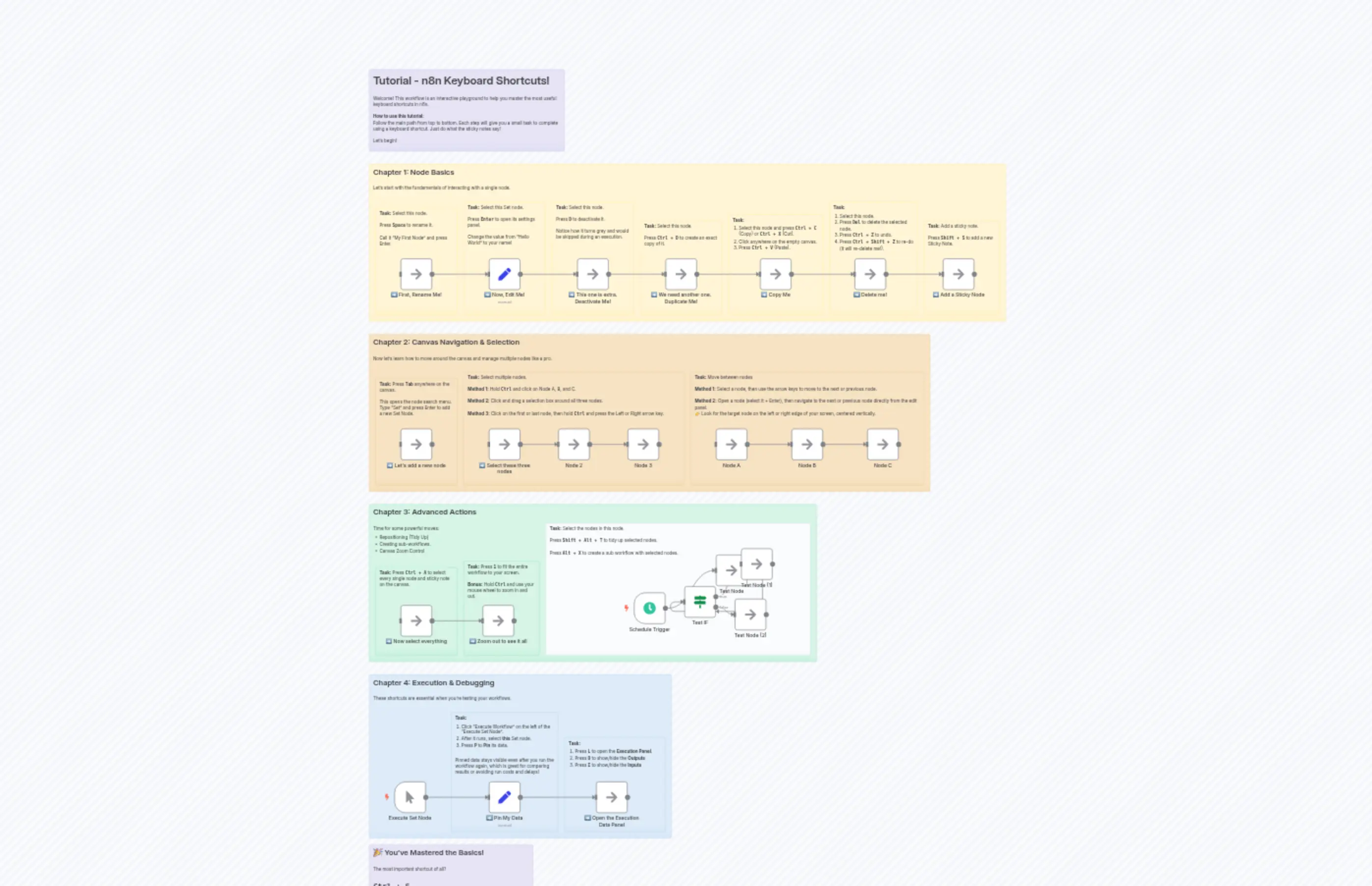
Tutorial - n8n Keyboard Shortcuts
Description
Categories
🤖 AI & Machine Learning
Nodes Used
n8n-nodes-base.ifn8n-nodes-base.setn8n-nodes-base.setn8n-nodes-base.noOpn8n-nodes-base.noOpn8n-nodes-base.noOpn8n-nodes-base.noOpn8n-nodes-base.noOpn8n-nodes-base.noOpn8n-nodes-base.noOp
PriceKostenlos
Views0
Last Updated11/28/2025
workflow.json
{
"meta": {
"instanceId": "e409ea34548a2afe2dffba31130cd1cf2e98ebe2afaeed2a63caf2a0582d1da0"
},
"nodes": [
{
"id": "0e06efaf-217e-45b2-bc30-b6bc8c8f4c58",
"name": "Test IF",
"type": "n8n-nodes-base.if",
"position": [
5540,
3920
],
"parameters": {
"options": {},
"conditions": {
"options": {
"version": 2,
"leftValue": "",
"caseSensitive": true,
"typeValidation": "strict"
},
"combinator": "and",
"conditions": [
{
"id": "3e271a03-2dc7-42e8-a16d-ea604d3e25a1",
"operator": {
"name": "filter.operator.equals",
"type": "string",
"operation": "equals"
},
"leftValue": "",
"rightValue": ""
}
]
}
},
"typeVersion": 2.2
},
{
"id": "ab6d5524-5eea-4e63-b4ea-9d0c3de9fda3",
"name": "Test Node",
"type": "n8n-nodes-base.noOp",
"position": [
5640,
3820
],
"parameters": {},
"typeVersion": 1
},
{
"id": "c9191a5a-af84-47cc-a191-f251f2f88093",
"name": "Test Node (1)",
"type": "n8n-nodes-base.noOp",
"position": [
5720,
3800
],
"parameters": {},
"typeVersion": 1
},
{
"id": "d1e8e1da-42cc-4bad-a8f2-10f898646283",
"name": "Test Node (2)",
"type": "n8n-nodes-base.noOp",
"position": [
5700,
3960
],
"parameters": {},
"typeVersion": 1
},
{
"id": "23215c2f-19e8-4129-b752-0e970b01cc05",
"name": "Schedule Trigger",
"type": "n8n-nodes-base.scheduleTrigger",
"position": [
5380,
3940
],
"parameters": {
"rule": {
"interval": [
{}
]
}
},
"typeVersion": 1.2
},
{
"id": "060bacf9-af70-4782-9497-fc553c9f200b",
"name": "Introduction",
"type": "n8n-nodes-base.stickyNote",
"position": [
4540,
2280
],
"parameters": {
"color": 6,
"width": 620,
"height": 260,
"content": "# Tutorial - n8n Keyboard Shortcuts!\n\nWelcome! This workflow is an interactive playground to help you master the most useful keyboard shortcuts in n8n.\n\n**How to use this tutorial:**\nFollow the main path from top to bottom. Each step will give you a small task to complete using a keyboard shortcut. Just do what the sticky notes say!\n\nLet's begin!"
},
"typeVersion": 1
},
{
"id": "81e7b7ed-e732-4e76-8662-2027994de971",
"name": "Chapter 1 Header",
"type": "n8n-nodes-base.stickyNote",
"position": [
4540,
2580
],
"parameters": {
"width": 2020,
"height": 500,
"content": "## Chapter 1: Node Basics\n\nLet's start with the fundamentals of interacting with a single node."
},
"typeVersion": 1
},
{
"id": "60ce28be-3fc8-42da-864f-29049af8d237",
"name": "➡️ First, Rename Me!",
"type": "n8n-nodes-base.noOp",
"position": [
4640,
2880
],
"parameters": {},
"typeVersion": 1
},
{
"id": "1fdca224-c4d8-4a66-acb8-ed5d59503b2d",
"name": "➡️ Now, Edit Me!",
"type": "n8n-nodes-base.set",
"position": [
4920,
2880
],
"parameters": {
"options": {},
"assignments": {
"assignments": [
{
"id": "12345",
"name": "my_value",
"type": "string",
"value": "Hello World"
}
]
}
},
"typeVersion": 3.4
},
{
"id": "17b57c03-3b8f-4ca0-b787-0b5fd7233177",
"name": "➡️ This one is extra. Deactivate Me!",
"type": "n8n-nodes-base.noOp",
"position": [
5200,
2880
],
"parameters": {},
"typeVersion": 1
},
{
"id": "580773f5-87c3-4ce6-a47a-ed53010d5152",
"name": "➡️ We need another one. Duplicate Me!",
"type": "n8n-nodes-base.noOp",
"position": [
5480,
2880
],
"parameters": {},
"typeVersion": 1
},
{
"id": "042babb6-5d81-4ec6-99bb-1ecc51737d75",
"name": "Chapter 2 Header",
"type": "n8n-nodes-base.stickyNote",
"position": [
4540,
3120
],
"parameters": {
"color": 2,
"width": 1780,
"height": 500,
"content": "## Chapter 2: Canvas Navigation & Selection\n\nNow let's learn how to move around the canvas and manage multiple nodes like a pro."
},
"typeVersion": 1
},
{
"id": "7677467c-1c2a-43d2-b0d8-ab123c5a1e84",
"name": "➡️ Let's add a new node",
"type": "n8n-nodes-base.noOp",
"position": [
4640,
3420
],
"parameters": {},
"typeVersion": 1
},
{
"id": "f3aa0932-b40b-4344-96d7-406f29338181",
"name": "➡️ Select these three nodes",
"type": "n8n-nodes-base.noOp",
"position": [
4920,
3420
],
"parameters": {},
"typeVersion": 1
},
{
"id": "aaef3fa0-aaa1-403f-be6c-a228dcd21a97",
"name": "➡️ Now select everything",
"type": "n8n-nodes-base.noOp",
"position": [
4640,
3980
],
"parameters": {},
"typeVersion": 1
},
{
"id": "a5f43676-7a1d-43f3-9b4b-a7e5634fc57e",
"name": "➡️ Zoom out to see it all",
"type": "n8n-nodes-base.noOp",
"position": [
4900,
3980
],
"parameters": {},
"typeVersion": 1
},
{
"id": "e66a774b-6aee-42ab-afe7-8576a75c8a96",
"name": "Chapter 3 Header",
"type": "n8n-nodes-base.stickyNote",
"position": [
4540,
3660
],
"parameters": {
"color": 4,
"width": 1420,
"height": 500,
"content": "## Chapter 3: Advanced Actions\n\nTime for some powerful moves:\n- Repositioning (Tidy Up)\n- Creating sub-workflows.\n- Canvas Zoom Control"
},
"typeVersion": 1
},
{
"id": "eded3259-8aab-4e03-8c8f-08bc2eb4f736",
"name": "➡️ Copy Me",
"type": "n8n-nodes-base.noOp",
"position": [
5780,
2880
],
"parameters": {},
"typeVersion": 1
},
{
"id": "36aa670a-c8de-46bb-9105-2c47400e1742",
"name": "Chapter 4 Header",
"type": "n8n-nodes-base.stickyNote",
"position": [
4540,
4200
],
"parameters": {
"color": 5,
"width": 960,
"height": 520,
"content": "## Chapter 4: Execution & Debugging\n\nThese shortcuts are essential when you're testing your workflows."
},
"typeVersion": 1
},
{
"id": "ce55c037-9dc1-4f1d-852b-c3e9c57dd39d",
"name": "➡️ Pin My Data",
"type": "n8n-nodes-base.set",
"position": [
4920,
4540
],
"parameters": {
"options": {},
"assignments": {
"assignments": [
{
"id": "12345",
"name": "status",
"type": "string",
"value": "Data is ready!"
}
]
}
},
"typeVersion": 3.4
},
{
"id": "2dd6a69f-449e-498e-a931-e387e9cbd8ca",
"name": "Conclusion",
"type": "n8n-nodes-base.stickyNote",
"position": [
4540,
4740
],
"parameters": {
"color": 6,
"width": 520,
"height": 240,
"content": "## 🎉 You've Mastered the Basics!\n\nThe most important shortcut of all?\n\n## `Ctrl + S`\n### to Save your workflow!**\n\nDo it often. Congratulations!"
},
"typeVersion": 1
},
{
"id": "762c949c-8d0f-41f3-ba71-6cbef1921a56",
"name": "Sticky Note13",
"type": "n8n-nodes-base.stickyNote",
"position": [
4560,
2720
],
"parameters": {
"width": 260,
"height": 340,
"content": "**Task:** Select this node.\n\nPress **`Space`** to rename it.\n\nCall it \"My First Node\" and press Enter."
},
"typeVersion": 1
},
{
"id": "193ec512-51d0-4e35-93fd-72c887ea7a8e",
"name": "Sticky Note14",
"type": "n8n-nodes-base.stickyNote",
"position": [
4840,
2700
],
"parameters": {
"width": 260,
"height": 360,
"content": "**Task:** Select this Set node.\n\nPress **`Enter`** to open its settings panel.\n\nChange the value from \"Hello World\" to your name!"
},
"typeVersion": 1
},
{
"id": "53456077-077d-44e5-a90d-c977f4dfff2a",
"name": "Sticky Note15",
"type": "n8n-nodes-base.stickyNote",
"position": [
5120,
2700
],
"parameters": {
"width": 260,
"height": 360,
"content": "**Task:** Select this node.\n\nPress **`D`** to deactivate it.\n\nNotice how it turns grey and would be skipped during an execution."
},
"typeVersion": 1
},
{
"id": "f39397f5-25be-41a4-9bdb-d2c54de69fe8",
"name": "Sticky Note16",
"type": "n8n-nodes-base.stickyNote",
"position": [
5400,
2760
],
"parameters": {
"width": 260,
"height": 300,
"content": "**Task:** Select this node.\n\nPress **`Ctrl + D`** to create an exact copy of it."
},
"typeVersion": 1
},
{
"id": "d90d4586-12b1-4263-87de-6be5d1569285",
"name": "Sticky Note17",
"type": "n8n-nodes-base.stickyNote",
"position": [
4560,
3260
],
"parameters": {
"color": 2,
"width": 260,
"height": 340,
"content": "**Task:** Press **`Tab`** anywhere on the canvas.\n\nThis opens the node search menu. Type \"Set\" and press Enter to add a new Set Node."
},
"typeVersion": 1
},
{
"id": "0be4d82b-9c13-4c41-895f-d4605f51466a",
"name": "Sticky Note18",
"type": "n8n-nodes-base.stickyNote",
"position": [
4840,
3240
],
"parameters": {
"color": 2,
"width": 700,
"height": 360,
"content": "**Task:** Select multiple nodes.\n\n**Method 1:** Hold **`Ctrl`** and click on Node A, B, and C.\n\n**Method 2:** Click and drag a selection box around all three nodes.\n\n**Method 3:** Click on the first or last node, then hold **`Ctrl`** and press the Left or Right arrow key."
},
"typeVersion": 1
},
{
"id": "e15735b7-11b5-45e7-b70a-97a386c7ee5b",
"name": "Sticky Note19",
"type": "n8n-nodes-base.stickyNote",
"position": [
4560,
3860
],
"parameters": {
"color": 4,
"width": 260,
"height": 280,
"content": "**Task:** Press **`Ctrl + A`** to select every single node and sticky note on the canvas."
},
"typeVersion": 1
},
{
"id": "c8d8b1f8-2767-474c-89f0-ece01c8a2f5e",
"name": "Sticky Note20",
"type": "n8n-nodes-base.stickyNote",
"position": [
4840,
3840
],
"parameters": {
"color": 4,
"height": 300,
"content": "**Task:** Press **`1`** to fit the entire workflow to your screen.\n\n**Bonus:** Hold **`Ctrl`** and use your mouse wheel to zoom in and out."
},
"typeVersion": 1
},
{
"id": "3404b042-94a5-49d5-bbda-78ca653a8af3",
"name": "Sticky Note21",
"type": "n8n-nodes-base.stickyNote",
"position": [
5680,
2740
],
"parameters": {
"width": 300,
"height": 320,
"content": "**Task:**\n1. Select this node and press **`Ctrl + C`** (Copy) or **`Ctrl + X`** (Cut).\n2. Click anywhere on the empty canvas.\n3. Press **`Ctrl + V`** (Paste)."
},
"typeVersion": 1
},
{
"id": "671c1003-aa71-456b-b45d-de52c690957e",
"name": "Sticky Note22",
"type": "n8n-nodes-base.stickyNote",
"position": [
4800,
4320
],
"parameters": {
"color": 5,
"width": 340,
"height": 380,
"content": "**Task:**\n1. Click \"Execute Workflow\" on the left of the \"Execute Set Node\".\n2. After it runs, select **this** Set node.\n3. Press **`P`** to **Pin** its data.\n\n\nPinned data stays visible even after you run the workflow again, which is great for comparing results or avoiding run costs and delays!"
},
"typeVersion": 1
},
{
"id": "624f37c1-7f3a-40b2-9da6-ac97fd8b6899",
"name": "Node 2",
"type": "n8n-nodes-base.noOp",
"position": [
5140,
3420
],
"parameters": {},
"typeVersion": 1
},
{
"id": "52785615-0602-451d-bcc9-09f2f28c707c",
"name": "Node 3",
"type": "n8n-nodes-base.noOp",
"position": [
5360,
3420
],
"parameters": {},
"typeVersion": 1
},
{
"id": "f75ab513-6f97-4ad0-91a8-d8528d9c8a96",
"name": "Execute Set Node",
"type": "n8n-nodes-base.manualTrigger",
"position": [
4620,
4540
],
"parameters": {},
"typeVersion": 1
},
{
"id": "5b17f75f-7ee5-4604-bc0d-abe2a8e7a1fb",
"name": "➡️ Open the Execution Data Panel",
"type": "n8n-nodes-base.noOp",
"position": [
5260,
4540
],
"parameters": {},
"typeVersion": 1
},
{
"id": "cbe67873-4baf-47b2-b53f-b24a7519b77d",
"name": "Sticky Note24",
"type": "n8n-nodes-base.stickyNote",
"position": [
5160,
4400
],
"parameters": {
"color": 5,
"width": 320,
"height": 300,
"content": "**Task:**\n1. Press **`L`** to open the **Execution Panel**.\n2. Press **`O`** to show/hide the **Outputs**\n3. Press **`I`** to show/hide the **Inputs**"
},
"typeVersion": 1
},
{
"id": "66f66abe-3505-43b6-b75d-296d8b973dab",
"name": "Sticky Note",
"type": "n8n-nodes-base.stickyNote",
"position": [
5100,
3720
],
"parameters": {
"color": 7,
"width": 840,
"height": 420,
"content": "**Task:** Select the nodes in this node.\n\nPress **`Shift + Alt + T`** to tidy up selected nodes.\n\nPress **`Alt + X`** to create a sub workflow with selected nodes."
},
"typeVersion": 1
},
{
"id": "bebda701-fa75-4c09-a1ee-3374d9ef63fa",
"name": "Sticky Note25",
"type": "n8n-nodes-base.stickyNote",
"position": [
6000,
2700
],
"parameters": {
"width": 280,
"height": 360,
"content": "**Task:**\n1. Select this node.\n2. Press **`Del`** to delete the selected node.\n3. Press **`Ctrl + Z`** to undo.\n4. Press **`Ctrl + Shift + Z`** to re-do (it will re-delete me!)."
},
"typeVersion": 1
},
{
"id": "f193c6e9-2a73-4837-8ea7-3b0f933609db",
"name": "➡️ Delete me!",
"type": "n8n-nodes-base.noOp",
"position": [
6080,
2880
],
"parameters": {},
"typeVersion": 1
},
{
"id": "3fe1ec6e-445f-490f-8418-399d7a61e1fb",
"name": "➡️ Add a Sticky Node",
"type": "n8n-nodes-base.noOp",
"position": [
6360,
2880
],
"parameters": {},
"typeVersion": 1
},
{
"id": "4fbc63ca-6949-4623-8052-cfd51cd27f1e",
"name": "Sticky Note26",
"type": "n8n-nodes-base.stickyNote",
"position": [
6300,
2760
],
"parameters": {
"height": 300,
"content": "**Task:** Add a sticky note.\n\nPress **`Shift + S`** to add a new Sticky Note."
},
"typeVersion": 1
},
{
"id": "a6565c59-2273-442b-8e35-72be9c010157",
"name": "Sticky Note27",
"type": "n8n-nodes-base.stickyNote",
"position": [
5560,
3240
],
"parameters": {
"color": 2,
"width": 740,
"height": 360,
"content": "**Task:** Move between nodes\n\n**Method 1:** Select a node, then use the arrow keys to move to the next or previous node.\n\n**Method 2:** Open a node (select it + Enter), then navigate to the next or previous node directly from the edit panel.\n👉 Look for the target node on the left or right edge of your screen, centered vertically."
},
"typeVersion": 1
},
{
"id": "61ed0817-5659-43e5-8f11-e31513dd5680",
"name": "Node A",
"type": "n8n-nodes-base.noOp",
"position": [
5640,
3420
],
"parameters": {},
"typeVersion": 1
},
{
"id": "6e63eebb-5ec6-458c-a4ee-f97f52365e97",
"name": "Node B",
"type": "n8n-nodes-base.noOp",
"position": [
5880,
3420
],
"parameters": {},
"typeVersion": 1
},
{
"id": "77db4ffb-348b-427f-bed3-c3c7afe6e7fb",
"name": "Node C",
"type": "n8n-nodes-base.noOp",
"position": [
6120,
3420
],
"parameters": {},
"typeVersion": 1
}
],
"pinData": {},
"connections": {
"Node 2": {
"main": [
[
{
"node": "Node 3",
"type": "main",
"index": 0
}
]
]
},
"Node A": {
"main": [
[
{
"node": "Node B",
"type": "main",
"index": 0
}
]
]
},
"Node B": {
"main": [
[
{
"node": "Node C",
"type": "main",
"index": 0
}
]
]
},
"Test IF": {
"main": [
[
{
"node": "Test Node (1)",
"type": "main",
"index": 0
}
],
[
{
"node": "Test Node (2)",
"type": "main",
"index": 0
}
]
]
},
"Test Node": {
"main": [
[
{
"node": "Test IF",
"type": "main",
"index": 0
}
]
]
},
"➡️ Copy Me": {
"main": [
[
{
"node": "➡️ Delete me!",
"type": "main",
"index": 0
}
]
]
},
"Execute Set Node": {
"main": [
[
{
"node": "➡️ Pin My Data",
"type": "main",
"index": 0
}
]
]
},
"Schedule Trigger": {
"main": [
[
{
"node": "Test Node",
"type": "main",
"index": 0
}
]
]
},
"➡️ Delete me!": {
"main": [
[
{
"node": "➡️ Add a Sticky Node",
"type": "main",
"index": 0
}
]
]
},
"➡️ Pin My Data": {
"main": [
[
{
"node": "➡️ Open the Execution Data Panel",
"type": "main",
"index": 0
}
]
]
},
"➡️ Now, Edit Me!": {
"main": [
[
{
"node": "➡️ This one is extra. Deactivate Me!",
"type": "main",
"index": 0
}
]
]
},
"➡️ First, Rename Me!": {
"main": [
[
{
"node": "➡️ Now, Edit Me!",
"type": "main",
"index": 0
}
]
]
},
"➡️ Let's add a new node": {
"main": [
[]
]
},
"➡️ Now select everything": {
"main": [
[
{
"node": "➡️ Zoom out to see it all",
"type": "main",
"index": 0
}
]
]
},
"➡️ Zoom out to see it all": {
"main": [
[]
]
},
"➡️ Select these three nodes": {
"main": [
[
{
"node": "Node 2",
"type": "main",
"index": 0
}
]
]
},
"➡️ This one is extra. Deactivate Me!": {
"main": [
[
{
"node": "➡️ We need another one. Duplicate Me!",
"type": "main",
"index": 0
}
]
]
},
"➡️ We need another one. Duplicate Me!": {
"main": [
[
{
"node": "➡️ Copy Me",
"type": "main",
"index": 0
}
]
]
}
}
}